1
Driver Installation (Microsoft Windows) Install from setup program Double click the “setup.exe” and follow the setup wizard steps to install the ASMedia ASM1042x USB 3.0 Host controller driver. Verify installation of the software 1.
2.
3.
4.
5.
6.
7.
8.
9.
10.
On the Start menu, select 'Control Panel' Open on the 'System' applet (you may first have to select 'Switch to Classic View') Select the 'Hardware' tab Select the 'Device Manager' button. For Vista, Server 2008, Win7, Expand the 'Universal Serial Bus Controllers' entry Right‐click on 'ASMedia xHCI Controller' Select 'Properties' Select the 'Driver' tab Select the 'Driver Details' button The follow file should be displayed, then installation was successful: ‐'system32\DRIVERS\asmtxhci.sys' Vista, Server 2008 and Win7 Connecting USB Storage Devices 1.
2.
3.
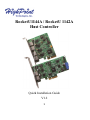
Make sure the RocketU 1144A / RocketU 1142A has been installed into your PC. Connect the enclosure or hard disk to the HighPoint RocketU HBA with USB 3.0 cables. Allow the drives/enclosure to spin up for a few moments. Once the devices are ready, they will be recognized by the operating system and can be accessed as needed. 6