1
Installation (continued)
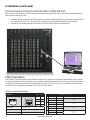
Connecting the XTPro transmitter
Connecting The Transmitter
1. Connect the output of the computer video card to the video input of the transmitter using the included male
to male video cable.
2. Connect the output of the computer audio card to the audio input of the transmitter using 3.5mm audio male
to male audio cable.
3. Connect local monitor to the VGA out of the transmitter.
4. Connect external speakers to the transmitter’s audio out (Standard 3.5mm stereo miniplug).
5. In the back of the unit connect the CAT5 cable that will connect to the CATXPro. *NOTE: You can not use RS232
and IR at the same time.
Connecting the XTPro receiver
Connecting The Receiver
1. Connect CAT5 cable (coming from the CATXPro) to the back of the receiver.
2. Connect 1-2 display monitors to the VGA out connectors on the front of the receiver.
3. Connect 1-2 sets of external speakers to the audio output connections on the front of the unit. (Standard
3.5mm stereo Miniplug
XTPro RX
Adjusting and Tuning the Signal (Skew)
In order to fine tune the signal, adjust the individual dials
one at a time starting with GREEN, then BLUE, and lastly
RED. As you turn the dials you will notice the colors slightly
change as you increase or decrease the strength. All dials
should be approximately the same value.
www.smartavi.com
7