1
2 Use your DVD
player
Congratulations on your purchase, and
welcome to Philips! To fully benefit from the
support that Philips offers, register your product
at www.philips.com/welcome.
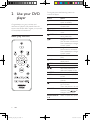
During play, press the following buttons to
control the player.
Button
DISC MENU
OPTIONS
Basic play control
/
OK
BACK
STOP
/
SUBTITLE
GOTO
AUDIO
VOLUME
REPEAT/REPEAT
A-B
8
Action
Turn on the player, or
switch to standby.
Open or close the disc
compartment.
Access the home menu.
Access or exit the disc
menu.
Access more options
during video play.
Navigate the menus.
Slow forward or backward.
Press repeatedly to change
a search speed.
Navigate the menus.
Fast forward or backward.
Press repeatedly to change
a search speed.
Confirm a selection or
entry.
Return to a previous
display menu.
Stop play.
Start, pause or resume play.
Skip to the previous or
next track, chapter or file.
Select a subtitle language.
Skip to a title, a chapter or
a track.
Select an audio language or
channel.
Fit the picture display to
the TV screen.
Zoom the picture in or out.
Activate volume control,
and then press
/
to
change a volume level.
Select a repeat play option.
EN
DVP2880_F7_UM_V1.0.indb 8
2013/1/11 15:00:23