1
Communication Connections
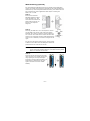
10/100BaseT(X) Ethernet Port Connection
The 10/100BaseT(X) ports located on the AWK-3131’s front panel are
used to connect to Ethernet-enabled devices.
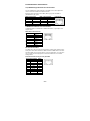
Below we show pinouts for both MDI (NIC-type) ports and MDI-X
(HUB/Switch-type) ports.
MDI Port Pinouts
Pin
Signal
1
Tx+
2
Tx3
Rx+
6
Rx-
MDI-X Port Pinouts
Pin
Signal
1
Rx+
2
Rx3
Tx+
6
Tx-
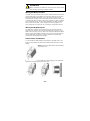
8-pin RJ45
1000BaseT Ethernet Port Connection
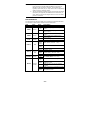
1000BaseT data is transmitted on differential TRD+/- signal pairs over
copper wires.
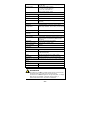
MDI/MDI-X Port Pinouts
Pin
Signal
1
TRD(0)+
2
TRD(0)3
TRD(1)+
4
TRD(2)+
5
TRD(2)6
TRD(1)7
TRD(3)+
8
TRD(3)-
RS-232 Connection
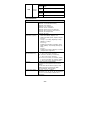
The AWK-3131 has one RS-232 (8-pin RJ45) console port located on the
front panel. Use either an RJ45-to-DB9 or RJ45-to-DB25 cable to connect
the Moxa AWK-3131’s console port to your PC’s COM port. You may then
use a console terminal program to access the AWK-3131 for console
configuration.
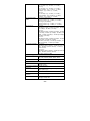
Console Pinouts for 10-pin or 8-pin RJ45
10-Pin Description 8-Pin
1
----2
DSR
1
3
RTS
2
4
GND
3
5
TxD
4
6
RxD
5
7
DCD
6
8
CTS
7
9
DTR
8
10
-----
- 11 -