1
Installation (Professional installation recommended)
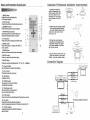
Name and function of each part
~.
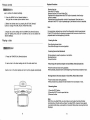
1. Unpack and check the
trol Unit
.=...;;..:;......;;;....;;..---'--'
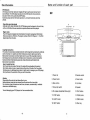
1. MENU button
Press this button to display the
LCO's menu screen.
2. EJECT button
Press this button to slide the disc out and in.
3. NUMBER buttons
Press these buttons to input numbers.
4. REV/FWO-Scan buttons
Use these buttons to scan forward and
backward through pictures or sound.
2 --+~
3
20
5
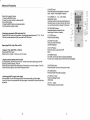
5. TITLE button
Press this button to display the OVO's title.
12
13
14
15
16
18
1
7 619 8
r_~C::-=-C)T,I,~~)
1
22
~~:?) E~,:~
.:-:~) (~) E~:) (J (=~
23
25 24
26
27
10
6. MENU button
Press this button to display the OVO' s
11 ---+-'-'-::'
menu screen.
7. ZOOM button
Zoom in or zoom out the picture on screen.
8. ANGLE button
Press it to switch the picture's angle.
9. SLOW button
Press this button slow playback at 1/2 ,1/4,1/6, 1/8speed.
28
-
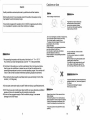
contents. Disassemble the
meral support bracket from
the unit as shown in the
illustration. by unser ewing
the six screws on the unit
'.
body.
•
--
"
2. Tighten the metal support bracket
to the ceilling support beam (s) ,
using the supplied screws. Take
extra care to not penetr ate the
roof of your car.
3. Connect the wiring harness.
according to the diagram under
"'Connection Diagram"'on page17.
to the wires located in the dome
light of your vehicle.
ave>
\
4. Flip the monitor screen down and
tighten the monitor to the support
bracket, using the supplied screws.
"
Connection Diagram
'.
e :J.
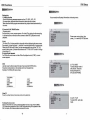
10. Program button
Use this button to program individually.
~
11. VOL + button
Press this button to volume up.
r
12. PBC button
Playback control.
f
13. POWER button
The power turns on and off when
this button is pressed.
,I...
7.
.,
~~
-
- l.
:::
-~
Yidoo outpu.t( Jl1101)
.Indio ridrt outpu.t (red)
""'(
Audioldt ~t(1Irite)
,,
14. Play/Pause button
Use this button to play picture or
sound or stop temporarily.
lid..:! input( JIll",,)
15. STOP button
Press this button to stop playback of the picture or sound
16.10+ button
Press this button to select a program of
which the sequence number on the disc is more than 10.
17 . OVO/AV buttons
Press these buttons to OVO/AV functions
switch screen.
IR wireless headphone (optional)
!--<o1l{JJlll---L........------.
.Iwli.l. rt iapllt (1Irit.)
®
======
4
CAR AUDIO(DVD OR VL1J)
13
12V
BAITERY
8