1
PoE+ Desktop Switch • User Manual
English
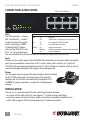
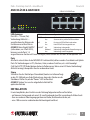
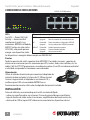
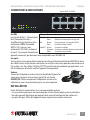
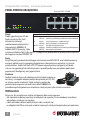
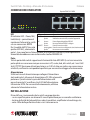
CONNECTIONS & INDICATORS
8 RJ45 10/100M ports
2
4
6
8
1
3
5
7
PoE
POWER
LINK / ACT
1
2
3
4
5
6
7
8
LEDs
LED StatusOperation
The LED indicators — Power,
PWR
On
Power on
PoE, Link/Activity — make it
Off
Check the AC connection; turn the power on
easier to monitor the switch
PoE
On
Port is linked to a PSE/PoE device
and its connections. NOTE:
Off
No PSE/PoE device is linked
On Model 560757 (above,
LNK/ACT On
Valid port connection
Blinking
Valid port connection; data transmitted/received
with just four PoE LEDs), only
Off
No link established
Ports 1-4 can provide power
to a connected device; all powered devices should also comply with IEEE 802.3af.
Ports
All ports on the switch support Auto-MDI/MDI-X functionality, so crossover cables and uplink
ports are not needed for connections to PCs, routers, hubs, other switches, etc. Cat5/5e/6
UTP/STP cables provide optimal performance; if a status LED doesn’t indicate a link or activity,
check the corresponding device for proper setup and operation.
Power
Use the power cord to connect the power adapter (both included)
to the DC 48V power jack on the rear panel. Then plug the
adapter into an AC outlet and confirm that the power LED is
lit. NOTE: For proper operation, use only the included power
adapter.
INSTALLATION
Prior to use, it is recommended that the switch be placed/positioned:
• on a level surface with at least 25 mm (approx. 1”) of clearance for ventilation;
• away from sources of electrical noise: radios, transmitters, broadband amplifiers, etc.;
• within 100 m (approx. 328’) of network devices it’s to be connected to.
2
ENGLISH