1
LFAU
Installation Instructions
Adjustments
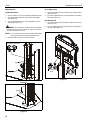
Pitch Adjustment
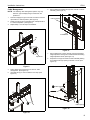
Height Adjustment
5.
Turn pitch adjustment knob clockwise to tilt display forward.
(See Figure 15)
6.
Turn pitch adjustment knob counterclockwise to tilt display
back. (See Figure 15)
1.
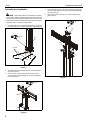
Remove cable cover (G) to expose height adjustment knob.
2.
Turn height adjustment knob clockwise to raise display.
(See Figure 13)
3.
Turn height adjustment knob counterclockwise to lower
display. (See Figure 13)
WARNING: Do not attempt to raise or lower the adjustment
Roll Adjustment
7.
Turn roll adjustment knob clockwise to adjust roll to the left.
(See Figure 15)
8.
Turn roll adjustment knob counterclockwise to adjust roll to
the right. (See Figure 15)
carriage beyond its upper or lower limit. High and low points
are shown in Figures 13 and 14.
NOTE: A 1/2" socket wrench may also be used to adjust height
7
by turning bolt just above height adjustment knob.
4.
Reinstall cable cover (G) to column assembly.
height adjustment knob
8
5
2
3
1
high point
1
5
6
2
7
8
pitch adjustment
knob
3
roll adjustment
knob
Figure 15
Figure 13
low point
Figure 14
10
6