1
LFAU
Installation Instructions
9.
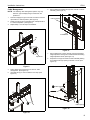
WARNING: Display may be very heavy! Ensure display
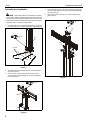
Move latches on interface uprights to the "closed" position
to secure display to head assembly. (See Figure 7)
may be safely lifted and maneuvered as required to install on
cart. Failure to take adequate precautions can result in
serious personal injury or damage to equipment!
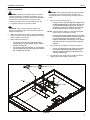
7.
Position latches on interface uprights so that they are in the
"open" position. (See Figure 5)
8.
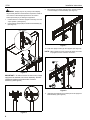
Hang interface uprights (B) on interface head assembly (E).
(See Figure 5)
9
open position
9
Figure 7
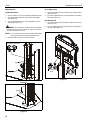
10. Snap four upright covers (A) onto uprights. (See Figure 8)
NOTE: Tabs on inside of covers (A) will snap directly into holes
on uprights to ensure a secure connection.
8
7
8
10 (A) x 4
7
(B) x 2
Figure 5
IMPORTANT ! : In order to ensure an even mount, install
uprights to be centered over column assembly. Do NOT
install both uprights to the same side of column
assembly! (See Figure 6)
11
Figure 8
11. (Optional) Use padlocks (not provided) to secure uprights to
head assembly. (See Figure 8)
Figure 6
8