1
Opticon
H-22 User Manual
1.8. Installing the Battery
The H-22 ships with a Lithium-ion battery in the box. Charge the battery fully before the first use.
Perform the following procedure to install the battery.
Note: The battery can also be charged in the optional cradle.
1.8.1.
Installing the Battery
Step 1:
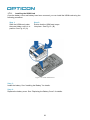
Remove the battery cover. See
“Removing the Battery Cover” for
details.
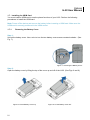
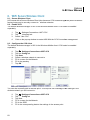
Step 2:
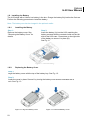
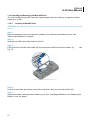
Insert the battery (A) into the H-22 matching the
battery contacts with the contacts inside on the left
side of the H-22 case. Press down on the right side
of the battery to secure it in place (B).
See Fig 11.
Figure 11. Install the Battery
1.8.2.
Replacing the Battery Cover
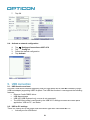
Step 1:
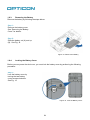
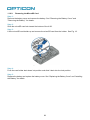
Align the battery cover with the top of the battery bay. See Fig. 12.
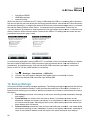
Step 2:
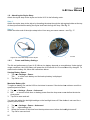
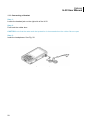
Lower the cover in place. Secure it by turning the battery cover screws clockwise with a
coin. See Fig. 13.
Figure 12. Align the Battery Cover
23
Figure 13. Lower the Battery Cover