1
2
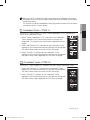
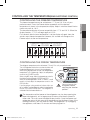
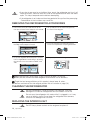
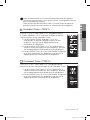
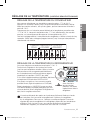
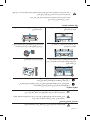
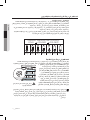
Coolselect Turbo <TYPE 1>
"Fresh(3°C)", "Soft Freeze(-5°C)" and "Frozen Vegetable(-12°C)" indicates the
status of the Coolselect Turbo.
02 OPERATING
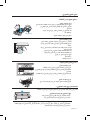
When you use this function the energy consumption of the refrigerator will increase.
Remember to turn it off when you don’t need it and return the freezer to your original
temperature setting.
This function must be activated before putting large amount of food stuff in the freezer
compartment at least 24 hours before.
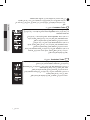
1.When "Frozen Vegetable(-12°C)" selected on the Coolselect
Turbo, regardless of the overall temperature setting of the
refrigerator. This feature helps keep frozen vegetable fresh for
longer.
2.When "Soft Freeze(-5°C)" selected on the Coolselect Turbo,
regardless of the overall temperature setting of the refrigerator.
this feature helps keep meat and fish fresh for longer.
3.When "Fresh(3°C)" selected on the Coolselect Turbo,
regardless of the overall temperature setting of the refrigerator.
this feature helps keep vegetable and fruit fresh for longer.
2-1
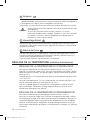
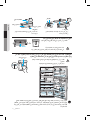
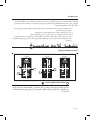
Coolselect Turbo <TYPE 3>
“Fresh(3°C)”, “Soft Freeze(0°C)” indicates the status of the Coolselect Turbo.
1.When “Soft Freeze(0°C)” selected on the Coolselect Turbo,
regardless of the overall temperature setting of the refrigerator.
this feature helps keep meat and fish fresh for longer.
2.When “Fresh(3°C)” selected on the Coolselect Turbo,
regardless of the overall temperature setting of the refrigerator.
this feature helps keep vegetable and fruit fresh for longer.
operating _9
DA99-01697C(0.6).indb
9
2011.5.31
2:24:26 PM