1
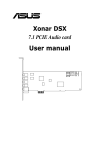
Xonar DSX
7.1 PCIE Audio card
User manual
E7797
First Edition V1
October 2012
Copyright © 2012 ASUSTeK COMPUTER INC. All Rights Reserved.
No part of this manual, including the products and software described in it, may be reproduced,
transmitted, transcribed, stored in a retrieval system, or translated into any language in any form or by any
means, except documentation kept by the purchaser for backup purposes, without the express written
permission of ASUSTeK COMPUTER INC. (“ASUS”).
Product warranty or service will not be extended if: (1) the product is repaired, modified or altered, unless
such repair, modification of alteration is authorized in writing by ASUS; or (2) the serial number of the
product is defaced or missing.
ASUS PROVIDES THIS MANUAL “AS IS” WITHOUT WARRANTY OF ANY KIND, EITHER EXPRESS
OR IMPLIED, INCLUDING BUT NOT LIMITED TO THE IMPLIED WARRANTIES OR CONDITIONS OF
MERCHANTABILITY OR FITNESS FOR A PARTICULAR PURPOSE. IN NO EVENT SHALL ASUS, ITS
DIRECTORS, OFFICERS, EMPLOYEES OR AGENTS BE LIABLE FOR ANY INDIRECT, SPECIAL,
INCIDENTAL, OR CONSEQUENTIAL DAMAGES (INCLUDING DAMAGES FOR LOSS OF PROFITS,
LOSS OF BUSINESS, LOSS OF USE OR DATA, INTERRUPTION OF BUSINESS AND THE LIKE),
EVEN IF ASUS HAS BEEN ADVISED OF THE POSSIBILITY OF SUCH DAMAGES ARISING FROM ANY
DEFECT OR ERROR IN THIS MANUAL OR PRODUCT.
SPECIFICATIONS AND INFORMATION CONTAINED IN THIS MANUAL ARE FURNISHED FOR
INFORMATIONAL USE ONLY, AND ARE SUBJECT TO CHANGE AT ANY TIME WITHOUT NOTICE,
AND SHOULD NOT BE CONSTRUED AS A COMMITMENT BY ASUS. ASUS ASSUMES NO
RESPONSIBILITY OR LIABILITY FOR ANY ERRORS OR INACCURACIES THAT MAY APPEAR IN THIS
MANUAL, INCLUDING THE PRODUCTS AND SOFTWARE DESCRIBED IN IT.
Products and corporate names appearing in this manual may or may not be registered trademarks or
copyrights of their respective companies, and are used only for identification or explanation and to the
owners’ benefit, without intent to infringe.
ii
Contents
Contents....................................................................................................... iii
Notices.......................................................................................................... iv
Safety information........................................................................................ v
Trademarks.................................................................................................... v
License.......................................................................................................... v
1.
Introduction...................................................................................... 1
1.1
Package contents.................................................................. 1
1.3
Specifications summary........................................................ 2
1.2
2.
3.
4.
5.
Xonar DSX card layout.................................................................... 4
Installing the hardware.................................................................... 6
3.1
3.2
Connecting to a TV tuner card.............................................. 7
Installing the card driver..................................................................... 8
Connecting speakers and peripherals........................................... 9
5.1
Connecting digital speaker systems (Home Theater)........... 9
5.3
Connecting Analog Speaker Systems................................. 12
5.4
5.5
Connecting stereo headphones.......................................... 10
Connecting a microphone................................................... 17
Connecting Line-In audio sources....................................... 18
Xonar Audio Center....................................................................... 19
6.1
Xonar Audio Center GUI..................................................... 19
6.3
Mixer/Volume...................................................................... 27
6.2
6.4
6.5
6.6
6.7
6.8
7.
Installing the audio card........................................................ 6
Installing software............................................................................ 8
5.2
6.
System requirements............................................................ 1
6.9
Main Setting........................................................................ 21
Effects................................................................................. 30
Karaoke............................................................................... 32
FlexBass............................................................................. 34
Smart Volume Normalization............................................... 35
DS3D GX and DSP Modes................................................. 37
VocalFX............................................................................... 39
Troubleshooting and FAQs........................................................... 42
iii
Notices
Federal Communications Commission Statement
This device complies with Part 15 of the FCC Rules. Operation is subject to the
following two conditions:
• This device may not cause harmful interference, and
• This device must accept any interference received including interference that
may cause undesired operation.
This equipment has been tested and found to comply with the limits for a
Class B digital device, pursuant to Part 15 of the FCC Rules. These limits are
designed to provide reasonable protection against harmful interference in a
residential installation. This equipment generates, uses and can radiate radio
frequency energy and, if not installed and used in accordance with manufacturer’s
instructions, may cause harmful interference to radio communications. However,
there is no guarantee that interference will not occur in a particular installation. If
this equipment does cause harmful interference to radio or television reception,
which can be determined by turning the equipment off and on, the user is
encouraged to try to correct the interference by one or more of the following
measures:
• Reorient or relocate the receiving antenna.
• Increase the separation between the equipment and receiver.
• Connect the equipment to an outlet on a circuit different from that to which the
receiver is connected.
• Consult the dealer or an experienced radio/TV technician for help.
Canadian Department of Communications Statement
This digital apparatus does not exceed the Class B limits for radio noise emissions
from digital apparatus set out in the Radio Interference Regulations of the
Canadian Department of Communications.
This class B digital apparatus complies with Canadian ICES-003.
Australia statement notice
From 1 January 2012, updated warranties apply to all ASUS products consistent
with the Australian Consumer Law. For the latest product warranty details, please
visit http://support.asus.com. Our goods come with guarantees that cannot be
excluded under the Australian Consumer Law. You are entitled to a replacement or
refund for a major failure and compensation for any other reasonably foreseeable
loss or damage. You are also entitled to have the goods repaired or replaced if the
goods fail to be of acceptable quality and the failure does not amount to a major
falure.
If you require assistance, please call ASUS Customer Service at 1300 2787 88 or
visit us at �http://support.asus.com.
iv
Safety information
•
•
•
•
•
•
•
•
Before installing the device on a motherboard, carefully read all the manuals
that came with the package.
To prevent electrical shock hazard or short circuits, switch off the power supply
before installing the device on a motherboard or connecting any signal cables
to the device.
If the device is broken, do not try to fix it by yourself. Contact a qualified service
technician or your retailer.
Before using the product, make sure all cables are correctly connected. If you
detect any damage, contact your dealer immediately.
To avoid short circuits, keep paper clips, screws, and staples away from
connectors, sockets and circuitry.
Avoid dust, humidity, and temperature extremes. Do not place the product in
any area where it may be exposed to moisture.
Place the product on a stable surface.
If you encounter technical problems with the product, contact a qualified
service technician or your retailer.
This symbol of the crossed out wheeled bin indicates that the product
(electrical and electronic equipment) should not be placed in municipal
waste. Check local regulations for disposal of electronic products.
Trademarks
Xonar and ASUS logo are trademarks of ASUSTek Computer Inc. “Dolby”
and “Dolby Digital Live”, “Dolby Pro Logic IIx”, “Dolby Virtual Speaker”, “Dolby
Headphone” are trademarks of Dolby Laboratories. “DTS” and “DTS CONNECT”,
“DTS Interactive”, “DTS Neo: PC” are trademarks of Digital Theater Systems,
Inc. EAX and A3D are trademarks of Creative Technology Ltd. Microsoft,
DirectSound3D, Windows are trademarks of Microsoft Corporation. Other company
and product names may be trademarks of the respective companies with which
they are associated. ASIO is a trademark and software of Steinberg Media
Technologies GmbH.
License
Dolby Master Studio driver is manufactured under license from Dolby Laboratories;
DTS Connect driver is manufactured under license from Digital Theater Systems,
Inc.
vi
1.
1.1
Introduction
Package contents
•
ASUS Xonar DSX PCIE audio card
•
Low Profile Bracket x1
•
•
•
S/PDIF TOSLINK optical adapter x1
Support CD
Quick Start Guide
1.2
System requirements
•
One PCIE 1.0 (or higher) compatible slot for the audio card
•
Intel® Pentium® 4 1.4 GHz or AMD® Athlon 1400 CPU or faster CPU
•
60 MB available HDD space for driver installation package
•
•
•
•
Microsoft® Windows® Vista / Win 7(32/64bit) / XP(32/64bit) / MCE2005
256 MB (or above) DRAM system memory
CD-ROM drive (or DVD-ROM drive ) for software installation
High-quality headphones, powered analog speakers, or a Dolby Digital or DTS
decoder, to enjoy the ultra-high fidelity sound of the card
ASUS Xonar DSX
1.3
Specifications summary
Items
Description
Audio Performance
Output Signal-to-Noise Ratio (AWeighted):
Up to 107dB
Input Signal-to-Noise Ratio (AWeighted):
100 dB
Output Total Harmonic Distortion +
Noise at 1kHz (A-Weighted):
Up to 0.0017% (-95dB)
Input Total Harmonic Distortion + Noise
at 1kHz (A-Weighted):
Up to 0.0017% (-95dB)
Frequency Response
(-3dB, 24-bit/96kHz input):
<10Hz to 48KHz
Output/Input Full-Scale Voltage
1 Vrms (5.65 Vp-p)
Sample Rate Conversion Quality
Almost lossless, high-fidelity floating-point filters, with:
-140dB THD+N (typical value for 44.1K->48KHz, 24bit)
145dB Dynamic Range (typical value for
44.1K->48KHz, 24bit)
Bus Compatibility
PCI Express
PCI Express v1.0 or above bus compatible
Main Chipset
Audio Processor
ASUS AV200 High-Performance Sound Processor (Max.
192KHz/24bit)
D-A Converter of Digital Sources:
Wolfson WM8776*1 (108dB SNR, Max. 192kHz/24bit)
Wolfson WM8776*1 (103dB SNR, Max. 192kHz/24bit)
A-D Converter for Analog Inputs:
Wolfson WM8776*1 (102dB SNR, Max. 96kHz/24bit)
Sample Rate and Resolution
Analog Playback Sample Rate and
Resolution
44.1K/48K/96K/192KHz @ 16/24bit for all channels
Analog Recording Sample Rate and
Resolution
44.1K/48K/96K @ 16/24bit
S/PDIF Digital Output
44.1K/48K/96K/192KHz @ 16/24bit, Dolby Digital, DTS,
WMA-Pro
ASIO 2.0 Driver Support:
44.1K/48K/96K/192KHz @ 16/24bit
I/O Ports
Analog Output Jack:
3.50mm mini jack*4 (Front/Side/Center-Subwoofer/Back)
Analog Input Jack:
3.50mm mini jack*1 (Line-In/Mic-In)
Other line-level analog input (for CDIN/TV Tuner):
Aux-In (4-pin header on the card)
(continued on the next page)
ASUS Xonar DSX
Items
Description
Digital S/PDIF Output
High-bandwidth Optical Connector supports 192KHz/24bit
(shared with Back surround output jack)
- additional S/PDIF out header for HDMI audio output
Front-Panel Audio Header
Intel HDA front-panel compatible and supports HP jackdetection and automatically switch audio output from backpanel to front
Driver Features
Operating System
Windows® XP(32/64bit) / Vista/ 7 / MCE2005
DTS® Technologies
DTS Connect (DTS Interactive Encoder and DTS Neo:PC) for
both Windows® XP and Windows® Vista
- DTS Interactive encodes any 3D gaming audio into true-tolife 5.1 DTS Digital surround sound experience
- DTS Neo:PC could expand any stereo music to 7.1 surround
sounds
DirectSound3D Game Extensions 2.5
(DS3D GX 2.5)/DirectX
DS3D GX 2.5.0 supports EAX gaming sound effects and
DirectSound 3D hardware enhanced functions on Windows®
Vista. (DirectX/DirectSound 3D compatible)
Smart Volume Normalizer™
Normalizes the volume of all audio sources into a constant
level and also enhances your 3D sound listening range and
advantages in gaming
VocalFX™
The latest vocal effect technologies for gaming and VoIP:
-VoiceEX: produces vivid environmental reverberation for EAX
games
-ChatEX: emulates different background environment effects
when you chat online
-Magic Voice: changes your voice pitch to different types
(Monster/Cartoon...) for disguising your real voice or just for
fun when chatting online
Karaoke Functions
Music Pitch-Shifting, Voice Cancellation, and Microphone
Echo effects with Stereo Mix recording (Wave and Mic-In) for
online Karaoke or DJ applications
FlexBass™
Professional Bass Management/Enhancement system
Xear 3D™ Virtual Speaker Shifter
Adjustable virtual 7.1-speaker positioning
Other Effects
10-band Equalizer/27 Environment Effects
3D Gaming Sound Engines/APIs
Windows Vista: DirectSound3D® GX 2.5, EAX® 2.0&1.0,
DirectSound® HW, DirectSound® SW, A3D® 10, OpenAL
generic modes, 128 3D sounds processing capability
Bundled Software
RMAA 6.0.6
RightMark Audio Analyzer utility to easily test the audio quality
of the sound card in your PC.
Accessories
Accessories
- Low profile bracket
- S/PDIF TOSLINK optical adapter
*Specifications are subject to change without notice.
ASUS Xonar DSX
2.
Xonar DSX card layout
6
1
2
3
4
5
9
Audio ports
1
2
3
4
5
ASUS Xonar DSX
7
8
No
Item
Description
1
Microphone In port
Connect your external PC microphone to this 3.5mm port for voice
input. Built-in high-quality Microphone pre-amplifier.
1
Line In port
Connect analog devices like MP3 players, CD players, music
synthesizers and other line-level sound sources to this 3.5mm port
for audio recording or processing (through an ultra-high fidelity 102dB
SNR A-D converter).
2
Headphone/Front
Out port
Connect your headphones or 2/2.1 channel speakers to this 3.5mm
port. For multi-channel speaker systems, this port connects to the
front left/right input on the powered speakers.
3
Side Surround Out
port
Connects to the surround channel input on 4/4.1/5.1/6.1/7.1 powered
analog speakers.
4
Center/Subwoofer
Out port
Connects to the center/subwoofer input on 5.1/6.1/7.1 powered
analog speakers.
5
Rear/back Surround
Out port
Connects to the Back Surround input on 6.1/7.1 powered analog
speakers.
5
S/PDIF Out port
Optical TOSLINK digital output port. Connects to external digital
decoder or digital speaker systems, Home Theater systems, AV
receivers for outputting digital audio including PCM, DTS Digital, DTS,
WMA-Pro, etc.
6
Front panel audio
header
Intel HDA front-panel compatible and supports HP jack-detection and
automatically switches audio output from the back panel to the front
panel.
7
Aux Input Header
Usually connects to the Analog Audio output of TV tuner card or
other sound source inside your PC system. (To monitor your TV tuner
card’s audio from this Aux-In, you must enable the “monitor” function
for Aux-In in the Xonar DSX Audio Center‘s recording mixer.)
8
S/PDIF Out header
Connects to the graphics card with HDMI support.
9
PCI Express Bus
Golden Fingers
Insert into the PCI Express slot on your motherboard.
Supports both front-panel and sound card mic input mixing
ASUS Xonar DSX
3.
3.1
Installing the hardware
Installing the audio card
Before you proceed with the following installation steps, it’s
recommended that you disable your onboard audio device in your
BIOS settings, or uninstall any other audio cards on your PC. (For
BIOS setting or uninstallation of other sound cards, refer to the user
manuals of your motherboard and audio card.)
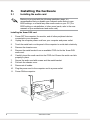
Installing the Xonar DSX card
1.
2.
Power OFF the computer, the monitor, and all other peripheral devices
connected to your computer.
Unplug the computer power cord from your computer and power outlet.
3.
Touch the metal back or side panel of the computer to avoid static electricity.
4.
Remove the chassis cover.
6.
Carefully insert the audio card into the PCIE slot. Ensure the audio card sits
properly in place.
5.
7.
8.
9.
Remove the metal bracket from an available PCIE slot for the Xonar DSX
audio card.
Secure the audio card with screws and the metal bracket.
Put back the chassis cover.
Reconnect all cables.
10. Plug the power cord to the computer and to a power outlet.
11. Power ON the computer.
1
ASUS Xonar DSX
2
3.2
1.
2.
3.
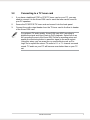
Connecting to a TV tuner card
If you have a traditional PCIE or PCIE TV tuner card on your PC, you may
need to connect it to the Xonar DSX card to send the tuner card’s sound to
your PC speakers.
Secure the PCIE/PCIE TV tuner card and screw it into the back-panel.
Connect the audio output header from the TV tuner card to the Aux-In header
of the Xonar DSX card.
For optimum TV audio quality, Xonar DSX uses ADC recording to
digitize the signal and loop it back to DAC playback. Select Aux-In as
the recording source in the Xonar DSX Center’s recording mixer and
enable the monitoring button to pass this signal to the audio output.
Using this setup, you can even turn on sound effects such as ProLogic IIx to expand the stereo TV audio to 5.1 or 7.1 channel surround
sound. TV audio on your PC will become even better than on your TV
set.
ASUS Xonar DSX
4.
Installing software
Installing the card driver
Ensure that you have installed the audio card driver before installing
the Xonar DSX driver. Otherwise, driver installation error may occur.
1.
2.
3.
After you have installed the Xonar DSX card, turn on your computer.
Windows® automatically detects the audio card and searches for device
drivers. When prompted for the drivers, click Cancel.
Insert the support CD into the optical drive. If Autorun is enabled on your
system, the setup starts automatically. If not, run setup.exe from your
support CD.
Follow the onscreen instructions to finish the installation.
The version and content of the support CD are subject to change
without notice.
ASUS Xonar DSX
5.
Connecting speakers and peripherals
5.1
Connecting digital speaker systems (Home Theater)
The Xonar DSX supports DTS Interactive technology, which transcodes any audio,
including games and music, into industry-standard DTS surround bit-streams.
This makes playback through your home theater system possible, creating an
immersive and impressive cinema surround sound experience. A single digital
cable connection can carry high-quality DTS digital audio from any of your PC
audio sources to any digital speakers or AV Receivers with DTS 5.1 decoding
capabilities.
1
SPDIF Out
2
No
Item
Description
1
Optical adapter
Plug the optical TOSLINK adapter into the S/PDIF-Out combo
connector.
2
Optical cable
Connect your decoder’s S/PDIF-In port to the optical adapter with the
TOSLINK optical cable.
You can also use a coaxial cable for a S/PDIF connection. Just plug
the coaxial RCA male connector to the S/PDIF-Out combo jack and
connect the other end into the coaxial S/PDIF input on your decoder.
ASUS Xonar DSX
5.2
5.2.1
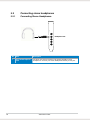
Connecting stereo headphones
Connecting Stereo Headphones
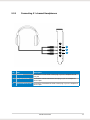
Headphone Out
10
No
Item
Description
1
Front Out/Headphone
Jack
The Front Out jack has a built-in high-quality amplifier to drive
headphones. Connect your stereo headphones directly to this jack.
ASUS Xonar DSX
5.2.2
Connecting 5.1 channel Headphones
1
2
3
No
Item
Description
1
Front Out
Connect the front-channel 3.5mm plug of your 5.1 headphones into
this jack.
2
Side Surround Out
Connect the surround-channel 3.5mm plug of your 5.1 headphone
into this jack.
3
Center/Subwoofer Out
Connect the Center/Bass-channel 3.5mm plug of your 5.1 headphone
into this jack.
ASUS Xonar DSX
11
5.3
5.3.1
Connecting Analog Speaker Systems
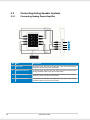
Connecting Analog Power Amplifier
1
2
3
4
12
No
Item
Description
1
Front Out
Connects to the “left front” and “right front” input ports of the analog
amplifier with the mini-jack to RCA cable.
2
Side Surround Out
Connects to the “left surround” and “right surround” input ports of the
analog amplifier with the mini-jack to RCA cable.
3
Center/Subwoofer
Connects to the “Center” and “subwoofer” input ports of the analog
amplifier with the mini-jack to RCA cable.
4
Back Surround Out
Connects to the “left back” and “right back” input ports of the analog
amplifier with the mini-jack to RCA cable.
ASUS Xonar DSX
5.3.2
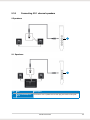
Connecting 2/2.1 channel speakers
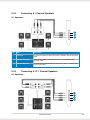
2 Speakers
1
2.1 Speakers
1
No
Item
Description
1
Front Out/Headphone
Jack
Connect the 2/2.1 speaker set’s 3.5mm plug into this Front Out jack.
ASUS Xonar DSX
13
5.3.3
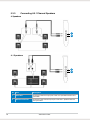
Connecting 4/4.1 Channel Speakers
4 Speakers
1
2
4.1 Speakers
1
2
14
No
Item
Description
1
Front Out
Connects to the Front input port of the 4/4.1 speakers with the minijack cable.
2
Side Surround Out
Connects to the Surround input port of the 4/4.1 speakers with the
mini-jack cable.
ASUS Xonar DSX
5.3.4
Connecting 5.1 Channel Speakers
5.1 Speakers
1
2
3
No
Item
Description
1
Front Out
Connects to the Front input port of the 5.1 speakers with the mini-jack
cable.
2
Side Surround Out
Connects to the Surround input port of the 5.1 speakers with the
mini-jack cable.
3
Center/Subwoofer
Connects to the Center/Subwoofer input port of the 5.1 speakers with
the mini-jack cable..
5.3.5
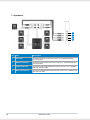
Connecting 6.1/7.1 Channel Speakers
6.1 Speakers
1
2
3
4
ASUS Xonar DSX
15
7.1 Speakers
1
2
3
4
16
No
Item
Description
1
Front Out
Connects to the Front input port of the 6.1/7.1 speakers with the
mini-jack cable.
2
Side Surround Out
Connects to the Surround input port of the 6.1/7.1 speakers with the
mini-jack cable.
3
Center/Subwoofer
Connects to the Center/Subwoofer input port of the 6.1/7.1 speakers
with the mini-jack cable.
4
Back Surround Out
Connects to the Back Surround input port of the 6.1/7.1 speakers with
the mini-jack cable.
ASUS Xonar DSX
5.4
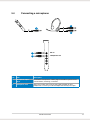
Connecting a microphone
1
1
2
1
Mic In
2
Headphone Out
No
Item
Description
1
Microphone Input
Jack
Connect the microphone’s 3.5mm plug into this Mic-In jack for voice
communication, recording, or karaoke.
2
Headphone Jack
The Front Out jack has a built-in high-quality amplifier to drive
headphones. Connect your stereo headphones directly to this jack.
ASUS Xonar DSX
17
5.5
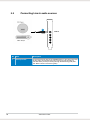
Connecting Line-In audio sources
1
18
Line In
No
Item
Description
1
Line Input Jack
Connect the 3.5mm plug of the CD/MP3 Player or any other Line level
analog audio sources into this Line-In jack for sound recording or
real-time Dolby sound processing through the Monitoring path (See
the “Mixer” section of the driver guide).
ASUS Xonar DSX
6.
6.1
1.
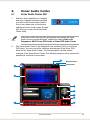
Xonar Audio Center
Xonar Audio Center GUI
After the driver installation is complete
and your computer has been rebooted,
you will find the Xonar Audio Center’s
icon in the system tray on the bottom
right-hand corner of the screen. Double
click this icon to open the Xonar Audio
Center utility.
If the icon could not be found in the system tray, launch the Xonar
Audio Center from the Windows® desktop by clicking Start > All
Programs > ASUS Xonar DSX Audio > Xonar DSX Audio Center.
2.
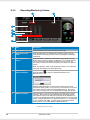
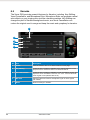
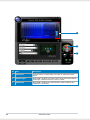
The Xonar Audio Center is the Graphical User Interface (GUI) for the Xonar
DSX driver. You can control the functions and features of the Xonar DSX
driver on the Xonar Audio Center. The following picture shows a basic
overview of the Xonar Audio Center. The following sections of this manual will
describe its functions in more detail.
4
Minimize button
Close button
1
2
5
6
7
8
3
9
ASUS Xonar DSX
19
No
Item
Description
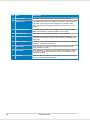
1
Support link
Clicking this button will lead you to the ASUS official website.
2
Display Area
This display area shows the 10-band signal meter, volume level, and
the status of the Dolby/DTS technologies, EQ, and DSP modes.
Note: This area is for displaying information and is not used to alter
settings.
20
3
Setting Menu Panel
This panel gives access to the setting tabs, including Main Settings,
Mixer/volume, Effects, Karaoke, FlexBass, and VocalFX.
4
Information icon
Clicking this icon will display the driver information window.
5
Menu Open/Close
Clicking this button will move the display area and reveal the
configuration area below. Clicking it again will move the display area
back down.
6
Master Volume
This knob controls the master playback volume. Drag the small circle
inside it to change the volume level.
7
Mute Button
Click this button to mute audio playback; it will display a red light
when playback is muted.
8
SVN Button
Click this button to enable the “Smart Volume Normalization” feature
for constant volume from all playback sources. It will display a blue
light when enabled.
9
DSP Mode
These 2 buttons give access to quick gaming surround sound effect
(GX2.5) and effect-free (Hi-Fi) modes.
ASUS Xonar DSX
6.2
6.2.1
Main Setting
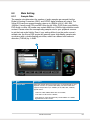
Sample Rate
The sample rate determines the number of audio samples per second that the
Digital-to-Analog Converters (DAC) and S/PDIF digital interface will output. The
Xonar DSX card can support sample rates up to 192KHz (44.1K, 48K, 96K,
192KHz). Usually audio CDs and MP3 files are 44.1KHz; DVD-Video uses 48KHz;
DVD-Audio or other HD media may contain 96KHz or 192KHz high-definition audio
content. Please select the corresponding sample rate for your playback sources
to get the best audio fidelity. Even if your setting differs from the audio source’s
sample rate, the Xonar DSX engine will execute super high-fidelity sample-rateconversion with a double floating-point filter, which can reduce total harmonic
distortion (THD+N) by -140dB.
1
No
Item
Description
1
Sample Rate
Select the sample rate that corresponds to (or exceeds that of) your
playback sources, for optimal audio fidelity. The Xonar DSX card
supports sample rates up to 192KHz (44.1K, 48K, 96K, 192KHz).
Typical values:
-Audio CD, MP3, WMA, Wave files are 44.1KHz;
-The audio of DVD-Video is 48KHz;
-DVD-Audio or other HD media may contain 96KHz or 192KHz
high-definition audio content.
ASUS Xonar DSX
21
6.2.2
Analog Out mode
1
2
3
No
Item
Description
1
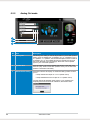
Analog Out
The Analog Out setting is used to adjust audio to your actual speaker
setting, such as headphones, 2 speakers (or 2.1), 4 speakers (or 4.1),
5.1 speakers, 7.1 speakers, Front Panel Headphone and Front Panel
2 speakers (or 2.1). Xonar DSX will play the channels and process
the proper 3D/DTS sound accordingly. Select the correct speaker
type for your connected speakers.
2
Speaker Test
Click this button to show the speaker test window in the right pane.
Click the “play” button to test each speaker one by one or click each
speaker to test them individually.
3
HP Advanced Setting
Clicking this button will display an advanced setting window to allow
you to:
– Swap center/bass output for 5.1/7.1-speaker set up
– Swap Side/Back Surround output for 7.1-speaker set up
Tick the appropriate Speaker Swap options if your speakers are
outputting the incorrect channel. Otherwise, leave them blank.
22
ASUS Xonar DSX
6.2.3
SPDIF Out / DTS Interactive
Xonar DSX is capable of producing DTS Interactive audio, which is audio
transcoded real-time into industry-standard DTS Digital bit-streams on-the-fly. This
is ideal for playback through a home theater system, creating an immersive and
impressive cinema surround sound experience. This technology enables a single
digital connection to carry high quality DTS surround audio from your PC to digital
speakers and AV Receivers.
2
1
No
Item
Description
1
S/PDIF Out enable/
disable
Click this check box to enable S/PDIF output.
2
S/PDIF Output
Formats/Functions
This pull-down menu allows you to select one of the following four
formats:
- PCM (Pulse Code Modulation, which is a typical raw audio data
format.)
- DTS Interactive, real-time 5.1ch encoding
ASUS Xonar DSX
23
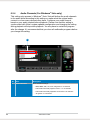
6.2.4
Audio Channels (For Windows® Vista only)
This setting only appears in Windows® Vista. Vista will deliver the audio channels
to the audio driver according to this setting no matter what the original audio
content is or how many channels they have. Configure your audio channel
based on your audio content before playback. Please note that this setting is
synchronized with Vista’s system speaker configuration and changing the setting
during playback will stop audio playback. You may have to restart the program
after the change. It’s recommended that you close all multimedia programs before
you change this setting.
1
No
Item
Description
1
Audio Channels
Recommended settings:
- MP3, WMA, AAC, CD, VCD, 2D games => 2 channels
- DVD-Video with Dolby Digital or DTS 5.1 => 6 channels
- DVD-Video with Dolby Digital EX or DTS ES => 8 channels
- 3D games => 8 channels
24
ASUS Xonar DSX
6.2.5
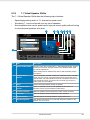
7.1 Virtual Speaker Shifter
The 7.1 Virtual Speaker Shifter has the following major features:
•
Expanding/upmixing audio to 7.1-channel surround sound
•
Virtual speakers that can be positioned to improve sound quality without having
to move physical speakers and wires
•
Virtualizing 7.1 surround sound over any set of speakers
2
3
4
5
6
7
8
1
No
Item
Description
1
Shifter enable/disable
Click this check box to enable the 7.1 Virtual Speaker Shifter. Clicking
the text bar will switch the right window to the Speaker Shifter page
for manual adjustments.
Note: Settings will be retained even when a different Analog Output
is selected.
2
Drag speaker or
listener
You can drag each speaker or listener to a different position “virtually”
using only your mouse. The Xonar DSX card will process the sound
and reposition the virtual speakers real-time. The Subwoofer does not
emit directional sounds, and hence can be moved only closer to or
further away from the listener.
3
Reset
Resets all Speaker Shifter settings to defaults.
4
Increase/decrease
volume
Click + to increase volume (moves speakers closer); click – to
decrease volume (moves speakers further away)
5
Counter-clockwise
Make all speakers (except Subwoofer) rotate counter-clockwise
6
Clockwise
Make all speakers (except Subwoofer) rotate clockwise
7
Manual Rotation
Manually drag and rotate all speakers (except Subwoofer)
8
Manual Drag Mode
The default mode allows you to manually drag each speaker or the
listener with your mouse.
ASUS Xonar DSX
25
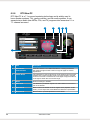
6.2.6
DTS Neo:PC
DTS Neo:PC is a 7.1 surround upmixing technology and is widely used in
home theater systems, TVs, game consoles, and car audio systems. It can
expand stereo audio from MP3s, CDs, and TV programs into immersive 5.1 or
7.1-channel surround.
2
3
4
5
6
1
26
No
Item
Description
1
DTS Neo:PC
enable/disable
Click this check box to enable DTS Neo:PC. Clicking the text bar
will switch the right window to the Pro-Logic IIx page for manual
adjustments.
2
Center Width
This parameter is used to adjust how audio expands from the center
speaker and is used for audio vocals in songs and music. Drag the
scroll bar to the left to centralize the vocal signal. Drag the scroll bar
to the right to widen the vocal sound range.
3
Reset
Reset all settings to defaults.
4
Dimension
The dimension parameter adjusts how audio fades from the front or
rear of the listener.
5
Music Mode
Music mode is the default mode for regular music playback. In this
mode, you can adjust the Center Width and Dimension parameters.
6
Movie Mode
Movie mode is a preset optimized for movie audio.
ASUS Xonar DSX
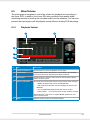
6.3
Mixer/Volume
The mixer page is designed to control the volume for playback and recording on
the Xonar DSX. In addition, the Xonar DSX also provides a high-quality digital
monitoring function for hearing the recorded audio from the speakers. You can also
process the input signals with all playback sound effects including DTS technology.
6.3.1
Playback Volume
1
5
2
3
4
No
Item
Description
1
Playback volume tab
Click this button to show the playback volume page.
2
Volume slider
Drag this slider down to decrease the volume; drag it up to increase
the volume. The tool-tip displays percentage increments.
3
Mute button
Click this button to mute the audio channel; click this button again to
restore the audio output.
4
Source / path name
This shows the source name for each volume control slider, including:
- WAVE: All digital audio sources except MIDI files
- SW: Software Synthesizer; control the playback volume of the
MIDI files
- CD: CD-ROM digital playback (CD-DA) volume control
- LEFT, RIGHT . . .: the volume control for each speaker/ channel
NOTE: Windows® Vista does not support WAVE, Synthesizer, and
CD-In volume controls.
5
Reset
Reset all volume controls to the default settings
ASUS Xonar DSX
27
6.3.2
Recording/Monitoring Volume
1
7
2
3
4
5
6
No
Item
Description
1
Recording Volume Tab
Click this button to show the recording volume page.
2
Recording volume
slider
Drag this slider down to decrease the recording volume; drag up
to increase the recording volume. The tool-tip displays percentage
increments.
3
Recording Selector
button
Click this button to select the path/source you are going to record.
Note that the recording function on Windows® is a one-path selector.
You can select only one default recording source at a time. You
may have to restart the recorder program if you switch to a different
source.
Note: On Windows® Vista, some applications allow you to select the
recording device/path in the application itself.
4
Microphone-In
Advanced Setting
Click this button
Microphone-In:
to open the advanced settings for the
Enabling “Microphone Boost” will increase volume gain to boost
microphone input signals. If you connect your microphone to the front
panel audio module, enable “Front Panel Microphone”. For typical
low-cost PC microphones, it’s recommended to enable this function.
5
Monitoring button
Click this button to monitor and loopback recording audio to output
speakers. The recording volume will affect the monitoring signals
from speaker output. The audio will be mixed into the streams from
your PC and all DSP effects will be applied to both the source and the
output. A typical application is to apply DTS Neo:PC 7.1-ch spreading
to your TV audio, CD, MP3, or stereo game console audio from a
gaming device such as Wii, XBOX, PS2/PS3/PSP, etc.
(continued on the next page)
28
ASUS Xonar DSX
6
Source / path name
This area indicates the source name for each volume control slider:
S/PDIF-In: S/PDIF digital input source
MIC: recording from MIC jack
Mix: Stereo Mix will record MIC + Front Panel MIC + WAVE
audio
Aux: recording from Aux-In sources such as TV-tuner audio
cards or other sound sources
Line-In: recording from Line-in jack for external audio devices
WAVE: recording from digital wave audio you are playing on
your PC
7
Reset
Click to reset all volume controls to the default settings.
ASUS Xonar DSX
29
6.4
6.4.1
Effects
Environment Effects
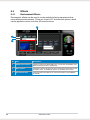
Environment effects can be used to create realistic listening experiences that
mimic different environments. There are a total of 27 environment options, which
can be applied to music and other 2D sound sources.
3
1
2
30
No
Item
Description
1
Default environments
These four buttons activate Bathroom, Concert hall, Underwater, and
Music Pub environments, respectively.
2
More options
Clicking this button will apply the environment effect selected from the
pull-down menu. 23 additional options are available in this menu.
3
Environment size
There are three size settings for each environment: Large, Medium,
and Small.
ASUS Xonar DSX
6.4.2
10-Band Equalizer
The equalizer can modify the audio output for different frequencies, and be used
to compensate for deficiencies in your speakers/systems. There are 12 default
patterns and you can also make your own settings.
1
3
2
4
5
6
No
Item
Description
1
Default equalizer
options
There are 12 available equalizer patterns. Click one to apply it.
2
Equalier slider
Adjust the gain for each band (30~16KHz)
3
User Defined
You can click this button to apply your own defined parameters saved
in the pull-down menu.
4
Save name
Key in a name for your own “User Defined” equalizer setting
5
Add / save
Click this “+” button to save the parameters into User Defined list
6
Delete
Click this “–” button to delete the parameters from User Defined list
ASUS Xonar DSX
31
6.5
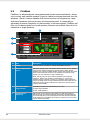
Karaoke
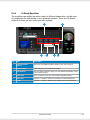
The Xonar DSX provides powerful features for Karaoke, including Key-Shifting,
Vocal Cancellation, and Microphone Echo. Microphone Echo can generate natural
echo effects on your singing voice just like a karaoke machine. Key-Shifting can
change the pitch of Karaoke background music, and Vocal Cancellation can
reduce the original vocal in songs and keep the music and symphony for karaoke.
5
1
2
3
4
32
No
Item
Description
1
On/Off
Click the switch to turn on or off the functions on this page.
2
Key-Shifting
Check the box to enable or disable the key shifting feature for music
playback from 4 semitones below to 4 semitones above.
3
Vocal Cancellation
Check the box to enable or disable the vocal cancellation function and
adjust the voice cancellation level from 0 to +100. +100 will eliminate
most original vocals (default value is 50).
4
Mic Echo
Select the Mic Echo function and adjust the gain for echo signals
(30~16KHz)
5
Reset
Reset all settings to defaults.
ASUS Xonar DSX
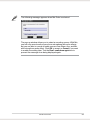
The following message appears when Mic Echo is selected:
The pop-up window allows you to select a recording source. With Mic,
you will only record audio source from microphone with echo effects;
but you are able to record all audio sources from Wave, Aux, and Mic
with microphone echo effect. Click OK to accept or Cancel if you want
to enable the setting later. Tick the Don’t remind me again box to
prevent the message from being displayed again.
ASUS Xonar DSX
33
6.6
FlexBass
FlexBass, an advanced bass management and enhancement mechanism, allows
you to select each satellite speaker’s type for optimal sound performance from the
speakers. (Small: common speaker that cannot produce low frequencies; Large:
wide-band speakers that can produce low frequencies well). It comes with an
adjustable crossover frequency for the boundary of the bass signals. FlexBass will
filter out the bass signals from small speaker channels and redirect them all to the
subwoofer or large speakers.
4
1
2
3
No
Item
Description
1
On/Off
Click this button to disable or enable all FlexBass functions.
2
Small / Large speaker
option
Select the speaker type connected to the Xonar DSX. If your speaker
type cannot handle low-frequency signals (bass), select “Small”
speaker type. The Xonar DSX will filter out the bass signals and send
them to the subwoofer channel. If the speakers support full-range
signals, you can select the “Large” speaker type.
Note: Usually, low-cost PC 2-channel speakers are small-type
speakers. Refer to the speaker’s specifications or consult your
speaker vendor. However, common 2.1 speakers with a subwoofer
should be categorized as large speakers because the subwoofer can
redirect the bass signals inside the two channels to the subwoofer
speaker automatically.
34
3
Picture for Small/
Large speaker
Small/large speakers are identified by their colors:
Orange: large speakers
Green: small speakers
4
LFE Crossover
Frequency
Adjusts the cut-off frequency (50~250Hz) for LFE (low-frequency
effects) signals. Xonar DSX will filter out the bass signals below the
crossover frequency from small speaker channels and forward them
to the subwoofer. The higher the crossover frequency, the more bass
signals will be subtracted.
ASUS Xonar DSX
6.7
Smart Volume Normalization
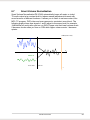
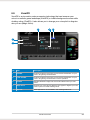
Smart Volume NormalizationTM (SVN) automatically keeps all music or video/
TV audio output at a constant level to reduce manual adjustment inherent with
sound sources of different loudness. It allows you to listen to various content, like
MP3, TV program, DVD video and even games at a consistent sound level. The
following graph shows how signals 1 and 2 adjust to the same level (for example,
10dB below full scale) after you turn on SVN. Please note that lower volume music
2 becomes louder when you turn on SVN while higher volume music 1 becomes
quieter.
0dB (Full-scale)
Music 1
T
-10 dB
Music 2
SVN Off
SVN On
-
ASUS Xonar DSX
35
3
2
1
36
No
Item
Description
1
SVN On/Off
Click this button to enable SVN. This button is outlined blue when
active.
2
SVN blue light
When SVN is enabled, the master volume knob will be illuminated by
a blue light. It will be lit red if the volume is muted.
3
SVN display
When SVN is enabled, the “Smart Volume” meter will light up and
indicate the volume level.
ASUS Xonar DSX
6.8
DS3D GX and DSP Modes
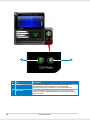
Xonar DSX introduces an innovative technology – DirectSound 3D Game
Extensions v2.5 (DS3D GX 2.5) - to restore DirectSound 3D Hardware acceleration
mode and its subsidiary EAX effects on Windows® Vista for 3D games. Unlike
some proprietary API like OpenAL, DS3D GX doesn’t require games to
support OpenAL API. All existing games compatible with Microsoft DirectX and
DirectSound 2D/3D will be supported with DS3D GX technology. Before you start
EAX and DS3D HW games, enable DS3D GX on the Xonar Audio Center, and
disable the function after playing.
In addition, Xonar DSX also offers a Hi-Fi mode for hi-fidelity playback without
any effect processing to retain original audio fidelity. Every time you turn on Hi-Fi
mode, Xonar DSX will clear all sound effects. It’s also recommended to use Hi-Fi
mode for audio quality tests (using RMAA software or another machine-based
measurement). Use the DSP mode button to quickly enable this feature without
having to configure all the settings.
No sound effects will be applied to high-definition 96KHz/192KHz
content.
ASUS Xonar DSX
37
1
38
2
No
Item
Description
1
GX Mode
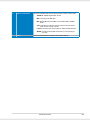
DirectSound 3D Game Extensions mode supports EAX and
DirectSound 3D Hardware extensions for many DirectX/
DirectSound3D games on Windows® Vista and Windows® XP.
2
Hi-Fi Mode
This mode enables Hi-Fidelity playback, where all effects will be
cleared to keep the original digital data and analog output quality as
high as possible.
ASUS Xonar DSX
6.9
VocalFX
VocalFX is an innovative voice processing technology that can immerse your
voice in a realistic game landscape (VoiceEX) or imitate background scenes while
chatting online (ChatEX). It also allows you to change your voice pitch to disguise
who you are (Magic Voice).
3
4
5
1
2
No
Item
Description
1
VoiceEX
Produces realistic and dynamic environmental reverberation for your
voice in 3D gaming communication.
2
Local VoiceEX
Produces realistic and dynamic environmental reverberation for your
voice in 3D gaming communication over the speakers.
3
ChatEX
Emulates different background environment effects when you chat
online.
4
Magic Voice
Changes your voice pitch to different voice types to disguise your real
voice or just for fun while chatting online.
5
App List
VOIP applications can be added to the VOIP application list.
ASUS Xonar DSX
39
For 3D Games
1.
2.
Tick the check box of VoiceEX and Local VoiceEX.
Make sure you and your team member can talk to each other in the game.
For VOIP
1.
40
Click the App List button.
2.
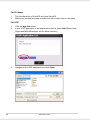
If your VOIP application is not displayed on the list, press Add.(Ensure that
Skype and MSN Messenger are the latest versions)
3.
Navigate to the VOIP application and click Open.
ASUS Xonar DSX
4.
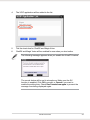
The VOIP application will be added to the list.
5.
Tick the check box for ChatEX and Magic Voice.
6.
ChatEX and Magic Voice will be enabled for use when you chat online.
The following message appears when you enable the VocalFX feature:
The record device will be set to microphone. Make sure the GX
function is enabled. Click OK to accept, or Cancel if you want to
enable the setting later. Check Don’t remind me again to prevent the
message from being displayed again.
ASUS Xonar DSX
41
7.
Troubleshooting and FAQs
[Troubleshooting]
The audio card driver could not be installed on my PC.
Instructions:
1.
2.
3.
4.
Make sure that you have properly plugged the audio card in the PCIE slot on
your motherboard.
Check that the Windows hardware device manager has discovered a
multimedia audio device. If no device is found, try scanning for new
hardware.
Reboot your system.
Remove the card, plug it into another PCIE slot, and try again.
I cannot find the Xonar DSX Audio Center
Instructions:
1.
Make sure you have installed the driver
2.
Locate the Xonar DSX Audio Center icon in the system tray found at the
bottom right-hand corner of the screen. Double-click the icon to open the
Xonar DSX Audio Center utility.
3.
If the icon is not on the system tray, go to the Windows Control Panel and
double click the “Xonar DSX Audio Center” icon to make it visible in the
system tray.
4.
After the driver installation is complete, it’s recommended that you reboot
your computer to complete setup. If the icon still doesn’t appear, reinstall the
device drivers.
I cannot hear any sound from my analog speakers
Instructions:
1.
2.
42
The Xonar DSX uses power from the PCIE bus and from a separate power
cable. Check if you connected the small 4-pin power connector from the
power supply to the Xonar DSX. If you did not plug the internal power, Xonar
DSX Audio Center will display a warning message and prevent you from
using the application even if you double-click the Xonar DSX Audio Center
icon on the system tray.
Ensure that you have connected the speakers properly and have powered on
your speakers.
ASUS Xonar DSX
3.
4.
5.
6.
Ensure that the device master volume or the software player has NOT been
muted on the Xonar DSX Audio Center.
If you are using the DTS encoder through the S/PDIF output, the analog
output will be muted to get rid of the interference between your digital
speaker system and analog speakers or headphones. Check if this setting is
enabled.
Go to the sound and audio device settings found in Windows Control Panel
to check if the playback default device is set to Xonar DSX Audio Device
instead of other onboard AC97 or HDA codec device. If a different device is
set, select Xonar DSX Audio Device and restart your system.
Reboot your system.
I cannot hear any sound from the S/PDIF output
Instructions:
1.
2.
3.
4.
Ensure that you have enabled S/PDIF output in the Audio Center GUI (Main
page).
Ensure that you are connecting the correct S/PDIF output jack on the card to
the decoder’s (AV receiver) S/PDIF input jack.
You may need to select the correct input and mode of your decoder or AV
receiver. For DTS output, you may have to check that the AV receiver is set
to DTS decoding mode.
If you are using 192KHz PCM output, please make sure your decoder can
support 192KHz decoding. Try changing it to 44.1K or 48KHz first.
I cannot hear audio input (Mic, Line-in, AUX, etc.) from my speakers
Instructions:
1.
2.
Go to the mixer recording page in the Audio Center and select the correct
input as the recording source. If you are using Windows® Vista, go to the
system audio control panel settings to check if the current default recording/
input device is correct.
Remember to turn on the digital monitoring button for that recording source.
I cannot hear the TV tuner audio from my speakers
Instructions:
1. If you are using a traditional TV tuner card with an analog audio output,
connect the card to the Aux-In header on the audio card.
2. Select Aux-In as the recording source and switch on the digital monitoring
button on the recording mixer page.
ASUS Xonar DSX
43
3. If you are using a TV tuner card with digital audio output instead of analog,
check that the sound is not muted and whether other applications can play
sound out. If you still have problems, refer to the TV tuner card’s software
user guide.
[FAQ]
Q1: Does the Xonar DSX support Windows® Vista?
Answer:
Yes, the Xonar DSX driver package does support Windows® Vista 32/64 bit and
most key features are available. In addition, Xonar DSX supports unique DS3D GX
on Windows® Vista, which can recover DirectSound 3D hardware and EAX gaming
sound effects on Vista for a lot of existing DirectX games.
Q2: Why does the Xonar DSX support DTS technology?
Answer:
DTS is the well-known brand and technology recognized by the CE industry and
available on a wide range of audio equipment. Moreover, DTS Digital Surround
5.1 audio can deliver better high-quality sound than Dolby Digital. Xonar includes
these features to make your PC a powerful media and entertainment center.
Q3: Why is Xonar DSX the best audio card for HTPC and multi-channel
speakers?
Answer:
The Xonar DSX supports DTS Interactive, which allows a single digital connection
to your AV receiver to carry DTS Digital Surround audio. In addition, Xonar DSX
also provides DTS Neo:PC to upmix TV audio and other types of audio to multichannel surround sound in Home Theater environments. Xonar DSX also has High
Fidelity SNR at 192K/24bit which is only available in high-quality consumer audio
cards. The Xonar is therefore the best card to deliver high-quality audio through
an analog connection to your home theater system or high-end multi-channel
speakers.
Q4: Does the Xonar DSX support EAX on Windows® Vista?
Answer:
Yes, Xonar DSX can support EAX2.0 not only on Windows® XP but also on
Windows® Vista through innovative DirectSound3D Game EXtensions v2.5 (DS3D
GX 2.5) technology.
44
ASUS Xonar DSX
Q5: Why do I need DTS for PC games?
Answer:
DTS Interactive and Neo:PC are available on the latest game consoles, like
XBOX360 and PS3. DTS can provide the best gaming sound experience and
compatibility with home theater or TV systems.
Q6: What is the most important benefit of the Xonar DSX for musicians?
Answer:
1.
2.
3.
Ultimate Fidelity: Xonar DSX has the highest quality of audio in/out for the
cleanest sound production.
Duplex HD: Supports audio sampling rates up to 24bit/192KHz for output and
24bit/96KHz for input.
ASIO 2.0: Xonar DSX includes an ASIO 2.0 driver for low-latency, lowdistortion music creation application.
Q7: Is PCM sound output through S/PDIF limited to 2-channels even with
different analog output channels?
Answer:
The S/PDIF protocol specification (IEC-60958) can only carry 2-channel PCM
data or non-PCM AC3/DTS data. When a user selects PCM output for S/PDIF,
the Xonar sound card will always deliver 2-channel PCM data through the S/PDIF
output port. For attaining 5.1 channel surround sounds, you can select DTS
Interactive encoding output from the S/PDIF out menu, which will allow the Xonar
DSX to deliver up to 7.1 surround sound for games, DVD movies, and even stereo
music.
Q8: Why can I hear and record sound from other recording devices when
Wave/Digital is selected in Record on Windows® Vista?
Answer:
Unlike Windows® XP, Windows® Vista manages multiple audio devices and audio
streams, identifying them as either digital input or analog input. This system allows
for multiple recording devices to run simultaneously in Windows® Vista. Wave In or
SPDIF-In, considered as a digital input, is an independent recording device from
Analog Devices such as Mic In, Line In, or Aux In. Therefore, if you have analog
input other than Wave In in use and set to be monitored, you are able to hear
and even record sound from those analog devices even if Wave In / SPDIF-In is
selected as the default recording device.
Turn off the monitoring function for analog input devices if you only prefer to hear
and record Wave In / SPDIF-In sound.
ASUS Xonar DSX
45
Q9: Why are sound effects not available when playing 96K or 192KHz sound
sources?
Answer:
The sound effects feature on the Xonar DSX currently supports standard 44.1K
and 48KHz sound sources. However, users are assured of high fidelity playback
for 96K sound sources. This is the common setup professional audiophiles and
musicians prefer.
Sound effects can still be applied using commercial or free audio editing software
(Ableton Live, Cakewalk, CoolEdit, Soundforge, etc.) to convert the sound files to
48KHz. Please note that the frequency meter on the Xonar DSX Audio Center will
not take effect when the playback source is at a 96KHz sample rate to prevent any
processing distortion.
46
ASUS Xonar DSX
ASUSTeK COMPUTER INC. (Asia Pacific)
Address
Telephone
Fax
E-mail
Website
Technical Support
Telephone
Online support
4F, No. 150, Li-Te Road, Peitou, Taipei, Taiwan 11259
+886-2-2894-3447
+886-2-2890-7798
[email protected]
www.asus.com.tw
+86-21-38429911
support.asus.com
ASUS COMPUTER INTERNATIONAL (America)
Address
Telephone
Fax
Website
Technical Support
Telephone
Support Fax
Online support
800 Corporate Way, Fremont, CA 94539, USA
+1-510-739-3777
+1-510-608-4555
usa.asus.com
+1-812-282-2787
+1-812-284-0883
support.asus.com
ASUS COMPUTER GmbH (Germany and Austria)
Address
Fax
Website
Online contact
Harkort Str. 21-23, D-40880 Ratingen, Germany
+49-2102-959911
www.asus.de
www.asus.de/sales
Technical Support
Telephone (Component)
Telephone (System/
Notebook/Eee/LCD)
Support Fax
Online support
+49-1805-010923*
+49-1805-010920*
+49-2102-959911
support.asus.com
* EUR 0.14/minute from a German fixed landline; EUR 0.42/minute from a mobile phone.
ASUS Xonar DSX
47