1
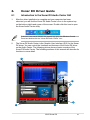
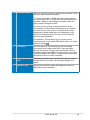
No
Item
Description
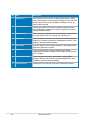
1
Display Area
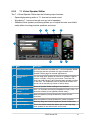
This display area shows the 10-band signal meter, volume
level, and the status of the Dolby technologies, EQ, and DSP
modes. Note: this area just displays information, but is not
used to alter settings.
2
Menu Open/Close
Clicking this button will move the display area and reveal
the configuration area below. Clicking it again will move the
display area back down.
3
Master Volume
This rotary knob controls the master playback volume. Drag
the small circle inside it to change the volume level.
4
SVN Button
Click this button to enable the “Smart Volume Normalization”
feature for constant volume from all playback sources. It will
display a blue light when enabled.
5
Mute Button
Click this button to mute audio playback; it will display a red
light when playback is muted.
6
DSP Mode
These 4 buttons give access to quick sound effects
combinations for Music, Games, DVD Video, and effect-free
(Hi-Fi) modes.
7
Setting Menu Panel
This panel gives access to setting tabs, including Main
Settings, Mixer/volume, Effects, Karaoke/MagicVoice, and
FlexBass. (see the following details)
8
Information icon
Clicking this icon will pop up driver’s Information window.
22
ASUS Xonar DX