1
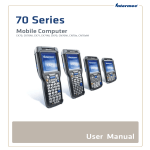
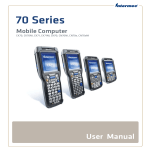
70 Series
Mobile Computer
CK70, CK71, CN70, CN70e
User Manual
Intermec by Honeywell
6001 36th Ave.W.
Everett, WA 98203
U.S.A.
www.intermec.com
The information contained herein is provided solely for the purpose of allowing customers to
operate and service Intermec-manufactured equipment and is not to be released, reproduced, or
used for any other purpose without written permission of Intermec by Honeywell.
Information and specifications contained in this document are subject to change without prior
notice and do not represent a commitment on the part of Intermec by Honeywell.
©2012– 2014 Intermec by Honeywell. All rights reserved.
For patent information, please refer to www.hsmpats.com
Wi-Fi is a registered certification mark of the Wi-Fi Alliance.
Microsoft, Windows, Windows Embedded Handheld, Excel and the Windows logo are either
registered trademarks or registered trademarks of Microsoft Corporation in the United States
and/or other countries.
microSD and microSDHC are trademarks or registered trademarks of SD-3C, LLC in the United
States and/or other countries.
Bluetooth is a trademark of Bluetooth SIG, Inc., U.S.A.
This product includes software developed by the OpenSSL Project for use in the OpenSSL Toolkit
(www.openssl.org).
This product includes cryptographic software written by Eric Young ([email protected]).
This product uses Regex++, Index software during its operational phases. The owner of Regex++
has granted use of the software to anyone provided such use is accompanied by the following
copyright and permission notice:
Regex++, Index. (Version 3.31, 16th Dec 2001)
Copyright © 1998-2001 Dr John Maddock
Permission to use, copy, modify, distribute and sell this software and its documentation for any
purpose is hereby granted without fee, provided that the above copyright notice appear in all
copies and that both that copyright notice and this permission notice appear in supporting
documentation. Dr John Maddock makes no representations about the suitability of this software
for any purpose. It is provided “as is” without express or implied warranty.
ii
70 Series Mobile Computer User Manual
Document Change Record
This page records changes to this document. The document was
originally released as Revision 001.
Version
Number
Date
Description of Change
007
6/2014
Added information on the N5603 scanner, how to
set a password in Intermec Settings, support for
HanXin symbology, and updated language
provisioning settings. Also updated the cleaning
procedure and default settings.
006
03/2013
Added information to support the 70 Series RFID
Mobile Computers.
005
11/2012
Added information to support firmware version
1.50:
• CloneNGo application
• New camera settings
• SceneEditor application
• EA30 imager extended reading range
004
2/2012
Revised information on ScanNGo bar codes.
003
12/2011
Added information on:
• the flashlight feature.
• the Carrier Selection application.
Revised information on:
• the Intermec Settings menus.
• upgrading the system software and the
operating system.
• GPS procedures.
• ScanNGo bar codes.
002
06/2011
70 Series Mobile Computer User Manual
Revised to add information on
non-incendive (NI) versions of the computer,
provisioning the computer, the new
ScanDiagnostics application, and how to use the 70
Series as a USB mass storage device. Also corrected
the cold boot procedure and removed the compass.
iii
iv
70 Series Mobile Computer User Manual
Contents
Contents
Before You Begin. . . . . . . . . . . . . . . . . . . . . . . . . . . . . . . . . . . . . . . . . . . . . . . . . . . . . . . . . . . . . . . . . xi
Safety Information . . . . . . . . . . . . . . . . . . . . . . . . . . . . . . . . . . . . . . . . . . . . . . . . . . . . . . . xi
Global Services and Support . . . . . . . . . . . . . . . . . . . . . . . . . . . . . . . . . . . . . . . . . . . . . . xi
Warranty Information. . . . . . . . . . . . . . . . . . . . . . . . . . . . . . . . . . . . . . . . . . . . xi
Web Support . . . . . . . . . . . . . . . . . . . . . . . . . . . . . . . . . . . . . . . . . . . . . . . . . . . . xi
Send Feedback. . . . . . . . . . . . . . . . . . . . . . . . . . . . . . . . . . . . . . . . . . . . . . . . . . . xii
Telephone Support . . . . . . . . . . . . . . . . . . . . . . . . . . . . . . . . . . . . . . . . . . . . . . xii
Who Should Read This Manual . . . . . . . . . . . . . . . . . . . . . . . . . . . . . . . . . . . . . . . . . . . xii
Related Documents . . . . . . . . . . . . . . . . . . . . . . . . . . . . . . . . . . . . . . . . . . . . . . . . . . . . . . xii
1 About the Computer Features
......................................... 1
About the 70 Series Mobile Computers . . . . . . . . . . . . . . . . . . . . . . . . . . . . . . . . . . . . . . . . . . . . . 2
What’s New in This Release . . . . . . . . . . . . . . . . . . . . . . . . . . . . . . . . . . . . . . . . . . . . . . . . 4
Overview of 70 Series Features . . . . . . . . . . . . . . . . . . . . . . . . . . . . . . . . . . . . . . . . . . . . . 5
About the Status LEDs . . . . . . . . . . . . . . . . . . . . . . . . . . . . . . . . . . . . . . . . . . . . . . . . . . . . 6
70 Series Accessories . . . . . . . . . . . . . . . . . . . . . . . . . . . . . . . . . . . . . . . . . . . . . . . . . . . . . . . . . . . . . . 8
About Language Provisioning . . . . . . . . . . . . . . . . . . . . . . . . . . . . . . . . . . . . . . . . . . . . . . . . . . . . . 10
Turn On the Computer for the First Time. . . . . . . . . . . . . . . . . . . . . . . . . . . . . . . . . . 11
Save Current Language when You Update the OS . . . . . . . . . . . . . . . . . . . . . . . . . . . 11
About the Battery . . . . . . . . . . . . . . . . . . . . . . . . . . . . . . . . . . . . . . . . . . . . . . . . . . . . . . . . . . . . . . . . 11
Charge the Battery . . . . . . . . . . . . . . . . . . . . . . . . . . . . . . . . . . . . . . . . . . . . . . . . . . . . . . . 11
Change the Battery. . . . . . . . . . . . . . . . . . . . . . . . . . . . . . . . . . . . . . . . . . . . . . . . . . . . . . . 12
About Battery Status . . . . . . . . . . . . . . . . . . . . . . . . . . . . . . . . . . . . . . . . . . . . . . . . . . . . . 14
About Battery Life and Conservation . . . . . . . . . . . . . . . . . . . . . . . . . . . . . . . . . . . . . . 16
About the Keypad . . . . . . . . . . . . . . . . . . . . . . . . . . . . . . . . . . . . . . . . . . . . . . . . . . . . . . . . . . . . . . . . 16
Enter Characters on the QWERTY Keypad . . . . . . . . . . . . . . . . . . . . . . . . . . . . . . . . . 24
Enter Characters on the Numeric Keypad . . . . . . . . . . . . . . . . . . . . . . . . . . . . . . . . . . 24
Enter Characters on the CK70 and CK71 Keypads . . . . . . . . . . . . . . . . . . . . . . . . . . 25
About the Power Button . . . . . . . . . . . . . . . . . . . . . . . . . . . . . . . . . . . . . . . . . . . . . . . . . . 26
About the Intermec Dashboard Button . . . . . . . . . . . . . . . . . . . . . . . . . . . . . . . . . . . . 27
Configure the Screen Backlight . . . . . . . . . . . . . . . . . . . . . . . . . . . . . . . . . . . . . . . . . . . . . . . . . . . 28
Configure the Screen Brightness . . . . . . . . . . . . . . . . . . . . . . . . . . . . . . . . . . . . . . . . . . . . . . . . . . 28
Adjust the Volume . . . . . . . . . . . . . . . . . . . . . . . . . . . . . . . . . . . . . . . . . . . . . . . . . . . . . . . . . . . . . . . 28
70 Series Mobile Computer User Manual
v
Contents
About the Imager . . . . . . . . . . . . . . . . . . . . . . . . . . . . . . . . . . . . . . . . . . . . . . . . . . . . . . . . . . . . . . . . 29
Use the Imager as a Flashlight. . . . . . . . . . . . . . . . . . . . . . . . . . . . . . . . . . . . . . . . . . . . . . . . . . . . . 29
Read Bar Codes . . . . . . . . . . . . . . . . . . . . . . . . . . . . . . . . . . . . . . . . . . . . . . . . . . . . . . . . . . . . . . . . . . 30
Read RFID Tags . . . . . . . . . . . . . . . . . . . . . . . . . . . . . . . . . . . . . . . . . . . . . . . . . . . . . . . . . . . . . . . . . 32
Insert a MicroSD Card . . . . . . . . . . . . . . . . . . . . . . . . . . . . . . . . . . . . . . . . . . . . . . . . . . . . . . . . . . . 33
Install a MicroSD Card in a CN70 or CN70e . . . . . . . . . . . . . . . . . . . . . . . . . . . . . . . 33
Install a MicroSD Card in a CK70 or CK71 . . . . . . . . . . . . . . . . . . . . . . . . . . . . . . . . . 36
Transfer Files to and from Your PC . . . . . . . . . . . . . . . . . . . . . . . . . . . . . . . . . . . . . . . . . . . . . . . . 38
How to Transfer Files. . . . . . . . . . . . . . . . . . . . . . . . . . . . . . . . . . . . . . . . . . . . . . . . . . . . . 38
Set Up the Computer as a Mass Storage Device . . . . . . . . . . . . . . . . . . . . . . . . . . . . . 38
2 About the User Interface and Intermec Applications
. . . . . . . . . . . . . . . 39
About the User Interface. . . . . . . . . . . . . . . . . . . . . . . . . . . . . . . . . . . . . . . . . . . . . . . . . . . . . . . . . . 40
About the Home Screen . . . . . . . . . . . . . . . . . . . . . . . . . . . . . . . . . . . . . . . . . . . . . . . . . . 40
Interact with the Screen . . . . . . . . . . . . . . . . . . . . . . . . . . . . . . . . . . . . . . . . . . . . . . . . . . 41
Title Bar Status Icons . . . . . . . . . . . . . . . . . . . . . . . . . . . . . . . . . . . . . . . . . . . . . . . . . . . . 42
Align the Screen . . . . . . . . . . . . . . . . . . . . . . . . . . . . . . . . . . . . . . . . . . . . . . . . . . . . . . . . . 45
About Intermec Applications . . . . . . . . . . . . . . . . . . . . . . . . . . . . . . . . . . . . . . . . . . . . . . . . . . . . . 46
Applications Available on the Mobile Computer . . . . . . . . . . . . . . . . . . . . . . . . . . . . 46
Applications You Can Download to the Mobile Computer. . . . . . . . . . . . . . . . . . . 48
3 Use the Phone
. . . . . . . . . . . . . . . . . . . . . . . . . . . . . . . . . . . . . . . . . . . . . . . . . . . . . . . . . . 53
About the Phone . . . . . . . . . . . . . . . . . . . . . . . . . . . . . . . . . . . . . . . . . . . . . . . . . . . . . . . . . . . . . . . . . 54
Activate the UMTS Phone . . . . . . . . . . . . . . . . . . . . . . . . . . . . . . . . . . . . . . . . . . . . . . . . 55
Activate the CDMA Phone . . . . . . . . . . . . . . . . . . . . . . . . . . . . . . . . . . . . . . . . . . . . . . . . 56
Start the Activation Wizard . . . . . . . . . . . . . . . . . . . . . . . . . . . . . . . . . . . . . . . . . . . . . . . 57
Turn the Phone On and Off. . . . . . . . . . . . . . . . . . . . . . . . . . . . . . . . . . . . . . . . . . . . . . . . . . . . . . . 58
About Network Carriers . . . . . . . . . . . . . . . . . . . . . . . . . . . . . . . . . . . . . . . . . . . . . . . . . . . . . . . . . . 58
Switch Network Carriers. . . . . . . . . . . . . . . . . . . . . . . . . . . . . . . . . . . . . . . . . . . . . . . . . . . . . . . . . . 59
Add the WWAN Connection . . . . . . . . . . . . . . . . . . . . . . . . . . . . . . . . . . . . . . . . . . . . . . . . . . . . . . 60
vi
70 Series Mobile Computer User Manual
Contents
About the Network Connection . . . . . . . . . . . . . . . . . . . . . . . . . . . . . . . . . . . . . . . . . . . . . . . . . . . 61
Make a Phone Call . . . . . . . . . . . . . . . . . . . . . . . . . . . . . . . . . . . . . . . . . . . . . . . . . . . . . . . . . . . . . . . 61
Make an Emergency Phone Call . . . . . . . . . . . . . . . . . . . . . . . . . . . . . . . . . . . . . . . . . . . . . . . . . . . 61
4 Use the Camera
. . . . . . . . . . . . . . . . . . . . . . . . . . . . . . . . . . . . . . . . . . . . . . . . . . . . . . . . . 63
About the Color Camera. . . . . . . . . . . . . . . . . . . . . . . . . . . . . . . . . . . . . . . . . . . . . . . . . . . . . . . . . . 64
About the Camera Settings . . . . . . . . . . . . . . . . . . . . . . . . . . . . . . . . . . . . . . . . . . . . . . . 65
Configure the Camera . . . . . . . . . . . . . . . . . . . . . . . . . . . . . . . . . . . . . . . . . . . . . . . . . . . . 67
Configure Camera Scenes. . . . . . . . . . . . . . . . . . . . . . . . . . . . . . . . . . . . . . . . . . . . . . . . . 68
Take a Picture . . . . . . . . . . . . . . . . . . . . . . . . . . . . . . . . . . . . . . . . . . . . . . . . . . . . . . . . . . . . . . . . . . . 68
Record a Video. . . . . . . . . . . . . . . . . . . . . . . . . . . . . . . . . . . . . . . . . . . . . . . . . . . . . . . . . . . . . . . . . . . 69
Save Pictures and Videos to a microSD Card. . . . . . . . . . . . . . . . . . . . . . . . . . . . . . . . . . . . . . . . 69
5 Use GPS
. . . . . . . . . . . . . . . . . . . . . . . . . . . . . . . . . . . . . . . . . . . . . . . . . . . . . . . . . . . . . . . . . . 71
About the Integrated GPS on Your Computer . . . . . . . . . . . . . . . . . . . . . . . . . . . . . . . . . . . . . . 72
Use the GPSID Installed on the Computer . . . . . . . . . . . . . . . . . . . . . . . . . . . . . . . . . 72
About the GPS Module Operating Modes . . . . . . . . . . . . . . . . . . . . . . . . . . . . . . . . . . 73
Improve GPS Performance on the Computer . . . . . . . . . . . . . . . . . . . . . . . . . . . . . . . 74
6 Configure the Computer
. . . . . . . . . . . . . . . . . . . . . . . . . . . . . . . . . . . . . . . . . . . . . . . 75
How to Configure the Computer . . . . . . . . . . . . . . . . . . . . . . . . . . . . . . . . . . . . . . . . . . . . . . . . . . 76
Use Intermec Settings on the Computer. . . . . . . . . . . . . . . . . . . . . . . . . . . . . . . . . . . . . . . . . . . . 77
Start Intermec Settings . . . . . . . . . . . . . . . . . . . . . . . . . . . . . . . . . . . . . . . . . . . . . . . . . . . 77
About the Structure of Intermec Settings . . . . . . . . . . . . . . . . . . . . . . . . . . . . . . . . . . 77
Navigate in Intermec Settings . . . . . . . . . . . . . . . . . . . . . . . . . . . . . . . . . . . . . . . . . . . . . 82
Enable Intermec Settings Password . . . . . . . . . . . . . . . . . . . . . . . . . . . . . . . . . . . . . . . . 83
Configure Profile Settings with Intermec Settings . . . . . . . . . . . . . . . . . . . . . . . . . . 83
Restore Default Settings to a Menu . . . . . . . . . . . . . . . . . . . . . . . . . . . . . . . . . . . . . . . . 84
Restore Default Settings for All Parameters . . . . . . . . . . . . . . . . . . . . . . . . . . . . . . . . 84
Hide Menu Items in Intermec Settings . . . . . . . . . . . . . . . . . . . . . . . . . . . . . . . . . . . . . 84
Use Intermec Settings Remotely with SmartSystems . . . . . . . . . . . . . . . . . . . . . . . . . . . . . . . . 85
70 Series Mobile Computer User Manual
vii
Contents
About Network Communications . . . . . . . . . . . . . . . . . . . . . . . . . . . . . . . . . . . . . . . . . . . . . . . . . 86
Configure 802.11a/b/g/n (Wi-Fi) Radio Communications . . . . . . . . . . . . . . . . . . . 86
Configure Ethernet Communications . . . . . . . . . . . . . . . . . . . . . . . . . . . . . . . . . . . . . 86
Configure Bluetooth Communications . . . . . . . . . . . . . . . . . . . . . . . . . . . . . . . . . . . . 87
About Serial and USB Communications . . . . . . . . . . . . . . . . . . . . . . . . . . . . . . . . . . . 92
Create an ISP Connection. . . . . . . . . . . . . . . . . . . . . . . . . . . . . . . . . . . . . . . . . . . . . . . . . 93
Create a VPN Server Connection . . . . . . . . . . . . . . . . . . . . . . . . . . . . . . . . . . . . . . . . . . 94
About Wireless Security . . . . . . . . . . . . . . . . . . . . . . . . . . . . . . . . . . . . . . . . . . . . . . . . . . . . . . . . . . 95
Choose Between Microsoft and Funk Security . . . . . . . . . . . . . . . . . . . . . . . . . . . . . . 96
Load a Certificate . . . . . . . . . . . . . . . . . . . . . . . . . . . . . . . . . . . . . . . . . . . . . . . . . . . . . . .106
7 Manage the Computer
. . . . . . . . . . . . . . . . . . . . . . . . . . . . . . . . . . . . . . . . . . . . . . . . 109
Manage the Computer in Your Network . . . . . . . . . . . . . . . . . . . . . . . . . . . . . . . . . . . . . . . . . .110
Manage the Computer Using CloneNGo . . . . . . . . . . . . . . . . . . . . . . . . . . . . . . . . . .110
Manage the Computer Using SmartSystems. . . . . . . . . . . . . . . . . . . . . . . . . . . . . . .110
Manage the Computer Using Third-Party Software . . . . . . . . . . . . . . . . . . . . . . . .111
Develop and Install Applications . . . . . . . . . . . . . . . . . . . . . . . . . . . . . . . . . . . . . . . . . . . . . . . . .111
Develop RFID Applications . . . . . . . . . . . . . . . . . . . . . . . . . . . . . . . . . . . . . . . . . . . . . .112
Package Your Application. . . . . . . . . . . . . . . . . . . . . . . . . . . . . . . . . . . . . . . . . . . . . . . .112
Choose a Target Location . . . . . . . . . . . . . . . . . . . . . . . . . . . . . . . . . . . . . . . . . . . . . . . .112
Install Applications Using SmartSystems Console . . . . . . . . . . . . . . . . . . . . . . . . .113
Install Applications Using Microsoft ActiveSync . . . . . . . . . . . . . . . . . . . . . . . . . . .113
Install Applications Using a Storage Card . . . . . . . . . . . . . . . . . . . . . . . . . . . . . . . . .113
Launch Applications Automatically . . . . . . . . . . . . . . . . . . . . . . . . . . . . . . . . . . . . . .114
Update the System Software . . . . . . . . . . . . . . . . . . . . . . . . . . . . . . . . . . . . . . . . . . . . . . . . . . . . .114
Update Individual or Multiple Computers Using the SmartSystems Console .114
Update Individual Mobile Computers Using a microSD Card . . . . . . . . . . . . . . .116
8 Troubleshoot and Maintain the Computer
. . . . . . . . . . . . . . . . . . . . . . . . . . 117
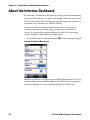
About the Intermec Dashboard . . . . . . . . . . . . . . . . . . . . . . . . . . . . . . . . . . . . . . . . . . . . . . . . . .118
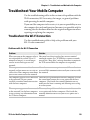
Troubleshoot Your Mobile Computer. . . . . . . . . . . . . . . . . . . . . . . . . . . . . . . . . . . . . . . . . . . . .119
Troubleshoot the Wi-Fi Connection . . . . . . . . . . . . . . . . . . . . . . . . . . . . . . . . . . . . . .119
Troubleshoot 802.1x Security . . . . . . . . . . . . . . . . . . . . . . . . . . . . . . . . . . . . . . . . . . . .120
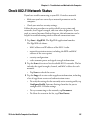
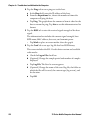
Check 802.11 Network Status . . . . . . . . . . . . . . . . . . . . . . . . . . . . . . . . . . . . . . . . . . . . . . . . . . . .121
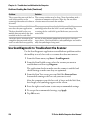
Troubleshoot Reading Bar Codes. . . . . . . . . . . . . . . . . . . . . . . . . . . . . . . . . . . . . . . . .123
Use ScanDiagnostic to Troubleshoot the Scanner. . . . . . . . . . . . . . . . . . . . . . . . . .124
viii
70 Series Mobile Computer User Manual
Contents
Troubleshoot Operating the Computer . . . . . . . . . . . . . . . . . . . . . . . . . . . . . . . . . . .125
Troubleshoot RFID Problems . . . . . . . . . . . . . . . . . . . . . . . . . . . . . . . . . . . . . . . . . . . .126
Call Product Support. . . . . . . . . . . . . . . . . . . . . . . . . . . . . . . . . . . . . . . . . . . . . . . . . . . . . . . . . . . .127
Find Your Configuration Number . . . . . . . . . . . . . . . . . . . . . . . . . . . . . . . . . . . . . . . .127
Find Your Operating System Version . . . . . . . . . . . . . . . . . . . . . . . . . . . . . . . . . . . . .127
Reset the Computer . . . . . . . . . . . . . . . . . . . . . . . . . . . . . . . . . . . . . . . . . . . . . . . . . . . . . . . . . . . . .128
Reboot the Computer . . . . . . . . . . . . . . . . . . . . . . . . . . . . . . . . . . . . . . . . . . . . . . . . . . .128
Cold Boot the Computer . . . . . . . . . . . . . . . . . . . . . . . . . . . . . . . . . . . . . . . . . . . . . . . .128
Clean Boot the Computer. . . . . . . . . . . . . . . . . . . . . . . . . . . . . . . . . . . . . . . . . . . . . . . .130
Clean the Computer. . . . . . . . . . . . . . . . . . . . . . . . . . . . . . . . . . . . . . . . . . . . . . . . . . . . . . . . . . . . .131
ASpecifications and Default Settings
. . . . . . . . . . . . . . . . . . . . . . . . . . . . . . . . . 133
Physical and Environmental Specifications . . . . . . . . . . . . . . . . . . . . . . . . . . . . . . . . . . . . . . . .134
CN70 and CN70 RFID Physical Dimensions . . . . . . . . . . . . . . . . . . . . . . . . . . . . . .134
CN70e and CN70e RFID Physical Dimensions . . . . . . . . . . . . . . . . . . . . . . . . . . . .134
CK70 and CK70 RFID Physical Dimensions . . . . . . . . . . . . . . . . . . . . . . . . . . . . . . .134
CK71 Physical Dimensions . . . . . . . . . . . . . . . . . . . . . . . . . . . . . . . . . . . . . . . . . . . . . .134
Environmental Specifications . . . . . . . . . . . . . . . . . . . . . . . . . . . . . . . . . . . . . . . . . . . .134
Power and Electrical Specifications . . . . . . . . . . . . . . . . . . . . . . . . . . . . . . . . . . . . . . .135
70 Series Non-Incendive Computer Specifications . . . . . . . . . . . . . . . . . . . . . . . . .136
Operating System . . . . . . . . . . . . . . . . . . . . . . . . . . . . . . . . . . . . . . . . . . . . . . . . . . . . . . .136
Hardware . . . . . . . . . . . . . . . . . . . . . . . . . . . . . . . . . . . . . . . . . . . . . . . . . . . . . . . . . . . . . .136
Back Accessory Interface Pin-outs . . . . . . . . . . . . . . . . . . . . . . . . . . . . . . . . . . . . . . . .137
Touch Screen Specifications . . . . . . . . . . . . . . . . . . . . . . . . . . . . . . . . . . . . . . . . . . . . .137
Standard Communications . . . . . . . . . . . . . . . . . . . . . . . . . . . . . . . . . . . . . . . . . . . . . .137
Wireless LAN . . . . . . . . . . . . . . . . . . . . . . . . . . . . . . . . . . . . . . . . . . . . . . . . . . . . . . . . . . .138
Regulatory Approvals . . . . . . . . . . . . . . . . . . . . . . . . . . . . . . . . . . . . . . . . . . . . . . . . . . .138
Bar Code Symbologies. . . . . . . . . . . . . . . . . . . . . . . . . . . . . . . . . . . . . . . . . . . . . . . . . . .138
Imager Reading Distances . . . . . . . . . . . . . . . . . . . . . . . . . . . . . . . . . . . . . . . . . . . . . . .139
Default Configuration . . . . . . . . . . . . . . . . . . . . . . . . . . . . . . . . . . . . . . . . . . . . . . . . . . . . . . . . . .148
Data Collection Settings. . . . . . . . . . . . . . . . . . . . . . . . . . . . . . . . . . . . . . . . . . . . . . . . .148
Communications Settings . . . . . . . . . . . . . . . . . . . . . . . . . . . . . . . . . . . . . . . . . . . . . . .151
Device Settings . . . . . . . . . . . . . . . . . . . . . . . . . . . . . . . . . . . . . . . . . . . . . . . . . . . . . . . . .153
GPS Settings . . . . . . . . . . . . . . . . . . . . . . . . . . . . . . . . . . . . . . . . . . . . . . . . . . . . . . . . . . .155
Core Messaging Service Settings. . . . . . . . . . . . . . . . . . . . . . . . . . . . . . . . . . . . . . . . . .156
Device Monitor Settings . . . . . . . . . . . . . . . . . . . . . . . . . . . . . . . . . . . . . . . . . . . . . . . . .156
Virtual Wedge Settings . . . . . . . . . . . . . . . . . . . . . . . . . . . . . . . . . . . . . . . . . . . . . . . . . .157
RFID Settings . . . . . . . . . . . . . . . . . . . . . . . . . . . . . . . . . . . . . . . . . . . . . . . . . . . . . . . . . .158
70 Series Mobile Computer User Manual
ix
Contents
B Keypads and Keystrokes
. . . . . . . . . . . . . . . . . . . . . . . . . . . . . . . . . . . . . . . . . . . . . 161
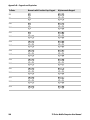
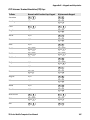
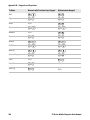
Standard Characters . . . . . . . . . . . . . . . . . . . . . . . . . . . . . . . . . . . . . . . . . . . . . . . . . . . . . . . . . . . .162
CN70 Keypads and Keystrokes . . . . . . . . . . . . . . . . . . . . . . . . . . . . . . . . . . . . . . . . . . .162
CN70e Keypads and Keystrokes . . . . . . . . . . . . . . . . . . . . . . . . . . . . . . . . . . . . . . . . . .167
CK70 Keypads and Keystrokes . . . . . . . . . . . . . . . . . . . . . . . . . . . . . . . . . . . . . . . . . . .171
CK71 Keypads and Keystrokes . . . . . . . . . . . . . . . . . . . . . . . . . . . . . . . . . . . . . . . . . . .178
C ScanNGo Wi-Fi Configuration Bar Codes
. . . . . . . . . . . . . . . . . . . . . . . . . . . . 187
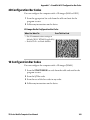
Radio Configuration Bar Codes . . . . . . . . . . . . . . . . . . . . . . . . . . . . . . . . . . . . . . . . . . . . . . . . . .188
2D Configuration Bar Codes. . . . . . . . . . . . . . . . . . . . . . . . . . . . . . . . . . . . . . . . . . . . .189
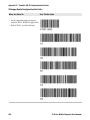
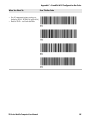
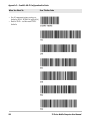
1D Configuration Bar Codes. . . . . . . . . . . . . . . . . . . . . . . . . . . . . . . . . . . . . . . . . . . . .189
I Index
x
. . . . . . . . . . . . . . . . . . . . . . . . . . . . . . . . . . . . . . . . . . . . . . . . . . . . . . . . . . . . . . . . . . . . 195
70 Series Mobile Computer User Manual
Before You Begin
Before You Begin
This section provides you with safety information, technical support
information, and sources for additional product information.
Safety Information
Your safety is extremely important. Read and follow cautions in this
document before handling and operating Intermec equipment. You
can be seriously injured, and equipment and data can be damaged if
you do not follow the safety cautions.
This section explains how to identify and understand cautions and
notes that are in this document.
A caution alerts you to an operating procedure, practice,
condition, or statement that must be strictly observed to prevent
equipment damage or destruction, or corruption or loss of data.
Note: Notes either provide extra information about a topic or contain
special instructions for handling a particular condition or set of
circumstances.
Global Services and Support
Warranty Information
To understand the warranty for your Intermec product, visit the
Intermec website at www.intermec.com and click Support >
Returns and Repairs > Warranty.
Disclaimer of warranties: The sample code included in this document
is presented for reference only. The code does not necessarily
represent complete, tested programs. The code is provided “as is with
all faults.” All warranties are expressly disclaimed, including the
implied warranties of merchantability and fitness for a particular
purpose.
Web Support
Visit the Intermec website at www.intermec.com to download our
current manuals (in PDF).
70 Series Mobile Computer User Manual
xi
Before You Begin
Visit the Intermec technical knowledge base (Knowledge Central) at
www.intermec.com and click Support > Knowledge Central to
review technical information or to request technical support for your
Intermec product.
Send Feedback
Your feedback is crucial to the continual improvement of our
documentation. To provide feedback about this manual, please
contact the Intermec Technical Communications department directly
at [email protected].
Telephone Support
In the U.S.A. and Canada, call 1-800-755-5505.
Outside the U.S.A. and Canada, contact your local Intermec
representative. To search for your local representative, from the
Intermec website, click About Us > Contact Us.
Who Should Read This Manual
This manual is written for the person who is responsible for
installing, configuring, and maintaining the 70 Series Mobile
Computer.
This manual provides you with information about the features of the
70 Series mobile computer, and how to install, configure, operate,
maintain, and troubleshoot it.
Before you work with the 70 Series mobile computer, you should be
familiar with your network and general networking terms, such as IP
address.
Related Documents
This is a list of related Intermec documents.
•
Intermec Settings Command Reference Manual
•
Intermec Developer Library (IDL) Resource Kit Developer’s Guide
The Intermec website at www.intermec.com contains our documents
(as PDF files) that you can download for free.
xii
70 Series Mobile Computer User Manual
Before You Begin
To download documents
1 Visit the Intermec website at www.intermec.com.
2 Click the Products tab.
3 Using the Products menu, navigate to your product page. For
example, to find the CN70 computer product page, click
Computers > Handheld Computers > CN70.
4 Click the Manuals tab.
If your product does not have its own product page, click Support >
Manuals. Use the Product Category, the Product Family, and
Product to find your documentation.
70 Series Mobile Computer User Manual
xiii
Before You Begin
xiv
70 Series Mobile Computer User Manual
1
About the Computer Features
This chapter introduces the 70 Series Mobile Computers with
Windows® Embedded Handheld operating system. Use this
chapter to learn about the basic features and functions of each
computer, as well as the available accessories for it.
1
Chapter 1 — About the Computer Features
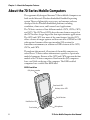
About the 70 Series Mobile Computers
The ergonomically-designed Intermec 70 Series Mobile Computers are
built on the Microsoft Windows Embedded Handheld operating
system. They are lightweight, easy-to-use, and run most software
developed for the Windows Embedded platform, including
standalone, client-server, and browser-based applications.
The 70 Series consists of four different models: CN70, CN70e, CK70,
and CK71. The CN70 and CN70e have the same features except that
the CN70e offers a larger keypad for data-input intensive applications.
The CK70 and CK71 have most of the same features, but the CK71
offers a choice of imager options and does not offer a WWAN or GPS
radio option. Intermec offers non-incendive (NI) versions for
hazardous environments, in addition to RFID versions of the CN70,
CN70e, and CK70.
Throughout this manual, all versions of the mobile computer are
referred to as 70 Series unless information is specific to a particular
model of computer. Pictures of the CN70 and CK70 represent the four
models of the 70 Series computers. Non-Incendive (NI) computers
have a teal label on the top of the computer. The RFID-enabled
computers have a visible blue RFID label.
CN70 Front View
Cell phone speaker
Good read LED
Battery status LED
On/off button
Notification LED
Scan button
2
Microphone
70 Series Mobile Computer User Manual
Chapter 1 — About the Computer Features
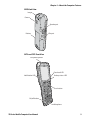
CN70 Back View
Imager
Camera
Speaker port
Battery
IrDa port
CK70 and CK71 Front View
Cell phone speaker
Good read LED
Notification LED
Battery status LED
Scan button
On/off button
Microphone
70 Series Mobile Computer User Manual
3
Chapter 1 — About the Computer Features
CK70 (Left) and CK71 (Right) Back View
Imager
Camera
Imager
Camera
Left speaker
port
IrDA port
Battery
Left speaker
port
IrDA port
Battery
What’s New in This Release
This version of the user manual contains these updates:
•
•
•
•
4
Added language persistence through an operating system update.
For more information, see “Save Current Language when You
Update the OS” on page 11.
Added information on setting a password for Intermec Settings.
For more information, see “Enable Intermec Settings Password”
on page 83.
Added CK71 support for the N5603 extended range scanner. For
more information, see “N5603 Extended Range Reading
Distances” on page 145 in Appendix A.
Added support for HanXin symbology.
70 Series Mobile Computer User Manual
Chapter 1 — About the Computer Features
Overview of 70 Series Features
The 70 Series includes these standard features:
Intermec 70 Series Feature List
Standard Features
EA30 area imager that can read bar codes and
capture images.
CK70 CK71 CN70
x
Choice of EA30, EX25, or N5603 imagers
x
CN70e
x
x
x
x
x
x
x
Multi-processor architecture with 512 MB
DRAM and 1G Flash
x
802.11a/b/g/n and Bluetooth® radios
x
CDMA, UMTS, or Flexible Network Radio
capability
x
x
x
GPS radio on CDMA, UMTS, or Flexible
Network Radio computers
x
x
x
x
5-megapixel auto-focus color camera
x
x
x
x
Customer-accessible microSD slot for
memory cards up to 32 GB
x
x
x
x
Customer-accessible SIM card slot
x
x
x
x
IrDA port with speeds up to 4 Mbps
x
x
x
x
Ultra-high frequency (UHF) RFID option to
read and write data to RFID tags
x
x
x
Note: The RFID-enabled computers do not have WWAN or GPS radio
options.
The 70 Series Mobile Computer with an IEEE 802.11a/b/g/n radio
installed is Wi-Fi® certified for interoperability with other
802.11a/b/g/n wireless LAN devices.
70 Series Mobile Computer User Manual
5
Chapter 1 — About the Computer Features
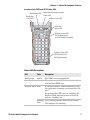
About the Status LEDs
Use the following illustrations and table to understand the status
LEDs on your computer. All six status LEDS are not available on every
70 Series computer. For example, the QWERTY versions of the CN70
and CN70e do not have a Green key status LED.
Location of the CN70 Status LEDs
Good Read and Ready-to-Work
Status LED
Notification LED
Orange key
status LED
6
Battery status LED
Green key
status LED
Shift key
status LED
70 Series Mobile Computer User Manual
Chapter 1 — About the Computer Features
Location of the CK70 and CK71 Status LEDs
Notification LED
Good Read and Ready-to-Work
status LED
Orange key
status LED
Battery status LED
Green key
status LED
Shift key status LED
(CK70 alphanumeric
and CK71 function numeric)
Shift key status LED
(CK70 numeric and
CK71 alphanumeric)
Status LED Descriptions
LED
Color
Description
Notification
Amber
This LED is user-programmable.
Good Read
Green
The computer successfully decoded a bar code or
read and write RFID tags.
Ready-to-Work Blue
If you have Intermec Terminal Emulator (ITE),
the application is running and connected to the
host.
If you do not have ITE, you can configure the
Ready-to-Work indicator to turn on or off to
indicate a healthy state.
Blinking ITE is running but not connected to the host.
blue
The computer is unhealthy.
70 Series Mobile Computer User Manual
7
Chapter 1 — About the Computer Features
Status LED Descriptions (Continued)
LED
Color
Description
Off
ITE is not installed or not running.
The computer is healthy.
See “About Battery Status” on page 14.
Battery
Key Status
Shift
Green
The Green function key is enabled.
When writing RFID tags, a Good Read LED will
blink on Green if a write is successful.
Orange
The Orange function key is enabled.
Red
The Shift key is enabled.
When writing RFID tags, the Battery Status LED
will turn on Red for 1 second and then return to
its previous state if a write is unsuccessful.
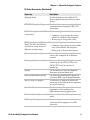
70 Series Accessories
The 70 Series computer ships with a battery. All other accessories are
sold and ordered separately. For help, contact your local Intermec sales
representative.
70 Series Accessories
Accessory
Description
Audio Snap-On Adapter
Use the audio adapter to connect the
computer to a headset.
Back Accessory Interface
Use the back accessory interface to attach
accessories such as the magstripe reader
adapter to the CK70 and CK71.
CK70/CK71 Battery
This battery provides main power to the
CK70 and CK71.
CK70/CK71 Magstripe Reader
Adapter
Use the magnetic stripe reader to be able to
read magnetic cards with the CK70 and
CK71 computer.
CN70/CN70e Battery
This battery provides main power to the
CN70 and CN70e.
CN70/CN70e Magstripe Reader Use the magnetic stripe reader to be able to
Snap-On Adapter
read magnetic cards with the CN70 and
CN70e computer.
8
70 Series Mobile Computer User Manual
Chapter 1 — About the Computer Features
70 Series Accessories (Continued)
Accessory
Description
Desktop Stand
Use the desktop stand to hold the 70
Series computer on your desk or a stable
surface.
DEX/UCS Snap-On Adapter
Use this adapter to receive and send serial
communications through a DEX/UCS
connection.
DX1 Desktop Dock with USB
connectivity
Use the desktop dock with the:
• Computer cup to charge the battery
while it is installed in the computer.
• Battery cup to charge the battery.
DX2 Dual Dock and DX4 Quad Use these charger bases with the:
Dock. The DX2 and DX4 are
• Computer cup to charge batteries while
available in charge-only and
they are installed in the computer.
Ethernet configurations.
• Battery cup to charge two batteries.
Ethernet Snap-On Adapter
Use the Ethernet adapter to be able to
connect the computer to an Ethernet
network.
Handstrap Replacement Kit
You can order and install a replacement
handstrap for the CN70, CN70e, and
CK70/CK71. Each kit contains 5
handstraps.
Holster
Use the holster to store the computer
when you need your hands free.
IP30 Handheld RFID Reader
Use the IP30 Handheld RFID Reader to
read/write RFID tags through Bluetooth.
RS-232 Snap-On Adapter
Use the RS-232 adapter to convert the
connector on the bottom of the computer
to a serial connector.
Scan Handle
Use the scan handle to provide better
ergonomics to the computer for
high-volume scanning applications.
Tethered Stylus Replacement Kit You can order and install a replacement
stylus.
USB Snap-On Adapter
70 Series Mobile Computer User Manual
Use this adapter to convert the bottom
connector of the computer to a USB
connector.
9
Chapter 1 — About the Computer Features
70 Series Accessories (Continued)
Accessory
Description
Vehicle Dock
Use the vehicle dock to provide power and
hold your computer while you are using it
in a vehicle.
Vehicle Holder
Use the vehicle holder to hold your
computer while you are using it in a
vehicle.
Vehicle Power Adapter
Use the vehicle power adapter to provide
power to the computer from your vehicle.
Vocollect® Snap-On Adapter
Use this adapter to be able to use the
Vocollect voice solution in your
warehouse.
About Language Provisioning
If your 70 Series computer includes language provisioning, you are
prompted to select a language provision when the computer starts for
the first time. It may take up to 15 minutes to load your language.
These languages are available:
• Chinese Simplified (CHS)
• Chinese Traditional (CHT)
• Spanish (ESN)
• French (FRA)
• German (GER)
• Italian (ITA)
• Japanese (JPN)
• Korean (KOR)
• Russian (RUS)
• World Wide English (WWE)
If you want to change the language provisioning, you need to send
your computer to an Intermec Global Repair Center.
10
70 Series Mobile Computer User Manual
Chapter 1 — About the Computer Features
Turn On the Computer for the First Time
You may have to select a language the first time you turn on the
computer.
1 Insert the battery into the computer. The computer turns on and
you are prompted to select a language.
ud
2 Use the
,
, and Enter key to select a language and navigate
through the screens.
The language you selected loads on the computer. The computer
restarts when it finishes configuring the device for your language.
Save Current Language when You Update the OS
You can use Intermec Settings to make your selected language persist
through an operating system update.
1 Tap Start > Settings > System > Intermec Settings. The Intermec
Settings Main Menu appears.
2 Tap Device Settings > Language.
3 Select the Save current language when updating OS checkbox.
4 Tap OK.
About the Battery
The battery used in this device may present a fire or chemical burn
hazard if it is mistreated. Do not disassemble it, heat it above
100 °C (212 °F) or incinerate it. Dispose of used batteries
promptly. Keep away from children.
The computers use these rechargeable Lithium-ion battery pack as the
main power source:
•
•
3.7 V, 4000 mAH (14.8 Wh) battery for the CN70 and CN70e
3.7 V, 5200 mAH (19.2 Wh) battery for the CK70 and CK71
Charge the Battery
You need to fully charge the battery before using your computer for the
first time. Use one of the charging accessories listed in the next table to
charge the battery.
70 Series Mobile Computer User Manual
11
Chapter 1 — About the Computer Features
70 Series Charging Accessories
Charging Accessory
Charging Time
Snap-on adapters
Up to 6 hours
DX1, DX2, or DX4 dock
Up to 6 hours
CN70, CN70e, CK70, and CK71 Vehicle Power Adapter Up to 6 hours
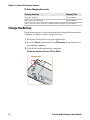
Change the Battery
If your battery power is low, you need to either charge the battery in the
computer, or replace it with a charged battery.
1 Save your files and close any open applications.
2 Press the Power button and choose Hibernate from the menu to
suspend the computer.
3 Detach the handstrap from the computer.
Detach the Handstrap From a CN70 or CN70e
12
70 Series Mobile Computer User Manual
Chapter 1 — About the Computer Features
Detach the Handstrap From a CK70 or CK71
4 Make sure the computer is in hibernate mode and the screen is off.
5 Remove the battery.
•
On the CN70 or CN70e, push the battery release toward the
bottom of the computer until the battery releases and then lift
it away from the computer.
70 Series Mobile Computer User Manual
13
Chapter 1 — About the Computer Features
•
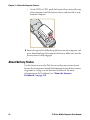
On the CK70 or CK71, push the battery release toward the top
of the computer until the battery releases and then lift it away
from the computer.
6 Insert the top end of a fully charged battery into the computer, and
press down firmly on the bottom of the battery. Make sure that the
battery release is fully engaged.
About Battery Status
Use the battery icon on the Title bar to see the power status of your
battery. If you want more detailed information on your battery such as
usage time or voltage, use the Intermec Dashboard. For more
information on the Dashboard, see “About the Intermec
Dashboard” on page 118.
14
70 Series Mobile Computer User Manual
Chapter 1 — About the Computer Features
Battery Icon Status Descriptions
Battery Icon Status
Battery is fully charged.
Battery has a high charge.
Battery has a medium charge. You should be able to work for
several more hours before changing batteries.
Battery is low. You need to charge or replace the battery soon.
Battery is critically low. You need to replace the battery now.
Battery is charging.
The battery is not installed.
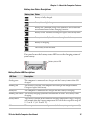
You can also use the battery status LED to see the charging status of
your battery.
Battery status LED
Battery Status LED Descriptions
LED State
Description
Steady green
The computer is connected to a charger and the battery is more than 95%
charged.
Blinking red
The battery is very low. The computer will soon go into Suspend mode.
Charge or replace the battery.
Steady red
The computer is connected to a charger and the battery is charging.
Blinking red-amber The battery charging system has encountered an error. The battery is not
charging.
Steady amber
The battery is outside of the allowable charging temperature range. Charging
will resume when the battery temperature is back in the acceptable range of
5 °C to 35 °C (41 °F to 95 °F).
Off
The computer is not on external power and the battery is operating normally.
70 Series Mobile Computer User Manual
15
Chapter 1 — About the Computer Features
About Battery Life and Conservation
Batteries that are stored outside the computer for long periods of time
slowly discharge. Intermec recommends storing the battery in a
charger to maintain battery performance.
Battery Conservation Tips
When You Want To:
Do This to Save Battery Power:
Use the computer and • Connect the computer to an external power
the Low Battery status
source.
icon appears or the
• Or, save your data and press the Power button
Battery light comes on.
and select Hibernate. After the computer turns
off, remove the battery and insert a fully charged
battery.
Stop using the
computer for 5
minutes or longer.
Make sure that the low battery icon is not on the
screen and the Battery LED is not on. Press the
Power button and choose Suspend to suspend the
computer.
Store the computer for If you are storing the computer for a few days, like
more than a day.
over the weekend, install a charged battery or
connect the computer to a power source.
If you are storing the computer for longer, remove
and charge the battery, and then store both the
battery and computer in a cool location. If you store
the battery for several months, recharge the battery
to keep it at peak performance.
Store the battery
Store the batteries in a charger.
outside the computer.
About the Keypad
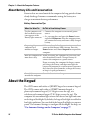
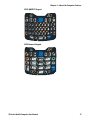
The CN70 comes with either a QWERTY keypad or a numeric keypad.
The CN70e comes with either a QWERTY numeric keypad, a
phone-style numeric keypad (1-2-3 digits across the top), or a
calculator-style numeric keypad (7-8-9 digits across the top). The
computer has an ambient light sensor that detects low light and turns
on the keypad backlight. By default, the keypad backlight is enabled in
low light conditions. You can disable the keypad backlight to conserve
power. Use Intermec Settings to configure the backlight. For help, see
“Use Intermec Settings on the Computer” on page 77.
16
70 Series Mobile Computer User Manual
Chapter 1 — About the Computer Features
CN70 QWERTY Keypad
@
$
Q
?
E
S
D
&
A
+
%
W
2
1
R
T
F
G
/
X
C
N
B
V
O
K
L
P
9
8
sym
Esc
J
H
I
6
5
4
7
Z
3
U
Y
M
0
Enter
Space
CN70 Numeric Keypad
Esc
1
Caps
2
ABC
3
DEF
4
GHI
5
JKL
6
MNO
7
PQRS
8
TUV
9
WXYZ
0
Space
70 Series Mobile Computer User Manual
Enter
17
Chapter 1 — About the Computer Features
CN70e QWERTY Numeric Keypad
CN70e Calculator-Style Numeric Keypad
18
70 Series Mobile Computer User Manual
Chapter 1 — About the Computer Features
CN70e Numeric Keypad
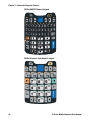
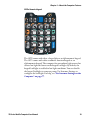
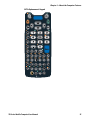
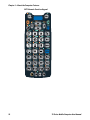
The CK70 comes with either a large alpha or an alphanumeric keypad.
The CK71 comes with either a numeric function keypad or an
alphanumeric keypad. The computer has an ambient light sensor that
detects low light and turns on the keypad backlight. By default, the
keypad backlight is enabled in low light conditions. You can disable
the keypad backlight to conserve power. Use Intermec Settings to
configure the backlight. For help, see “Use Intermec Settings on the
Computer” on page 77.
70 Series Mobile Computer User Manual
19
Chapter 1 — About the Computer Features
CK70 Large Alpha Keypad
20
70 Series Mobile Computer User Manual
Chapter 1 — About the Computer Features
CK70 Alphanumeric Keypad
70 Series Mobile Computer User Manual
21
Chapter 1 — About the Computer Features
CK71 Numeric Function Keypad
22
70 Series Mobile Computer User Manual
Chapter 1 — About the Computer Features
CK71 Alphanumeric Keypad
70 Series Mobile Computer User Manual
23
Chapter 1 — About the Computer Features
Enter Characters on the QWERTY Keypad
You need to use the orange modifier key b and the Shift key y to
access all characters and functions on the QWERTY keypad.
To type a character:
• Press the key for that character.
To type a character or access a function on the overlay:
• Press b and then press the key for the character or function.
To only type characters or access functions on the overlay:
Press b twice to lock the orange modifier key to stay on, and then
press the keys for the characters or functions.
To type a single uppercase letter:
•
• Press y and then the letter key.
To type all uppercase letters:
• Press y y to turn on Caps Lock, and then press the letter keys.
You can still type orange modifier characters by pressing b and then
the key for that character.
To turn off Caps Lock, press y.
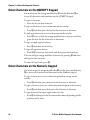
Enter Characters on the Numeric Keypad
You need to use the orange modifier key b and the green modifier key
c to access all characters and functions on the Numeric keypad.
To type a character or access a function printed in orange on the
overlay:
• Press b and then press the key for the character or function.
To type a character or access a function printed in green on the overlay:
• Press c and then press the key for the character or function.
To type letters in the upper right corner of a key:
•
24
Press c and then press the key one to three times depending on the
position of the letter.
70 Series Mobile Computer User Manual
Chapter 1 — About the Computer Features
For example, in the upper right corner of the 2 key there are the
letters “ABC”:
• To type “c”, press c 2 2 2.
• To type “C,” press c 1 and then press c 2 2 2.
Note: On the calculator-style keypad, the 2 is replaced by the 8.
To only type letters:
Press c c to lock the green modifier key, and then press the key
one to four times depending on the position of the letter.
While the green modifier key is locked, press 1 to toggle between only
uppercase and lowercase letters.
•
To unlock the green modifier key, press c.
Note: If uppercase letters are enabled and you unlock the green
modifier key, you may need to press c 1 to type lowercase letters.
Enter Characters on the CK70 and CK71 Keypads
You need to use the orange modifier key b, the green modifier key c,
and the Shift or Caps Lock key y to access all characters and functions
on the Alpha, Alphanumeric, and Numeric Function keypads.
To type a character or access a function printed in orange on the
overlay or in the upper left corner of a key:
• Press b and then press the key for the character or function.
To type a character or access a function printed in green on the overlay:
• Press c and then press the key for the character or function.
To type a single uppercase letter:
• Press y and then the letter key.
To type all uppercase letters:
• Press y y to turn on Caps Lock, and then press the letter keys.
You can still type orange or green modifier characters by pressing b or
c and then the key for that character.
To turn off Caps Lock, press y.
70 Series Mobile Computer User Manual
25
Chapter 1 — About the Computer Features
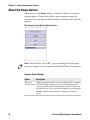
About the Power Button
When you press the Power button, a dialog box with a list of power
options appears. If you do not select a power options setting, the
currently selected action (the button outlined in bold) occurs after the
timeout.
The Intermec Power Options Default Screen
Note: The Real Time Clock (RTC) persists through all of the power
options as long as it receives power from the Real Time Clock battery.
Intermec Power Options
Option
Description
Hibernate
High power saving mode. Use this setting only for swapping
(battery swap) the battery. The computer saves the current system state,
registry, and file system and then powers off all radios and
internal devices. You can wake the computer by pressing the
Power button or connecting the computer to external
power.
26
70 Series Mobile Computer User Manual
Chapter 1 — About the Computer Features
Intermec Power Options (Continued)
Option
Description
Suspend
Medium power saving mode. The computer powers off all
radios and internal devices not involved in saving the system
state, but the phone stays on to receive calls. This is the
default setting. You can wake the computer by pressing the
Power button, pulling the scanner trigger, receiving a call,
scheduling an event such as an alarm, or by connecting
external power.
Reboot
The computer does not save the current system state, but the
registry and file systems are saved. The computer shuts down
all running processes and restarts.
Cancel
The Power Options menu is cancelled.
Screen Off
Lowest power saving mode. The screen turns off, but the
phone, all radios, and internal devices stay on. Tap the screen
to turn the screen back on.
Shutdown
Very high power saving mode. The computer turns off
everything. You must press Power or apply external power to
restart the computer.
The Intermec Power Options screen is customizable. You can use
Intermec Settings to determine which options are available to end
users, the timeout until the default choice is selected, the default
action if no option is selected, or to disable the Power Options screen.
For more information on customizing the screen using Intermec
Settings, see “Use Intermec Settings on the Computer” on page 77
or see the Intermec Settings Command Reference Manual.
About the Intermec Dashboard Button
If the Ready-to-Work light blinks, your computer may be experiencing
a problem. Press the Intermec Dashboard button (m) to launch the
Intermec Dashboard application and view troubleshooting and status
information.
You can press the m button at any time to bring up the Intermec
Dashboard. If the computer is not healthy, the current issues are
displayed at the top of the screen. If the device is healthy, you can use
the Dashboard to view device information. For more information, see
“About the Intermec Dashboard” on page 118.
70 Series Mobile Computer User Manual
27
Chapter 1 — About the Computer Features
Configure the Screen Backlight
The display has an ambient light sensor that automatically adjusts the
backlight intensity to conserve power and ensure the display is
readable.
By default, the screen turns off when there is no activity with the
computer. Press a key or tap the screen to resume activity.
You can configure the screen backlight to turn off.
1 Tap Start > Settings > Power.
2 Tap Advanced on the horizontal scroll bar.
3 Select the screen power off settings for when the computer is on
battery power or external power.
Configure the Screen Brightness
You can configure the screen brightness using Intermec Settings or
from the Start menu.
1 Tap Start > Settings > System > Backlight.
2 Adjust the slider to the desired brightness level.
3 Tap OK.
Adjust the Volume
You can adjust the computer volume for your needs and your
environment. The volume includes sounds you hear when you tap the
screen or read bar codes with the imager. You can set the volume to off,
very low, low, medium, high, very high (default), or vibrate.
You can also use the buttons on the right side of the computer to
adjust the volume:
•
•
28
The upper button increases the volume.
The lower button decreases the volume.
70 Series Mobile Computer User Manual
Chapter 1 — About the Computer Features
You can adjust the volume settings using Intermec Settings or the
horizontal scroll menu.
1 Tap the Volume icon at the top of the screen, and then tap the
volume icon on the horizontal scroll menu.
2 Use your stylus or the u and d keys to adjust the volume slider to
the volume you want, select Vibrate, or select Off.
About the Imager
The computer ships with an internal imager. You can use the imager as
a flashlight or to read bar codes.
Note: When the Pictures & Videos application is running, you cannot
use the imager.
Use the Imager as a Flashlight
You can use the EA30 imager as a flashlight. By default, the imager is
set to read bar codes. To use the imager as a flashlight, you must remap
the Left side lower button.
1 Open Intermec Settings on the mobile computer by tapping
Start > Settings > System > Intermec Settings.
2 From the Intermec Settings main menu, tap Device Settings >
Keypad.
3 From the Keypad menu, tap Button Remapping.
4 From the Left side lower button menu, select Flashlight.
5 From the Flashlight timeout drop-down menu, select how long to
leave the flashlight on before it automatically turns off.
6 Tap OK.
70 Series Mobile Computer User Manual
29
Chapter 1 — About the Computer Features
Read Bar Codes
Depending on the imager model in your computer, you can read 1D
and 2D bar code symbologies, composite symbologies, and postal
codes.
You can also connect the computer to cordless scanners (like the SF51
and SR61) through Bluetooth communications or tethered scanners
(like the SR30 and SR61T) through the RS-232 adapter. For help, see
“Connect to a Bluetooth Scanner” on page 88 and “Connect to a
Tethered Scanner” on page 92, respectively.
1 Enable only the bar code symbologies that you need.
2 Use Intermec Settings to select the predefined imager mode that
best suits your environment:
Predefined Mode
For Scanning
1D
Only 1D labels.
1D and 2D Standard
(Default) All types of bar code labels.
1D and 2D Bright
Environment
In high ambient light, such as outdoors
in the sunshine.
1D and 2D Reflective Surface
Glossy labels.
Note: You can also select the imager predefined mode in Profile
Settings by tapping Start > Profile Settings > Scanning.
3 Point the imager window at the bar code label, and hold the
computer steady a few inches from the label.
4 Press the Scan button. The laser pointer and illumination beam or
frame appear.
30
70 Series Mobile Computer User Manual
Chapter 1 — About the Computer Features
Scanning with the EA30 Imager
5 Use the laser pointer as a guide and aim toward the middle of the
bar code. Make sure that the illumination beam or frame covers the
bar code you are trying to decode.
When the computer successfully reads a bar code label, you hear a
high beep, and the Good Read LED turns on briefly.
6 Release the Scan button.
70 Series Mobile Computer User Manual
31
Chapter 1 — About the Computer Features
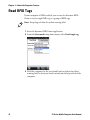
Read RFID Tags
If your computer is RFID-enabled, you can use the Intermec RFID
Demo to read a single RFID tag or a group of RFID tags.
Note: Keep fingers below the yellow warning label.
1 Start the Intermec RFID Demo application.
2 From the Scan mode drop-down menu, select Read single tag.
3 Hold the computer by the scan handle only or below the yellow
warning label so that your hand is mostly on the keypad end of the
computer.
32
70 Series Mobile Computer User Manual
Chapter 1 — About the Computer Features
4 Position the computer an inch from the tag and press the Scan
button. If the read is successful, a table appears at the bottom of the
screen that displays the EPC value of that tag.
For more information about how to use the Intermec RFID Demo,
refer to the Intermec RFID Demo User Guide.
Insert a MicroSD Card
You can use a microSD™ card to increase file storage and install
software. The computers support an optional 32 GB maximum
capacity microSD card.
Note: The computer resets when you open the card access door to
insert the microSD card. Make sure you completely close the card
access door before you use your computer.
Install a MicroSD Card in a CN70 or CN70e
You need a Phillips screwdriver to install the microSD card.
1 Press the Power button to turn off the computer.
2 Remove the handstrap and the battery.
70 Series Mobile Computer User Manual
33
Chapter 1 — About the Computer Features
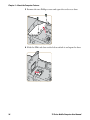
3 Remove the two Phillips screws and open the card access door.
4 Slide the SIM card door to the left to unlock it and open the door.
34
70 Series Mobile Computer User Manual
Chapter 1 — About the Computer Features
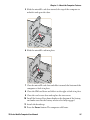
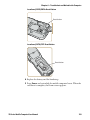
5 Slide the microSD card door towards the top of the computer to
unlock it and open the door.
6 Slide the microSD card into place.
7 Close the microSD card door and slide it towards the bottom of the
computer to lock it in place.
8 Close the SIM card door and slide it to the right to lock it in place.
9 Close the card access door and replace the two screws.
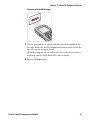
10 Install the battery. Press down firmly on the bottom of the battery,
and make sure that the battery release tab is fully engaged.
11 Attach the handstrap.
12 Press the Power button. The computer cold boots.
70 Series Mobile Computer User Manual
35
Chapter 1 — About the Computer Features
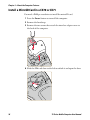
Install a MicroSD Card in a CK70 or CK71
You need a Phillips screwdriver to install the microSD card.
1 Press the Power button to turn off the computer.
2 Remove the handstrap.
3 Remove the two screws that attach the interface adapter cover to
the back of the computer.
4 Slide the SIM card door to the left to unlock it and open the door.
36
70 Series Mobile Computer User Manual
Chapter 1 — About the Computer Features
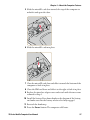
5 Slide the microSD card door towards the top of the computer to
unlock it and open the door.
6 Slide the microSD card into place.
7 Close the microSD card door and slide it towards the bottom of the
computer to lock it in place.
8 Close the SIM card door and slide it to the right to lock it in place.
9 Replace the interface adapter cover and attach with the two screws
removed in Step 2.
10 Install the battery. Press down firmly on the bottom of the battery,
and make sure that the battery release tab is fully engaged.
11 Reattach the handstrap.
12 Press the Power button. The computer cold boots.
70 Series Mobile Computer User Manual
37
Chapter 1 — About the Computer Features
Transfer Files to and from Your PC
The 70 Series support these two methods for transferring files to and
from your PC:
•
•
Using Microsoft ActiveSync or Windows Mobile Device Center.
Using the 70 Series as a mass storage device.
How to Transfer Files
To transfer files, you need to physically connect your mobile computer
to your PC and install either Microsoft ActiveSync (Windows XP or
earlier) or Windows Mobile Device Center (Windows Vista or Windows
7) on your PC. ActiveSync and Windows Mobile Device Center are free
applications available from the Microsoft website at
www.windowsmobile.com/getstarted.
Use one of these accessories to connect your mobile computer to your
PC:
•
•
USB snap-on adapter (Model 1000AA07)
USB cable
Set Up the Computer as a Mass Storage Device
You can connect the computer as a mass storage device to your
desktop PC. When connected as a mass storage device, you can easily
transfer files between the computers.
1 Go to www.datalight.com and download the Reliance Nitro
Windows Driver (RNWD). You need to login before you can
download the driver.
2 Connect the mobile computer to your desktop PC using a USB
cable.
3 On the mobile computer, tap
Start > Settings > System > Intermec Settings.
4 From the Intermec Settings Main Menu, tap Device Settings >
USB.
5 From the USB function driver menu, select Mass storage - Flash
File Store and tap OK.
6 Copy files to and from your desktop PC to the mobile computer.
38
70 Series Mobile Computer User Manual
2
About the User Interface and Intermec
Applications
Use this chapter to learn about the Windows Embedded Handheld
user interface and how to interact with the screen. You can also use
this chapter to learn about the Intermec applications on your
computer, as well as additional Intermec applications you can
download.
39
Chapter 2 — About the User Interface and Intermec Applications
About the User Interface
The user interface for the Windows Embedded Handheld 6.5
operating system is different from previous versions of Windows
Mobile. The interface is touch-friendly and easy to navigate. Use the
following sections to understand how to interact with Windows
Embedded Handheld 6.5.
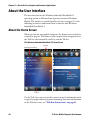
About the Home Screen
When you turn on your mobile computer, the Home screen is the first
screen that appears. The Home screen contains three navigation bars:
the Title bar, the horizontal scroll bar, and the Tile bar.
The Windows Embedded Handheld 6.5 Home Screen
Horizontal scroll bar
Title bar
Only available
for RFID-enabled
computers
Tile bar
Use the Title bar icons to view the current status of information such
as signal strength and battery power remaining. For more information
on the Title bar icons, see “Title Bar Status Icons” on page 42.
40
70 Series Mobile Computer User Manual
Chapter 2 — About the User Interface and Intermec Applications
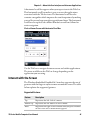
A horizontal scroll bar appears when you tap an icon in the Title bar.
This horizontal scroll bar makes it easy to access the applications
associated with the Tile bar icons. The horizontal scroll bar also
contains a magnifier which improves the touch experience by making
parts of the screen large enough to tap with your finger. The horizontal
scroll bar also replaces tabs within Windows screens and allows for
easier navigation.
Clock & Alarms Screen with Horizontal Scroll Bar
Use the Tile bar to navigate between screens and within applications.
The icons available on the Tile bar change depending on the
application you are using.
Interact with the Screen
The Windows Embedded Handheld 6.5 interface supports the use of
gestures with the finger or stylus to move around the screen. The table
below explains the supported gestures.
Supported Gestures
Gesture
Description
Tap
Represents the left click of a mouse.
Double-tap
Represents the left double-click of a mouse.
Hold
Represents the right click of a mouse when you press and hold
on the screen and a context menu appears.
70 Series Mobile Computer User Manual
41
Chapter 2 — About the User Interface and Intermec Applications
Supported Gestures (Continued)
Gesture
Description
Flick
Initiates scrolling in the direction (horizontal or vertical) the
finger or stylus moves across the screen.
Pan
Press and hold on the screen and then drag in any direction.
Title Bar Status Icons
Tappable icons in the Title bar immediately show you the status of
your network, your phone, the volume, the battery, and the time. Use
the following table to understand what the icons mean.
Title Bar Status Icon Descriptions
Icon
Description
You have a new notification.
You have a new text message.
You have a new email message.
You have a new instant message.
You missed a call.
The speakerphone is on.
The phone is roaming.
An alarm is set.
The microphone is on.
An internet call is in progress.
A Bluetooth headset is detected.
An ActiveSync connection has been established.
42
70 Series Mobile Computer User Manual
Chapter 2 — About the User Interface and Intermec Applications
Title Bar Status Icon Descriptions (Continued)
Icon
Description
There is a problem with the ActiveSync synchronization.
An ActiveSync synchronization is in progress over USB.
A CDMA connection is active.
A CDMA connection is available, but not transferring data.
A UMTS network is available.
Connecting to a UMTS network.
A UMTS connection is active.
A 3G+ network is available.
An EDGE network is available.
Connecting to an EDGE network.
An EDGE connection is active.
A GPRS network is available.
Connecting to a GPRS network.
A GPRS connection is active.
An HSDPA network is available.
Connecting to an HSDPA network.
An HSDPA connection is active.
Bluetooth is on.
Wi-Fi is on but not connected, and no networks are detected.
70 Series Mobile Computer User Manual
43
Chapter 2 — About the User Interface and Intermec Applications
Title Bar Status Icon Descriptions (Continued)
Icon
Description
Wi-Fi is not connected to a network, and other networks are
detected.
Other wireless networks are detected.
Connected to a wireless network.
Synchronizing through a Wi-Fi connection.
Connected to a wireless network, and other networks are
detected.
Information about a new wireless network is available.
A network connection is active.
A network connection is inactive.
The phone has maximum signal strength.
The phone has no signal.
The phone capability is off.
The phone has no service.
The phone is searching for service.
Data is being transferred.
A voice call is in progress.
A voice call is on hold.
There is no SIM card present in the computer.
The volume is off and the phone is set to vibrate.
The volume is on.
44
70 Series Mobile Computer User Manual
Chapter 2 — About the User Interface and Intermec Applications
Title Bar Status Icon Descriptions (Continued)
Icon
Description
The volume is off.
The battery has a full charge.
The battery has a high charge.
The battery has a medium charge.
The battery has a low charge.
The battery has a very low charge.
The battery is attached to external power and is charging.
No battery is installed in the computer.
Call forwarding is on.
Voice mail is off.
GPS locator is off.
GPS locator is on.
Align the Screen
You may need to align your screen if you tap on one area and it
registers in a different part of the screen. Make sure you only use the
stylus to complete the alignment process.
1 Tap Start (t) > Settings > System > Screen.
2 Follow the prompts on the screen to complete the alignment
process.
70 Series Mobile Computer User Manual
45
Chapter 2 — About the User Interface and Intermec Applications
About Intermec Applications
Intermec provides many useful applications to help you configure,
troubleshoot, and connect your computer to other devices and
networks. You can also download additional applications from the
Intermec website to help you use all of the features of your computer.
Applications Available on the Mobile Computer
Use this table to understand some of the Intermec applications
available on your computer.
Intermec Applications Available on the Mobile Computer
Icon
Application
Description
Bluetooth
Audio
Use the Bluetooth Audio application to connect to
a Bluetooth headset or hands-free device. For more
information, see “Connect to a Bluetooth Audio
Device” on page 91.
Carrier
Selection
Use the Carrier Selection application to quickly
change your network carrier. For more
information, see “About Network Carriers” on
page 58.
CloneNGo
Use CloneNGo to configure basic device settings
on multiple client computers from one master
computer. For more information, see “Manage the
Computer Using CloneNGo” on page 110.
iGPS
Use the iGPS application to improve the
performance of GPS on your computer. For more
information, see “Improve GPS Performance on
the Computer” on page 74. iGPS is only available
on computers with phone capability.
Intermec RFID Use the RFID Demo application to read and write
Demo
RFID tags. For more information, see Intermec
RFID Demo User Guide.
Intermec
Settings
46
Use Intermec Settings to configure your computer.
You can use Intermec Settings to individually
configure a computer or you can use it through
SmartSystems™ to configure all of your
computers. For more information, see “Use
Intermec Settings on the Computer” on page 77.
70 Series Mobile Computer User Manual
Chapter 2 — About the User Interface and Intermec Applications
Intermec Applications Available on the Mobile Computer (Continued)
Icon
Application
Description
ISpyWiFi
Use ISpyWiFi to check your 802.11 status and
diagnose issues with the connection. For more
information, see “Check 802.11 Network Status”
on page 121.
Profile Settings Use Profile Settings to easily configure the
computer for a specific use. You can choose
predefined values for the Camera, Power, and
Scanning.
• Tap the Profile Setting you want to use.
You will see a message that changes are saved and a
check mark appears next to your choice.
For more information on modifying Profile
Settings options, see “Configure Profile Settings
with Intermec Settings” on page 83.
ScanDiagnostic Use the ScanDiagnostic application to
troubleshoot problems with the internal or
external scanner. For more information, see “Use
ScanDiagnostic to Troubleshoot the
Scanner” on page 124.
SceneEditor
Use the SceneEditor application to modify
predefined camera scenes or create new scenes. For
more information, see “Configure Camera
Scenes” on page 68.
Wireless Center Use the Wireless Center to turn radios (Wi-Fi,
Bluetooth, phone) on and off and configure
settings for each radio.
Wireless
Printing
Use the Wireless Printing application to connect to
a Bluetooth printer. For more information, see
“Connect to a Bluetooth Printer” on page 89.
Wireless
Readers
Use the Wireless Readers application to connect to
the IP30. For more information, see IP30 Handheld
RFID Reader User Guide.
Wireless
Scanning
Use the Wireless Scanning application to connect
to a Bluetooth scanner. For more information, see
“Connect to a Bluetooth Scanner” on page 88.
70 Series Mobile Computer User Manual
47
Chapter 2 — About the User Interface and Intermec Applications
Applications You Can Download to the Mobile Computer
You can download several Intermec applications that extend the
capabilities of your 70 Series computer. Some of the applications
require the purchase of a license to run. All of the applications listed
below are available from the Intermec website at www.intermec.com
> Support > Downloads. Go to this website and enter the information
to find your 70 Series computer.
About eMDI
Intermec Enhanced Mobile Document Imaging Application (eMDI) is
a professional document capture application that enables you to
capture images of full page documents (8.5 x 11 or A4 paper sizes) with
the camera. You can transfer the images from your mobile computer
to a PC or server. For more information, see the Intermec Enhanced
Mobile Document Imaging User Guide. You can download and use
eMDI for a 30-day evaluation period. After the evaluation period
expires, you will need to purchase a license.
About Features Demo
Intermec Features Demo provides a simple way to explore key features
of your mobile computer. You will find applications that demonstrate
scanning, document imaging, image capture, printing, and GPS
functionality. Many of the applications that are part of Features Demo
also have separate full-featured versions that you can download and
license for your computer. For more information on Features Demo,
see Intermec Features Demo User Guide.
About Image Capture
The Intermec Image Capture application is provided for use on the 70
Series computers with an EA30 imager. Image capture provides a way
for users to capture a high quality grayscale image with a mobile
computer. Image Capture also allows you to change settings to provide
the best image possible for the conditions present. You do not need to
license Image Capture.
48
70 Series Mobile Computer User Manual
Chapter 2 — About the User Interface and Intermec Applications
About Intermec Browser
Intermec Browser is a web browser designed for Intermec computers
and is compatible with Microsoft® Internet Explorer® 6 (IE6) and
Pocket Internet Explorer (PIE). This locked-down application
deliberately limits normal web browser functionality. For example,
users cannot exit the program, type URLs, or use the Back button. You
can configure Intermec Browser for your specific application
requirements and you can design your own web pages.
You can download and use Intermec Browser for free for a 60-day
evaluation period. After the evaluation period expires, you need to
purchase a license. For more information on Intermec Browser, see the
Intermec Browser User Manual.
About Intermec Connection Manager
Intermec Connection Manager is a software application and API
interface that provides seamless network roaming for Intermec mobile
computers configured with one or more wired or wireless technologies
(Ethernet, 802.11, GPRS, CDMA). Intermec Connection Manager
works in the background to automatically establish and maintain
connections. You can download and use Intermec Connection
Manager for a 60-day evaluation period. the evaluation period expires,
you will need to purchase a license.
About Intermec HTML5 Browser
Intermec HTML5 Browser provides a free open-platform application
environment for Intermec computers. You can now run the same
cross-platform web applications on an Intermec computer that you
can run on iOS and Android devices. Intermec HTML5 Browser also
lets you run applications while the computer is connected to the web
or while it is offline. For more information on the HTML5 Browser, see
the Intermec HTML5 Browser User Guide.
70 Series Mobile Computer User Manual
49
Chapter 2 — About the User Interface and Intermec Applications
About Intermec Launcher
Intermec Launcher is a Microsoft Windows application, designed for
Intermec mobile computers, that provides a platform from which
other applications may be launched while attempting to provide a
locked-down environment. You can configure Intermec Launcher for
your specific application requirements. You can download and use
Intermec Launcher for a 60-day evaluation period. After the evaluation
period expires, you will need to purchase a license. For more
information on Intermec Launcher, see the Intermec Launcher User
Guide.
About Intermec Terminal Emulator (ITE)
Intermec Terminal Emulator (ITE), part of Intermec Client Pack (ICP),
is the next generation of Intermec’s popular terminal emulation client
designed for enterprise-level data collection. It provides a consistent
user interface and a common menu structure to simplify the use and
management of applications running on Intermec mobile and wireless
computers.
ITE is packed with enhancements that improve productivity, reduce
errors, and deliver fast return on investment. It supports multiple
emulation protocols in a single client and has new features such as
session persistence, remote management and configuration, and offers
a maintenance plan to keep you up-to-date with the latest releases and
upgrades. You can download and use ITE for a 60-day evaluation
period. After the evaluation period expires, you will need to purchase a
license and maintenance plan. For more information on ITE, see the
Intermec Terminal Emulator (ITE) User Guide.
About SmartSystems
SmartSystems™ is an easy-to-use software platform that provides IT
Administrators and Integrators a single, integrated portal for
hands-free provisioning, deployment, and management of Intermec
devices minimizing the effort spent on software upgrades, equipment
monitoring, maintenance and troubleshooting.
50
70 Series Mobile Computer User Manual
Chapter 2 — About the User Interface and Intermec Applications
SmartSystems provides a consistent way to manage Intermec devices
including mobile computers, RFID readers, printers and bar code
scanners, located on-site or remote, to make the most of limited IT
resources, and lower the total cost of ownership for Intermec data
collection equipment. SmartSystems can be downloaded at no charge
from the Intermec website. For more information, visit
www.intermec.com/SmartSystems.
About Intermec RFID Demo
The Intermec RFID Demo provides a way to explore the features of
your RFID-enabled computers. The application comes installed on the
computers and can be used to perform these tasks:
• Read RFID tags
• Write data to RFID tags
For more information about how to use the Intermec RFID Demo, see
Intermec RFID Demo User Guide.
70 Series Mobile Computer User Manual
51
Chapter 2 — About the User Interface and Intermec Applications
52
70 Series Mobile Computer User Manual
3
Use the Phone
You can use the phone feature to make and receive telephone
calls, as well as transmit data through cellular wide-area
networks (WWANs). However, the RFID-enabled computers
do not support the phone feature.
53
Chapter 3 — Use the Phone
About the Phone
The 70 Series mobile computer supports two types of cellular
technology:
• CDMA
• UMTS
Note: Your Flexible Network Radio mobile computer supports both
CDMA and UMTS technology. Your Flexible Network Radio does not
support Network Information and Time Zone (NITZ) messages to
automatically set the system time.
Phone features on the computer include a speaker and a microphone.
You can also use a Bluetooth headset or hands-free kit. The phone
feature is enabled by default on WWAN-equipped mobile computers.
After you turn on the phone and activate service with your wireless
carrier, you can customize the phone features and network settings.
For more information, see the online help on your mobile computer.
54
70 Series Mobile Computer User Manual
Chapter 3 — Use the Phone
Activate the UMTS Phone
You use a SIM card to activate the UMTS phone on your computer.
You can purchase the SIM card from your network provider.
1 Press the Power button to turn off the computer.
2 On the CN70 or CN70e:
a Push the battery release tab forward until the battery releases,
and lift the battery away from the computer.
b Remove the two Phillips screws and open the card access door.
3 On the CK70, remove the two screws and lift the card access door
away from the computer.
4 Slide the SIM card door to the left to unlock it and open the door.
70 Series Mobile Computer User Manual
55
Chapter 3 — Use the Phone
5 Slide the SIM card into the slot in the card access door.
6 Close the SIM card door and slide it to the right to lock it in place.
7 Close the card access door and replace the two screws.
8 Install the battery. Press down firmly on the bottom of the battery,
and make sure that the battery release tab is fully engaged.
9 Press the Power button. The computer cold boots.
Activate the CDMA Phone
To activate the CDMA radio module in your mobile computer, you
need to contact your wireless carrier and set up an account for each
mobile computer. The following table lists the carriers that Intermec
currently supports. If your carrier is not listed in the table, please
contact Intermec product support to see if it is now supported.
Currently Supported Carriers
56
Country
Carriers
United States
Sprint, Verizon
70 Series Mobile Computer User Manual
Chapter 3 — Use the Phone
The carrier requires the Mobile Equipment Identifier (MEID) to start
the activation process. You can find the MEID:
on a label located in the upper right corner of the battery
compartment.
• on the outside of the computer shipping box.
• in the Version Information menu. Tap Start > Settings >
Personal > Phone > Version Information tab.
The activation process is slightly different for each CDMA carrier.
Your carrier sales contact and an Intermec representative can guide
you through the process. After you supply the MEID to your carrier,
they will respond with values that you must enter using the Windows
Mobile Activation Wizard (if required). Some of the supported carriers
do not require you to enter any values. The following table shows the
carriers, the correct activation method to use, and the values that you
need to activate your phone.
•
Values Required for CDMA Phone
Carrier
Activation Method
Activation Values You Need
Sprint
Activation Wizard
• Master Subsidy Lock (MSL) or
activation code
• MDN
• MEID
Verizon
• Dial *22899
• Activation Wizard
None. All parameters are automatically
transferred wirelessly.
After activation, the settings are permanently stored in the CDMA
module. Changing the OS loads will not affect any of the settings or
activation parameters stored in the WAN modem.
Start the Activation Wizard
Depending on your wireless carrier, you may need to use the Windows
Mobile Activation Wizard to activate your phone.
1 Tap Start > Phone, or tap the Phone button on the Tile bar.
The phone application starts.
2 Tap Menu > Activation Wizard.
70 Series Mobile Computer User Manual
57
Chapter 3 — Use the Phone
Turn the Phone On and Off
Before you can start using your phone, you need to enable it. You can
use Wireless Center to enable and disable your phone, as well as
Bluetooth and Wi-Fi communications.
1 Tap Start > Settings > Connections > Wireless Center.
2 Tap Phone to turn on the Phone
3 (Optional) To configure the phone, tap Menu in the tile bar at the
bottom of the screen.
4 Tap OK when you are done configuring the options.
5 Tap OK to close Wireless Center.
About Network Carriers
Your Flexible Network Radio-enabled CN70, CN70e, or CK70 mobile
computer contains a highly configurable WWAN platform. When you
switch network carriers, or perform a clean boot, the cellular network
connection is automatically configured.
58
70 Series Mobile Computer User Manual
Chapter 3 — Use the Phone
Switch Network Carriers
Use the Carrier Selection application to quickly change your WWAN
radio network carrier on your Flexible Network Radio-enabled CN70,
CN70e, or CK70 mobile computer.
1 Tap Start > Settings > Personal > Carrier Selection.
2 Select a Carrier and tap OK. A dialog box appears asking if you
want to switch carriers.
3 Tap Yes to switch carriers.
If the update is successful, the Carrier Selection screen appears and
displays the updated carrier information.
If the update is unsuccessful, a message box appears. Tap Ok to
return to the Carrier Selection screen.
70 Series Mobile Computer User Manual
59
Chapter 3 — Use the Phone
Add the WWAN Connection
If you are switching to a CDMA network, or switching from a CDMA
network to a UMTS network, you must add the WWAN connection in
Intermec Settings.
1 Tap Start > Settings > System > Intermec Settings >
Communications > WWAN Radio.
2 Select Add New WWAN Connection.
3 Enter a Connection Name. In the Phone Number field, enter #777
and tap OK. The Manage WWAN Radio State screen appears.
4 From Active Connection, select your Connection Name and
Connect Now and tap OK.
60
70 Series Mobile Computer User Manual
Chapter 3 — Use the Phone
About the Network Connection
Note: When you perform a clean boot, the selected carrier will default
to generic UMTS.
When you perform a clean boot, all user-created network connection
entries are deleted, and only the generic UMTS remains. After you
perform a clean boot, you can find more information about generic
UMTS by tapping Start > Settings > Connections > Connections >
Tasks tab > Manage Existing Connections > Modem tab.
Make a Phone Call
After you activate your UTMS or CDMA phone, you are ready to start
making phone calls.
Note: Your Flexible Network Radio mobile computer is data only. You
cannot make phone calls from the Flexible Network Radio.
1 Press Phone.
2 Tap the keys to enter the telephone number you want to call, and
tap Talk.
Make an Emergency Phone Call
You can use the UMTS phone to make an emergency phone call even
if the SIM card is missing. When the SIM card is not installed, the
phone will show that you have no service. However, if you dial certain
emergency numbers (such as 112, 911, 000, 08, 118, 119, and 999) the
call will go through.
Note: Your Flexible Network Radio mobile computer is data only. You
cannot make phone calls from the Flexible Network Radio.
70 Series Mobile Computer User Manual
61
Chapter 3 — Use the Phone
62
70 Series Mobile Computer User Manual
4
Use the Camera
You can use the color camera to take pictures and record
videos.
63
Chapter 4 — Use the Camera
About the Color Camera
The camera and flash are located on the back of the computer. You run
the Pictures & Videos application to access the camera features.
Note: While the Pictures & Videos application is running, you cannot
use the imager.
In the Pictures & Videos application, you can:
configure camera settings.
take, view, and edit pictures.
switch between Still (camera) mode and Video mode.
record and launch video clips stored on the computer or a microSD
card.
You can send pictures and video clips to others or save an image as the
background on the Home screen. If you download the eMDI
application, it uses the camera to capture images.
•
•
•
•
64
70 Series Mobile Computer User Manual
Chapter 4 — Use the Camera
About the Camera Settings
You can configure camera settings to meet the needs of your operating
environment:
•
•
Basic camera settings are available from the main menu of the
Pictures & Videos application.
Advanced camera settings are available from the Settings menu
option from the main menu of the Pictures & Videos application.
Basic Camera Settings
Setting
Description
Mode
Determines the camera operating mode:
• Normal: Takes one picture.
• Burst: Takes a series of three pictures.
• Timer: Waits 10 seconds before taking the picture.
Resolution
Determines the resolution of the image. You can select
values for image resolution or screen resolution.
Zoom
Determines the amount of zoom: from 1x to 4x.
Scenes
Predefined scenes that optimize the camera settings for a
specific environment:
•
•
•
•
•
•
•
•
•
DocCap: Intermec document capture.
Check: Capture images of paper checks.
Night: Low light conditions.
Cloudy: Cloudy or overcast conditions.
Daylight: Bright sun.
Van Interior: Dimly lit vehicle interior.
Warehouse: Warehouse environment.
Office Store: Office or store environment.
Manual: Manually configure a specific set of camera
settings.
• Auto: The camera automatically configures the settings.
Settings
Advanced camera settings that you can configure. See the
next table, “Advanced Camera Settings”.
Torch
The state of the camera flash depending on the lighting
conditions: on, off, or automatic.
Flash
The state of the camera flash when you take a picture: on,
off, or automatic.
70 Series Mobile Computer User Manual
65
Chapter 4 — Use the Camera
Setting
Description
Focus
Determines if the focus is continuous, single shot, or
manual. If you select manual focus, you need to set the
Focus Distance.
Focus
Distance
The distance at which the camera focuses. Values are 2.5 in,
4.5 in, 7.5 in, 1-3 ft, 3-9 ft, and Infinity (focuses the lens so
that an infinitely distant object would be in focus).
Advanced Camera Settings
Setting
Description
Exposure
Metering
The area of the image the camera uses to determine optimal
exposure:
• Whole Avg.: Uses the image as a whole.
• Whole Center Weight: Uses the entire image but places
emphasis on the center quarter of the image.
Center 1/4 Avg.: Uses the center quarter of the image.
Lower 1/4 Avg.: Uses the lower quarter of the image.
Upper 1/4 Avg.: Uses the upper quarter of the image.
Lower 1/2 Avg.: Uses the lower half of the image.
Upper 1/2 Avg.: Uses the upper half of the image.
Default is Center 1/4 Avg.
•
•
•
•
•
Exposure
Exposure level of the image. Values are from -2.5 (darker,
underexposed) to +2.5 (lighter, overexposed) in increments of
0.5. Default is 0.
Brightness Brightness level of the image. Manual settings are from -4 (very
dark) to +4 (very light) in increments of 1. Default is Auto.
Contrast
Amount of contrast in the image. Manual settings are from -4
(least contrast) to +4 (most contrast) in increments of 1. Default
is Auto.
Saturation Color saturation level. Manual settings are from -4 (black and
white) to +4 (maximum color) in increments of 1. Default is
Auto.
Sharpness
66
Sharpness of the image. Manual settings are from -4 (very soft)
to +4 (very sharp) in increments of 1. Default is Auto.
70 Series Mobile Computer User Manual
Chapter 4 — Use the Camera
Setting
Description
White
Balance
Compensates for specific lighting conditions to produce true
color images:
•
•
•
•
•
Auto: Automatic White Balance (AWB) control.
Sunny: Outdoors in bright, midday sunny conditions.
Cloudy: Outdoors with a completely overcast cloudy sky.
Tungsten: Indoors lit with tungsten light bulbs.
Office: Indoors lit with fluorescent light bulbs.
Default is Auto.
Flash
Profile
Controls the amount of flash for a specific condition:
• 0: This profile is reserved.
• 1: Document imaging in light to moderately light ambient
conditions.
• 2: Dark, semi-reflective environments, such as a vehicle
interior or dimly lit room.
• 3: Dark, non-reflective large or outdoor environments.
Provides very long flash durations.
• 4: This profile is reserved.
Default is 1.
DeNoise
Controls the amount of noise, or graininess, in the image:
• Disabled: Disable noise reduction.
• Normal: Use normal noise reduction.
• Enhanced: Enhance the noise reduction.
Configure the Camera
Use the Pictures & Videos application to configure the camera.
Note: You can also use Intermec Settings to configure some camera
options.
1 Tap Start > Pictures & Video.
2 To enter Still mode, tap the Camera icon in the grid or the Camera
button on the Tile bar.
3 Tap Menu.
4 Select a setting to configure.
70 Series Mobile Computer User Manual
67
Chapter 4 — Use the Camera
Configure Camera Scenes
You can modify predefined camera scenes or create new scenes to
further accommodate your specific needs.
1 Tap Start > SceneEditor.
2 Select a Scene to configure.
Or, to create a new scene, tap New.
3 Configure the necessary settings.
If you are creating a new scene, type a name in the Scene box.
4 Tap Save.
5 When you are prompted to save the settings, tap Yes.
The changes you made are saved.
6 Tap ok to close the message box.
Take a Picture
When you take a picture, the image is saved as a .jpg file and stored in
the /My Documents/My Pictures folder.
1 Tap Start > Pictures & Videos.
2 Tap the Camera icon in the grid or the Camera button on the Tile
bar, or press Enter.
3 Using the screen as a viewfinder, move the camera until you have
the image you want to take a picture of.
4 Hold the camera as still as possible, and press Enter to take and
save the picture.
If you choose to save your pictures to Main memory, they are saved
to permanent storage on your mobile computer.
68
70 Series Mobile Computer User Manual
Chapter 4 — Use the Camera
Record a Video
You need to switch to video mode to record video. When you record
video, the video is saved as an .mp4 file and stored in the /My
Documents/My Pictures folder.
1 Tap Start > Pictures & Videos.
2 Tap the Camera icon in the grid or the Camera button on the Tile
bar, or press Enter.
3 Tap Menu > Video.
4 Using the screen as a viewfinder, move the video camera until you
see the scene you want to video record.
5 Press Enter to start recording.
6 When you are done, tap Stop or press Enter to stop recording and
save the video.
If you choose to save your videos to Main memory, they are saved to
permanent storage on the computer.
Save Pictures and Videos to a microSD Card
Pictures and videos are automatically saved to the main memory on
your computer. You can save your pictures and video to a microSD
card to easily transport them to another device.
1 Install a microSD card. For help, see “Insert a MicroSD Card” on
page 33.
2 Tap Start > Pictures & Videos.
3 Tap the camera icon.
4 Tap Menu > Options.
5 From the Save files to list, select SD card, and tap OK.
70 Series Mobile Computer User Manual
69
Chapter 4 — Use the Camera
70
70 Series Mobile Computer User Manual
5
Use GPS
The 70 Series computer comes equipped with an integrated
Global Positioning System (GPS) receiver if your computer has
phone capability (WWAN radio). The GPS receiver can deliver
standard National Marine Electronics Association (NMEA)
data strings to GPS applications. The RFID-enabled computers
do not have phone capability, and therefore do not support
GPS.
71
Chapter 5 — Use GPS
About the Integrated GPS on Your Computer
Intermec recommends that you use the GPS Intermediate Driver
(GPSID) instead of directly accessing the GPS hardware. The GPSID is
a Microsoft software component that interacts between applications
and the GPS hardware.
As a Microsoft software component, the GPSID:
•
•
allows multiple applications to simultaneously access the GPS data
stream.
provides access to GPS data without requiring applications to
recognize and parse NMEA syntax.
Use the GPSID Installed on the Computer
To use the GPSID installed on your mobile computer, you need to
configure the GPSID settings.
1 Tap Start > Settings > System > External GPS. The GPS Settings
screen appears with Programs selected.
2 Select the COM port that you want your programs to use to get
GPS data from your computer.
72
70 Series Mobile Computer User Manual
Chapter 5 — Use GPS
3 Tap Access in the horizontal scroll bar and select the Manage GPS
automatically check box.
4 Tap OK.
About the GPS Module Operating Modes
The integrated GPS module has three operating modes:
• Standalone
• MS Assisted (Mobile Station Assisted)
• gpsOneXTRA™ (UMTS computers only)
In Standalone mode, the GPS module relies solely on GPS satellites to
determine position.
In MS Assisted mode, the computer can determine position without
receiving GPS signals directly from satellites; instead, the computer
receives GPS signals and information provided by the cellular network.
Even when the computer can receive a satellite signal, MS Assisted can
improve position accuracy and reduce the time to determine initial
position (Time-To-First-Fix). Check with your cell phone carrier for
availability and pricing for MS Assisted service.
70 Series Mobile Computer User Manual
73
Chapter 5 — Use GPS
Qualcomm’s gpsOneXTRA Assistance technology provides enhanced
operation for Standalone GPS. This option enables the UMTS-enabled
computer to automatically download a small assistance data file from
the XTRA servers through a brief internet access session. To use this
option, you must have a valid and activated WAN data connection.
Note: Internet connection fees may apply.
Another option you can configure with iGPS is the fix interval. The fix
interval defines how often the GPS should provide new information.
Larger intervals use less power, but many applications require small
intervals to work correctly. The default for fix interval, in seconds, is 4.
The Flexible Network Radio has a maximum interval of 4.
Improve GPS Performance on the Computer
Use the iGPS application to improve the performance of the GPS on
your CN70, CN70e, or CK70 computer.
Note: Anytime you change the GPS settings, the phone module
automatically resets.
1 Go to Start > Settings > System > iGPS.
2 In the Fix Interval tab, enter a value for the fix interval. The default
setting is 4 and should be optimized for most applications.
3 Tap the Fix Type tab and select one of these options: Standalone
(1), MS assisted (2), or Enable gpsOneXTRA (check box).
4 Tap OK.
74
70 Series Mobile Computer User Manual
6
Configure the Computer
Use this chapter to learn about the available methods for
configuring your mobile computer and how to use Intermec
Settings. You can also use this chapter to learn how to
configure network communications and wireless security.
75
Chapter 6 — Configure the Computer
How to Configure the Computer
You can configure many parameters on the computer such as the bar
code symbologies it decodes or the network settings. The values you
set for these parameters determine how the computer operates.
There are several ways to configure the computer:
Directly on the computer. You can use Intermec Settings directly
on the computer to change only the settings on that computer. For
more information, see the next section, “Use Intermec Settings
on the Computer.”
• Remotely using Intermec SmartSystems. When you use
SmartSystems, you can remotely configure all of your 70 Series
mobile computers as well as other SmartSystems-enabled Intermec
computers and peripherals. For more information, see “Use
Intermec Settings Remotely with SmartSystems” on page 85.
• You can use a third-party device management product that
supports the computer and Intermec Settings, such as Soti
MobiControl or Wavelink Avalanche. For more information, visit
the Device Management page on the Intermec website.
You can also configure the computer with configuration bundles that
you create using SmartSystems. For more information, see the
SmartSystems Online Help.
•
76
70 Series Mobile Computer User Manual
Chapter 6 — Configure the Computer
Use Intermec Settings on the Computer
Use Intermec Settings to configure parameters for Intermec
applications on the computer as well as some device-specific
parameters like volume. You can configure parameters for important
functions like data collection and communications.
Start Intermec Settings
Intermec Settings is located on the System screen.
Tap Start > Settings > System > Intermec Settings. The Intermec
Settings Main Menu appears. The RFID option will be listed if you
have an RFID-enabled computer.
.
About the Structure of Intermec Settings
Use the tables below to help find the parameters in Intermec Settings
that you want to configure. Each table contains the parameters for one
of the Intermec Settings Main Menu options.
If you see > next to a menu option, there are more screens available in
the next level. If you see ... next to a menu option, there is only one
more screen available.
70 Series Mobile Computer User Manual
77
Chapter 6 — Configure the Computer
Most parameters are saved as soon as you tap OK. Some settings such
as the Serial Port Switch require you to reboot the computer for the
changes to take effect.
Data Collection Menu
Data Collection Options
Parameters You Can Configure
Internal Scanner
•
•
•
•
•
•
•
•
•
•
•
•
•
•
•
•
•
Bluetooth Scanner
Dock Tethered Scanner
Camera
Symbologies
Scanner settings
Imager settings
Decode security
Symbologies
Scanner settings
Imager settings
Decode security
Symbologies
Scanner settings
Scanner port settings
Imager settings
Decode security
Symbologies
Scanner settings
Camera settings
Decode security
BT-Configure on Connect
Bluetooth-configure on connect
Magstripe Reader
• Enable magstripe reader
• Reader model (read-only)
Communications Menu
Communications Options
Parameters You Can Configure
Device Name
Device name
802.11 Radio
• Security choice (supplicant)
• Security settings (includes Wi-Fi settings
such as enable/disable radio)
• IP settings
• Certificates
Ethernet Adapter
78
IP settings
70 Series Mobile Computer User Manual
Chapter 6 — Configure the Computer
Communications Menu (Continued)
Communications Options
Parameters You Can Configure
Bluetooth
Bluetooth settings (power, discoverable,
connectable, and so on)
WWAN Radio
•
•
•
•
•
Serial Port Switch
Serial port switch settings (IrDA, docking
connector, and back interface)
Add WWAN connection
Edit WWAN connections
Manage WWAN radio
Carrier Selection
WWAN information
Device Settings Menu
Device Settings Options
Parameters You Can Configure
Date and Time
Date and time settings
Good Read
•
•
•
•
•
•
•
•
Sounds
Internal scanner
Tethered scanner
Bluetooth scanner
Beeper and voice volume
Headset beeper volume
Vibrate mode intensity
Screen taps
Key clicks
Backlight
Backlight settings (display backlight, keypad
backlight, and light level)
Screen
• Screen rotation
• Screen rotation sensor
Keypad
Button Remapping (Flashlight timeout, Left
side lower button, Handle trigger, Center scan
button, Left side upper button, Left side lower
button, Right side upper button, Right side
lower button)
Power Management
•
•
•
•
70 Series Mobile Computer User Manual
Power button
Battery power
External power
Device off sensor
79
Chapter 6 — Configure the Computer
Device Settings Menu (Continued)
Device Settings Options
Parameters You Can Configure
USB
USB function driver
System Component
Versions
System component versions (read-only)
IDL Runtime Versions
ITC50 (read-only)
Profile Settings Application Whether these parameter options appear in
Profile Settings:
• Camera
• Power
• Scanning
Features Disabled by Policy None (read-only)
Printer Menu
Printer Options
Parameters You Can Configure
Printer (if connected
through Bluetooth)
Printer settings (Auto detect printer, memory,
display, and so on)
Note: The Printer menu displays settings for Bluetooth connected
printers. The settings that appear in the menu are dependent on the
printer that is paired with the device. The printer needs to be using the
Wireless Printing application.
GPS Menu
GPS Options
GPS
Bread crumbing settings
SmartSystems Information Menu
SmartSystems
Information Options Parameters You Can Configure
80
Identity
Identity information (hardware version, firmware
version, OS version, and so on) (read-only)
Administrator
Administrator settings (name, phone, and email)
Location
Location settings (country, state, city, campus, and
detail)
Information
Device Notes (read-only)
70 Series Mobile Computer User Manual
Chapter 6 — Configure the Computer
Virtual Wedge Menu
Virtual Wedge Options
Parameters You Can Configure
Enable Virtual Wedge
Enable virtual wedge
Bar Code Scanner Wedge
Bar code scanner wedge settings (bar code
scanner grid and label encoding)
Magstripe Reader Wedge
Magstripe Reader Grid
Core Messaging Service Menu
Core Messaging Service Options
Parameters You Can Configure
Server IP
Server IP (read-only)
Associated Server IP
Associated server IP
Broadcast Name
Broadcast name
Port
Port (read-only)
Keep Alive Ping Interval
Keep alive ping interval
Device Monitor Menu
Device Monitor Options
Parameters You Can Configure
Device Health Controls
•
•
•
•
•
•
Device Health Screen Captures
Device health screen capture settings
(directory and screen capture allowed)
Enable Health Data Collection
Enable Device Health Application
Enable Blue Light (LED)
Set Rule File Location
Collect Abuse History
Set Data Refresh Periods
Disabled Executables
None (read-only)
Device Wipe
Device wipe settings (enable wipe and
interval)
License Manager Menu
License Manager Options
Parameters You Can Configure
About
About settings (read-only)
License Vault
None (displays applications that are
licensed)
70 Series Mobile Computer User Manual
81
Chapter 6 — Configure the Computer
Location Services Menu
Location Services Options
Parameters You Can Configure
Server
Server settings (port and enable server)
Virtual GPS
Virtual GPS settings
RFID Menu
RFID Options
Parameters You Can Configure
Enable RFID Service
Enable or disable RFID Service
Application Connection
•
•
•
•
•
•
•
Reader 1
Allow external BRI Connections
BRI TCP Port
Enable Logging
Enable Reader
Connected
Reader Model
RFID Module
For more information on all parameters in Intermec Settings, see the
Intermec Settings Command Reference Manual.
Navigate in Intermec Settings
You can easily navigate through the screens in Intermec Settings to
find the parameter you need to configure.
To move down a level in Intermec Settings:
• Tap the menu item in the list.
To move back a level in Intermec Settings:
• Tap Back or Cancel on the Tile bar.
To save a parameter setting:
• Tap OK.
To exit Intermec Settings:
•
82
Tap Menu > Exit or OK.
70 Series Mobile Computer User Manual
Chapter 6 — Configure the Computer
Enable Intermec Settings Password
You can protect Intermec Settings from other users by enabling a
password.
1 Start Intermec Settings.
2 Tap Menu > Enter Password.
3 Select the Enable password checkbox.
4 Type your password in the Enter: text box.
5 Retype your password in the Confirm: text box.
6 (Optional) Select the Use password to protect CAB Installation
if you want to restrict the installation of .cab files.
7 Tap OK.
Configure Profile Settings with Intermec Settings
A profile is a set of predefined values that you can easily apply to the
computer to ensure optimal performance in a specific scenario. The
end user does not need to figure out the “right” settings because we
have already done that work for you. Profile Settings is available from
the Start menu so you can make it available to the end user for easy
configuration.
Use Intermec Settings to determine the profiles you want the end user
to see in the Profile Settings application.
1 Go to Device Settings > Profile Settings Application.
2 Select Camera, Power, or Scanning.
3 From the Camera, Power, or Scanning submenu, check or clear the
Display check box for the settings you want to have available to the
end user.
4 Click OK to save your selection.
70 Series Mobile Computer User Manual
83
Chapter 6 — Configure the Computer
Restore Default Settings to a Menu
You can restore the items in a single menu to their default settings.
1 Navigate to the menu that you want to restore to defaults.
2 Tap Menu > Restore Menu Defaults.
3 When prompted, tap Yes to restore the menu default settings.
4 If prompted to refresh the computer, tap Yes.
Restore Default Settings for All Parameters
You can restore all Intermec Settings parameters to their default
settings.
1 Tap Menu > Restore All Defaults. The applications asks if you are
sure you want to restore all defaults.
2 Tap Yes.
After several minutes, all of the default settings are restored.
Hide Menu Items in Intermec Settings
You can hide items in the Intermec Settings menus if you do not want
to have them available for other users to access. Hidden items are not
saved when you back up your settings in the SmartSystems console.
On the mobile computer, you can:
•
•
hide menu items by tapping and holding the item, and then
choosing Hide Menu Item from the popup list. When asked if you
want to hide the menu, tap Yes.
restore all hidden items in all menus, by tapping Menu > Unhide
All Items.
Note: When you restore default settings in Intermec Settings, only the
settings for visible items are restored to defaults. The settings for
hidden menu items are not affected.
84
70 Series Mobile Computer User Manual
Chapter 6 — Configure the Computer
Use Intermec Settings Remotely with
SmartSystems
Your mobile computer is SmartSystems-enabled, which lets you open
Intermec Settings from the SmartSystems console to remotely
configure all of your mobile computers. For more information about
SmartSystems, see “Manage the Computer Using SmartSystems”
on page 110.
1 In the SmartSystems console, select a mobile computer and
right-click.
2 From the menu, select Intermec Settings.
3 Configure the settings you need to change. As you select
parameters from the tree structure, help for each parameter
appears in the upper right pane of Intermec Settings.
4 When you are done making changes, select File > Save Settings.
For help using Intermec Settings, click Help > Contents. For
information about all of the parameters in Intermec Settings, see
the Intermec Settings Command Reference Manual.
70 Series Mobile Computer User Manual
85
Chapter 6 — Configure the Computer
About Network Communications
You can easily add the mobile computer to your wireless or wired data
collection network. You can connect your computer using:
•
•
•
•
802.11a/b/g/n radio communications.
Ethernet communications.
Bluetooth communications.
USB and serial communications.
Configure 802.11a/b/g/n (Wi-Fi) Radio Communications
The mobile computer contains an 802.11 radio to transfer data using
wireless communications and to support the TCP/IP network
protocols. This section of the manual assumes that your wireless
network is set up, including your access points.
By default, the 802.11 radio is disabled. Use the following procedure to
enable the Wi-Fi radio using Intermec Settings. If you would like to use
ScanNGo bar codes to easily enable the radio and set the default
security settings, see Appendix C, “ScanNGo Wi-Fi Configuration
Bar Codes” on page 187.
1 Tap Start > Settings > System > Intermec Settings.
2 From the Intermec Settings main menu, tap Communications >
802.11 Radio > Radio Enabled.
3 Select the Radio Enabled check box and tap OK. By default, the
computer uses Funk security and enables DHCP.
4 Use Intermec Settings to configure any other parameters you need
to use for communication with your network.
5 Configure 802.11 security. For help, see “About Wireless
Security” on page 95.
Configure Ethernet Communications
To configure Ethernet communications, connect your mobile
computer to your Ethernet network using the Ethernet Snap-On
Adapter (Model 1000AA01) or an Ethernet dock.
1 Connect the Ethernet snap-on adapter to your mobile computer.
86
70 Series Mobile Computer User Manual
Chapter 6 — Configure the Computer
2 Connect the Ethernet cable from your network to the snap-on
adapter or dock.
Ethernet communications are automatically enabled on your
mobile computer.
3 Make sure that your computer is communicating with the network.
The network connection icon ( ) should appear on the title bar.
Configure Bluetooth Communications
Your mobile computer is Bluetooth™-enabled, which lets you connect
to other Bluetooth devices, such as scanners, printers, or audio devices.
You need to turn on the Bluetooth radio before you can discover and
connect to other Bluetooth devices. By default, the radio is turned off.
You can configure Bluetooth communications using Intermec
Settings or from the Start menu.
1 Tap Start > Settings > Bluetooth > Mode.
2 Select the Turn on Bluetooth check box.
3 (Optional) If you want your computer to be visible to other
Bluetooth devices, select Make this device visible to other
devices.
70 Series Mobile Computer User Manual
87
Chapter 6 — Configure the Computer
4 Tap OK.
The Bluetooth radio maintains its state through a reboot or cold
boot and maintains virtual COM ports. But, if you clean boot your
computer you need to recreate pairings to devices.
Connect to a Bluetooth Scanner
You can connect the computer to an Intermec Bluetooth scanner, such
as the SF51 or SR61.
1 Tap Start > Settings > System > Wireless Scanning.
88
70 Series Mobile Computer User Manual
Chapter 6 — Configure the Computer
2 Tap Add Device.
3 Select Quick Connect, Search, or Manual. Follow the onscreen
instruction to add a wireless scanner.
Connect to a Bluetooth Printer
To configure your computer for Bluetooth wireless printing, you need
to:
•
•
create an application that opens the wireless printing COM port on
your computer. For help, see the Bluetooth Resource Kit, which is
part of the Intermec Developer Library (IDL), available from the
Intermec website at www.intermec.com/idl.
select the current wireless printer on your computer. For help, see
the next procedure.
Note: You can also print wirelessly using Microsoft APIs with
Bluetooth extensions for Winsock and Bluetooth virtual COM ports.
For help, see the Bluetooth Resource Kit documentation.
70 Series Mobile Computer User Manual
89
Chapter 6 — Configure the Computer
1 Tap Start > Settings > System > Wireless Printing.
2 Tap Search to find a printer, or tap Manual to enter a device
address. Follow the onscreen instructions to select the current
wireless printer.
3 (Optional) Tap Print Test Page. The printer prints out a test page.
90
70 Series Mobile Computer User Manual
Chapter 6 — Configure the Computer
Connect to a Bluetooth Audio Device
Use the Bluetooth Audio enabler to discover, activate, and connect to
Bluetooth audio devices such as a headset. This enables system sounds
to be monitored through the headset.
1 Tap Start > Settings > System > Bluetooth Audio.
2 Tap Search to find your Bluetooth headset or hands-free device.
3 Select your device from the list and configure any settings.
4 Click OK when you are done.
Connect to an IP30 through Bluetooth
You can use Bluetooth to establish a connection between the IP30 and
the mobile computer using the Wireless Reader Wizard. For more
information, see IP30 Handheld RFID Reader User Guide.
70 Series Mobile Computer User Manual
91
Chapter 6 — Configure the Computer
About Serial and USB Communications
You can use these 70 Series accessories to transmit data to and receive
data from another device through serial or USB communications:
• RS-232 Snap-On Adapter (Model 1000AA03)
• USB Snap-On Adapter (Model 1000AA07)
For more information about these accessories and how to order them,
see “70 Series Accessories” on page 8.
Connect to a Tethered Scanner
Use this procedure to connect your mobile computer to an SR30,
SR61T, or ASCII tethered scanner and enable RS-232
communications.
1 Tap Start > Settings > System > Intermec Settings >
Communications > Serial Port Switch.
2 Select Standard docking and IrDA and tap OK.
If the serial port switch is set to one of the other options, you need
to select Standard docking and IrDA and then save and reboot
the computer before you proceed.
3 Tap Back to return to the Main Menu.
4 Tap Data Collection > Dock Tethered Scanner > Enable
scanner auto-detect.
5 Select the Enable scanner auto-detect check box and tap OK.
6 Perform one of these items based on the type of scanner you are
connecting:
•
•
For an SR30 or SR61T scanner, tap Scanner Settings, select SR
Intermec Scanner, and then tap OK.
For an ASCII scanner, tap Scanner Settings, select ASCII, and
then tap OK. Set up the appropriate COM port settings by
selecting Scanner Port Settings.
7 Connect the RS-232 snap-on adapter with the attached scanner to
the bottom of the mobile computer.
92
70 Series Mobile Computer User Manual
Chapter 6 — Configure the Computer
Create an ISP Connection
You can create an Internet Service Provider (ISP) connection to send
and receive email messages using Messaging (Outlook Email) and view
web pages using Internet Explorer Mobile. You need to get your ISP
dial-up access telephone number, a user name, and a password from
your ISP.
1 Tap Start > Settings > Connections > Connections.
2 Under My ISP, tap Add a new modem connection.
3 Enter a name for the connection, such as “ISP Connection.”
4 If you are using an external modem connected to your mobile
computer with a cable, select Hayes Compatible on COM1 from
the Select a modem list.
5 Tap Next.
6 Enter the access phone number and then tap Next.
7 Enter the User name, Password, and Domain (if provided by an
ISP or your network administrator).
8 Tap Finish.
9 On the Connections screen, tap Advanced on the horizontal scroll.
10 Tap Dialing Rules.
70 Series Mobile Computer User Manual
93
Chapter 6 — Configure the Computer
11 When the Enable Dialing Rules box appears, tap OK.
12 Tap Edit.
13 In the Name field, enter your phone type (Home, Mobile, or
Work).
14 Tap OK until you exit the Connections screen.
Create a VPN Server Connection
You can create a Virtual Private Network (VPN) connection to securely
connect to servers, such as a corporate network, through the Internet.
Before you can create a VPN connection, you need this information
from your network administrator:
• User name
• Password
• Domain name
• TCP/IP settings
• Host name or IP address of the VPN server
After you have located this information, you can create a VPN server
connection.
1 Tap Start > Settings > Connections > Connections.
2 Under My Work Network, tap Add a new VPN server
connection.
3 Step through the screens to set up your VPN connection.
94
70 Series Mobile Computer User Manual
Chapter 6 — Configure the Computer
About Wireless Security
The computer provides five types of security for your wireless network:
•
•
Wi-Fi Protected Access 2 (WPA2™)
Wi-Fi Protected Access (WPA)
• 802.1x
• LEAP
• WEP
This section explains how to configure wireless security on your
mobile computer. Intermec recommends that you implement WPA2
security using PSK (Personal) or 802.1X (Enterprise) key management
as appropriate.
You must use either Funk or Microsoft security to implement your
security solution. For details, see the next section, “Choose Between
Microsoft and Funk Security.” Intermec recommends that you
always implement WPA2 security using PSK (Personal) or 802.1X
(Enterprise) key management.
If you are using WPA-802.1x, WPA2-802.1x, or 802.1x security, this
section also assumes that your authentication server and
authenticators are properly configured.
Note: Your security choice does not depend on your authentication
server. For example, you can choose Funk security if you use Microsoft
Active Directory® to issue certificates.
70 Series Mobile Computer User Manual
95
Chapter 6 — Configure the Computer
Choose Between Microsoft and Funk Security
The computer supports both Funk and Microsoft security, which
dynamically select wireless networks based on your preferences. The
option you choose depends on your network security needs.
•
If you are using the computer in a static environment that requires
a high level of security, you should use Funk security, which offers
CCX v4.0 compliance, support for LEAP and TTLS, and
configuration for up to four profiles.
To use Funk security, you need to select a profile. For help, see the
next section, “Select a Funk Security Profile.”
•
If you are primarily using the computer to connect to Wi-Fi
hotspots, you may want to use Microsoft security.
To use Microsoft security, you need to select it as your security
choice. For help, see “Select Microsoft as Your Security Choice”
on page 101.
Select a Funk Security Profile
You can define up to four profiles for Funk security. Different profiles
let your computer communicate in different networks without having
to change all of your security settings. For example, you may want to
set up one profile for the manufacturing floor and one for the
warehouse. By default, the active profile is Profile 1.
Select a Funk Security Profile
Use the following procedure to select a Funk security profile.
1 Start Intermec Settings.
2 Select Communications > 802.11 Radio > Funk Security.
3 Select a profile. A list of configurable settings appears.
4 (Optional) In the Profile Label text box, enter a meaningful name
for your profile.
5 Configure your security settings. For help, see the next sections.
6 Repeat Steps 3 through 5 for each profile you want to define.
7 Set an active profile by choosing it in the Active Profile list.
8 Save your settings.
96
70 Series Mobile Computer User Manual
Chapter 6 — Configure the Computer
Configure WPA or WPA2 Enterprise (802.1x) Security with Funk
Use these procedures to set WPA-802.1x or WPA2-802.1x security on
your computer with Funk security.
1 Make sure the communications and radio parameters on your 70
Series are configured.
2 Make sure Funk is selected as your security choice.
3 Start Intermec Settings.
4 Select Communications > 802.11 Radio > Funk Security.
5 Select the profile you want to configure.
6 For Association, select WPA or WPA2. Encryption automatically
defaults to TKIP or AES, respectively.
7 For 8021x, select TTLS, PEAP, EAP-FAST, or TLS.
8 If you selected TTLS, EAP-FAST, or PEAP:
a For Prompt for Credentials, select Enter credentials now.
b Enter a User Name and User Password.
c
For Validate Server Certificate, select Yes.
Note: The correct date must be set on your computer when you enable
Validate Server Certificate.
9 If you selected TLS:
a Load a user and root certificate on your computer. For help, see
“Load a Certificate” on page 106.
b Enter a User Name and Subject Name.
c
For Validate Server Certificate, select Yes.
70 Series Mobile Computer User Manual
97
Chapter 6 — Configure the Computer
Configure WPA or WPA2 Personal (PSK) Security with Funk
Use the following procedure to configure WPA-PSK or WPA2-PSK
with Funk security.
1 Make sure the communications and radio parameters on your
computer are configured.
2 Make sure Funk is selected as your security choice.
3 Start Intermec Settings.
4 Select Communications > 802.11 Radio > Funk Security.
5 Select the profile you want to configure.
6 For Association, select WPA or WPA2.
7 For 8021x, select None.
8 For Pre-Shared Key, enter the pre-shared key or passphrase.
The pre-shared key must be a value of 32 hex pairs preceded by 0x
for a total of 66 characters. The value must match the key value on
the access point. The passphrase must be from 8 to 63 characters.
After you enter a passphrase, the 70 Series internally converts it to
a pre-shared key. This value must match the passphrase on the
authenticator.
9 Save your settings.
Configure 802.1x Security with Funk Security
Use the following procedure to configure 802.1x-WEP security with
Funk security. Intermec recommends that you use WPA2-802.1x
instead of 802.1x-WEP if possible.
1 Make sure the communications and radio parameters on your
computer are configured.
2 Make sure Funk is selected as your security choice.
3 Start Intermec Settings.
4 Select Communications > 802.11 Radio > Funk Security.
5 Select the profile you want to configure.
6 For Association, select Open.
7 For Encryption, select WEP.
98
70 Series Mobile Computer User Manual
Chapter 6 — Configure the Computer
8 For 8021x, select TTLS, PEAP, or TLS.
9 If you selected TTLS or PEAP:
a Enter a User Name.
b For Prompt for Credentials, select Enter credentials now.
c
Enter a User Password.
d For Validate Server Certificate, select Yes.
10 If you select TLS:
a Load a user and root certificate on your computer. For help, see
“Load a Certificate” on page 106.
b For Validate Server Certificate, select Yes.
c
Enter a User Name and Subject Name.
11 Save your settings.
Configure LEAP Security with Funk
After you configure the communications and radio parameters on
your mobile computer and select Funk as your security choice, you can
configure LEAP.
1 Start Intermec Settings.
2 Select Communications > 802.11 Radio > Funk.
3 Select the profile you want to configure.
4 For 8021x, select LEAP.
5 For Association, select Open, WPA, WPA2, or Network EAP.
Encryption automatically defaults to TKIP if you selected WPA,
AES if you selected WPA2, and WEP if you selected Open or
Network EAP.
6 For Prompt for Credentials, select Enter credentials now.
7 Enter a User Name and User Password.
8 Save your settings.
70 Series Mobile Computer User Manual
99
Chapter 6 — Configure the Computer
Configure Static WEP Security with Funk Security
Use the following procedure to configure static WEP security with
Funk. Intermec recommends that you use WPA2-PSK instead of WEP
if possible.
1 Make sure the communications and radio parameters on your
computer are configured.
2 Make sure Funk is selected as your security choice.
3 Start Intermec Settings.
4 Select Communications > 802.11 Radio > Funk Security.
5 Select the profile you want to configure.
6 For Association, select Open.
7 For Encryption, select WEP.
8 For 8021x select None.
9 Define a value for the keys you want to use. You can define up to
four keys (Key 1 through Key 4).
Enter an ASCII key or a hex key that is either 5 bytes or 13 bytes
long depending on the capability of the radio. Set a 5- byte value for
64-bit WEP or a 13-byte value for 128-bit WEP. Hex keys must be
preceded by 0x and contain 5 or 13 hex pairs.
10 For Transmit key, select the key you want to use for transmitting
data.
11 Save your settings.
100
70 Series Mobile Computer User Manual
Chapter 6 — Configure the Computer
Use Open (No Security) Associations with Funk
Use the following procedure to configure your mobile computer for
open security using Funk.
1 Start Intermec Settings.
2 Select Communications > 802.11 Radio > Funk Security.
3 Select the active profile you are using.
4 For Association, select Open.
5 For Encryption, select None.
6 Tap OK. Your settings are saved.
Select Microsoft as Your Security Choice
The default security setting is Funk. If you want to use Microsoft
Wireless Zero Configuration (WZC) security, you need to select it as
your security choice. After you select Microsoft as your security choice,
you will be prompted to save your settings and reset the computer for
your change to take effect.
With Microsoft as your security choice, you can configure:
•
•
•
WPA or WPA2
802.1x
Static WEP
Select Microsoft Security
Use the following procedure to select Microsoft security.
1 Start Intermec Settings. For help, see “Start Intermec Settings”
on page 77.
2 Select Communications > 802.11 Radio > Security Choice.
3 From the Security Choice list, select Microsoft Security. An alert
box appears telling you that you must save your settings and reboot
the computer for the new security choice to take effect.
4 Select Yes. The computer resets and starts with Microsoft Security
as the Security Choice.
70 Series Mobile Computer User Manual
101
Chapter 6 — Configure the Computer
Configure WPA or WPA2 Enterprise (802.1x) Security with
Microsoft
Use these procedures to set WPA-802.1x security on your computer
with Microsoft security.
1 Make sure the communications and radio parameters on your
computer are configured.
2 Start Intermec Settings.
3 Select Communications > 802.11 Radio > Microsoft Security.
4 For Infrastructure Mode, select Infrastructure.
5 For Network Authentication, select WPA or WPA2. Data
Encryption automatically defaults to TKIP for WPA and AES for
WPA2.
6 For 802.1x Authentication, select either TLS, or PEAP.
7 If you selected TLS:
a Load a user and root certificate on your computer. For help, see
“Load a Certificate” on page 106.
b Select Properties. The Certificates dialog box appears.
c
Select the certificate you want to use from the list. The User
Logon dialog box appears.
d Enter a User Name and Domain and tap OK.
e Tap OK to exit the Certificates dialog box.
f
Press OK to save the Microsoft Security settings.
8 If you selected PEAP:
a Load a root certificate of the authentication server on your
computer. For help, see “Load a Certificate” on page 106.
b Press OK to save the security settings and the User Logon dialog
box appears.
c
Enter a User Name, Password, and Domain. Select Save
Password if you want to save the password for future
authentication sessions.
d Press OK to save the Microsoft Security settings.
102
70 Series Mobile Computer User Manual
Chapter 6 — Configure the Computer
Enable WPA or WPA2 Personal (PSK) Security with Microsoft
Use the following procedure to enable WPA-PSK with Microsoft
Security.
1 Make sure the communications and radio parameters on your
computer are configured.
2 Start Intermec Settings.
3 Select Communications > 802.11 Radio > Microsoft Security.
4 For Infrastructure Mode, select Infrastructure.
5 For Network Authentication, select WPA-PSK. Data Encryption
automatically defaults to TKIP for WPA and AES for WPA2.
6 For Pre-Shared Key, enter the pre-shared key or the passphrase.
The pre-shared key must be a value of 32 hex pairs preceded by 0x
for a total of 66 characters. The value must match the key value on
the authenticator. The passphrase must be from 8 to 63 characters.
After you enter a passphrase, the computer internally converts it to
a pre-shared key.
7 Save your settings.
Configure 802.1x Security with Microsoft
Use the following procedure to configure 802.1x security with
Microsoft security. Intermec recommends that you use WPA2-802.1x
instead of 802.1x-WEP if possible.
1 Make sure the communications and radio parameters on your
computer are configured.
2 Start Intermec Settings.
3 Select Communications > 802.11 Radio > Microsoft Security.
4 For Infrastructure Mode, select Infrastructure.
5 For Network Authentication, select Open.
6 For Data Encryption, select WEP.
7 For 802.1X Authentication, select TLS or PEAP.
70 Series Mobile Computer User Manual
103
Chapter 6 — Configure the Computer
8 If you selected TLS:
a Load a user and root certificate on your computer. For help, see
“Load a Certificate” on page 106.
b Select Properties. The Certificates dialog box appears.
c
Select the certificate you want to use from the list. The User
Logon dialog box appears.
d Enter a User Name and Domain and tap OK.
e Tap OK to exit the Certificates dialog box.
f
Press OK to save the Microsoft Security settings.
9 If you selected PEAP:
a Load a root certificate of the authentication server on your
computer. For help, see “Load a Certificate” on page 106.
b Press OK to save the security settings and the User Logon dialog
box appears.
c
Enter a User Name, Password, and Domain. Select Save
Password if you want to save the password for future
authentication sessions.
d Press OK to save the Microsoft Security settings.
10 For Network Key Setting, select Automatic.
11 Save your settings.
Configure Static WEP Security with Microsoft
Use the following procedure to configure static WEP security with
Microsoft security. Intermec recommends that you use WPA2-PSK
instead of WEP if possible.
1 Make sure the communications and radio parameters on your
computer are configured.
2 Start Intermec Settings.
3 Select Communications > 802.11 Radio > Microsoft Security.
4 For Network Authentication, select Open.
5 For Data Encryption, select WEP.
6 For Network Key Setting, select Enter Key and Index.
104
70 Series Mobile Computer User Manual
Chapter 6 — Configure the Computer
7 For Network Key Value, enter an ASCII key or a hex key that is
either 5 bytes or 13 bytes long depending on the capability of the
radio.
Set a 5-byte value for 64-bit WEP or a 13-byte value for 128-bit
WEP. Hex keys must be preceded by 0x and contain 5 or 13 hex
pairs.
8 For Network Key Index, select the key you want to use for data
transmission.
9 Save your settings.
Use Open (No Security) Associations with Microsoft
Use the following procedure to configure your mobile computer for
open security using Microsoft WZC.
1 Start Intermec Settings.
2 Select Communications > 802.11 Radio > Microsoft Security.
3 For Network Authentication, select Open.
4 For Data Encryption, select Disabled.
5 Tap OK. Your settings are saved.
70 Series Mobile Computer User Manual
105
Chapter 6 — Configure the Computer
Load a Certificate
To use transport layer security (TLS) with WPA or 802.1x security, you
need a unique client certificate on the computer and a trusted root
certificate authority (CA) certificate. Certificates are pieces of
cryptographic data that guarantee a public key is associated with a
private key. They contain a public key and the entity name that owns
the key. Each certificate is issued by a certificate authority.
1 Start Intermec Settings.
2 Go to Start > Settings > System > Intermec Settings.
3 Tap Communications > 802.11 Radio > Certificates. The
Certificates screen appears.
4 To import a certificate chain:
a Tap Import Certificates to install the selected certificate.
b In the CertImportUI screen, tap the <<< button next to the
Select pfx to import text field.
c
Select the root certificate from the list.
d Tap Import Certificate.
106
70 Series Mobile Computer User Manual
Chapter 6 — Configure the Computer
5 To import user and root certificates from a Microsoft IAS server:
a Tap Import Certificates.
b Tap Web Enrollment.
c
Enter the User, Password, and Server (IP address) to log into
the server.
d Tap OK. A dialog box appears asking if you want to load the
root certificate.
e Tap OK. The Enrollment Tool message box appears telling you
that the certificate has been added.
f
Tap OK to close the message box.
70 Series Mobile Computer User Manual
107
Chapter 6 — Configure the Computer
108
70 Series Mobile Computer User Manual
7
Manage the Computer
Use this chapter to learn how to remotely update, configure,
and monitor your Intermec mobile computers. You will also
find information on installing and developing software
applications as well as how to upgrade the system software.
109
Chapter 7 — Manage the Computer
Manage the Computer in Your Network
When you have multiple mobile computers and peripherals in your
network, it is essential to have an easy way to manage updates,
configure all of the devices, and remotely troubleshoot problems.
Intermec provides a free device management software platform called
SmartSystems to help you manage your devices. You can also purchase
third-party device management software through a vendor.
Manage the Computer Using CloneNGo
Intermec CloneNGo is a software application that allows you to copy
the settings and parameters from a master computer onto one or more
client computers. Cloning reduces redundancy and error by providing
an efficient and accurate way to copy and transmit settings from a
master computer to one or more client computers through an adhoc
wireless network. For more information on using CloneNGo, see the
CloneNGo User Guide.
Manage the Computer Using SmartSystems
Intermec SmartSystems is a software platform that lets you manage all
of your SmartSystems-enabled devices simultaneously from a central
server. The SmartSystems console displays all SmartSystems-enabled
computers and peripherals in your network.
Intermec SmartSystems Console
110
70 Series Mobile Computer User Manual
Chapter 7 — Manage the Computer
Through the console, you can:
drag-and-drop configuration bundles, operating system updates,
and firmware upgrades to multiple computers.
• save configuration settings from a single device and deploy those
settings to many devices simultaneously.
• remotely change settings on SmartSystems-enabled computers and
peripherals.
The SmartSystems console can report on asset locations and battery
status, making it easier to manage your mobile devices.
•
With a Provisioning license, SmartSystems can automatically push
software, configuration settings, and other files to connected mobile
computers. The license also enables ScanNGo, which makes
connecting additional mobile computers to your wireless network as
easy as reading bar codes. You can download SmartSystems from the
Intermec website at no charge. For more information, visit
www.intermec.com/SmartSystems. To purchase a Provisioning
license, contact your local Intermec sales representative.
Manage the Computer Using Third-Party Software
You can use third-party software such as Wavelink Avalanche to
centrally manage your Intermec devices. Device management software
enables you to update software, increase security, track your assets,
and troubleshoot devices remotely. You can download the Wavelink
Enabler for the mobile computer from the Wavelink website. For more
information, visit the Intermec website and search for Wavelink
Avalanche or visit www.wavelink.com to download the enabler.
Develop and Install Applications
Use the Intermec Resource Kits to develop applications to run on the
mobile computer. The Resource Kits are a library of C++, .NET, Java,
and web components grouped by functionality that you can use to
create applications for the computer. You can also find information
about the RFID Resource Kit. The Resource Kits are part of the
Intermec Developer Library (IDL). You can download the IDL from the
Intermec website at www.intermec.com/idl. For more information,
see the Intermec Developer Library Resource Kit Developer Guide.
70 Series Mobile Computer User Manual
111
Chapter 7 — Manage the Computer
Develop RFID Applications
If you want to develop RFID applications, use the Basic Reader
Interface (BRI). For more information, see the Basic Reader Interface
Programmer’s Reference Manual.
Package Your Application
For very simple applications, the executable file may be the only file
you need to deploy. More typically, you will have a set of files to install.
Intermec recommends using .cab files to install your applications. The
computer uses standard Windows Mobile .cab files and will install
third-party .cab files.
Choose a Target Location
You can have your .cab file place your application in any of these
memory locations on the mobile computer:
The ObjectStore.
The optional microSD card. Depending on available disk space,
you may want to consider installing your application files on the
microSD card. Using a card creates the Storage Card folder on the
computer.
• The non-volatile Flash File Store. Applications and data in the
Flash File Store will persist through a clean boot.
Note: The Flash File Store is erased if you reflash the operating system
image.
•
•
Files copied to any of these locations are safe when you cold boot the
computer as long as the AutoRun system is installed in the appropriate
location. When AutoRun is installed on the computer, all .cab files in
the CabFiles folder are automatically extracted after a cold boot. For
more information about AutoRun, see the Intermec Developer Library
Resource Kit Developer Guide.
112
70 Series Mobile Computer User Manual
Chapter 7 — Manage the Computer
Install Applications Using SmartSystems Console
You can use the SmartSystems console to drag-and-drop Intermec
applications onto your mobile computer. The console is part of
SmartSystems.
1 Download your application file from the Intermec website and
unzip it on your desktop PC.
2 Double-click the application file to install it. The application file
should appear in the Software Vault.
3 From the SmartSystems console in the Software Vault,
drag-and-drop the application onto each mobile computer in your
network, or drop the application on a group of computers
contained in a folder.
Install Applications Using Microsoft ActiveSync
When you only have a few computers to update with applications, you
can copy files using Microsoft ActiveSync. This procedure assumes
that Microsoft ActiveSync is installed on your PC and is up and
running.
1 Connect to the mobile computer via ActiveSync.
2 Copy the .cab files from your development PC to the computer.
3 Reboot or cold boot the computer.
4 After the boot process is finished, browse to the .cab files and tap
the files to install them.
Install Applications Using a Storage Card
Use a storage card to install applications on one computer at a time or
if you have no network connection.
1 Copy your application file to the storage card.
2 Install the storage card in the mobile computer.
3 On the mobile computer, browse to the Storage Card folder and
run your application.
70 Series Mobile Computer User Manual
113
Chapter 7 — Manage the Computer
Launch Applications Automatically
There are two ways to launch an application automatically on a cold
boot:
Set up your .cab file to place a shortcut to the application in the
\Windows\StartUp directory at install time.
• Use AutoRun.exe to start your application at boot time. AutoRun
ships on the computer and automates other operations.
At boot time, AutoRun executes any commands found in its data file,
Autouser.dat. For more information on how to use the AutoRun.exe
feature, view the Readme.txt file located in the My Device\Flash File
Store\2577 directory on your computer.
•
Update the System Software
The mobile computer uses SmartSystems bundles to update the
operating system (OS) and the system software.
You can use these methods to update your mobile computer:
•
•
You can update individual computers, or multiple computers at
the same time using the SmartSystems console. For help, see the
next section, “Update Individual or Multiple Computers Using
the SmartSystems Console”.
You can update individual computers using a microSD card.
Update Individual or Multiple Computers Using the
SmartSystems Console
You can use the SmartSystems console to update the operating system
or system software on your mobile computer. The console is part of
SmartSystems and is available from the Intermec website. Before you
can update your mobile computer, you need:
•
•
114
SmartSystems. To download SmartSystems, go to
www.intermec.com/SmartSystems and click the Downloads tab.
the SmartSystems bundles you want to install. These
SmartSystems bundles are available from the Intermec website at
www.intermec.com. Go to Support > Downloads >
OS/Firmware/Drivers list.
70 Series Mobile Computer User Manual
Chapter 7 — Manage the Computer
After you have located these items, you can update your mobile
computer using SmartSystems.
1 Open the SmartSystems console.
2 Make sure the mobile computer is discovered.
3 Make sure the mobile computer is in a powered dock or that power
management is disabled.
4 Download the SmartSystems bundle to your PC.
5 Double-click the SmartSystems bundle on your PC to extract the
update files to the software vault.
6 From the SmartSystems console, locate the bundle to install and
drag them to each mobile computer (or group in a folder) you want
to update. The SmartSystems console installs the update on your
mobile computers.
After the download is complete, your mobile computer begins the
update process and automatically performs a cold boot. The
computer then boots into a special Update Loader mode where the
computer has no network connections and is completely unusable.
This process can take anywhere from 30 seconds to 15 minutes
depending on the update.
After the update is complete, the computer boots again.
Note: The SmartSystems console indicates that your mobile
computer is offline, by displaying a red stop symbol, until the
computer reboots and reconnects to the system.
70 Series Mobile Computer User Manual
115
Chapter 7 — Manage the Computer
Update Individual Mobile Computers Using a microSD Card
You can transfer upgrade bundles from your desktop PC to your
mobile computer using a storage card. Before you can update your
mobile computer, you need:
the SmartSystems bundles you want to install. These
SmartSystems bundles are available from the Intermec website at
www.intermec.com. Go to Support > Downloads >
OS/Firmware/Drivers list.
• the SmartSystems bundles you want to install. These
SmartSystems bundles are available from the Intermec website at
www.intermec.com. Go to Support > Downloads >
OS/Firmware/Drivers list.
• a microSD card formatted to FAT or FAT32.
After you have located these items, you can update your mobile
computer using a storage card.
•
1 Download the SmartSystems bundle to your PC and note the
download location.
2 On your desktop PC, navigate to the download location and select
the folder with the correct firmware version. For example,
umts_wwe or umts_tp.
3 Transfer the autoflash.img file into the root directory of the
microSD card.
4 Turn off your mobile computer and install the microSD card in
your mobile computer. For help, see “Insert a MicroSD Card” on
page 33.
5 Turn on your mobile computer.
The update process begins. Your mobile computer may restart
several times during this process. When the update is complete, the
Autoflash Complete message appears.
6 Remove the microSD card.
Note: If you do not remove the storage card, the update process
repeats each time the computer reboots.
7 Reboot your mobile computer and follow the setup process.
116
70 Series Mobile Computer User Manual
8
Troubleshoot and Maintain the Computer
If you encounter any problems while using the 70 Series
computer, look in this chapter to find a possible solution. You
will also find information on routine maintenance.
117
Chapter 8 — Troubleshoot and Maintain the Computer
About the Intermec Dashboard
The Intermec Dashboard is designed to provide proactive monitoring
of your mobile computers to prevent downtime. You can easily see the
health of the device and can help pinpoint the source of a problem to
determine if it is hardware or software related.
Intermec Dashboard displays information such as the status of
network connections, battery usage, storage space, and internal
devices. It also provides system information such as the operating
system, firmware, and hardware configuration.
•
Press the Intermec Dashboard button (m) on the computer keypad.
Intermec Dashboard Main Screen
Intermec Dashboard is highly integrated with SmartSystems. You can
use SmartSystems to remotely monitor the health of your computers.
For more information, refer to the SmartSystems online help.
118
70 Series Mobile Computer User Manual
Chapter 8 — Troubleshoot and Maintain the Computer
Troubleshoot Your Mobile Computer
Use the troubleshooting tables in this section to fix problems with the
Wi-Fi connection, 802.1x security, the imager, or general problems
with operating the mobile computer.
If you send the computer in for service, it is your responsibility to save
the computer data and configuration. Intermec is responsible only for
ensuring that the hardware matches the original configuration when
repairing or replacing the computer.
Troubleshoot the Wi-Fi Connection
Use this troubleshooting table to help solve problems with your
802.11 radio connection.
Problems with the Wi-Fi Connection
Problem
Solution
When you turn on the computer after it
was suspended for a while (10 to 15
minutes or longer), it can no longer
send or receive messages over the
network.
Host may have deactivated or lost current terminal
emulation session. In a TCP/IP direct connect network,
turn off the “Keep Alive” message from host to maintain
the TCP session while the computer is suspended.
Move closer to an access point or to a different location
The computer is connected to the
network and you move to a new site to to reestablish communications until you reconnect with
collect data. Your computer now shows the network.
you are not connected to the network.
The computer appears to be connected
to the network, but you cannot
establish a terminal emulation session
with the host computer.
There may be a problem with the host computer, or with
the connection between the access point and the host
computer. Check with the network administrator to
make sure the host is running and allowing users to log
in to the system.
The computer appears to be connected
to the network, but the host computer
is not receiving any information from
the 70 Series computer.
There may be a problem with the connection between the
access point and the host computer. Check with the
network administrator or use your access point user’s
manual.
70 Series Mobile Computer User Manual
119
Chapter 8 — Troubleshoot and Maintain the Computer
Problems with the Wi-Fi Connection
Problem
Solution
A network connection icon appears in The computer may not be communicating with the
the toolbar, but then disappears.
intended access point. Make sure the network name
matches the access point network name. Default network
name is “INTERMEC.”
The access point may not be communicating with the
server. Ensure the access point is turned on, properly
configured, and has 802.1x security enabled.
Troubleshoot 802.1x Security
Use the following table to troubleshoot problems with your 802.1x
security that will prevent you from connecting to your network, such
as an incorrect password.
Problems with 802.1x Security
Problem
Solution
The computer indicates it is
not authenticated.
Make sure that:
• the User Name and Password parameters on the computer
must match the user name and password on authentication
server. You may need to reenter the password on both the
computer and authentication server.
• on your authentication server, the user and group are allowed
and the group policy is allowed to log into the server. For help,
see the documentation that shipped with your authentication
server software.
• the IP address and secret key for access point must match the
IP address and secret key on the authentication server. You may
need to reenter the IP address and secret key on both your
access point and authentication server.
• the authentication server software is running on the server PC.
You receive a message saying Date and time are not saved when you perform a clean boot.
Reenter the date and time, and then save your changes.
“The server certificate has
expired or your system date is
incorrect” after you perform a
clean boot on the computer.
120
70 Series Mobile Computer User Manual
Chapter 8 — Troubleshoot and Maintain the Computer
Check 802.11 Network Status
If you have trouble connecting to your 802.11 wireless network:
Make sure you have correctly set network parameters on the
computer.
• Check your wireless security settings.
Follow the next procedure to verify available access points and
networks, check signal strength, and view other diagnostics. If you
need to contact Intermec Product Support, this information can be
helpful in troubleshooting wireless network connection issues.
•
1 Tap Start > iSpyWiFi. The ISpyWiFi application launches.
The ISpyWiFi tab shows:
•
MAC address and IP address of the 802.11 radio.
•
network association status, including the SSID and MAC
address of the access point.
•
security configuration.
• radio transmit power and signal strength information.
2 Tap the Scan tab to view a list of available 802.11 networks. The list
includes the signal strength, channel, and MAC address for each
network.
• Tap Scan to refresh the screen.
3 Tap the Supp tab to view radio supplicant information, including
a list of supplicant events and authentication status.
•
To verify the settings for the currently active security profile, tap
Configure Profile. Intermec Settings launches for you to
configure 802.11 Radio settings.
•
To try reconnecting to the network, tap Reconnect.
•
To delete the events in the list, tap Clear Events.
70 Series Mobile Computer User Manual
121
Chapter 8 — Troubleshoot and Maintain the Computer
4 Tap the Ping tab to run a ping test to the host.
a In the Host field, enter the IP address of the host.
b From the Repetitions list, choose the number of times the
computer will ping the host.
c
Tap Ping. The graph shows the amount of time it takes for the
host to return the ping. Tap List to see this information in a list
format.
5 Tap the RSSI tab to view the received signal strength of the host
signal.
The information box includes the current signal strength, host
SSID name, MAC address, data rate, and transmit power.
• Tap Mark to place an arrow marker above the graph.
6 Tap the Conf tab to set up a log file that lists RSSI history.
This screen includes the 802.11 radio driver version and available
radio modes.
a Check the Log to File check box.
b (Optional) Change the sample period and number of samples
displayed.
c
Tap Log File. The Save As screen appears.
d (Optional) Change the name of the saved log file, the folder to
which the file will be saved, the content type (log or text), and
the location.
e Tap OK.
122
70 Series Mobile Computer User Manual
Chapter 8 — Troubleshoot and Maintain the Computer
Troubleshoot Reading Bar Codes
Use this section to troubleshoot problems that may prevent you from
being able to read a bar code, such as the symbology not being enabled.
Problems Reading Bar Codes
Problem
Solution
You cannot see the illumination
beam or frame from the imager
when you press the Scan button
and aim the imager at a bar code
label.
• You may be too far away from the bar code label. Try
moving closer to the bar code label and scan it again.
• You may be reading the bar code label “straight on.” Change
the reading angle and try again.
• The imager hardware trigger might be disabled in Intermec
Settings. To check the setting go to Start > Settings >
Systems > Data Collection > Scanner Settings. Hardware
trigger should be checked.
When you release a Scan button or The Good Read light will remain on if you configure the
handle trigger, the Good Read
computer to use continuous/edge triggering. If you configure
light does not turn off.
the computer for level triggering and the Good Read light
remains on, there may be a problem. Press one of the Scan
buttons or pull the trigger again without scanning a bar code
label. If the light is still on, contact your local Intermec
representative.
The scanner will not read the bar
code label.
• Aim the scanner beam to cross the entire bar code label in
•
•
•
•
one pass. Vary the scanning angle.
Check the quality of the bar code label. Scan a bar code label
that you know will scan. Compare the two bar code labels to
see if the bar code quality is too low. You may need to
replace the label that you cannot scan.
Make sure the bar code symbology is enabled and
configured correctly. Use Intermec Settings to check the
symbologies. Expand Data Collection > Symbologies
beneath devices listed (scanner, virtual wedge) to check and
enable symbologies, then scan the bar code label again.
Make sure the computer application is expecting input
from a bar code. You may need to type this information
instead.
The scanner may not be turned on or the scanner may be
unable to scan a specific bar code. Run the ScanDiagnostic
application to help you troubleshoot the problem. For
more information, see
70 Series Mobile Computer User Manual
123
Chapter 8 — Troubleshoot and Maintain the Computer
Problems Reading Bar Codes (Continued)
Problem
Solution
The scanner does not read the bar The scanner window may be dirty. Clean the window with a
solution of ammonia and water. Wipe dry. Do not allow
code labels quickly, or the
scanning beam seems to be faint or abrasive material to touch the window.
obscured.
You scan a valid bar code label to
enter data for your application.
The data decoded by the scan
module does not match the data
encoded in the bar code label.
The computer may have decoded the bar code label in a
symbology other than the label’s actual symbology. Try
scanning the bar code label again. Make sure you scan the
entire label.
The input device attached to the
computer does not work well or
read bar code labels very quickly.
Set the Scanner Model command to the specific attached
input device. Check enabled bar code symbologies and enable
only the symbologies being used.
Use ScanDiagnostic to Troubleshoot the Scanner
Use the ScanDiagnostic application to troubleshoot problems such as
the inability to read a bar code or a scanner that does not turn on.
1 From the Home menu, tap Start > ScanDiagnostic.
2 From the Scan Health screen, select the scanner you want to
troubleshoot and then tap Diagnose.
The application checks to make sure the scanner is enabled and
checks settings to make sure they are optimized.
3 From the Scan Test screen, press and hold the Press to Scan
button while aiming at the bar code you want to read.
After the computer scans the bar code, it beeps and the label data,
data length, and symbology appear on the screen.
4 Press the right arrow button to view any recommended settings.
5 To accept the recommended settings, tap Apply.
6 Tap OK to exit.
124
70 Series Mobile Computer User Manual
Chapter 8 — Troubleshoot and Maintain the Computer
Troubleshoot Operating the Computer
Use this section to troubleshoot problems that may prevent you from
being able to operate the computer.
Problems Operating the Computer
Problem
Solution
You press the Power button Try the following solutions:
and nothing happens.
• Replace or charge the battery. The battery may be completely
drained.
• Remove the battery and press the Reset button to perform a cold
boot. For help, see “Cold Boot the Computer” on page 128.
The computer appears to be • Press the Power button and select Suspend from the Power
locked up and you cannot
Options menu. Press the Power button to turn the screen back on.
enter data.
• Press the Power button and select Reboot from the Power
Options menu.
• Remove the battery and press the Reset button to perform a cold
boot. For help, see “Cold Boot the Computer” on page 128.
• Try reloading the firmware. For help, see “Update the System
Software” on page 114.
• If the computer does not boot or reset, contact your Intermec
representative for help.
The accelerometer does not You may need to calibrate the accelerometer using the Sensor
appear to be accurate.
Calibration application. Tap Start > Settings > System > Sensor
Calibration. Rotate the computer to calibrate all six orientations.
You tap the screen and
nothing happens.
Align your screen. For help, see “Align the Screen” on page 45.
You cannot type a character You may have locked a modifier key on the keypad. Press the
necessary key sequence to unlock the key. For help, see “About the
on the keypad or you can
Keypad” on page 16.
only type uppercase or
lowercase letters.
70 Series Mobile Computer User Manual
125
Chapter 8 — Troubleshoot and Maintain the Computer
Troubleshoot RFID Problems
Use this section to troubleshoot problems that may prevent you from
using the Intermec RFID Demo application.
Problems while working with RFID
Problem
Solution
Intermec RFID
Try the following solutions:
Demo fails to start.
• Verify that the RFID option is enabled in Intermec Settings.
• If RFID is enabled, then select Application Connection and verify that the
Reader is On and Reader Model is 70-Series RFID (IM11).
• If all of these options look OK and the RFID Demo still fails or the reader
show up not connected under Application Connection, then try a warm
boot of the computer.
For more information about Intermec Settings for RFID, see Intermec
RFID Demo User Guide.
The RFID-enabled Try the following solutions:
computer is unable
• Verify that the tag works.
to read RFID tags.
• Verify that you are either holding the tag properly or that the tag is
mounted properly. For example, a metal mount tag will not work
properly unless it is mounted on metal. If you hold a tag in your
hand you can detune it and it will not work properly.
• Move the computer in the right position, angle, or distance, to avoid
some dead spots or possible interference.
• Verify that reader settings are properly configured within Intermec
Settings for RFID. For example, if you enter a too low value for the Field
Strength dB you may not be able to read tags.
• Verify that you are not covering the RFID module (which is behind the
laser scanner warning label) with your hand. Hold the 70 Series computer
by the scan handle only or below the label.
126
70 Series Mobile Computer User Manual
Chapter 8 — Troubleshoot and Maintain the Computer
Call Product Support
If you cannot find the answer to your problem in the “Troubleshoot
Your Mobile Computer” on page 119, visit the Intermec technical
knowledge base (Knowledge Central) at intermec.custhelp.com to
review technical information or to request technical support. If you
still need help after visiting Knowledge Central, you may need to call
Product Support. To talk to an Intermec Product Support
representative, call 1-800-755-5505.
Before calling Intermec Product Support, make sure you have the
following information ready:
Configuration number
Serial number
Operating system version
If you are using security, know the type (Funk or Microsoft) and the
full set of parameters
• Power management settings
• If you use Intermec Terminal Emulator (ITE), find out the version
and protocol information. If you do not use ITE, find out the
language your custom application was written in and the tools you
used to create it.
You can find most of the information listed above in Intermec
Settings. Consult your application developer for information on your
custom application.
•
•
•
•
Find Your Configuration Number
To find the configuration number of your computer, look at the label
on the back of the computer.
Find Your Operating System Version
To find the OS version of your mobile computer, follow steps below:
1 Press the Intermec Dashboard (m) button to launch the
Dashboard.
2 Tap the Information bar. The Information Details page displays
information such as the firmware version and the OS version.
70 Series Mobile Computer User Manual
127
Chapter 8 — Troubleshoot and Maintain the Computer
Reset the Computer
If the computer does not resume after pressing the Power button, or if
the computer or an application locks up, you may need to reset the
computer. The computer uses the configuration currently saved in
flash memory during the boot process. There are three ways to reset the
computer:
•
•
•
Reboot
Cold boot
Clean boot
Reboot the Computer
You may need to reboot the computer to correct conditions where an
application stops responding to the system.
To reboot the computer, press the Power button and select Reboot
from the menu. The computer systematically shuts down, restarts, and
goes through the initialization process.
Cold Boot the Computer
In some cases where the computer completely stops responding, it may
be necessary to perform a cold boot or hard reset. Because cold booting
may result in data loss, use this method only if all other recovery
methods have failed.
Note: Cold booting the computer does not guarantee that cached disk
data will be saved, so transactional data may be lost during the reset.
All other data, such as configuration and network settings, is
preserved.
1 Press the Power button to suspend the computer.
2 Remove the handstrap and the battery pack.
3 Press the Reset button in the battery compartment on the back of
the computer.
128
70 Series Mobile Computer User Manual
Chapter 8 — Troubleshoot and Maintain the Computer
Location of CN70/CN70e Reset Button
Reset button
Location of CK70/CK71 Reset Button
Reset button
4 Replace the battery and the handstrap.
5 Press Power and wait while the mobile computer boots. When the
cold boot is complete, the Home screen appears.
70 Series Mobile Computer User Manual
129
Chapter 8 — Troubleshoot and Maintain the Computer
Clean Boot the Computer
A clean boot erases the memory in the mobile computer,
including all applications and data files, with the exception of
those found in the Flash File Store, or any removable storage.
If the computer seems to be locked up, try cold booting it. If this
process does not work, use a clean boot to get the computer up and
running for further troubleshooting.
You can perform a clean boot using the mobile computer.
Note: You can also perform a clean boot using the SmartSystems
Console. Right-click the 70 Series computer and select Intermec
Power Tools > Clean Boot Device.
1 Remove the battery pack from the back of the computer.
2 With a stylus, press the Reset button in the battery cavity.
3 Insert the battery back into the computer, and immediately press
and hold the Power button and Volume Down button (the lower
button on the right side).
4 Continue to hold the Power button and the Volume Down
button down until you are prompted to release them.
5 Press the Volume Up button on the right side to start the clean
boot.
6 Wait for the computer to load files from its ROM.
130
70 Series Mobile Computer User Manual
Chapter 8 — Troubleshoot and Maintain the Computer
Clean the Computer
To keep the computer in good working order, you may need to clean
the imager window, color camera window, and the touch screen. Clean
the windows and the touch screen as often as needed for the
environment in which you are using the computer.
Here is a list of approved cleaning solutions:
• Acetic acid, 10% in water
• Ethyl alchohol, 10% in water
• Mild soap solutions
• 5% to no more than 10% bleach or sodium hypochlorite in water
Avoid these cleaning agents and all products that contain these agents:
•
•
•
•
•
•
•
•
•
•
•
Hydrogenated hydrocarbons
Sodium hydroxide
Ammonia solutions
Ethers
Carbolic acid
Methyl or isopropyl alcohol
Methyl ethyl ketone (MEK)
Heavy detergents
Alkaline solutions
Oxidizing acids
Organic chemicals such as paint thinner, acetone, tolulene, xylene,
propyl or isopropyl alcohol, or kerosene.
There are no user-serviceable parts inside the 70 Series computer.
Opening the computer will void the warranty and may cause
damage to the internal components.
1 Press the Power button and choose to suspend the computer.
2 Dip a clean, soft, dry cloth towel in the cleaning solution and wring
out the excess.
3 Wipe off the imager window, camera lens, and flash area. Do not
allow any abrasive material to touch these surfaces.
70 Series Mobile Computer User Manual
131
Chapter 8 — Troubleshoot and Maintain the Computer
4 Wipe dry with a clean, soft, dry cloth.
5 Allow the computer to fully air dry before using it.
132
70 Series Mobile Computer User Manual
A
Specifications and Default Settings
133
Appendix A — Specifications and Default Settings
Physical and Environmental Specifications
CN70 and CN70 RFID Physical Dimensions
Dimensions 16.9 x 8.0 x 3.4 cm (6.66 x 3.14 x 1.35 in)
Weight
450 g (15.9 oz) with battery
CN70e and CN70e RFID Physical Dimensions
Dimensions 19.5 x 8.0 x 3.4 cm (7.66 x 3.14 x 1.35 in)
Weight
491 g (17.3 oz) with battery
CK70 and CK70 RFID Physical Dimensions
Dimensions 23.7 x 8.0 x 4.3 cm (9.33 x 3.16 x 1.69 in)
Weight
562 g (19 oz) with battery
CK71 Physical Dimensions
Dimensions 23.7 x 8.0 x 5.0 cm (9.33 x 3.16 x 1.98 in)
Weight
584 g (20.6 oz) with battery
Environmental Specifications
134
Operating temperature
-20 °C to 60 °C (-4 °F to 140 °F)
Storage temperature
-30 °C to 70 °C (-22 °F to 158 °F)
Charging temperature
0 °C to 45 °C (32°F to 113°F)
Relative humidity (operating)
5% to 95% non-condensing
Environmental rating
IP67 compliant
Drop Specifications
All corners and sides from 1.8 m (6 ft) per
MIL-STD 810F
70 Series Mobile Computer User Manual
Appendix A — Specifications and Default Settings
RFID Transceiver Specifications
Channel operation supported 865-868 MHz band (Europe)
902-928 MHz bands (varies by country,
contact your local Intermec sales office for
details)
Frequency range
865.6-867.6 MHz, or 902-928 MHz
Output power
Maximum: 10.5-29.5 dBm
Read range
20ft to read a single AD 223 tag
Read speed
Exceeding 50 tags per second (using
over air tags)
Tag data rate
For EPC Class 1 Gen2 tags, supports 320
KHz
Tags/Protocols supported
ISO 18000-6C or EPC Class1 Gen2
EPC Class1 Gen2, UHF Version 1.2.0
AD223 tags on Cardboard
ISO 18000-6C
NXP SL3ICS1002 G2XM - ability to read
512bit extended user memory and custom
commands.
Fujitsu FJ64 Kbyte
Impinj Monza 4QT
Temperature range
-20°C to +60°C (-4°F to 140°F)
Write range
.5 m (2-3 ft) to write a single AD223 tag
Power and Electrical Specifications
Battery type
Rechargeable Lithium-ion (Li-ion) battery
Battery capacity
CN70/CN70e: 3.7 V, 4000 mAh (14.8 Wh)
CK70/CK71:
3.7 V, 5200 mAh (19.2 Wh)
Electrical rating x 4.37/4.8 V; 2/1,5 A
70 Series Mobile Computer User Manual
135
Appendix A — Specifications and Default Settings
70 Series Non-Incendive Computer Specifications
The 70 Series mobile computers with non-incendive (NI) certification
comply with the following specifications for North America and
Canada regions only.
Location
Suitable for use in Division 2 locations
Safety
cULus Listing - ISA/ANSI 12.12.01
Gases
Class I - Groups A, B, C, D
Dusts
Class II - Groups F, G
Fibers and Flyings
Class III
Maximum Ambient Temperature T6 rating with a maximum temperature
of 50 °C (122 °F)
Operating System
Microsoft Windows Embedded Handheld.
Hardware
Main processor options TI OMAP3, 1 GHz
Memory
136
512 MB RAM
Persistent storage
1 GB Flash
Removable storage
up to 32 GB user-accessible microSD card slot
Keypad
CN70: QWERTY, Numeric
CN70e: QWERTY Numeric, Numeric,
Calculator-style
CK70: Large Alpha, Alphanumeric
CK71: Numeric Function, Alphanumeric
Imaging options
5 megapixel color camera and EA30 area imager
(all), N5603 (CK71 only), or EX25 (CK71 only)
70 Series Mobile Computer User Manual
Appendix A — Specifications and Default Settings
Back Accessory Interface Pin-outs
The back accessory interface provides power for peripheral devices out
the back of the CK70 and CK71 computers.
Pin
Pin Name
I/O
Description
1
OTB_PWR
Output
Power supply for peripheral
2
GND
3
OTB_RX
Input
DTE Data Receive
4
OTB_TX
Output
DTE Data Transmit
5
OTB_I/O_Voltage
Input
I/O Voltage Level
6
OTB_ID
BiDir
One Wire Bus for ID
7
OTB_RTS
Output
DTE Ready do Send
8
OTB_CTS
Input
DTE Clear to Send
Touch Screen Specifications
Transmissive VGA display with high-durability touch screen; 480 x
640 pixels; 8.9 cm (3.5 in) diagonal active area; LED backlight and
ambient light sensor.
Standard Communications
• UMTS (not available on CK71)
• CDMA (not available on CK71)
• Flexible Network Radio (not available on CK71)
• GPS (not available on CK71)
• 802.11a/b/g/n
• Bluetooth
• USB Full Speed V2.0 Host
• USB Full Speed V2.0 Client
Note: The Intermec 70 Series RFID-enabled computers do not
support UMTS, CDMA, or GPS.
70 Series Mobile Computer User Manual
137
Appendix A — Specifications and Default Settings
Wireless LAN
Standards compliant IEEE 802.11a/b/g/n (2.4 GHz and 5 GHz), Single
Stream
Data rates
up to 72Mbps
Security
802.11i, WPA, WPA2, 802.1x (EAP-TLS, TTLS, PEAP,
EAP-FAST), WEP
Certifications
WPA2™ (Enterprise, Personal), WPA™ (Enterprise,
Personal), Wi-Fi, WMM®, WMM Power Save, Cisco
Compatible Extensions (CCX 4.0)
Regulatory Approvals
FCC, CE, cULus Listed, DEMKO
Bar Code Symbologies
The imagers support all of the bar code symbologies listed in the next
table.
Supported Bar Code Symbologies
138
AustraliaPost
HanXin
Aztec
Infomail
BPO
Interleaved 2 of 5
Canada Post
Japan Post
China Post
KoreanPost
Codabar
Matrix 2 of 5
Codablock A
Maxicode
Codablock F
Micro PDF417
Code 11
MSI
Code 39
PDF417
Code 93
Planet
Code 128/GS1-128
Plessey
DataMatrix
Postnet
Dutch Post
QR Code
EAN/UPC
Standard 2 of 5
GS1 Composite
SwedenPost
70 Series Mobile Computer User Manual
Appendix A — Specifications and Default Settings
Supported Bar Code Symbologies (Continued)
GS1 DataBar Expanded
Telepen
GS1 DataBar Limited
TLC 39
GS1 DataBar Omni-Directional
Imager Reading Distances
Typical reading distances are done in an office environment using
office lights (4 lux). Minimum distances are measured in the dark (0
lux). Both reading distances are provided in respective scan engine
integration guides. Contact your local Intermec representative for
more information.
Below are the typical and minimum standard reading distances for the
70 Series computer built with an EA30 imager. Also included are
typical and minimum standard reading distances for the CK71 with an
EX25 or 5603ER imager.
Note: Minimum distances depend on the length of the bar code.
EA30 Typical Reading Distances - Extended Reading
Range
These typical reading distances are measured in an office environment
(250 lux) for the EA30 standard model with Extended Reading Range
activated. Extended Reading Range is enabled by default.
70 Series Mobile Computer User Manual
139
Appendix A — Specifications and Default Settings
EA30 Typical Reading Distances - Extended Reading Range Activated
0"
4"
8"
12"
16"
20"
24"
28"
32"
36"
40"
in
12"
30
Data Matrix 10 mils
8"
20
PDF417 10 mils
4"
10
0"
0
4"
10
0.125mm/5 mils
EAN/UPC
8"
20
0.5 mm / 20 mils
12"
30
1 mm / 40 mils
cm
0
10
20
30
40
50
60
70
80
90
100
EA30 Typical Reading Distances - Extended Reading Range Activated
Minimum
Distance
Symbology
Density
Code 39
0.125 mm/5 mils 6.50 cm/2.56 in
0.50 mm/20 mils 7 cm/ 2.76 in
14.50 cm/5.71 in
1 mm/40 mils
EAN/UPC 100% 0.33 mm/13 mils 6 cm/2.36 in
140
Maximum
Distance
24.50 cm/9.65 in
62.50 cm/24.61 in
97.50 cm/38.39 in
40 cm/15.75 in
70 Series Mobile Computer User Manual
Appendix A — Specifications and Default Settings
EA30 Area Imager Minimum Reading Distances
Minimum distances are measured in the dark (0 lux).
0"
4"
8"
12"
16"
20"
24"
28"
in
12"
30
Data Matrix 10 mils
8"
20
PDF417 10 mils
4"
10
0"
0
4"
10
0.125mm/5 mils
EAN/UPC
8"
20
0.5 mm / 20 mils
12"
30
1 mm / 40 mils
cm
0
10
20
30
40
50
60
70
EA30 Minimum Reading Distances
Symbology
Density
Minimum Distance
Maximum Distance
Code 39
0.1 mm (4 mils)
0.1250 mm (5 mils)
0.5 mm (20 mils)
1 mm (40 mils)
9.5 cm (3.74 in)
8 cm (3.15 in)
7 cm (2.76 in)
9.5 cm (3.74 in)
10.5 cm (4.13 in)
14 cm (5.51 in)
45 cm (17.72 in)
62 cm (24.41 in)
UPC/EAN 100%
0.33 mm (13.0 mils)
6 cm (2.36 in)
31.5 cm (12.4 in)
Data Matrix
0.18 mm (7 mils)
0.25 mm (10 mils)
0.38 mm (15 mils)
8 cm (3.15 in)
6.5 cm (2.56 in)
5.5 cm (2.17 in)
15.5 cm (6.1 in)
21.5 cm (8.46 in)
31.5 cm (12.4 in)
PDF417
0.25 mm (10 mils)
038 mm (15 mils)
5.5 cm (2.17 in)
7 cm (2.76 in)
25 cm (9.84 in)
34 cm (13.39 in)
70 Series Mobile Computer User Manual
141
Appendix A — Specifications and Default Settings
EX25 Near-Far Range Imager Minimum Reading
Distance
Minimum reading distances are measured in the dark (0 lux). The
following graphic does not include the 0.24 cm (0.09 in) setback for
the CK71.
0”
16”
32”
48”
64”
80”
96”
112”
128”
144”
160”
176”
in
80”
200
64”
160
100% EAN contrast UPC
48”
120
32”
80
16”
40
0”
0
16”
40
32”
80
0.25 mm/10 mils
48”
120
0.5 mm/20 mils
1 mm/40 mils
64”
160
1.4 mm/55 mils
200
80”
cm
0
50
100
150
200
250
300
350
400
450
EX25 Minimum Reading Distances with 0.24 cm (0.09 in) Setback
142
Symbology Density
Minimum Distance Maximum Distance
Code 39
0.08 mm (3 mils)
0.1 mm (2.8 mils)
0.25 mm (10 mils)
0.5 mm (20 mils)
1 mm (40 mils)
1.3 mm (51 mils)
15 cm (5.91 in)
15 cm (5.91 in)
15 cm (5.91 in)
16 cm (6.30 in)
25 cm (9.84 in)
40 cm (15.75 in)
35 cm (13.78 in)
45 cm (17.72 in)
115 cm (45.28 in)
210 cm (82.68 in)
310 cm (122.05 in)
310 cm (122.05 in)
EAN 100%
0.33 mm (13 mils)
15 cm (5.91 in)
145 cm (57.09 in)
70 Series Mobile Computer User Manual
Appendix A — Specifications and Default Settings
EX25 Near-Far Range Imager Typical Reading Distance
Typical reading distances are measured in an office environment (200
lux). The following graphics do not include the 0.24 cm (0.09 in)
setback for the CK71.
EX25 Near-Far Range Imager 1D Typical Reading Distances
0”
40”
80”
120”
160”
200”
240”
280”
320”
360”
400”
440”
480”
in
160”
400
128”
320
100% EAN
contrast UPC
96”
240
64”
160
32”
80
0”
0
32”
80
0.25 mm
10 mils
160
64”
0.5 mm/20 mils
240
1 mm/40 mils
96”
128”
320
2.5 mm/100 mils
400
160”
cm
0
100
200
70 Series Mobile Computer User Manual
300
400
500
600
700
800
900
1000
1100
1200
143
Appendix A — Specifications and Default Settings
EX25 1D Symbologies Typical Reading Distances with 0.24 cm (0.09 in)
Setback
Symbology
Density
Minimum Distance Maximum Distance
Code 39
0.25 mm (10 mils)
0.5 mm (20 mils)
1 mm (40 mils)
1.4 mm (55 mils)
2.5 mm (100 mils)
15 cm (5.91 in)
16 cm (6.30 in)
25 cm (9.84 in)
40 cm (15.75 in)
**
135 cm (53.15 in)
280 cm (110.24 in)
550 cm (216.54 in)
720 cm (283.46 in)
1200 cm (472.44 in)
Code 128
2.5 mm (100 mils) **
retro-reflective
1300 cm (511.81 in)
EAN 100%
160 cm (62.99 in)
0.33 mm (13 mils) 15 cm (5.91 in)
** Minimum distance depends on bar code width and scan angle.
EX25 Near-Far Range Imager 2D Typical Reading Distances
0”
40”
80”
120”
160”
200”
240”
280”
320”
360”
400”
440”
480”
in
160”
400
128”
320
96”
240
64”
160
32”
80
0”
0
32”
80
0.25 mm
10 mils
160
64”
0.76 mm/30 mils
240
1.4 mm/55 mils
96”
128”
320
2.5 mm/100 mils
400
160”
cm
0
144
100
200
300
400
500
600
700
800
900
1000
1100
1200
70 Series Mobile Computer User Manual
Appendix A — Specifications and Default Settings
EX25 2D Symbologies Typical Reading Distances with 0.24 cm (0.09 in)
Setback
Symbology
Density
Minimum Distance Maximum Distance
DataMatrix 0.25 mm (10 mils)
0.76 mm (30 mils)
1.4 mm (55 mils)
2.5 mm (100 mils)
7.5 mm (300 mils)
15 cm (5.91 in)
25 cm (9.84 in)
**
**
20 cm (7.87 in)
90 cm (35.43 in)
310 cm (122.05 in)
450 cm (177.17 in)
1100 cm (433.07 in)
1524 cm (600 in)
** Minimum distance depends on bar code width and scan angle.
N5603 Extended Range Reading Distances
Minimum reading distances are measured in the dark (0 lux).
Red Illumination Monochrome and Monocolor Sensors - Guaranteed
Specifications
Symbology
Near Distance Far Distance
Delta
5 mil Code39/128
14.7 cm/5.8 in 22.4 cm/8.8 in
7.6 cm/3.0 in
7.5 mil Code 39/128
11.2 cm/4.4 in 33.2 cm/13 in
21.8 cm/8.6 in
10 mil Code 39/128
8.1 cm/3.2 in
40.9 cm/16.1 in 32.8 cm/12.9 in
15 mil Code 39/128
5.1 cm/2.0 in
48.3 cm/19.0 in 43.2 cm/17.0 in
20 mil Code 39/128
7.9 cm/3.1 in
57.9 cm/22.8 in 50 cm/16.2 in
100% UPC
7.1 cm/2.8 in
48.3 cm/19.0 in 41.2 cm/16.2 in
5 mil PDF417
15.5 cm/6.1 in 18.8 cm/7.4 in
3.3 cm/1.3 in
6.7 mil PDF417
11.9 cm/4.7 in 24.9 cm/9.8 in
13.0 cm/5.1 in
10 mil PDF417
6.1 cm/2.4 in
37.8 cm/14.9 in 31.8 cm/12.5 in
10 mil DataMatrix/Aztec 13.5 cm/5.3 in 25.4 cm/10.0 in 11.9 cm/4.7 in
20 mil DataMatrix
10.2 cm/4.0 in 40.6 cm/16.0 in 30.5 cm/12.0 in
10 mil QR Code
10.9 cm/4.3 in 26.4 cm/10.4 in 15.5 cm/6.1 in
20 mil QR Code
5.3 cm/2.1 in
32 mil Maxicode
10.7 cm/4.2 in 45.0 cm/17.7 in 34.3 cm/13.5 in
70 Series Mobile Computer User Manual
45.0 cm/17.7 in 39.6 cm/15.6 in
145
Appendix A — Specifications and Default Settings
Minimum reading distances are measured in the dark (0 lux).
White Illumination Monocolor Sensor Only - Guaranteed
Specifications
Symbology
Near Distance Far Distance
Delta
5 mil Code39/128
14.7 cm/5.8 in 21.6 cm/8.5 in
6.9 cm/2.7 in
7.5 mil Code 39/128
11.2 cm/4.4 in 31.0 cm/12.2 in 19.8 cm/7.8 in
10 mil Code 39/128
8.1 cm/3.2 in
38.9 cm/15.3 in 30.7 cm/12.1 in
15 mil Code 39/128
5.1 cm/2.0 in
46.5 cm/18.3 in 41.4 cm/16.3 in
20 mil Code 39/128
7.9 cm/3.1 in
53.3 cm/21.0 in 45.5 cm/17.9 in
100% UPC
7.1 cm/2.8 in
46.5 cm/18.3 in 39.4 cm/15.5 in
5 mil PDF417
15.5 cm/6.1 in 18.3 cm/7.2 in
2.8 cm/1.1 in
6.7 mil PDF417
11.9 cm/4.7 in 24.1 cm/9.5 in
12.2 cm/4.8 in
10 mil PDF417
6.1 cm/2.4 in
36.8 cm/14.5 in 30.7 cm/12.1 in
10 mil DataMatrix/Aztec 13.5 cm/5.3 in 24.6 cm/9.7 in
11.2 cm/4.4 in
20 mil DataMatrix
10.2 cm/4.0 in 39.4 cm/15.5 in 29.2 cm/11.5 in
10 mil QR Code
10.9 cm/4.3 in 24.6 cm/9.7 in
20 mil QR Code
5.3 cm/2.1 in
32 mil Maxicode
10.7 cm/4.2 in 43.7 cm/17.2 in 33.0 cm/13.0 in
13.7 cm/5.4 in
40.6 cm/16.0 in 37.8 cm/14.9 in
Minimum reading distances are measured at 535 lux.
Red Illumination Monochrome and Monocolor Sensors - Typical
Specifications
146
Symbology
Near Distance Far Distance
Delta
10 mil Code 39/128
6.1 cm/2.4 in
44.2 cm/17.4 in 38.1 cm/15.0 in
15 mil Code 39/128
3.8 cm/1.5 in
54.9 cm/21.6 in 51.1 cm/20.1in
100% UPC
6.1cm/2.4 in
53.3 cm/21.0 in 47.2 cm/18.6 in
10 mil PDF417
5.6 cm/2.2 in
39.6 cm/15.6 in 34.0 cm/13.4 in
32 mil Maxicode
7.9 cm/3.1 in
52.8 cm/20.8 in 44.9 cm/17.7 in
70 Series Mobile Computer User Manual
Appendix A — Specifications and Default Settings
Minimum reading distances are measured at 535 lux.
White Illumination Monocolor Sensor Only- Typical Specifications
Symbology
Near Distance Far Distance
Delta
10 mil Code 39/128
6.1 cm/2.4 in
42.7 cm/16.8 in 36.6 cm/14.4 in
15 mil Code 39/128
3.8 cm/1.5 in
54.9 cm/21.6 in 51.1 cm/20.1in
100% UPC
6.1cm/2.4 in
53.3 cm/21.0 in 47.2 cm/18.6 in
10 mil PDF417
5.6 cm/2.2 in
39.6 cm/15.6 in 34.0 cm/13.4 in
32 mil Maxicode
7.9 cm/3.1 in
52.8 cm/20.8 in 44.9 cm/17.7 in
Field of View/Resolution
Focus
Extended Range (ER)
Horizonal Field Angle (degrees)
±15.8
Vertical Field Angle (degrees)
±12.2
70 Series Mobile Computer User Manual
147
Appendix A — Specifications and Default Settings
Default Configuration
The following tables list the default values of the configuration
settings supported on the mobile computer. If you restore the mobile
computer to factory default settings, the mobile computer uses these
values.
The settings are grouped by function and reflect the organization of
Intermec Settings. Not all of the configuration settings are listed in
this appendix. For detailed information on most of the settings, see the
Intermec Settings Command Reference Manual.
Data Collection Settings
Use data collection settings to configure the imager and to configure
the bar codes that you want the imager to be able to read.
Data Collection Settings
Data Collection Setting
Default Value
Enable Scanner/Camera Port
On
BT-Configure On Connect
Overwrite with computer settings
Enable Magstripe Reader
Disable
Symbology Settings
Symbology
148
Default Value
AustraliaPost
Disable
Aztec
Disable
BPO
Disable
CanadaPost
Disable
Codabar
Disable
Codablock A
Disable
Codablock F
Disable
Code 11
Disable
Code 39
Enable
Code 93
Disable
Code 128/GS1-128
Enable
70 Series Mobile Computer User Manual
Appendix A — Specifications and Default Settings
Symbology Settings (Continued)
Symbology
Default Value
DataMatrix
Enable
DutchPost
Disable
EAN/UPC
Enable UPC A, UPC E, EAN 8, EAN 13
GS1 Composite
Disable
GS1 DataBar Expanded
Disable
GS1 DataBar Limited
Disable
GS1 DataBar Omni-Directional
Disable
HanXin
Disable
Infomail
Disable
Intelligent Mail
Disable
Interleaved 2 of 5
Disable
JapanPost
Disable
Matrix 2 of 5
Disable
Maxicode
Disable
Micro PDF417
Disable
MSI
Disable
PDF417
Enable
Planet
Disable
Plessey
Disable
Postnet
Disable
QR Code
Disable
Standard 2 of 5
Disable
SwedenPost
Disable
Telepen
Disable
TLC 39
Disable
70 Series Mobile Computer User Manual
149
Appendix A — Specifications and Default Settings
Symbology Option Settings
Symbology Option Settings
Default Value
Preamble
None (Disabled)
Postamble
None (Disabled)
Symbology Identifier
Disable
Multicode
Disable
Scanner Settings
Scanner Settings
Default Value
Trigger Predefined Modes
Level
Trigger Mode
Level
Aimer Mode
Typical aimer
Hardware Trigger
Enable
Trigger Timeout (sec)
2
Aiming Duration (msec)
500
Turn Off After Good Read
Enable/One-shot
Auto-Trigger delay (msec)
0
Imager Settings
Imager Settings
Default Value
Predefined Modes
1D and 2D Standard
Image File Location
\My Documents\MDI
Signature Image Capture
Disable
Document Imaging
Disable
Image Capture
•
•
•
•
•
•
•
150
Output Compression
Bitmap
Output Compression Quality
0
Edge Enhancement
None
Noise Reduction
0
Subsampling
None
Image Rotation
None
Image Lighting Correction
Disable
70 Series Mobile Computer User Manual
Appendix A — Specifications and Default Settings
Decode Security Settings
Decode Security Settings
Default Value
Consecutive Data Validation
0
Identical Consecutive Timeout
300 ms
Different Consecutive Timeout
0
Center Decoding
Disable
Center Decoding Tolerance
0
Communications Settings
Use communications settings to configure how the mobile computer
communicates with the network.
Communications Settings
Communications Setting
Default Value
Device Name
IntermecCXXX (where XXX indicates
the model of mobile computer)
802.11 Radio Settings
802.11 Radio Setting
Default Value
Security Choice
Funk
Allow Security Changes
Enabled
Active Profile
Profile 1
DHCP
Enabled
Import Root Certificates
False
Import User Certificates
False
Import Pac Files
False
Radio Bands
b/g (2.4 GHz)
Radio Enabled
Off
70 Series Mobile Computer User Manual
151
Appendix A — Specifications and Default Settings
Ethernet Adapter Settings
Ethernet Adapter Setting
Default Value
Current Device IP Address
0.0.0.0
DHCP
Enabled
DHCP Client Identifier
Null
IP Address
Null
Subnet Mask
255.255.255.0
Default Router
Null
Primary DNS
Null
Secondary DNS
Null
Primary WINS
Null
Secondary WINS
Null
Bluetooth Settings
Bluetooth Setting
Default Value
Bluetooth Power
Off
WWAN Radio Settings
WWAN Radio Setting
Default Value
Radio State
On
Carrier Choice
Worldwide UMTS
Carrier Settings Auto Config
Disabled
Carrier Settings
Unavailable
Serial Port Switch
152
Serial Port Switch Setting
Default Value
Serial Port Switch
Standard Docking and IrDA
70 Series Mobile Computer User Manual
Appendix A — Specifications and Default Settings
Device Settings
Use device settings to configure settings on the mobile computer.
Device Settings
Device Setting
Default Value
Date
N/A
Time
N/A
Good Read Settings
Good Read Setting
Default Value
Internal Scanner Good Read Beep
One Beep
Tethered Scanner
One Beep
Bluetooth Scanner Good Read Beep
One Beep
RFID Scanner
One Beep
Backlight Settings
Backlight Setting
Default Value
Normal Light Backlight Adjustment
Normal
Low Light Backlight Adjustment
Normal
Bright Light Backlight Adjustment
Normal
Keypad Backlight
Automatic
Automatic Ambient Light Sensitivity Low Light
Screen Settings
Screen Setting
Default Value
Screen Rotations
Portrait 0 Degrees
Screen Rotation Sensor
Rotate Portrait, Rotate Landscape
70 Series Mobile Computer User Manual
153
Appendix A — Specifications and Default Settings
Sound Settings
Sound Setting
Default Value
Beeper and Voice
High
Headset Beeper
Very Low
Good Read Vibrate Intensity
1 Strong Pulse
Screen Taps
Off
Key Clicks
Off
Keypad Settings
Keypad Setting
Default Value
Button Remapping
Scanner
•
•
•
•
•
•
•
RFID Handle Trigger
RFID
Center Scan Button
Basic Reader Interface
Left Side Upper Button
Notes
Left Side Lower Button
Camera
Flashlight Timeout
1 Minute
Right Side Upper Button
Volume Up
Right Side Lower Button
Volumen Down
Green/Orange Keys Lock Options
Press Twice to Lock
Power Management Settings
Power Management Setting
Default Value
Enable Power Button Screen
On
Screen Options Displayed
Hibernate, Suspend, Reboot
Screen Timeout (Seconds)
5
Power Button Behavior
Suspend
Device Turns Off After (Battery Power)
5 minutes
Screen Turns Off After (Battery Power)
Disabled
Device Turns Off After (External Power) Disabled
Screen Turns Off After (External Power) Disabled
Device Off Sensor
154
Sleep Face Down
70 Series Mobile Computer User Manual
Appendix A — Specifications and Default Settings
Language Setting
Language Setting
Default Value
Save Current Language when Updating OS
Disabled
Profiles Settings Application
Profiles Settings
Default Value
Camera
Disable Camera Scan
Enable Camera Scan
Show Option in Profile Settings
Show Option in Profile Settings
Power
Always On
Maximize Battery Life
Normal
Show Option in Profile Settings
Show Option in Profile Settings
Show Option in Profile Settings
Scanning
1D Bar Codes Optimized
Bright Sunlight
Reflective Labels
Standard
Show Option in Profile Settings
Show Option in Profile Settings
Show Option in Profile Settings
Show Option in Profile Settings
USB Setting
Language Setting
Default Value
USB Function Driver
ActiveSync RNDIS Client
GPS Settings
Use GPS settings to configure how the mobile computer
communicates with the GPS network.
GPS Settings
GPS Setting
Default Value
Enable Bread Crumbing
Disable
70 Series Mobile Computer User Manual
155
Appendix A — Specifications and Default Settings
Core Messaging Service Settings
Use core messaging service settings to configure the message routers
between client and server software applications.
Core Messaging Service Settings
Core Messaging Service Setting
Default Value
Associated Server IP
Null
Broadcast Name
INTERMEC
Port
62241
Keep Alive Ping Interval
30 Seconds
Device Monitor Settings
Use device monitor settings to configure how the mobile computer
monitors the network.
Device Health Controls
Device Health Setting
Default Value
Enable Health Data Collection
On
Enable Device Health Application
On
Enable Blue Light
Off for Ready-to-Work
Set Rule File Location
\SmartSystems\HealthRules.txt
Collect Abuse History
Off
Asset Message Send Period
0
System Device Health (seconds)
90
Network Device Health (seconds)
45
Printer Device Health
300
WWAN Radio
300
Device Health Screen Captures
156
Device Health Screen Captures Setting
Default Value
Directory
\SmartSystems\ScreenCapture
Screen Captures Allowed
3
70 Series Mobile Computer User Manual
Appendix A — Specifications and Default Settings
Device Wipe
Device Wipe Setting
Default Value
Enable Wipe
Disabled
Interval (in days)
3
Virtual Wedge Settings
Use virtual wedge settings to configure the virtual wedge.
Virtual Wedge Setting
Setting
Default Value
Enable Virtual Wedge
Enabled
Virtual Wedge Method
Adapt to Application
Bar Code Scanner Grid
Null
Label Encoding (Code Page)
0-OS ANSI Default
Magstripe Reader Grid
Null
RFID Reader Wedge
•
•
•
•
•
•
•
Read Command
READ REPORT = EVENT
User-Defined Read Command
Null
Date (YYYY-MM-DD)
Disabled
Time (HH_MM_SS)
Diabled
Tag Separator
SP (space)
User-Defined End of Message
Null
RFID Reader Grid
Null
70 Series Mobile Computer User Manual
157
Appendix A — Specifications and Default Settings
RFID Settings
Use RFID settings to configure the RFID reader.
RFID Settings
RFID Setting
Default Value
Enable RFID Service
On
Application Connection
• Allow External BRI Connection Enabled
• BRI TCP Port
2189
• Enable Logging
Off
Reader 1
•
•
•
•
158
Enable Reader
On
Connected
On
Reader Model
70-Series RFID (IM11)
RFID Module
Frequency
915MHz or 865MHz (Europe)
Tag Type
EPC Class 1 Gen 2
Dense Reader Mode
On
LBT Channel
5
LBT Scan Enable
On
Field Separator
Space ()
ID Report
On
No Tag Report
Off
Report Timeout
0
Timeout Mode
Off
ID Tries
1
Antenna Tries
1
Read Tries
3
Write Tries
5
Initialization Tries
1
70 Series Mobile Computer User Manual
Appendix A — Specifications and Default Settings
RFID Settings (Continued)
RFID Setting
Default Value
Lock Tries
3
Select Tries
1
Unselect Tries
1
Initial Q
4
Field Strength dB
30
Session
2
Enable Antenna Port 1
On
Bluetooth Power Off
70 Series Mobile Computer User Manual
300
159
Appendix A — Specifications and Default Settings
160
70 Series Mobile Computer User Manual
B
Keypads and Keystrokes
161
Appendix B — Keypads and Keystrokes
Standard Characters
Use the following tables to learn how to enter standard and other
available characters and functions with the keypad. If there is no
sequence of keystrokes for a particular character or function, it is only
available through the soft input panel (SIP), which you can access by
tapping the keyboard icon on the touch screen.
Note: You can only enter “*” and “#” characters in the phone or
contacts applications.
CN70 Keypads and Keystrokes
CN70 Alphanumeric Characters
Character
Numeric Keypad
QWERTY Keypad
a
c2
c22
c222
c3
c33
c333
c4
c44
c444
c5
c55
c555
c6
A
B
C
D
E
F
G
H
I
J
K
L
M
b
c
d
e
f
g
h
i
j
k
l
m
162
70 Series Mobile Computer User Manual
Appendix B — Keypads and Keystrokes
Character
Numeric Keypad
QWERTY Keypad
n
c66
c666
c7
c77
c777
c7777
c8
c88
c888
c9
c99
c999
c9999
c12
c122
c1222
c13
c133
c1333
c14
c144
N
O
P
Q
R
S
T
U
V
W
X
Y
Z
yA
yB
yC
yD
yE
yF
yG
yH
o
p
q
r
s
t
u
v
w
x
y
z
A
B
C
D
E
F
G
H
70 Series Mobile Computer User Manual
163
Appendix B — Keypads and Keystrokes
Character
Numeric Keypad
QWERTY Keypad
I
c1444
c15
c155
c1555
c16
c166
c1666
c17
c177
c1777
c17777
c18
c188
c1888
c19
c199
c1999
c19999
0
1
2
yI
yJ
yK
yL
yM
yN
yO
yP
yQ
yR
yS
yT
yU
yV
yW
yX
yY
yZ
b,
bY
bU
J
K
L
M
N
O
P
Q
R
S
T
U
V
W
X
Y
Z
0
1
2
164
70 Series Mobile Computer User Manual
Appendix B — Keypads and Keystrokes
Character
Numeric Keypad
QWERTY Keypad
3
3
4
5
6
7
8
9
bI
bH
bJ
bK
bB
bN
bM
4
5
6
7
8
9
CN70 Characters and Functions
To Enter
Numeric Keypad
QWERTY Keypad
@ (at symbol)
N/A
& (ampersand)
N/A
* (asterisk)
*
: (colon)
N/A
, (comma)
N/A
$ (dollar)
N/A
! (exclamation)
N/A
- (hyphen)
-
% (percent)
N/A
. (period)
.
b#
bQ
bS
bC
bD
bX
bE
bO
bG
bR
.
bT
bV
+ (plus)
# (pound)
70 Series Mobile Computer User Manual
165
Appendix B — Keypads and Keystrokes
To Enter
Numeric Keypad
QWERTY Keypad
? (question mark)
N/A
‘ (apostrophe)
N/A
Forward Tab
j
{
u
d
l
r
c1
e
b|
b or c
c0
|
p
w
m
bA
bZ
j
{
u
d
l
r
yy
e
bP
b or y
s
|
p
w
m
Backspace
Up Arrow
Down Arrow
Left Arrow
Right Arrow
CapsLock
Enter
ok
Shift
Space
Esc
Talk
End Call
Intermec Dashboard
166
70 Series Mobile Computer User Manual
Appendix B — Keypads and Keystrokes
CN70e Keypads and Keystrokes
CN70e Alphanumeric Characters
Character Numeric Keypad
a
b
c
d
e
f
g
h
i
j
k
l
m
n
o
p
q
r
s
c2
c22
c222
c3
c33
c333
c4
c44
c444
c5
c55
c555
c6
c66
c666
c7
c77
c777
c7777
70 Series Mobile Computer User Manual
Calculator-Style Keypad
QWERTY Numeric Keypad
c8
c88
c888
c9
c99
c999
c4
c44
c444
c5
c55
c555
c6
c66
c666
c1
c11
c111
c1111
A
B
C
D
E
F
G
H
I
J
K
L
M
N
O
P
Q
R
S
167
Appendix B — Keypads and Keystrokes
Character Numeric Keypad
t
u
v
w
x
y
z
A
B
C
D
E
F
G
H
I
J
K
L
M
N
168
c8
c88
c888
c9
c99
c999
c9999
c12
c122
c1222
c13
c133
c1333
c14
c144
c1444
c15
c155
c1555
c16
c166
Calculator-Style Keypad
QWERTY Numeric Keypad
c2
c22
c222
c3
c33
c333
c3333
c78
c788
c7888
c79
c799
c7999
c74
c744
c7444
c75
c755
c7555
c76
c766
T
U
V
W
X
Y
Z
yA
yB
yC
yD
yE
yF
yG
yH
yI
yJ
yK
yL
yM
yN
70 Series Mobile Computer User Manual
Appendix B — Keypads and Keystrokes
Character Numeric Keypad
O
P
Q
R
S
T
U
V
W
X
Y
Z
0
1
2
3
4
5
6
c1666
c17
c177
c1777
c1777
7
c18
c188
c1888
c19
c199
c1999
c1999
9
0
1
2
3
4
5
6
70 Series Mobile Computer User Manual
Calculator-Style Keypad
QWERTY Numeric Keypad
c7666
c71
c711
c7111
c7111
1
c72
c722
c7222
c73
c733
c7333
c7333
3
0
1
2
3
4
5
6
yO
yP
yQ
yR
yS
yT
yU
yV
yW
yX
yY
yZ
0
1
2
3
4
5
6
169
Appendix B — Keypads and Keystrokes
Character Numeric Keypad
7
8
9
7
8
9
Calculator-Style Keypad
QWERTY Numeric Keypad
7
8
9
7
8
9
CN70e Characters and Functions
To Enter
Numeric Keypad
Calculator-Style
Keypad
@ (at symbol)
N/A
N/A
& (ampersand)
N/A
N/A
* (asterisk)
*
*
: (colon)
N/A
N/A
, (comma)
N/A
N/A
$ (dollar)
N/A
N/A
! (exclamation)
N/A
N/A
- (hyphen)
-
-
% (percent)
N/A
N/A
. (period)
.
b#
.
b#
? (question mark)
N/A
N/A
‘ (apostrophe)
N/A
N/A
Forward Tab
j
{
j
{
+ (plus)
# (pound)
Backspace
170
QWERTY Numeric Keypad
bQ
bU
*
bI
,
bE
bO
bR
.
b#
bY
bW
j
{
70 Series Mobile Computer User Manual
Appendix B — Keypads and Keystrokes
To Enter
Numeric Keypad
Calculator-Style
Keypad
QWERTY Numeric Keypad
Up Arrow
u
d
l
r
c1
e
b|
b or c
c0
|
p
w
m
u
d
l
r
c7
e
b|
b or c
c0
|
p
w
m
u
d
l
r
yy
e
b|
b or y
s
|
p
w
m
Down Arrow
Left Arrow
Right Arrow
CapsLock
Enter
ok
Shift
Space
Esc
Talk
End Call
Intermec Dashboard
CK70 Keypads and Keystrokes
CK70 Alphanumeric Characters
Character
Large Alpha Keypad
Alphanumeric Keypad
a
A
B
C
D
A
B
C
D
b
c
d
70 Series Mobile Computer User Manual
171
Appendix B — Keypads and Keystrokes
Character
Large Alpha Keypad
Alphanumeric Keypad
e
E
F
G
H
I
J
K
L
M
N
O
P
Q
R
S
T
U
V
W
X
Y
E
F
G
H
I
J
K
L
M
N
O
P
Q
R
S
T
U
V
W
X
Y
f
g
h
i
j
k
l
m
n
o
p
q
r
s
t
u
v
w
x
y
172
70 Series Mobile Computer User Manual
Appendix B — Keypads and Keystrokes
Character
Large Alpha Keypad
Alphanumeric Keypad
z
Z
yA
yB
yC
yD
yE
yF
yG
yH
yI
yJ
yK
yL
yM
yN
yO
yP
yQ
yR
yS
yT
Z
yA
yB
yC
yD
yE
yF
yG
yH
yI
yJ
yK
yL
yM
yN
yO
yP
yQ
yR
yS
yT
A
B
C
D
E
F
G
H
I
J
K
L
M
N
O
P
Q
R
S
T
70 Series Mobile Computer User Manual
173
Appendix B — Keypads and Keystrokes
Character
Large Alpha Keypad
Alphanumeric Keypad
U
yU
yV
yW
yX
yY
yZ
bP
bD
bE
bF
bG
bH
bI
bK
bL
bM
yU
yV
yW
yX
yY
yZ
0
1
2
3
4
5
6
7
8
9
V
W
X
Y
Z
0
1
2
3
4
5
6
7
8
9
CK70 Characters and Functions
To Enter
Large Alpha Keypad
Alphanumeric Keypad
@ (at symbol)
bS
bW
bO
N/A
& (ampersand)
* (asterisk)
174
bU
b0
70 Series Mobile Computer User Manual
Appendix B — Keypads and Keystrokes
To Enter
Large Alpha Keypad
Alphanumeric Keypad
: (colon)
bJ
cJ
bT
cS
cW
cX
cO
.
bX
bQ
cQ
cT
bY
cY
cN
bN
bV
cV
b2
b5
cX
; (semicolon)
, (comma)
$ (dollar)
! (exclamation)
- (hyphen or minus)
% (percent)
. (period)
+ (plus)
# (pound)
? (question mark)
‘ (apostrophe)
= (equals)
_ (underscore)
> (greater than)
< (less than)
[ (left square bracket)
] (right square bracket)
{ (left curly brace)
N/A
} (right curly brace)
N/A
~ (tilde)
N/A
70 Series Mobile Computer User Manual
N/A
N/A
cs
N/A
.
bs
c0
cY
bY
bS
cX
cV
bV
bT
cT
bU
cU
bW
175
Appendix B — Keypads and Keystrokes
To Enter
Large Alpha Keypad
Alphanumeric Keypad
\ (backslash)
cU
bU
c8
b8
bZ
/ (forward slash)
“ (quotes)
N/A
( (left parenthesis)
bR
cR
bZ
cZ
bs
) (right parenthesis)
Insert
Delete
Sym
¦ (broken vertical bar)
N/A
̀ (grave)
N/A
Forward Tab
j
{
u
d
l
r
yy
e
cm
y
s
Backspace
Up Arrow
Down Arrow
Left Arrow
Right Arrow
CapsLock
Enter
ok
Shift
Space
176
N/A
N/A
b4
b6
N/A
cS
cW
j
{
u
d
l
r
yy
e
cm
y
s
70 Series Mobile Computer User Manual
Appendix B — Keypads and Keystrokes
To Enter
Large Alpha Keypad
Alphanumeric Keypad
Esc
|
|
Alt
N/A
Alt
Ctrl
Ctrl
Ctrl
Send Call
bA
bC
m
c1
c3
m
To Enter
Large Alpha Keypad
Alphanumeric Keypad
F1
cD
cE
cF
cG
cH
cI
cK
cL
cM
cP
¡
¢
£
¤
¥
b¡
b¢
b£
b¤
b¥
bA
bB
bC
bD
End Call
Intermec Dashboard
CK70 Function Keys
F2
F3
F4
F5
F6
F7
F8
F9
F10
F11
N/A
F12
N/A
F13
N/A
F14
N/A
70 Series Mobile Computer User Manual
177
Appendix B — Keypads and Keystrokes
To Enter
Large Alpha Keypad
Alphanumeric Keypad
F15
N/A
F16
N/A
F17
N/A
F18
N/A
F19
N/A
F20
N/A
F21
N/A
F22
N/A
F23
N/A
F24
N/A
bE
bF
bG
bH
bI
bJ
bK
bL
bM
bN
CK71 Keypads and Keystrokes
CK71 Alphanumeric Characters
Character
Numeric with Function Keys Keypad
Alphanumeric Keypad
a
b7
b8
b9
b4
b5
b6
b1
b2
A
B
C
D
E
F
G
H
b
c
d
e
f
g
h
178
70 Series Mobile Computer User Manual
Appendix B — Keypads and Keystrokes
Character
Numeric with Function Keys Keypad
Alphanumeric Keypad
i
b3
b0
bb¡
b¢
b£
b¤
b¥
b¦
b§
b¨
b©
bª
b«
b¬
bm
b Ctrl
b Alt
by7
by8
by9
I
J
K
L
M
N
O
P
Q
R
S
T
U
V
W
X
Y
Z
yA
yB
yC
j
k
l
m
n
o
p
q
r
s
t
u
v
w
x
y
z
A
B
C
70 Series Mobile Computer User Manual
179
Appendix B — Keypads and Keystrokes
Character
Numeric with Function Keys Keypad
Alphanumeric Keypad
D
by4
by5
by6
by1
by2
by3
by0
byby¡
by¢
by£
by¤
by¥
by¦
by§
by¨
by©
byª
by«
by¬
bym
yD
yE
yF
yG
yH
yI
yJ
yK
yL
yM
yN
yO
yP
yQ
yR
yS
yT
yU
yV
yW
yX
E
F
G
H
I
J
K
L
M
N
O
P
Q
R
S
T
U
V
W
X
180
70 Series Mobile Computer User Manual
Appendix B — Keypads and Keystrokes
Character
Numeric with Function Keys Keypad
Alphanumeric Keypad
Y
b y Ctrl
b y Alt
0
1
2
3
4
5
6
7
8
9
yY
yZ
0
1
2
3
4
5
6
7
8
9
Z
0
1
2
3
4
5
6
7
8
9
CK71 Characters and Functions
To Enter
Numeric with Function Keys Keypad
Alphanumeric Keypad
: (colon)
cs
; (semicolon)
N/A
, (comma)
N/A
b8
b5
cX
$ (dollar)
cS
cW
.
! (exclamation)
- (hyphen or minus)
. (period)
70 Series Mobile Computer User Manual
N/A
N/A
cs
.
181
Appendix B — Keypads and Keystrokes
To Enter
Numeric with Function Keys Keypad
Alphanumeric Keypad
+ (plus)
N/A
‘ (apostrophe)
N/A
= (equals)
N/A
_ (underscore)
c-
> (greater than)
N/A
< (less than)
N/A
[ (left square bracket)
N/A
] (right square bracket)
N/A
{ (left curly brace)
N/A
} (right curly brace)
N/A
~ (tilde)
N/A
\ (backslash)
c Alt
c Ctrl
bs
bY
bS
cX
cV
bV
bT
cT
bU
cU
bW
c2
b2
bZ
b4
b6
cS
cW
j
{
u
/ (forward slash)
“ (quotes)
N/A
Insert
bl
c4
Delete
¦ (broken vertical bar)
N/A
̀ (grave)
N/A
Forward Tab
j
{
u
Backspace
Up Arrow
182
70 Series Mobile Computer User Manual
Appendix B — Keypads and Keystrokes
To Enter
Numeric with Function Keys Keypad
Alphanumeric Keypad
Down Arrow
d
l
r
yy
e
cm
y
s
|
d
l
r
yy
e
cm
y
s
|
b|
Left Arrow
Right Arrow
CapsLock
Enter
ok
Shift
Space
Esc
Alt
Alt
Ctrl
Ctrl
Ctrl
Intermec Dashboard
m
m
To Enter
Numeric with Function Keys Keypad
Alphanumeric Keypad
F1
¡
¢
£
¤
¥
¦
§
¡
¢
£
¤
¥
b¡
b¢
CK71 Function Keys
F2
F3
F4
F5
F6
F7
70 Series Mobile Computer User Manual
183
Appendix B — Keypads and Keystrokes
To Enter
Numeric with Function Keys Keypad
Alphanumeric Keypad
F8
¨
©
ª
«
¬
c¡
c¢
c£
c¤
c¥
c¦
c§
c¨
c©
cª
c«
c¬
b£
b¤
b¥
bA
bB
bC
bD
bE
bF
bG
bH
bI
bJ
bK
bL
bM
bN
F9
F10
F11
F12
F13
F14
F15
F16
F17
F18
F19
F20
F21
F22
F23
F24
184
70 Series Mobile Computer User Manual
Appendix B — Keypads and Keystrokes
CK71 Intermec Terminal Emulation (ITE) Keys
To Enter
Numeric with Function Keys Keypad
Alphanumeric Keypad
Attention
c0
Autolog
N/A
Clear
b6
Duplicate
N/A
EEOF
N/A
Erase
N/A
Find
N/A
Field +
cx
bx
cA
c¤
c6
cD
c¥
cE
cF
c1
c1
cG
b3
cI
cH
cK
cM
cO
cN
b9
c¡
c¢
Field Fieldmark
N/A
Help
N/A
Hex
N/A
Home
c.
Keypad
N/A
Menu
N/A
Mode
N/A
New Line
N/A
Next Screen
c9
c1
c2
PA1
PA2
70 Series Mobile Computer User Manual
185
Appendix B — Keypads and Keystrokes
To Enter
Numeric with Function Keys Keypad
Alphanumeric Keypad
PA3
c3
cd
c£
cd
cP
c7
cR
c|
ce
c5
c8
cQ
bd
Page
Print
N/A
Previous Screen
c7
Remove
N/A
Reset
c|
ce
c5
c8
br
Return
Roll Down
Roll Up
System Request
View
N/A
View Down
bd
bu
View Up
186
N/A
N/A
70 Series Mobile Computer User Manual
C
ScanNGo Wi-Fi Configuration Bar Codes
You can use the ScanNGo Wi-Fi configuration bar codes to
quickly configure the 802.11 radio in your computer.
187
Appendix C — ScanNGo Wi-Fi Configuration Bar Codes
Radio Configuration Bar Codes
Use the following ScanNGo bar codes to enable the 802.11 radio and
set the defaults for either Funk or Microsoft Wireless Zero
Configuration security. After you scan the bar codes, you will still need
to use Intermec Settings or another configuration program to set
network-specific settings on your computer and to configure the
wireless security.
The CN70, CN70e, and CK70 are available with the EA30 imager only.
The CK71 has three imager options: the EA30, EX25, or N5603 imager.
If your CK71 has an EA30 or EX25 imager, use the 2D configuration
bar codes to configure the radio. If your CK71 has an N5603 imager,
use the 1D configuration bar codes to configure the radio. You can
find out what imager is in your CK71 by opening Intermec Settings
and tapping Data Collection > Internal Scanner > Scanner Settings.
Note: If you are using Microsoft security, you can only use the 1D
configuration bar codes.
The following ScanNGo bar codes were created using SmartSystems.
For more information on SmartSystems, see “Manage the Computer
Using SmartSystems” on page 110.
188
70 Series Mobile Computer User Manual
Appendix C — ScanNGo Wi-Fi Configuration Bar Codes
2D Configuration Bar Codes
You can configure the computer with a 2D imager (EA30 or EX25).
1 Scan the appropriate bar code from the table and wait for the
program to start.
2 Follow any instructions on the device.
2D Imager Radio Configuration Bar Codes
When You Want To:
Scan This Bar Code
• Set all communication settings to
defaults (Wi-Fi, WWAN if applicable)
• Enable Wi-Fi - set Funk defaults
1D Configuration Bar Codes
You can configure the computer with a 1D imager (N5603).
1 Scan the START HERE bar code from the table and wait for the
program to start.
2 Scan the 1/9 bar code.
3 Scan the rest of the bar codes in any order.
4 Follow any instructions on the device.
70 Series Mobile Computer User Manual
189
Appendix C — ScanNGo Wi-Fi Configuration Bar Codes
1D Imager Radio Configuration Bar Codes
When You Want To:
Scan This Bar Code
• Set all communication settings to
defaults (Wi-Fi, WWAN if applicable)
• Enable Wi-Fi - set Funk defaults
190
70 Series Mobile Computer User Manual
Appendix C — ScanNGo Wi-Fi Configuration Bar Codes
When You Want To:
Scan This Bar Code
• Set all communication settings to
defaults (Wi-Fi, WWAN if applicable)
• Enable Wi-Fi - set Funk defaults
70 Series Mobile Computer User Manual
191
Appendix C — ScanNGo Wi-Fi Configuration Bar Codes
When You Want To:
Scan This Bar Code
• Set all communication settings to
defaults (Wi-Fi, WWAN if applicable)
• Enable Wi-Fi - set Microsoft WZC
defaults
192
70 Series Mobile Computer User Manual
Appendix C — ScanNGo Wi-Fi Configuration Bar Codes
When You Want To:
Scan This Bar Code
• Set all communication settings to
defaults (Wi-Fi, WWAN if applicable)
• Enable Wi-Fi - set Microsoft WZC
defaults
70 Series Mobile Computer User Manual
193
Appendix C — ScanNGo Wi-Fi Configuration Bar Codes
194
70 Series Mobile Computer User Manual
I
Index
195
Index
Symbols
.cab files, using to install
applications 112
Numerics
70 Series
computer models 2
features 5
802.11 communications,
configuring 86
802.11 network status,
troubleshooting 121
802.11 radio, default settings 151
802.1x security
configuring with Funk 98
configuring with Microsoft 103
troubleshooting 120
A
accessories, described 8
activation wizard, starting 57
ActiveSync
establishing a partnership 38
using to install applications 113
aligning the screen 45
alpha keypad, CK70, illustrated 19
alphanumeric keypad
CK70, illustrated 21
CK71, illustrated 23
applications
developing with Intermec
Resource Kits 111
installing with
ActiveSync 113
computer as mass storage
device 38
Console 113
storage card 113
Intermec, available for download
48
launching automatically 114
packaging 112
troubleshooting 128
using with IF2 112
ASCII scanner, connecting 92
audio device, connecting with
Bluetooth 91
audio snap-on adapter, described 8
AutoRun, described 112
AutoRun.exe, using to start
application 114
196
B
back accessory interface
described 8
pin-outs 137
backlight
configuring screen 28
keypad behavior 19
bar code
default symbology settings 148
radio configuration 188
reading 30
reading, troubleshooting 123
battery
about 11
battery icons, described 14
changing 12
charging accessories 12
checking the status 14
described 8
status LED 15
Bluetooth
Audio application described 46
audio device, connecting to 91
communications, configuring
87–91
printer, connecting to 89
scanner, connecting to 88
BRI. See Basic Reader Interface
C
calculator-style keypad
entering characters on 24
illustrated 18
calling product support 127
camera
configuring 67
described 64
recording video 69
settings, described 65
taking a picture 68
Carrier Selection application
described 46
Carrier Selection application, using
to switch network carriers 59
carriers
supported 57
switching 59
CDMA phone
activating 56
carriers 56
certificate, loading 106
70 Series Mobile Computer User Manual
Index
changing the battery 12
characters
entering on CK70/CK71 keypad
25
entering on numeric keypad 24
entering on QWERTY keypad 24
entering with keystrokes 162–
186
charging accessories 12
CK70
keypads, illustrated 19, 21
keystrokes, listed 171–178
status LEDs 6, 7
CK70/CK71
battery, described 8
entering characters on keypad
25
magstripe reader adapter,
described 8
CK71
keypads, illustrated 22, 23
keystrokes, listed 178–186
status LEDs 7
clean boot, performing 130
cleaning computer 131
CloneNGo
using to manage computer 110
CloneNGo application
described 46
CN70
keypads, illustrated 16, 17
keystrokes, listed 162–166
status LEDs 6
CN70/CN70e
battery, described 8
vehicle dock, described 10
vehicle holder, described 10
CN70e
keypads, illustrated 18, 19
keystrokes, listed 167–171
cold boot, performing 128
communications
802.11, configuring 86
Bluetooth, configuring 87–91
default settings 151
Ethernet, configuring 86
serial 92
USB 92
configuration number, finding 127
configuring parameters 76
70 Series Mobile Computer User Manual
console, SmartSystems, using to
install applications 113
D
Dashboard
about the button 27
button, using 118
described 118
illustration 118
launching 27
default settings
bar code symbologies 148
communications 151
imager 150
restoring Intermec Settings 84
scanner 150
desktop stand, described 9
developing applications
using with IF2 112
DEX/UCS snap-on adapter,
described 9
DX1 desktop dock, described 9
DX2 dual dock, described 9
DX4 quad dock, described 9
E
EA30 area imager, reading
distances 139
electrical specifications 135
eMDI, described 48
emergency phone call, making with
computer 61
Enhanced Mobile Document
Imaging (eMDI) application,
described 48
environmental specifications 134
Ethernet
communications, configuring
86
snap-on adapter, described 9
EX25 imager, reading distances 142
F
Features Demo, described 48
features of 70 Series 5
files, transferring to and from PC
38
fix interval, configuring with iGPS
74
flash file store, using computer as
38
flashlight, using 29, 32
197
Index
flick, screen gesture, described 42
Funk security
configuring 802.1x 98
configuring LEAP 99
configuring static WEP 100
configuring WPA Enterprise
(802.1x) 97
configuring WPA Personal (PSK)
98
configuring WPA2 Enterprise
(802.1x) 97
configuring WPA2 Personal
(PSK) 98
profile, choosing 96
using open (no security)
associations 101
G
gestures, supported 41
Good Read LED
described 7
troubleshooting 123
GPS
configuring 72
GPSID, overview 72
improving performance 74
modes, described 74
gpsOneXTRA, described 73
H
handstrap replacement kit,
described 9
hard reset, performing 128
health, monitoring computer 118
Hibernate (battery swap), described
26
holster, described 9
Home screen, described 40
horizontal scroll bar
described 40
illustration 40
I
IDL (Intermec Developer Library)
111
iGPS
application described 46
using to improve performance
74
Image Capture, described 48
198
imager
default settings 150
described 29
reading distances 139–145
Intermec Browser, described 49
Intermec Connection Manager,
described 49
Intermec Dashboard, about 118
Intermec Developer Library (IDL)
111
Intermec Launcher, described 50
Intermec Resource Kits
described 111
downloading 111
Intermec Settings
command reference manual link
82, 85
described 46, 76
hiding menu items 84
main menu illustration 77
menu options 77–82
navigating in 82
restoring default settings 84
restoring menu items 84
setting password 83
starting 77
understanding structure 77
using remotely with
SmartSystems 85
using to configure Profile
Settings 83
Intermec Terminal Emulator (ITE),
described 50
Internet Service Provider (ISP)
connection, creating 93
ISpyWiFi
application described 47
diagnosing Wi-Fi status 121
K
keypad
backlight behavior 16, 19
illustrated 16
keystrokes for entering
characters 162–186
troubleshooting keys 125
Knowledge Central website 127
L
Language persistence 11
language provisioning 10
70 Series Mobile Computer User Manual
Index
launching applications
automatically 114
LEAP, configuring with Funk 99
LEDs
battery status, described 15
status, described 7
location, status LEDs 7
locked computer, troubleshooting
125
M
magstripe reader adapter, described
8
magstripe reader snap-on adapter,
described 8
mass storage device, using
computer as 38
memory, computer 136
microSD card
installing in a CK70/CK71 36
installing in a CN70/CN70e 33
using to save pictures and videos
69
Microsoft security
choosing 101
configuring 802.1x 10³
configuring static WEP 104
configuring WPA Enterprise
(802.1x) 102
configuring WPA Personal (PSK)
103
configuring WPA2 Enterprise
(802.1x) 102
configuring WPA2 Personal
(PSK) 103
using open (no security)
associations 105
Mobile Equipment Identifier
(MEID), locating 57
models of 70 Series computers 2
MS Assisted mode, described 73
N
N5603 extended range imager,
reading distances 145
network
carriers, switching 59
connection, troubleshooting
119
non-incendive (NI) specifications
136
70 Series Mobile Computer User Manual
Notification LED, described 7
numeric keypad
CK71, illustrated 22
CN70, illustrated 17
CN70e, illustrated 19
entering characters on 24
illustrated 16
O
open associations
configuring with Funk 101
configuring with Microsoft
WZC 105
operating system
finding version 127
version 2
P
pan, screen gesture, described 42
phone
CDMA, activating 56
features 54
making a call 61
making an emergency call 61
turning on and off 58
UMTS, activating 55
physical specifications 134
picture
saving to a microSD card 69
storage location 68
taking with camera 68
pin-outs, back accessory interface
137
Power button, described 26
power options
customizing 27
setting 26
power specifications 135
predefined imager mode, choosing
30
printer, connecting with Bluetooth
89
processor, computer 136
product support
calling 127
Profile Settings
application, described 47
configuring with Intermec
Settings 83
profile, choosing Funk security 96
199
Index
Q
QWERTY keypad
CN70, illustrated 17
entering characters on 24
illustrated 16
QWERTY numeric keypad
CN70e, illustrated 18
R
Read an RFID Tag, RFID 51
reading distances
EA30 area imager 139
EX25 imager 142
N5603 extended range imager
145
Ready-to-Work LED
described 7
reboot
performing 128
power option described 27
recording a video 69
regulatory approvals 138
reset
button, location 128
performing 128
RFID
applications, using with IF2 112
Demo application, about 51
Intermec Settings 77
RS-232 snap-on adapter, described
9
S
scan handle, described 9
ScanDiagnostic
Intermec application described
47
using to troubleshoot 124
scanner
Bluetooth, connecting to 88
default settings 150
supported tethered and cordless
30
tethered scanner, connecting 92
troubleshooting 123
ScanNGo, radio configuration bar
codes 188
SceneEditor
application, described 47
configuring camera scenes 68
200
scenes
camera setting
configuring 68
described 65
screen
aligning 45
backlight, configuring 28
brightness, configuring 28
gestures 41
no response, troubleshooting
125
specifications 137
Screen Off, power option, described
27
security, wireless 95–107
Sensor Calibration application,
using to troubleshoot 125
serial communications, about 92
settings, default, listed 148–157
Shift status LED, described 8
Shutdown, power option, described
27
SIM card, installing 55
SmartSystems
console, illustration 111
described 50
downloading 111
monitoring computer health
118
ScanNGo, described 111
using the console to install
applications 113
using to manage computer 110
SmartSystems Foundation
Console, using to install
applications 113
downloading 50
updating system software 114
using with remote Intermec
Settings 85
specifications
non-incendive (NI) 136
physical and environmental 134
status icons, Title bar 42
status LEDs
CK70 6
CN70 6
descriptions 7
storage card, using to install
applications 113
70 Series Mobile Computer User Manual
Index
storage, computer 136
Suspend, power option described
27
symbologies, supported 138
system software
updating with SmartSystems
Foundation 114
T
terminal emulation,
troubleshooting 119
tethered scanner, connecting 92
tethered stylus replacement kit,
described 9
Tile bar
described 40
illustration 40
Title bar
described 40
illustration 40
status icon descriptions 42
transferring files, to and from PC
38
troubleshooting 119–124
802.11 network status 121
802.1x security 120
operation 125
reading bar codes 123
Wi-Fi connection 119
troubleshooting RFID Demo 126
turning on or off phone 58, 61
U
UMTS phone, activating 55
USB communications, about 92
USB snap-on adapter, described 9
V
vehicle dock accessories, described
10
vehicle power adapter, described 10
video
recording 69
saving to a microSD card 69
Virtual Private Network (VPN)
connection, creating 94
Vocollect snap-on adapter,
described 10
volume, adjusting 28
70 Series Mobile Computer User Manual
W
Wavelink Avalanche, downloading
the enabler 111
WEP
static, configuring with Funk
100
static, configuring with
Microsoft 104
WiFi communications, supported 5
Wi-Fi radio, enabling 86
Wi-Fi, troubleshooting 119
Windows Embedded Handheld,
user interface 40
wireless
connectivity, troubleshooting
119
Wireless Center application,
described 47
Wireless Printing application,
described 47
Wireless Scanning application,
described 47
wireless security 95–107
certificate, loading 106
choosing Funk or WZC 96
configuration bar codes 188
Wireless Zero Configuration
(WZC), selecting security
choice 101
WPA
Enterprise (802.1x) security,
configuring with Funk 97
Enterprise (802.1x) security,
configuring with
Microsoft 102
Personal (PSK) security,
configuring with Funk 98
Personal (PSK) security,
configuring with
Microsoft 103
WPA2
Enterprise (802.1x) security,
configuring with Funk 97
Enterprise (802.1x) security,
configuring with
Microsoft 102
Personal (PSK) security,
configuring with Funk 98
Personal (PSK) security,
configuring with
Microsoft 103
201
Index
W (continued)
www.intermec.com
Knowledge Central 127
202
manuals, downloading xi, xii
Product Support 127
warranty information xi
70 Series Mobile Computer User Manual
by Honeywell
6001 36th Avenue West
Everett, Washington 98203
U.S.A.
tel 425.348.2600
fax 425.355.9551
www.intermec.com
© 2014 Intermec by Honeywell
All rights reserved.
70 Series Mobile Computer User Manual
*935-038-007*
P/N 935-038-007