1
Topcom T41
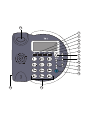
Buttons / connections
•
Press
(See picture on folded cover page)
•
Press
1.
2.
LCD display
Up key
7.2
3.
Down key
4.
5.
6.
7.
8.
Redial key
Delete key
Program key
Ringtone / Hold key
Calculator key
9.
10.
11.
Flash key
Volume key
Dial out key
12.
Handsfree key
13.
14.
15.
to move to the next digit
to exit the menu
ENGLISH
5
Set the area code
When you have a subscription to the caller ID
service it can be necessary in some countries to
enter your area code. When the telephone receives a caller ID it will remove the entered area
code from the incoming number.
•
Press
•
Use
•
Press
•
Use
•
Press
Numerical keypad
•
Press
Curl cord connection
Hook Switch
7.3
to enter the menu
/
to select “set CODe”
to enter the settings
/
to change
to move to the next digit.
to exit the menu
Set the PBX code
Put batteries in the battery compartment to activate the display :
When your phone is connected to a PBX system
you can enter the PBX line access code.
The line access code will be added when dialling
out a number from the caller ID list.
•
Open the battery compartment at the bottom
of the unit.
•
Press
•
Use
•
Insert 3 Alkaline AA standard batteries.
•
Press
•
Close the battery compartment.
•
Use
•
Connect one end of the line cord to the
telephone line wall socket and the other end
to the backside of the telephone.
•
Press
•
Press
6
Installation
7.4
The telephone line needs to be
disconnected prior to opening the
battery door!
7
7.1
Telephone settings
Set the time and date
When you have a subscription to the caller ID
service and your telephone provider sends the
date and time together with the telephone
number, the phone’s clock will be set automatically. The year must always be set manually !
•
Press
•
Use
•
Press
•
Use
Topcom T41
/
/
to enter the menu
/
to select “pCOde”
to enter the settings
/
to change select the digit
to move to the next digit.
to exit the menu
Set the operator prefix code
When you have subscribed at an alternative operator it sometimes is required to dial a prefix in front
of the telephone number.
When entering the prefix, the phone will automatically add the prefix in front of the dialled number.
For example:
Operator prefix: 1234
Number to be dialled : 012345678
Number dialled by the phone: 1234012345678
•
Press
•
Use
•
Press
to select “set date”
•
Use
to enter the settings
•
Press
•
Enter the prefix
to change
to enter the menu
/
to select “autO 1p”
to enter the settings
/
to select “ON” or “OFF”
5