1
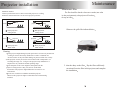
Projector installation
USB/SD PLAY
Multimedia play
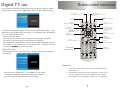
Enter " DTV/CARD" mode insert USB or SD/MMC card,It can recognize the
file in format of Mp3 JPEG MPEG-4 AVI VOB DAT
Input port instruction
This projector can support HDMI,USB,SD, component video signal, s-video signal,VGA
signal and TV signal,the audio in and audio out function.
•
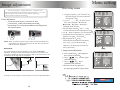
1. Press
to choose what you need to play
2. Press
to enter the submenu then press
to choose which
file you need to play,
3.If you want to return to main menu to play other media,press
4. Press RETURN to back previous menu
5. Choose the file and then press OK
begin to play in full screen
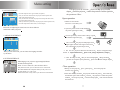
Play Operation
1. Play USB Movie
press the bottom key on the remote control
it can pause, stop forward back next previous and image zoom funtion
2. Play USB Music
press the bottom key on the remote control
it can pause, stop forward back next previous and image zoom funtion
3. Play USB Photo
press
display the picture or reverse the picture,
press SIZE +/- to magnify or shrink the picture Under the image zoom function,
press
to remove the picture to center
4, Under play mode,press RETURN back to main menu
Entertainment games
Choose Games to enter the games main menu Box Man Tetris Hit Rat
Press OK to enter the games use the number and
" to play the game
•
•
•
••
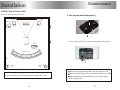
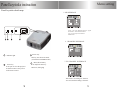
1. Indicator light
on stay situation the light is red
on working situation the light is green
2. Panel key
use panel key to adjust parameter
read the introduce of the panel key
3. Remote control receiver
when use the remote control,please
point this receiver directly
4. Lens
adjust the lens focus to improve
the image quality
5. Trapezoid correction
turn the knob on the projector left or right .
Adjust the image become square,can adjust +/-15
6. HDMI signal input , max support 1080i signal.
7. Signal wire connect
connect projector signal source
read the signal port introduce
8. Power switch
when use ,you need connect the
power wire with projector and
the power jace
•
•
••
••
9. Fuse
if open the power switch,the indicator
light donot work,it maybe the fuse
broken
5A220V)
10. Power switch
open and shut off this switch
when you want to open the projector
it must open this switch at frist
11. ventilation
this ventlilation window is very important
donot block this window.otherwise
it will burn the projector
12. ventilation
two side of the projector have the ventilation
when use ,you must ensure do not block it
13.USB port
14,SD card port
15,Digital TV and analog TV port
•
•