1
M
/B
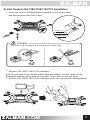
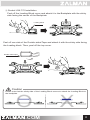
⑤ Attach the Backplate assembly to
the back side of the motherboard by
aligning the Nuts to the motherboard
mounting holes.
If you were unsuccessful at first attempt,
you may continue with the installation
without the Double-sided Tape as it is
not a necessary component.
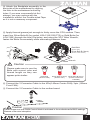
⑥ Apply thermal grease just enough to thinly cover the CPU surface. Then,
insert four Silver Bolts B through the AMD Clip holes, and using the 3/23"
Allen Wrench, fasten the Bolts incrementally while alternating between them.
Allen Wrench
M
/B
Silver Bolt B
(3mm)
Caution
Please make sure to use the
Bolts with correct color and
thread length as they can
appear quite similar.
Gold Bolts
Sliver Bolts A (4mm) Sliver Bolts B (3mm)
(Socket LGA 1366) (Socket LGA 2011)
(Socket AMD/LGA
1156/1155/775)
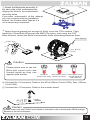
⑥ Connect the Y-Connector Cable to the 4Pin(140mm Center FAN), 3pin (120mm
Front FAN) .
⑦ Connect the Y-Connector Cable to the mother board.
M/B
Caution
Please make sure that PWM Control Mode is activated in the motherboard’s BIOS settings.
Beware of fan wire interuption
.COM
10