1
EN
PORTABLE RADIO
RT231 / RT235
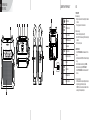
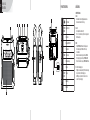
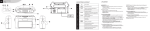
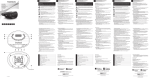
DESCRIPTION OF THE PRODUCT
1
10
7
2
3
4
5
6
2
Putting on indicator
4
FM/MW/LW band selector
5
Telescopic aerial
TUNING
7
9
9
8
Frequency selector
Radio frequency display
8
11
Off/On/Volume knob
3
6
1
Headphone jack
OFF/ON
VOLUME
Speaker
NEWS/
MUSIC
Tone selector
10
Mains power socket
11
Battery compartment
USE
POWER SUPPLY
Mains power supply
• Plug the mains power cord into the socket (10) on the backside
of the radio.
• Then plug the power cord into a mains socket.
Battery power supply
• Remove the battery compartment cover (11).
• Insert 4 LR14 1.5V batteries, ensuring that the indicated polarity
is followed.
• Put the cover back in place.
USING THE RADIO
• Turn the OFF/ON/VOLUME wheel clockwise to switch on the
radio.
• Slide the band selector to FM, MW or LW to select the frequency
range.
• Search the desired radio station by turning the TUNING.
• Adjust the volume by turning the OFF/ON/VOLUME.
• Turn the OFF/ON/VOLUME wheel anti-clockwise to switch off
the radio.
To improve radio reception:
• In FM mode, extend the telescopic aerial (5). Adjust its position,
length and angle to get the best reception quality.
• In MW/LW mode, turn the whole radio to orientate the internal
aerial and get the best possible reception.