1
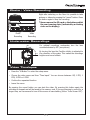
turn on video & images
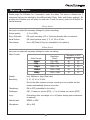
FAQ
Error
The camera switches itself off
Reason
The battery is not charged.
after start.
Solution
Charge the camera with USB for at
least 3 hours.
Unable to switch ON the
The battery is not inserted
camera.
correctly.
Check the contacts.
The battery is defective.
Replace the battery.
The video is flipped by 180°.
Wrong menu setting.
Change menu setting.
Date and Time are not
Wrong menu setting.
Change date and time in the setup.
Display shows "SD Error"
Faulty memory card.
Format or replace the memory card.
The video jerks when playing
The USB connection is too slow.
Save the file on the PC first and
displayed correctly.
on PC.
play then.
The memory card is not writing
Use one of the recommended cards.
fast enough.
The computer is too slow.
Plug the camera to a TV.
The data rate is too high for the
Reduce the data rate to „Standard”.
computer.
The camera does not react
The software has crashed.
while working.
Remove the battery for about 10
seconds.
17