1
GB
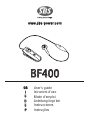
BF400
Thank you for choosing the SBS BF400
Bluetooth earpiece. Before using it for the first
time, follow the instructions printed below.
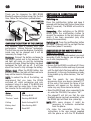
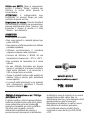
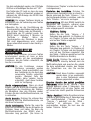
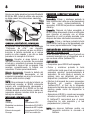
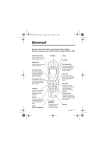
MULTIFUNCTION
BUTTON
VOLUME (+)
LED
MICROPHONE
VOLUME (-)
EARPHONE
CHARGING THE BATTERY OF THE EARPIECE
The earpiece uses a battery with high
performance “Lithium Polymer” technology.
The first time you use the earpiece, the battery
inside may not be charged and it will be
necessary to charge it up.
Recharg e . Connect the battery recharger to
the electric socket and to the earpiece. The
red light will come on and the recharging
process will begin. When the battery has been
recharged the light will go off. It will take
about two hours to fully recharge the battery.
Batter y dead. When the BF400 battery has
almost run down, the light will flash red and a
beep will be heard in the earpiece.
NOTE: to extend the life of the battery, we
recommend that you leave the BF400
switched off while recharging and only
recharge it when it is dead. If the BF400 has
not been used for some time, it may take a
few minutes for the red light to come on.
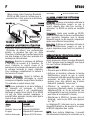
Status
Stand-by
LED
Flashing BLUE
“Find me” mode
Flashing RED/BLUE
Calling
Quick flashing BLUE
Battery dead
Slow flashing RED
Recharge
Fixed RED
SWITCHING ON, CONNECTING AND
SWITCHING OFF THE EARPIECE
Switching on.
Press the multifunction button and keep it
pressed until the blue light flashes three times
(about 3 seconds). The BF400 will switch to
stand by.
Connecting. After switching on the BF400,
briefly press the multifunction button to
connect the earpiece to the last device with
which it has been associated (only after
making the association).
Switching off . Press the multifunction button
and keep it pressed until the red light flashes
three times (about 3 seconds).
ASSOCIATION OF THE EARPIECE WITH A
BLUETOOTH DEVICE
Before using the Bluetooth headset, you must
associate it with the device you are going to
use it with (telephone/PC).
ASSOCIATION
• Ensure that the BF400 is switched off. Press
the multifunction button and keep it pressed
until the light starts flashing red/blue (about
6 seconds), in this way the earpiece is ready
to be picked up by other devices (“find me”
mode).
• Run the search for new Bluetooth
accessories from your device (phone/PC)**.
At the end of the search the name of our
earpiece will appear on the display (the
name may vary from device to device).
• Select the BF400 and, when requested to do
so, enter the PIN 0000, then press “OK”.
• The phone/PC will tell you that the new
bluetooth device has been associated, while
the BF400 light will flash blue (stand-by).
NOTE: With some phones it might be
necessary to authorise connection
from the phone.
* To make the association, follow the
instructions in the user manual supplied
with the phone or with the PC Bluetooth