Transcript
MOJITO
®
The new MOJITO speaker by DIVACORE® Nomad System makes you
listen to your favorite music, movies and videos wherever you are.
SD Card MP3 Player and FM Radio Player with Integrated LCD Screen
Fully compatible with all mobile devices.
Add a soundtrack to whatever you do.
About DIVACORE ® Nomad System
Contents
Charging
Connect
Your package should contain all the items listed below.
if there are any missing items, please contact your reseller :
Packing list:
l 1 Nomad speaker MOJITO
l 2 User manuals (EN+FR)
l 1 USB cable to mini USB
l 1 Mini USB cable to audio 3.5 mm/FM
l 1 sacoche de transport
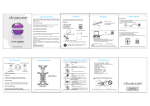
MOJITO
Mini USB: charge/audio input
Mini USB to audio 3.5mm/FM
Speaker
O/Menu/ON/OFF
Connect the mini USB to your speaker and audio 3.5mm to your audio device.
Anti slip pad
MOJITO speaker
2 User manuals(FR+EN)
USB Cable to
mini USB
transport
bag
DIVACORE ® Nomad System:
Leading Nomad Speakers.
Mini USB to audio
3.5 mm/FM
www.divacore.com
MAIN Functions
TIME
Once active, your LCD screen will show you
actual time.
Flick the MULTI button to the right or left to
access the MENU.
MAIN Functions
Flick the MULTI button to the right or left to
navigate inside the MENU :
CALENDAR
AUX
MUSIC
RADIO
SETTINGS
Confirm your choice with O/MENU button.
MUSIC Mode
Insert a SD card (or SDHC up to 23 GB) in the
SD slot of your MOJITO and enjoy all
informations and controls of a MP3 player
directly on your screen.
Audio IN/OUT 3.5 mm
/ Antenna Out/
Settings
To charge your speaker :
1 - Connect the USB connector to your computer (or USB charger – wall or car)
2 - Connect the Mini USB to your speaker.
How to open/close the speaker
FM RADIO
Radio Stations
MUSIC
Check SD Card
contents
SETTINGS
Date& Time settings
Backlight time
Language
Tools
Time to sleep
Alarm
FM settings
AUX
Line IN
AMPOFF
Mute
OPEN: To listen
Audio rate
Connect anything in audio out 3.5 mm antenna hole
Your item (headset in our example) will act as an antenna.
Tracks infos
SD Card Activity
Battery level
To listen to audio:
3 - Connect the mini USB to your speaker
4 – Audio 3.5 mm to connect to your audio device or not plug act as FM Antenna
While the battery is charging :
1 - Connect the USB connector to your computer (or USB charger – wall or car)
2 - Connect the Mini USB to your speaker.
Battery indicator will be active.
It remains fix once full charge.
CALENDAR
Check time
Check date
Mini USB Port
CLOSED: To travel
FM Radio
Key Functions
Core Active Bass
Play Time
Total title time
Artist Name
&Title
Equalizer
Connect the audio 3.5 mm cable to your speaker – it will act as an antenna.
Specifications
Core Active Bass
SETTINGS
VOLUME UP/DOWN
Volume Up : rotate and hold the MULTI button
to the right
Volume Down : rotate and hold the MULTI
button to the left
LINE IN – CONNECT THEM
MENU
MULTI
Function
Button
Reset Button
«WARRANTY 1 YEAR»
NB : Always Press a first time the MULTI BUTTON or O/MENU BUTTON
to activate your controls. Backlight will blink stronger once active.
LCD Screen
SD slot :
Insert your SD
Card ( or SDHC
Up to 32 GB)
With his headquarter based at Europe’s crossroad, DIVACORE ® Nomad
System is focused on innovation,multimedia and audio.
Our ability to anticipate expectations will symbolize the success of our
company.
Main objective of DIVACORE ® Nomad System is to anticipate lifestyle’s
evolutions and offer ideal solutions for our multimedia systems all turned
portable and nomad.
Exceptional and powerful sound, incredible battery life, the quality of our
products is outstanding and we will always offer you the latest features
existing.
MOJITO Controls
You can connect your MOJITO to another one :
And get more power .
Add always more speakers to get more power !
FM RADIO
Enjoy FM radio and record your favorites.
Unique : You can auto scan the complete FM
range,
And register the best ones.
Date& Time settings
Backlight time
Language
Tools
Time to sleep
Alarm
FM settings
CHARGING
1 - Connect the USB connector to your
computer (or USB charger – wall or car)
2 - Connect the Mini USB to your speaker
A charging signal will be shown on LCD
screen.You can also charge your speaker
while speaker is OFF.
Open – To listen
Step 1
Hold the speaker firmly by its base
and top cap.
Step 2
Turn top cap anti clockwise (5 mm)
Step 3
The top cap will spring up to expand
the speaker.
Now, enjoy the superb bass delivered via:
Core Active Bass system.
Model : MOJITO – DVC4502
Dimensions : Diam. 64 mm x (height) x 54 mm
Net Weigth : 94.8 g
Speaker : Diam. 45 mm
Input sensitiviyt : L/R 380 mV
Output Power : 3 W
Charge Voltage : 5V +/- 0,5V
Frequency : 1000 Hz – 16 KHz
Charging time : 1.5 - 2 hours
Playing time : 8 hours
Suitable temperature : 0°C – 40° C
Core Active Bass
(patented technology)
Close - To travel
Step 4 Shift top cap and base to avoid
any broken clip.
Hold speaker firmly by its base& press top
cap toward speaker base.
®
Step 5
Turn top cap clockwise (5mm)
Don’t press top and base parallel to avoid
any broken clip.
Caution: Pulling the flexible resonator beyond its
normal range can permanently damage the speaker.
© Copyright 2011
All rights reserved
Manual v. 2 , Oct 2012