1
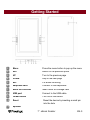
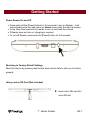
Getting Started Power Reader On and Off Press and hold the [Power] button for 5-6 seconds to turn on Reader - it will automatically enter the main menu on Home screen after the start-up screen. It may take a few moments for reader to turn on and load the content. If Reader does not turn on, charging is required. To turn off Reader, press and hold [Power] button for 3-4 seconds. Restoring to Factory Default Settings Reset the device by pressing reset button when device fails to start up or function properly. Using a micro SD Card (Not Included) Insert micro SD card into micro SD slot. 7’ eBook Reader EN-7