1
EM4600
WiFi Travel Router
2 | MULTILINGUAL
EM4600 WiFi Travel Router
Table of contents
1.0 Introduction ........................................................................................................... 2
2.0 (EN) Interface & LED Indicator description ............................................................ 3
3.0 (EN) Installation ..................................................................................................... 3
3.1 Secure your connection ..................................................................................... 4
2.0 (NL) Omschrijving van de aansluitingen en de LED’s............................................. 5
3.0 (NL) Installatie ....................................................................................................... 5
3.1 Beveilig uw verbinding ....................................................................................... 6
2.0 (FR) Description de l'interface et des voyants LED ................................................ 7
3.0 (FR) Installation ..................................................................................................... 7
3.1 Sécurisez votre connexion ................................................................................. 8
2.0 (IT) Descrizione di interfaccia e LED...................................................................... 9
3.0 (IT) Installazione .................................................................................................... 9
3.1 Proteggere la connessione .............................................................................. 10
2.0 (DE) Beschreibung von Schnittstellen & LED-Anzeigen ....................................... 11
3.0 (DE) Installation ................................................................................................... 11
3.1 Ihre Verbindung sichern................................................................................... 12
2.0 (ES) Descripción de indicadores LED e interfaz................................................... 13
3.0 (ES) Instalación ................................................................................................... 13
3.1 Proteja su conexión ......................................................................................... 14
2.0 (HU) Interfész és ledes kijelzők leírása ................................................................ 15
3.0 (HU) Telepítés ..................................................................................................... 15
3.1 Tegye biztonságossá a kapcsolatát ................................................................. 16
4.0 Frequently Asked Questions and other related information .................................. 17
5.0 Service and support............................................................................................. 17
6.0 Warning and points of attention ........................................................................... 17
7.0 Warranty conditions ............................................................................................. 18
8.0 Declaration of Conformity .................................................................................... 18
1.0 Introduction
Congratulations with the purchase of this high-quality Eminent product! This product
has undergone extensive testing by Eminent’s technical experts. Should you
experience any problems with this product, you are covered by a five-year Eminent
warranty. Please keep this manual and the receipt in a safe place.
Register your product now on www.eminent-online.com and receive product updates!
3 | MULTILINGUAL
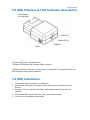
2.0 (EN) Interface & LED Indicator description
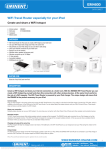
Ipad charger
(not included)
Reset (2)
Power LED (1)
USB-port
WAN
1) Power LED green : the power is on
1) Power LED blinking red: Wireless LAN is working
2) Reset: press the hole button for minimum of 3 seconds. The red WiFi led will turn
off and factory setting will be restored.
3.0 (EN) Installation
1. Connect the Ethernet cable to the WAN port
2. Connect the other end of the cable to the Internet port of the hotel room (or
Router)
3. Power the Travel router with the iPad power adapter and wait for about 25
seconds
4. Choose the WiFi network Eminent_4600_xxxxxx and connect
5. You are now connected to the internet
4 | MULTILINGUAL
3.1 Secure your connection
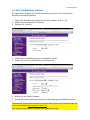
We strongly advise you to secure your wireless connection. You only need to do these
steps once.
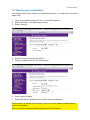
1. Open your browser and type 10.10.1.1 in the URL address
2. Select “Wireless” in the site contents menu
3. Select “Security”
4. Select Encryption and choose “WPA2”
5. Type your password in the “Pre-Shared Key”
6. Press “Apply Changes”
7. Reconnect with the EM4600 Travel Router with your password
Please check our website www.eminent-online.com for the newest updated manual,
drivers and firmware.
Also, you will find frequently asked questions in the FAQ section.
5 | MULTILINGUAL
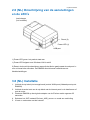
2.0 (NL) Omschrijving van de aansluitingen
en de LED’s
Ipad charger
(not included)
Reset (2)
Power LED (1)
USB-port
WAN
1) Power LED groen: het product staat aan
1) Power LED knippert rood: Wireless LAN is actief
2) Reset: druk met bijvoorbeeld een paperclip het kleine gaatje naast de usb poort in
voor minimaal drie seconden. De EM4600 wordt hiermee hersteld naar de
fabrieksinstellingen.
3.0 (NL) Installatie
1. Verbind de utp kabel (niet meegeleverd) met de WAN poort (Netwerkpoort op de
EM4600)
2. Verbind de ander kant van de utp kabel met de internet poort in de hotelkamer of
met de router
3. Plaats de EM4600 op de originele adapter van de iPad en wacht ongeveer 25
seconden
4. Selecteer het WiFi netwerk Eminent_4600_xxxxxx en maak een verbinding
5. U bent nu verbonden met het internet
6 | MULTILINGUAL
3.1 Beveilig uw verbinding
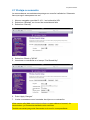
Wij adviseren u de draadloze verbinding met de EM4600 te beveiligen. U hoeft deze
stappen slechts eenmalig uit te voeren.
1. Open uw browser en typ 10.10.1.1 in de adresbalk
2. Selecteer “Wireless” in het menu
3. Selecteer “Security”
4. Selecteer “Encryption” en selecteer “WPA2”
5. Voer uw zelf gekozen password in het vakje “Pre-Shared Key” in
6. Druk op “Apply Changes”
7. Verbind nu opnieuw met uw EM4600 Travel Router en voer uw password in
Bezoek onze website www.eminent-online.com voor de meest actuele handleiding,
drivers en firmware.
Bekijk ook onze FAQ sectie voor veelgestelde vragen.
7 | MULTILINGUAL
2.0 (FR) Description de l'interface et des
voyants LED
Ipad charger
(not included)
Reset (2)
Power LED (1)
USB-port
WAN
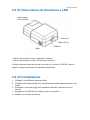
1) LED d'alimentation verte : l'appareil est sous tension
1) LED d'alimentation rouge : Le LAN sans fil fonctionne
2) Réinitialiser : appuyez sur le bouton du trou pendant au minimum 3 secondes. Le
LED WiFi rouge s'éteint et les réglages d'usine sont restaurés.
3.0 (FR) Installation
1. Branchez le câble Ethernet au port WAN
2. Connecter l'autre extrémité du câble au port Internet de la chambre d'hôtel (ou du
routeur)
3. Mettez sous tension le routeur de voyage avec l'adaptateur iPad et patientez
environ 25 secondes
4. Choisissez le réseau WiFi Eminent_4600_xxxxxx et connectez-vous
5. Vous êtes maintenant connecté à Internet
8 | MULTILINGUAL
3.1 Sécurisez votre connexion
Nous vous conseillons fortement de sécuriser votre connexion sans fil. Vous n'avez
qu'à effectuer ces étapes une seule fois.
1. Ouvrez votre navigateur et tapez 10.10.1.1 dans l'adresse URL
2. Sélectionnez "Wireless" dans le menu de contenu du site
3. Sélectionnez “Security”
4. Sélectionnez “Encryption” et choisissez "WPA2”
5. Tapez votre mot de passe dans “Pre-Shared Key”
6. Appuyez sur “Apply Changes”
7. Reconnectez-vous au routeur de voyage avec votre mot de passe
Veuillez consulter notre site Web www.eminent-online.com pour les manuel, pilotes et
firmware nouveaux et mis à jour.
En outre, vous trouverez des questions fréquemment posées dans la section FAQ.
9 | MULTILINGUAL
2.0 (IT) Descrizione di interfaccia e LED
Ipad charger
(not included)
Reset (2)
Power LED (1)
USB-port
WAN
1) LED di alimentazione verde: il dispositivo è acceso
1) LED di alimentazione rosso: LAN wireless in funzione
2) Reset: premere il tasto del foro per un minimo di 3 secondi. Il LED WiFi rosso si
spegne e vengono ripristinate le impostazioni predefinite.
3.0 (IT) Installazione
1. Collegare il cavo Ethernet alla porta WAN
2. Collegare l'altra estremità del cavo alla porta Internet della stanza dell'hotel (o del
router)
3. Alimentare il router da viaggio con l'adattatore dell'iPad e attendere circa 25
secondi
4. Scegliere la rete WiFi Eminent_4600_xxxxxx e connettersi
5. Adesso si è connessi ad Internet
10 | MULTILINGUAL
3.1 Proteggere la connessione
Si consiglia di proteggere la connessione wireless. È necessario effettuare queste
procedure una sola volta.
1. Aprire il browser e digitare 10.10.1.1 nell'indirizzo URL
2. Selezionare “Wireless” nel menu dei contenuti del sito
3. Selezionare “Security”
4. Selezionare Crittografia e scegliere “WPA2”
5. Digitare la password in “Pre-Shared Key”
6. Premere “Apply Changes”
7. Riconnettersi con il router da viaggio utilizzando la password
Controllate sul sito www.eminent-online.com per i nuovi aggiornamenti del manuale,
driver e firmware.
Inoltre troverete le domande più frequenti nella sezione FAQ.
11 | MULTILINGUAL
2.0 (DE) Beschreibung von Schnittstellen &
LED-Anzeigen
Ipad charger
(not included)
Reset (2)
Power LED (1)
USB-port
WAN
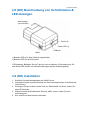
1) Betriebs-LED grün: Das Gerät ist eingeschaltet
1) Betriebs-LED rot: WLAN ist aktiv
2) Rücksetzen: Betätigen Sie die Taste im Loch mindestens 3 Sekunden lang. Die
rote WLAN-LED erlischt, die Werkseinstellungen werden wiederhergestellt.
3.0 (DE) Installation
1. Schließen Sie das Netzwerkkabel am WAN-Port an
2. Verbinden Sie das andere Kabelende mit dem Internetanschluss im Hotelzimmer
(oder Router)
3. Versorgen Sie den mobilen Router über ein iPad-Netzteil mit Strom, warten Sie
etwa 25 Sekunden
4. Wählen Sie das WLAN-Netzwerk Eminent_4600_xxxxxx, stellen Sie eine
Verbindung her
5. Nun sind Sie mit dem Internet verbunden
12 | MULTILINGUAL
3.1 Ihre Verbindung sichern
Wir raten Ihnen dringend, Ihre WLAN-Verbindung zu sichern. Sie müssen diese
Schritte nur einmal durchführen.
1. Öffnen Sie Ihren Browser, geben Sie die URL-Adresse 10.10.1.1 ein
2. Wählen Sie im Inhaltsmenü “Wireless”
3. Wählen Sie “Security”
4. Wählen Sie Verschlüsselung und anschließend „WPA2”
5. Geben Sie unter „Pre-Shared Key“ Ihr Kennwort ein
6. Klicken Sie auf “Apply Changes”
7. Stellen Sie mit Ihrem Kennwort erneut eine Verbindung zum mobilen Router her
Die aktuellste Version des Handbuchs sowie aktuelle Treiber und Firmware finden Sie
auf unserer Website www.eminent-online.com.
Der FAQ-Abschnitt enthält außerdem häufig gestellte Fragen.
13 | MULTILINGUAL
2.0 (ES) Descripción de indicadores LED e
interfaz
Ipad charger
(not included)
Reset (2)
Power LED (1)
USB-port
WAN
1) LED de alimentación verde: encendido
1) LED de alimentación rojo: LAN inalámbrica en funcionamiento
2) Reiniciar: presione el botón hundido durante como mínimo 3 segundos. El LED rojo
de WiFi se apagará y se restaurarán los parámetros de fábrica.
3.0 (ES) Instalación
1. Conecte el cable de Ethernet al puerto WAN
2. Conecte el otro extremo del cable al puerto de Internet de la habitación de hotel (o
enrutador)
3. Alimente el enrutador de viaje con el adaptador de alimentación del iPad y espere
unos 25 segundos
4. Seleccione la red WiFi Eminent_4600_xxxxxx y conéctese
5. Ya está conectado a Internet
14 | MULTILINGUAL
3.1 Proteja su conexión
Le recomendamos encarecidamente proteger su conexión inalámbrica. Solamente
tiene que seguir estos pasos una vez.
1. Abra su navegador y escriba 10.10.1.1 en la dirección URL
2. Seleccione “Wireless” en el menú de contenidos del sitio
3. Seleccione “Security”
4. Seleccione Cifrado y "WPA2”
5. Introduzca su contraseña en el campo “Pre-Shared Key”
6. Pulse “Apply Changes”
7. Vuelva a conectarse con el enrutador de viaje con su contraseña
Visite nuestro sitio Web www.eminent-online.com para obtener el manual, los
controladores y el firmware actualizados más recientes.
También encontrará preguntas frecuentes en la sección correspondiente.
15 | MULTILINGUAL
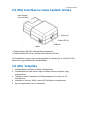
2.0 (HU) Interfész és ledes kijelzők leírása
Ipad charger
(not included)
Reset (2)
Power LED (1)
USB-port
WAN
1) Tápfeszültség LED zöld: tápfeszültség bekapcsolva
1) Tápfeszültség LED vörös: Vezeték nélküli hálózat működik
2) Visszaállítás: nyomja meg a gombot legalább 3 másodpercig. A vörös WiFi LED
kialszik és a gyári beállítások visszaállítódnak.
3.0 (HU) Telepítés
1. Csatlakoztassa az Ethernet kábelt a WAN porthoz
2. Csatlakoztassa a kábel másik végét a szálloda internet portjához (vagy
útválasztóhoz)
3. Táplálja az utazó útválasztót az iPad tápadapterével és várjon kb. 25
másodpercet
4. Válassza az Eminent_4600_xxxxxx WiFi hálózatot és csatlakozzon
5. Így már kapcsolódva van az internethez
16 | MULTILINGUAL
3.1 Tegye biztonságossá a kapcsolatát
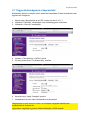
Kifejezetten ajánljuk a vezeték nélküli kapcsolat biztosítását. Ezeket a lépéseket csak
egyszer kell elvégeznie.
1. Nyissa meg a böngészőjét és az URL címhez írja be 10.10.1.1
2. Válassza a “Wireless” lehetőséget a site tartalomjegyzék menüjében
3. Válassza a “Security” lehetőséget
4. Válassz a Titkosítást és a "WPA2" opciót
5. Írja be a jelszavát az “Pre-Shared Key” mezőbe
6. Nyomja meg a “Apply Changes” gombot
7. Csatlakozzon újra az utazó útválasztóhoz a jelszavával
Látogasson el a www.eminent-online.com honlapra a legújabb kézikönyvért,
meghajtókért és firmware-ért.
Ugyanakkor megtalálja a gyakran feltett kérdéseket a GYIK részben.
17 | MULTILINGUAL
4.0 Frequently Asked Questions and other
related information
The latest Frequently asked questions for your product can be found on the support
page of your product. Eminent will update these pages frequently to assure you have
the most recent information. Visit www.eminent-online.com for more information about
your product.
5.0 Service and support
This users manual has been carefully written by Eminent’s technical experts. If you
have problems installing or using the product, please fill out the support form at the
website www.eminent-online.com/support.
You can also contact us by phone. Below you will find a list with phone numbers for
each supported country.
Country
Belgium (Dutch)
Belgium (French)
Denmark
Finland
Germany
Italy
Norway
Spain
Sweden
The Netherlands
UK
Hungary
Hungary
Hungary
Phone number
070 277 286
070 277 286
+45 69918565
+35 8942415826
+49 (0)30 887 89 298
+39 0240042016
+47 21075033
807 080 042
+46 840 309985
0900-3646368
+44 (0)203 318 9998
1-4088902 (From
Budapest)
06-1-4088902 (From the
rest of Hungary)
+36 1-4088902
(International)
Rate per minute*
€0.30
€0.30
Local Costs
Local Costs
Local Costs
Local Costs
Local Costs
€0.41
Local Costs
€0.45
Local Costs
Local Costs
Local Costs
Local Costs
* Rates mentioned in this table do not include cell phone charges.
6.0 Warning and points of attention
Due to laws, directives and regulations set out by the European parliament, some
(wireless) devices could be subject to limitations concerning its use in certain
European member states. In certain European member states the use of such devices
18 | MULTILINGUAL
could be prohibited. Contact your (local) government for more information about this
limitations.
Always follow up the instructions in the manual*, especially where it concerns devices
which need to be assembled.
Warning: In most cases this concerns an electronic device. Wrong/improper use may
lead to (severe) injuries!
Repairing of the device should be done by qualified Eminent staff. The warranty
immediately voids when products have undergone self repair and/or by misuse. For
extended warranty conditions, please visit our website at www.eminentonline.com/warranty.
*Tip: Eminent manuals are written with great care. However, due to new technological
developments it can happen that a printed manual does not longer contain the most
recent information.
If you are experiencing any problems with the printed manual or you can not find what
you are looking for, please always check our website www.eminent-online.com first for
the newest updated manual.
Also, you will find frequently asked questions in the FAQ section. It is highly
recommended to consult the FAQ section. Very often the answer to your questions will
be found here.
7.0 Warranty conditions
The five-year Eminent warranty applies to all Eminent products unless mentioned
otherwise before or during the moment of purchase. When having bought a secondhand Eminent product the remaining period of warranty is measured from the moment
of purchase by the product’s first owner. The Eminent warranty applies to all Eminent
products and parts inextricably connected to and/or mounted on the main product.
Power supply adapters, batteries, antennas and all other products not integrated in or
directly connected to the main product and/or products of which, without reasonable
doubt, can be assumed that wear and tear show a different pattern than the main
product are not covered by the Eminent warranty. Products are not covered by the
Eminent warranty when subjected to incorrect/improper use, external influences
and/or when opened by parties other than Eminent.
8.0 Declaration of Conformity
To ensure your safety and compliance of the product with the directives and laws
created by the European Commission you can obtain a copy of the Declaration of
19 | MULTILINGUAL
Conformity concerning your product by sending an e-mail message to: [email protected]. You can also send a letter to:
Eminent Europe BV
PO Box 276
6160 AG Geleen
The Netherlands
Clearly state ‘Declaration of Conformity’ and the article code of the product of which
you would like to obtain a copy of the Declaration of Conformity.
EM4600 | 11-2012
20 | MULTILINGUAL