1
PICTURE CD PLAYBACK
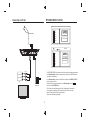
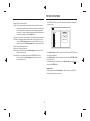
The PICTURE CD disc has such a directory structure structure as shown in the
following picture.
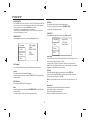
Normal: Shuffle mode is cancelled.
Shuffle: Shuffle mode enabled. When playback reaches the end of the current
chapter/track, playback jumps to a random chapter/track. As the end of
each chapter/track is reached, another random chapter/track will be
played until all tracks/chapters have been played or the Shuffle mode is
cancelled by toggling to a different Mode Option.
Music Intro: In this mode, the media will play 10 seconds then skip to next media
Edit Mode: To enable programmed playback mode. When you select the mode,
press LEFT Direction key to directory and press ENTER to choose the
desired track and press Add to program to add in programmed playbac.
Program view: Display program track.
Brower view: Display track directory.
Add to program: Choice the track press Add to program to add the track of the
program play directory.
Clear program: In the complete stop state(press the STOP button twice),
choose the track press Clear program to delete the track of the
program play directory.
1/7
Photo
1
2
100
102
Filter
Repeat off
Mode Normal
JPEG Preview
103
104
105
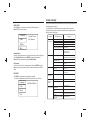
Press Direction key to choose the root directory and then press ENTER button to
enter into the sub directory.
Press Direction key to choose the desired picture and then press ENTER or PLAY
to enjoy the picture.
If you want to return to the upper menu, press Direction key to choose
the
icon and press ENTER button.
Image rotation
In picture play state, press Direction key to rotation the picture, press ANGLE
button to change the picture scan mode.
5