1
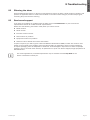
8. Troubleshooting
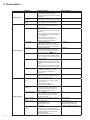
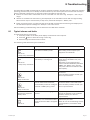
Power overload
LED is On.
Beep continuous.
UPS overtemperature
LED is On.
1 beep every 3 seconds.
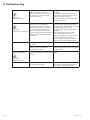
The UPS does not start.
Input bad wiring /
Output bad wiring
Power requirements exceed the
UPS capacity (greater than
100% of nominal; see in table 6
on page 41 for specific output
overload ranges).
Remove some of the equipment from
the UPS.
The UPS continues to operate, but
may switch to Bypass mode or shut
down if the load increases.
The alarm resets when the condition
becomes inactive.
The UPS internal temperature is
too high or a fan has failed.
At the warning level, the UPS
generates the alarm but remains
in the current operating state.
If the temperature rises another
10°C, the UPS transfers to Bypass
mode or shuts down if Bypass is
unusable.
If the UPS transferred to Bypass
mode, the UPS will return to normal
operation when the temperature drops
5°C below the warning level.
If the condition persists, shut down
the UPS.
Clear vents and remove any heat
sources. Allow the UPS to cool.
Ensure the airflow around the UPS is
not restricted. Restart the UPS.
If the condition continues to persist,
contact your service representative.
The input source is not connected
correctly.
Check the input connections.
The Remote Power Off (RPO)
switch is active or the RPO
connector is missing.
If the UPS Status menu displays the
"Remote Power Off" notice, inactivate
the RPO input.
Input/Output cables are not
connected to the correct terminal
blocks.
Connect correctly the Input/Output
cables.
The HotSwap MBP is no more
connected to the UPS.
If the HotSwap MBP is connected
to the UPS, check that the detection
connector is correctly plugged.
Led is On.
Beep continuous.
MBP disconnected
Page 38
5-6kVA EU_EN