1
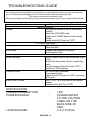
TROUBLESHOOTING GUIDE
The following checks will assist in the correction of most problems which you may encounter will
your set. Before going through the check list below first check the following points.
**The power cord must be connected firmly.
Should any problem persist after you have made these check consult your nearest friendly dealer.
Symptom
No radio
Disc play does not start.
Sound skips
Unit not working
No sound output
Severe hum or noise
Possible Causes (and Remedies)
Radio Reception
The function switch is not in the correct
position.
Adjust the VOLUME knob.
Rotate the TUNING knob to find a radio
station.
Switch the AUX IN jack to “OFF”
CD Player Operation
Reload the disc with the label side up.
Clean the disc.
Change the installation location.
Press reset button.
General
The AC power cord is not connected to an
outlet.
Check that the power cord is connecting
firmly.
Turn the power button from the “OFF”
position to “ON” position.
Turn VOLUME clockwise.
Press reset button.
Switch the AUX IN jack to “OFF” & remote
RCA cord.
The TV or VTR is too close to the stereo
system.
Separate from the TV or VTR.
SPECIFICATION
POWER CONSUMPTION
POWER SOURCE
:
:
LOUD SPEAKER
:
ENGLISH - 6
15W
PLEASE REFER
TO THE CAUTION
LABEL ON THE
BACK SIDE OF
UNIT.
2 X 3” 8 Ohms.