1
Chapter 4: Using the Printer
�������������������������������
*** A798 – Diagnostics Form ***
������������
�
�������������
�
Model number
:
Serial number
:
�������������
��������
�
Boot Firmware
���
�
Revision
:
���
�
CRC
:
��������������
P/N
:
��������
�
Flash Firmware
���
�
Revision
:
���
�
CRC
:
P/N
:
��������������
�����������������
�
H/W parameters
�����������������
�
Flash Memoriy Size
:
������������������
�
Flash Logos/Fonts
:
���������
�
Flash User Storage
:
������������
�
Flash Journal Size
:
�� ���������������
�
SRAM Size
:
�����������������
�
CPU Clock Freq.
:
�������������������� �
Head setting
:
���������
�
Pre-Heating
:
�����������
�
Print Density
:
���������
�
Max Speed
:
�����
�
Paper Width
:
�����������
�
Max Power
:
����������������
�
Knife
:
Partial Cut
:
���������������
Paper Low Sensor
:
��������������
�
��������������
�
Comm. Interface
����������
RX Buffer Size
:
���������
�
Interface type
:
���������
�
Parameters
��������
�
Baud Rate
:
������
�
Data Bits
:
������������
�
Stop Bit
:
����������������
�
Parity
:
����������������� �
Flow Control
:
Reception Errors
:
�������������������
�
USB Driver Type
:
USB Packet w/Error
:
Resident Code Pages
���������������������
:
����������������
A715 CP850 Emulation
��������������������
:
21
��������������������������������
�������������������������������
���������
����������
A798-720D-TD00
C073400014
�������������������
������
�����������������������������
�����������������������������
�����������������������
��������������������������������
����������������������
����������������
�����
����
V1.00
������������
08D3
189-7940154A
�����
����
V1.00
������������
D70C
189-7940155A
��
��
��
��
��
��
��
�������
��������
��������
��������
��������
��������
��������
���������������������������������
�����������������������������
�������
�����������
2 Mbytes
��������
1152 kbytes
����������
64 kbytes
�
64 kbytes
�����������������
128 kbytes
�����
50 MHz
�����
C
����������
Disabled
�����
100%
����
150 mm/sec
�������
80 mm
���������
55 W
��������
Enabled
125 steps
Disabled
����
���������
4096
������
RS232/USB
�
�
115200
����
8
�������
1
������
NONE
��������
DTR/DSR
Ignore
������������������
Printer Class
������������������
Reject
��������������
When the printer is configured for USB, this
location will show either: “USB Driver Type: Native”,
“USB Driver Type: Printer Class”, or “USB Driver:
Comm Class”.
437, 850, 852, 857, 858
� �������������������
860, 863, 865, 866
�������������������
1252, 862, 737, 874
� ���
Disabled
� ��
Logo(s) defined
: YES
User Char(s) defined
: NO
�������������������������������
Journal
Unused
:
64 kbytes
��������������������������
�����������������������������������
Diagnostice
: OFF
��������������������������
To enter Printer Config Menu :
1) Flip DIP switch #1 down
2) Reset the printer, while holding
the Paper Feed button down
�
���������������������������
����������������������������
�������������������������
����������������
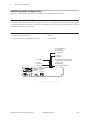
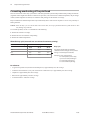
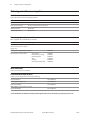
Print test and Configuration menu samples. Samples will vary depending on the printer model.
(Shown approximately 60% of size)
Short clicks are used in the main menu selections.
12/08
A798-UG00001 Rev. C
A798 Thermal Receipt Printer: User Guide