1
User Controls
Control Panel
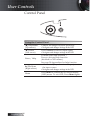
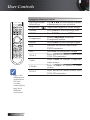
Using the Control Panel
English
26
▲/Keystone+
(Up arrow)
•Adjust the image Keystone positively.
•Navigates and changes settings in the OSD.
◄/Source
(Left arrow)
•Press Source to select an input signal.
•Navigates and changes settings in the OSD.
Enter / Help
Confirm your item selection./
Press to activate Help function
(disabled in OSD menus).
See page 58 Appendices for help function.
►/Re-Sync
(Right arrow)
•Automatically synchronizes the projector to
the input source.
•Navigates and changes settings in the OSD.
Menu
Press Menu to launch the on-screen display
(OSD) menu. To exit OSD, Press Menu again.