1
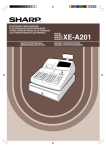
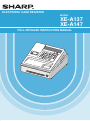
ELECTRONIC CASH REGISTER
MODEL
XE-A137
XE-A147
FULL DETAILED INSTRUCTION MANUAL
CAUTION:
The cash register should be securely fitted to the supporting platform to avoid instability when the drawer
is open.
CAUTION:
The socket-outlet shall be installed near the equipment and shall be easily accessible.
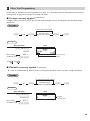
VORSICHT:
Die Netzsteckdose muß nahe dem Gerät angebracht und leicht zugänglich sein.
ATTENTION:
La prise de courant murale devra être installée à proximité de l’équipement et devra être facilement
accessible.
AVISO:
El tomacorriente debe estar instalado cerca del equipo y debe quedar bien accesible.
VARNING:
Det matande vägguttaget skall placeras nära apparaten och vara lätt åtkomligt.
LET OP:
Het stopcontact dient in de buurt van de kassa en gemakkelijk toegangbaar te zijn.
CAUTION:
For a complete electrical disconnection pull out the AC adapter.
VORSICHT:
Zur vollständigen elektrischen Trennung vom Netz den AC Adapter.
ATTENTION:
Pour obtenir une mise hors-circuit totale, débranchez l’adaptateur secteur.
AVISO:
Para una desconexión eléctrica completa, desenchufar el adaptador de CA.
VARNING:
För att helt koppla från strömmen, dra ut nätadaptern.
LET OP:
Maak de netspanningsadapter los om de stroomtoevoer volledig uit te schakelen.
INTRODUCTION
Thank you very much for your purchase of the SHARP Electronic Cash Register, Model XE-A137/XE-A147.
Please read this manual carefully before operating your machine in order to gain full understanding of functions
and features.
Please keep this manual for future reference. It will help you if you encounter any operational problems.
CAUTION!
Never install the batteries into the cash register before initializing it. Before you start operating the cash
register, you must first initialize it, then install three new alkaline batteries LR6 (“AA” size) on the register.
Otherwise, distorted memory contents and malfunction of the cash register will occur. For this procedure, please
refer to pages 7 to 8.
IMPORTANT
•Be very careful when removing and replacing the printer cover, as the cutter mounted on it is very
sharp.
•Install the cash register in a location not subject to direct sunlight, unusual temperature changes, high
humidity, splashing water or dust and sand.
Installation in such locations could cause damage to the cabinet, the electronic components and other precision
components.
•Never operate the register with wet hands.
The water could seep into the interior of the register and cause component failure.
•When cleaning your register, use a dry, soft cloth. Never use solvents, such as benzine and/or thinner.
The use of such chemicals will lead to discoloration or deterioration of the cabinet.
•The register plugs into any standard wall outlet (official (nominal) voltage).
Other electrical devices on the same electrical circuit could cause the register to malfunction.
•For protection against data loss, please install three alkaline batteries LR6 (“AA” size) after initializing
the cash register. When handling the batteries, please observe the following:
Incorrectly using batteries can cause them to burst or leak, possibly damaging the interior of the cash register.
•RISK OF EXPLOSION IF BATTERY IS REPLACED BY AN INCORRECT TYPE. DISPOSE OF USED BATTERIES ACCORDING TO THE INSTRUCTIONS.
•Be sure that the positive (+) and negative (–) poles of each battery are facing in the proper direction
for installation.
•Never mix batteries of different types.
•Never mix old batteries and new ones.
•Never leave dead batteries in the battery compartment.
•Remove the batteries if you do not plan to use the cash register for long periods.
•Should a battery leak, clean out the battery compartment immediately, taking care to avoid letting
the battery fluid come into direct contact with your skin.
•For battery disposal, follow the corresponding law in your country.
•For complete electrical disconnection, disconnect the AC adapter.
•Be sure to use the attached AC adapter. Otherwise, an electric shock or fire may be caused.
1
CONTENTS
INTRODUCTION............................................................................................................................................ 1
IMPORTANT................................................................................................................................................... 1
CONTENTS.................................................................................................................................................... 2
PARTS AND THEIR FUNCTIONS................................................................................................................. 4
1 External View......................................................................................................................................... 4
2 Printer.................................................................................................................................................... 4
3 Mode Switch and Mode key................................................................................................................... 5
4 Keyboard............................................................................................................................................... 5
5 Display................................................................................................................................................... 6
6 Drawer Lock Key................................................................................................................................... 6
PREPARING THE CASH REGISTER............................................................................................................ 7
1 Initializing the Cash Register................................................................................................................. 7
2 Installing Batteries................................................................................................................................. 8
3 Installing a Paper Roll............................................................................................................................ 9
HELP FUNCTION......................................................................................................................................... 10
BASIC FUNCTION PROGRAMMING.......................................................................................................... 11
1 Abbreviations and Terminology.............................................................................................................11
2 Prior to Programming............................................................................................................................11
3 Language Selection............................................................................................................................. 13
4 Date and Time Programming............................................................................................................... 13
5 Tax Programming................................................................................................................................. 14
6 Department Programming................................................................................................................... 15
7 PLU (Price Look-Up) and Subdepartment Programming.................................................................... 18
8 Text Programming................................................................................................................................ 20
BASIC SALES ENTRY (Example).............................................................................................................. 22
1 Basic Sales Entry................................................................................................................................. 22
2 PLU Sales Entry.................................................................................................................................. 23
CORRECTION.............................................................................................................................................. 24
1 Cancellation of the Numeric Entry....................................................................................................... 24
2 Correction of the Last Entry (direct void)............................................................................................. 24
3 Correction of the Next-to-last or Earlier Entry (indirect void)............................................................... 25
4 Subtotal Void........................................................................................................................................ 25
5 Correction after Finalizing a Transaction (Void mode)......................................................................... 26
FULL SALES REPORT (X or Z REPORT).................................................................................................. 27
OTHER BASIC SALES ENTRIES............................................................................................................... 29
1 Additional Information for BASIC SALES ENTRY............................................................................... 29
2 Error Warning...................................................................................................................................... 29
3 Starting Cash Memory (SCM) Entry.................................................................................................... 30
4 Item Entries.......................................................................................................................................... 31
5 Display of Subtotal............................................................................................................................... 34
6 Finalization of Transaction................................................................................................................... 35
7 Computation of VAT (Value Added Tax)/Tax........................................................................................ 37
OPTIONAL FEATURES............................................................................................................................... 39
1 Auxiliary Entries................................................................................................................................... 39
2 Auxiliary Payment Treatment............................................................................................................... 40
3 Special Printing Function..................................................................................................................... 42
PRIOR TO PROGRAMMING....................................................................................................................... 43
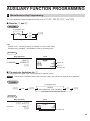
AUXILIARY FUNCTION PROGRAMMING.................................................................................................. 45
1 Miscellaneous Key Programming........................................................................................................ 45
2 Other Text Programming...................................................................................................................... 49
2
ADVANCED FUNCTION PROGRAMMING................................................................................................. 52
1 Register Number and Consecutive Number Programming................................................................. 52
2 Various Function Selection Programming 1......................................................................................... 53
3 Various Function Selection Programming 2......................................................................................... 61
4 EURO Programming............................................................................................................................ 63
5 Reading Stored Programs................................................................................................................... 66
READING (X) AND RESETTING (Z) OF SALES TOTALS.......................................................................... 68
1 Summary of Reading (X) and Resetting (Z) Reports........................................................................... 68
2 Daily Sales Totals................................................................................................................................ 69
EJ REPORT READING AND RESETTING.................................................................................................. 70
EURO MIGRATION FUNCTION................................................................................................................... 71
SD CARD FUNCTION.................................................................................................................................. 74
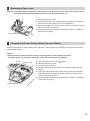
OPERATOR MAINTENANCE...................................................................................................................... 76
1 In Case of Power Failure..................................................................................................................... 76
2 In Case of Printer Error........................................................................................................................ 76
3 Cautions in Handling the Printer and Recording Paper....................................................................... 76
4 Replacing the Batteries........................................................................................................................ 77
5 Replacing the Paper Roll..................................................................................................................... 78
6 Removing a Paper Jam....................................................................................................................... 79
7 Cleaning the Printer (Printer Head / Sensor / Roller)........................................................................... 79
8 Removing the Drawer.......................................................................................................................... 80
9 Opening the Drawer by Hand.............................................................................................................. 80
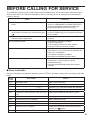
BEFORE CALLING FOR SERVICE............................................................................................................. 81
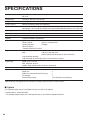
SPECIFICATIONS........................................................................................................................................ 82
3
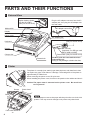
PARTS AND THEIR FUNCTIONS
1 External View
Option battery shutter
(for the XE-A1BT)
(Only for the XE-A147)
Plug the AC adapter connector into the AC
adapter jack, then plug the AC adapter into
the wall outlet.
AC adapter
AC adapter connector
Mode switch
Display
Printer cover
AC adapter jack
RS-232 connector
(Only for the XE-A147)
Keyboard
Drawer
SD card slot
(Important: For SD type card
SDHC 4GB to 32GB)
Cheque slot
Reset switch (Only for the XE-A147)
Drawer lock
DO NOT push the reset switch unless
instructed to do.
Doing so may damage or delete the data.
2 Printer
The printer is a receipt (one station) type thermal printer, and therefore it does
not require any type of ink ribbon or cartridge. The average life of the printer is
approximately 5 million lines.
When removing the printer cover, lift up its rear.
When installing the printer cover, hook it on the pawls on the cabinet and shut it.
Caution:The paper cutter is mounted on the printer cover. Be careful not
to cut yourself.
Sensor
Roller
Printer head
NOTE
Donotattempttoremovethepaperwiththeprintrollerarminthehold
position.Thismayresultindamagetotheprinterandprinterhead.
Print roller arm
4
3 Mode Switch and Mode key
Insert the mode key (the same key as drawer lock key) into the mode switch and move the key to get an
appropriate mode.
:
Turns the display off. No operations are possible.
REG:
:
Mode key
Permits transaction entry.
Permits correction after finalizing a transaction.
X/Flash:
Permits printing of sales reports and displaying the flash reports.
Z/PGM:
Permits printing and resetting of sales reports and programming.
4 Keyboard
■ Keyboard layout
■ Key names
F
Paper feed key
p
PLU/Subdepartment
key
A
Total/Amount tender/
No sale key
@
Multiplication/
receipt switch key
! $
Department keys
v
Void key
l
Clear key
c
Credit key
E
Escape/Help key
V
Foreign currency
exchange key
%
Percent key
s
Non-add code/Time
display/Subtotal key
t
Paid-out/Value added
tax key
C
Cheque key
R
Receipt print/Receivedon-account key
0:
1 9
Numeric keys
H
Shift key
5
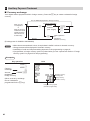
5 Display
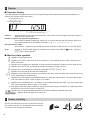
■ Operator display
Your cash register is equipped with a front LED (Light-Emitting Diode) display that affords easy visibility of 9
digits for the operator during transaction.
PLU/Subdepartment code
Department code Repeat
Receipt off (“.”)
Shift for the character entry (“_”)
DC for the character entry (“_”)
Amount:
Appears in the far-right eight (max.) positions. When the amount is negative, the minus symbol “-”
appears before the amount.
Number of repeats for repetitive registrations:
The number of repeats is displayed, starting at “2” and incremental with each repeat. When you
have registered ten times, the display will show “0”. (2 → 3 ..... 9 → 0 → 1 → 2 ... )
Receipt function status:
The indicator “.” appears in the receipt off position when the receipt function is in the OFF status.
Time:
Appears in the first to fifth positions (using 24-hour format) in the REG or
s key to display the time.
mode. Press the
■ Machine state symbols
: Appears during programming.
: Appears with an error code when an error is detected. For the details of error codes, please refer to
“Error code table”.
: Appears when the subtotal is displayed or when the amount tendered is smaller than the sales amount.
: Appears when the V key is pressed to calculate a subtotal in foreign currency.
: Appears when a transaction is finalized by pressing the A, C or c key.
: Appears when the change due amount is displayed.
: Appears in the far-left three positions at the timing of key entry when the electronic journal (EJ) memory
is full. (Depending on programming.)
: Appears when the voltage of the installed batteries is under the required level. You must replace with
new ones within two days. Refer to page 77 for details.
: Appears when the batteries are not installed, or the installed batteries are dead. You must replace with
new ones immediately. Refer to page 77 for details.
: May appear right below the seventh and eighth places at the timing of finalization of a transaction when
the electronic journal (EJ) memory is nearly full.
: Appears when programmed date (and time) for EURO modification operation has come.
: Appears when the paper is not set or out.
6 Drawer Lock Key
This key (the same key as mode key) locks and unlocks
the drawer. To lock it, turn 90 degrees counterclockwise.
To unlock it, turn 90 degrees clockwise.
6
PREPARING THE CASH REGISTER
Unpack the cash register and make sure all accessories are included. For details of accessories, please refer to
“SPECIFICATIONS” section.
For installing the cash register, find a stable surface near an AC outlet where the cash register will not subject to
water sources or direct sunlight.
For preparing the cash register, please follow the three steps shown below; “1 Initializing the Cash Register” on
this page, “2 Installing Batteries” on page 8, and “3 Installing a Paper Roll” on page 9.
1 Initializing the Cash Register
In order to operate the cash register properly, you must initialize it before operating for the first time. Follow this
procedure.
1. Insert the mode/drawer lock key into the mode switch and turn it to the REG position.
2. Insert the AC adapter into the AC outlet.
IMPORTANT: This operation must be performed without batteries installed.
3. The cash register has now been initialized. The register display will show “0.00”
with “
”.
NOTE IfthisdoesnothappenwheninsertingtheACadapter,thentheinitializationhasnotbeendone
successful.(Thiswilloccurwhenthevoltageishighbecauseyouoperatedthecashregisterbefore
startinginitialization.)WaitatleastoneminuteafterpullingouttheACadapterandreinserttheAC
adapterintotheACoutletonlyafterthiswaitingtimehaspassed.
7
2 Installing Batteries
Three new alkaline batteries LR6 (“AA”size) must be installed in the cash register to prevent the data and userprogrammed settings from being erased from the memory, when the AC adapter plug is accidentally
disconnected or in case of power failure. Once installed, the batteries will last approximately one year before
needing replacement. At this time, the “ ” symbol will appear on the display to indicate the batteries are low
and must be replaced within two days. If the no battery symbol “ ” appears, you must install the batteries
at once. Install three new alkaline batteries LR6 (“AA”size) according to the procedure shown below
with the AC adapter plug connected and set the mode switch to the REG position:
1. Push the printer cover forward and detach it.
Be careful with the paper cutter, so as not to cut yourself.
2. Open the battery compartment cover next to the paper roll cradle.
3. Install three new alkaline batteries LR6 (“AA”size) as per the diagram.
When the batteries are properly installed “
disappear.
4. Close the battery compartment cover.
” on the display will
NOTE •Besuretoobserveprecautionsshownonpage1whenhandling
batteries.
”
•Ifyoupressakeybymistake,anerrorsymbol“
maybedisplayed.Pressthelkeytoclearthesymbolafter
installingpaperrolls.
Caution: “ ” or “ ” can be displayed only when the cash register is being turned on. Please be
advised that when the cash register is being turned off for a long time, the data in memory
might be cleared without the warning symbols: “ ” or “ ”.
8
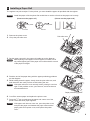
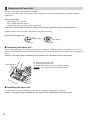
3 Installing a Paper Roll
The register can print receipts. For the printer, you must install the paper roll provided with the register.
NOTE Installthepaperrollintheprinter.Becarefulthentosettherollandcutthepaperendcorrectly.
(How to set the paper roll)
To the printer
Incorrect
(How to cut the paper end)
To the printer
Correct
Correct
1. Remove the printer cover.
2. Lift up the print roller arm.
Incorrect
Print roller arm
3. Set the paper correctly in the paper roll cradle as per the diagram.
NOTE Beforeplacinganewpaperrollinthepaperrollcradle,cutoff
thepasted(taped)partofthepaperandconfirmthatthecutend
ofthepaperisstraight.
4. Feed the end of the paper along with the paper positioning guides as
per the diagram.
5. While holding down the paper, slowly close the print roller arm, and
push down the arm until you hear a click locking the arm.
NOTE Iftheprintrollerarmisnotsecurelylocked,printingisnotdone
right.Ifthisproblemoccurs,openthearm,andclosethearm
asinstructedabove.
Paper positioning guides
6. Cut off the excess paper and replace the printer cover.
7. Press the F key to make sure the paper end comes out of the
printer cover and clean paper appears.
NOTE Ifthepaperenddoesnotcomeout,opentheprintercover,
andpassthepaperendbetweenthepapercutterandthe
paperguideoftheprintercover,andreplacetheprinter
cover.
9
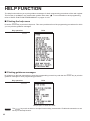
HELP FUNCTION
The help function allows you to print guidance messages for basic programming procedures of the cash register.
This function is available in any mode switch position other than “ ”. For more details on each programming,
refer to “BASIC FUNCTION PROGRAMMING” on pages 11 to 21.
■■ Printing the help menu
Press the E key to print the help menu. This menu provides a list of the programming procedures for which
you can print the guidance messages.
Key operation
Print
E
■■ Printing guidance messages
By reference to the help menu above, press the corresponding numeric key and then the E key to print the
guidance message for each programming procedure.
Key operation
Print
4 E
Sample print of TIME SETTING
E key works as the error escape function during a transaction. Finalize the transaction to use
the key as the help function.
NOTE The
10
BASIC FUNCTION PROGRAMMING
Before starting sales entries, you must first program necessary items so the cash register suits your sales
needs. In this manual, there are three sections, BASIC FUNCTION PROGRAMMING (pages 11-21) where
required items must be programmed, AUXILIARY FUNCTION PROGRAMMING (pages 45-51) for using all
available keyboard keys and ADVANCED FUNCTION PROGRAMMING (pages 52-67) where various optional
programming features are provided. Find the required functions and program them accordingly.
1 Abbreviations and Terminology
Dept.:
Department; a category for merchandise classifications. Every sales item should belong to a
department.
PLU:
Price Look Up; a category for merchandise classifications. PLUs are used to call up preset prices by a
code entry.
VAT:
Value Added Tax
X report: Report to read sales data
Z report: Report to read and reset sales data
Receipt ON/OFF function: To print or not to print receipts in the REG mode.
2 Prior to Programming
■ Procedure for programming
1. Check to see whether a paper roll is present in the machine. If there is not enough paper on a roll, replace it
with a new one (refer to “Replacing the Paper Roll” in “OPERATOR MAINTENANCE” chapter for the
replacement).
2. Put the mode key in the mode switch and turn it to the Z/PGM position.
3. Program necessary items into the cash register.
Every time you program an item, the cash register will print the setting. Please refer to print samples in each
section.
4. If necessary, issue programming reports for your reference.
NOTE •Onthekeyoperationexampleshownintheprogrammingdetails,numberssuchas“221012”indicates
theparameterwhichmustbeenteredusingthecorrespondingnumerickeys.
•Asterisksinthetablesshownintheprogrammingdetailsindicatedefaultsettings.
■ Description of special keys
0, 1 to 9
:
l
s
A
Used for numerical number entry.
Used for character code entry.
Used for cancel entry.
Used for data decision entry.
Used for programming termination entry.
11
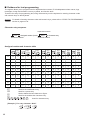
■■ Guidance for text programming
The register allows you to program texts for department item names, PLU/subdepartment item names, logo
messages, foreign and domestic currency symbols, and function texts.
There are two ways for programming text; using character keys on the keyboard or entering character codes
with numeric keys on the keyboard.
NOTE For details of entering character codes with numeric keys, please refer to “PRIOR TO PROGRAMMING”
section on pages 43-44.
Character entry sequence
Capital letter selection
Assigned number (0 to 9)
W
Double-size character
H
Character entry
Small letter selection
Assigned number and character table
H
H
H
H
H
H
0
A
a
K
k
U
u
0
0
Ä
ä
Ď
ď
Ò
ò
1
B
b
L
l
V
v
1
1
Ö
ö
È
è
Ó
ó
2
C
c
M
m
W
w
2
2
Ü
ü
É
é
Ô
ô
3
D
d
N
n
X
x
3
3
À
à
Ê
ê
Õ
õ
4
E
e
O
o
Y
y
4
4
Á
á
Ë
ë
Š
š
5
F
f
P
p
Z
z
5
5
Â
â
Ì
ì
Ť
ť
6
G
g
Q
q
%
%
6
6
Ã
ã
Í
í
Ù
ù
7
H
h
R
r
+
+
7
7
Å
å
Î
î
Ú
ú
8
I
i
S
s
-
-
8
8
Č
č
Ñ
ñ
Û
û
9
J
j
T
t
!
!
9
9
Ç
ç
Ň
ň
Ž
ž
,
Used for the small letter entry.
Used for a space entry.
Used to delete the last character or figure.
Used for the double-size character entry.
,
,
,
Used for character entry.
H
S
B
W
,
,
[ Example ] For entry character “MnH”
3H
2
M
12
H
n
7
H
3 Language Selection
To set "0"
88
s
@
*Language: 0: English
1: German
By default, English is set.
2: French
Key operation example
A
*Language (0 - 4)
3: Spanish
4: Swedish
Print
s 88 @
0A
Caution: W
hen you change the language, the texts such as logo messages and function texts, which you
programmed, will be reset to the default settings. The language selection must be made before
programming logo messages and function texts.
4 Date and Time Programming
■ Date
For setting the date, enter the date in 6 digits using the day-month-year (DD/MM/YY) format, then press the
s key.
Date(DD/MM/YY)
s
Key operation example
Print
221012
(22 October, 2012)
Date
s
■ Time
For setting the time, enter the time in 4 digits using the 24-hour format. For example, when the time is set to
2:30 AM, enter 230; and when it is set to 2:30 PM, enter 1430.
Time(max. 4 digits in 24-hour format)
Key operation example
s
Print
1430
s
Time
13
5 Tax Programming
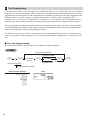
If you program the VAT/tax, the cash register can calculate the sales tax. In the VAT system, the tax is included
in the price you enter in the register, and the tax amount is calculated when tendered according to the VAT rate
programmed. In the tax system, the tax is calculated when tendered according to the tax rate programmed, and
added to the price. The cash register can provide totally 6 kinds of VAT/tax systems (automatic VAT1-4,
automatic tax 1-4, manual VAT 1-4, manual VAT 1, manual tax 1-4, and automatic VAT1 and automatic tax 2-4
systems) and 4 kinds of rates. By default, the cash register is pre-programmed as automatic VAT1-4 system.
When you program tax rate(s) and taxable status for each department (by default, VAT1/tax1 is set to taxable.),
tax will be automatically added to sales of items assigned to the department according to the programmed tax
status for the department and the corresponding tax rate(s).
For details of the tax systems, refer to “Computation of VAT (Value Added Tax)/tax” section. To change the tax
system, please refer to “Other programming” of “Various Function Selection Programming 1” section (Job code
69).
■ Tax rate programming
The percent rate specified here is used for tax calculation on taxable subtotals.
To program other kind of tax
To program “0.0000”
s
9
@
Tax number
(1 to 4)
@
To delete a tax rate
*Tax rate: YYYYYYY
Tax rate=0.0000 to 100.0000
Key operation example
s9@
2@
0070000
s
A
14
s
*Tax rate
Print
v
A
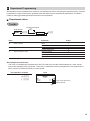
6 Department Programming
Merchandise can be classified into a maximum of 8 departments. Items sold using the department keys can later
be printed on a report shown as the quantities sold and sales amounts classified by department. The data is
useful for making purchasing decisions and other store operations.
■ Department status
For dept. 5 through 8
To set all zeros
ABC
H
@
A
Dept. key
To program another department
Item:
Selection:
A
SICS / Normal
B
Sign
C
Type of unit price entry
Entry:
SICS
Normal*
Negative department
Positive department*
Open and preset
Preset only
Open only*
Inhibit department key
1
0
1
0
3
2
1
0
* Default settings
SICS (Single Item Cash Sale)
• If an entry of a department programmed for SICS is made first, the sale will be finalized as a cash sale as
soon as the department key is pressed. If the entry is made after entering a department not programmed for
SICS, it does not finalize and result in a normal sale.
Key operation example
Print
113 @
"A
Sign
Type of unit price entry
SICS / Normal
15
■■ Preset unit price
For dept. 5 through 8
H
To program zero
Dept. key
Unit price (max. 8 digits)
A
To program another department
Key operation example
1000 !
Print
Unit price
A
NOTE If a department is not programmed to allow the entry of preset unit prices in functional programming, the
department is automatically changed to allow the entry of preset unit prices by this programming entry.
■■ VAT/tax status
For dept. 5 through 8
H
To program zero
s
20
VAT/tax status
(1 to 4)
@
Dept. key
A
To program another department
VAT/tax status
16
Selection:
VAT/tax 1*
VAT/tax 2
VAT/tax 3
VAT/tax 4
Non VAT/tax
Key operation example
s 20 @
2!
A
Entry:
1 e.g. for this number a VAT/tax rate of 7% is assigned
2
3
4
0
Print
VAT/tax status (VAT/tax 2)
■■ HALO digits (entry digit limit)
Set the number of allowable digits for the maximum entry amount for each department. The limit is effective for
operations in the REG mode.
NOTE To activate this function, the programming (job code 62) “HALO function” must be set “Valid (1)” on page
55.
For dept. 5 through 8
To program zero
s
@
28
H
Dept. key
HALO (0 to 8)
A
To program another department
Key operation example
Print
s 28 @ 5!
A
HALO (entry digit limit)
■■ Department text (item label)
For dept. 5 through 8
H
s
@
101
To keep current setting
Dept. key
Character entry
(max. 12 characters)
s
A
To program another department
Key operation example
s 101 @
!
8
3
S
0
N
2
A
0
C
8
K
S
Print
Text
programmed for
dept. 1
s
A
(Programming SNACKS for dept.1)
For details of the text entry (“SNACKS”), please refer to the “Guidance for text programming” on page 12.
17
7 PLU (Price Look-Up) and Subdepartment Programming
The PLU function allows speedy key entries whereby a price is automatically called up when a code is entered.
The subdepartment is a kind of “open PLU”, which requires you to enter a price after the PLU code is entered.
PLU/subdepartment setting for 1 through 200 codes are available.
■ Unit price and associated department assignment
To delete the PLU code
v
For dept. 5 through 8
To program zero
p
PLU code
H
Associated
Dept. key
Unit price
(max. 8 digits)
A
To program or delete the following PLU code
To program or delete another PLU code
Key operation example
Print
1p
125 !
Unit price
Associated dept.
A
PLU code
■ PLU/subdepartment selection
To program "0"
PLU code
p
*A (0 or 1)
s
A
To program the following PLU code
To program another PLU code
*A: 0 for subdepartment or 1 for PLU
Key operation example
1p
0s
Print
PLU/subdept.
A
NOTE WhenyouprogramthelastPLUcode,theprogrammingsequencewillbecompletewithapressofthe
skey.
18
■■ PLU text (item label)
To keep current setting
s
102
@
PLU code
p
Character entry
s
A
(max. 12 characters)
To program following PLU code
To program another PLU code
Key operation example
Print
s 102 @ 1p
MELON s
A
Text
programmed
for PLU code 1
(Programming MELON to PLU1)
For details of the text entry (“MELON”), please refer to the “Guidance for text programming” on page 12.
(M:2
, E:4
, L:1
, O:4
, N:3
)
19
8 Text Programming
Please refer to “Guidance for text programming” section as for how to entering characters.
■ Logo messages (6 lines and 30 characters for each line)
The register can print programmed messages on every receipt. On the standard model, a header 3-line and
footer 3-line logo message is printed on the receipt. If you want to print in other logo message format, please
change the format. For the programming details, refer to “Logo message print format” on page 61.
To keep current setting
s
104
@
*Line no.
(1 - 6)
@
Character entry
(max. 30 characters)
s
A
To program another line
*Line no.; “Header 3-line message” type : 1 to 3
“Header 6-line message” type : 1 to 6
“Header 3-line and footer 3-line message” type: 1 to 6 (1 to 3 as header, 4 to 6 as footer)
Logo message print format (3 types)
Header 1st line
Header 1st line
Header 1st line
Header 2nd line
Header 2nd line
Header 2nd line
Header 3rd line
Header 3rd line
Header 3rd line
Header 4th line
Header 5th line
Header 6th line
Footer 4th line
Footer 5th line
Footer 6th line
Header 3-line
message
Header 6-line
message
Header 3-line
message and
footer 3-line
message
(Default setting)
NOTE Aheader3-lineandfooter3-linelogomessageispreprogrammedwhenshipped.Pleasestartentering
fromthefirstlinewhenyoufirstprogramalogomessage.
20
To print the logo message “THANK YOU” using double sized characters and centering on the third line.
Key operation example
s 104 @ 3@
WSWSWS
T
W WHWAWNWK
WSWYWOWU
s
A
Print
For details of the text entry, please refer to the “Guidance for text programming” on page 12.
(T:9
, H:7
, A:0
, N:3
, K:0
, Y:4
, O:4
, U:0
)
21
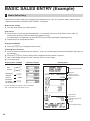
BASIC SALES ENTRY (Example)
1 Basic Sales Entry
Listed below is a basic sales entry example when selling items by cash. For operation details, please refer to
“Additional Information for BASIC SALES ENTRY” on page 29.
Modeswitchsetting
1. Turn the mode switch to the REG position.
Itementries
2. Enter the price for the appropriate department. For example if the price 15.00 EURO, enter “1500” by
numeric keys and then press the appropriate department key.
For department 5 to department 8, press the H key first before pressing the department key.
3. Repeat step 2 for all department items.
Displayingsubtotals
4. Press the s key to display the amount due.
Finalizingthetransaction
5. Enter the amount received from the customer. (You can omit this step if the amount tendered is the same as
the subtotal.)
6. Press the A key, and the change due is displayed and the drawer is opened.
7. Tear off the receipt and give it to the customer with his or her change.
8. Close the drawer.
Key operation example
Item
entries
Operator display
Receipt print
1500 !
2300 "
Displaying
subtotal
Amount
tendered
Finalizing
the transaction
s
4000
Logo message (Header)
Date/Time
Register number/
Consecutive number
Price
Items
A
(In this example, tax system is set to automatic
VAT 1-4 and the tax1 rate is set to 7%.)
Total quantity
Total amount
Cash tendering/amount
received
Change
Logo message (Footer)
22
2 PLU Sales Entry
Enter a PLU code using numeric keys and press the p key.
Key operation example
Operator display
Receipt print
1p
71 p
141 p 3620 p
A
23
CORRECTION
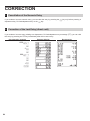
1 Cancellation of the Numeric Entry
If you make an incorrect numeric entry, you can clear the entry by pressing the l key only before pressing a
department key, PLU/subdepartment key or the % key.
2 Correction of the Last Entry (direct void)
If you make an incorrect entry relating to a department, PLU/subdepartment or percentage (%), you can void
this entry by pressing the v key immediately after the incorrect entry.
Key operation example
1250 H "
v
2p
v
600 H $
%
v
1p
A
24
Operator display
Receipt print
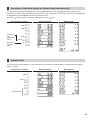
3 Correction of the Next-to-last or Earlier Entry (indirect void)
You can void any incorrect department entry, PLU/subdepartment entry or item refund entry made during a
transaction if you find it before finalizing the transaction (e.g. pressing the A key). This function is applicable
to department, PLU/subdepartment and refund entries only.
Press the v key just before you press a department key or p key.
Key operation example
Operator display
Receipt print
1310 H "
1755 H #
10 p
Correction
of a
department
entry
Correction
of a PLU
entry
12 p
825 H #
1310 v H "
12 v p
A
4 Subtotal Void
You can void an entire transaction. Once subtotal void is executed, the transaction is aborted and the register
issues a receipt.
Key operation example
Operator display
Receipt print
1310 "
"
1755 H "
10 p
35 p
s
Subtotal void
v
s
25
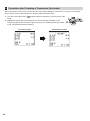
5 Correction after Finalizing a Transaction (Void mode)
When you need to void incorrect entries that are found after finalizing a transaction or cannot be corrected by
direct, indirect void or subtotal void, the following steps should be taken:
1. Turn the mode switch to the
position using the mode key, to enter into the void
mode.
2. Repeat the entries that are recorded on an incorrect receipt. (All data on the
incorrect receipt is removed from register memory; the voided amounts are added
to the void mode transaction totalizer.)
Incorrect receipt
26
Cancellation receipt
FULL SALES REPORT (X or Z REPORT)
•Use the reading function (X) when you need to take a reading of sales information entered since the last reset.
You can take this reading any number of times. It does not affect the register’s memory.
•Use the resetting function (Z) when you need to clear the register’s memory. Resetting prints all sales information
and clears the entire memory except for the GT1 through GT3, reset count, and consecutive number.
X1 and Z1 reports: Daily sales reports
X2 and Z2 reports: Periodic (monthly) consolidation reports
When you take an X1 or X2 report, turn the mode switch to the X/Flash position, and use the corresponding key
sequence.
When you take an Z1 or Z2 report, turn the mode switch to the Z/PGM position, and use the corresponding key
sequence.
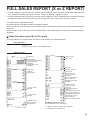
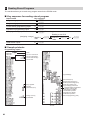
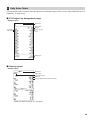
■■ Daily full sales report (X1 or Z1 report)
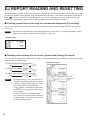
Put the mode key in the mode switch and turn it to the X/Flash or the Z/PGM position.
*2
Key operation
A
(For Z1 report: in the Z/PGM position)
Sample report
Mode title*1
Reset counter
Net grand total (GT2-GT3)
Grand total of plus
registration
Grand total of minus
registration
Dept. code
Sales q’ty
Sales amount
“+” dept. counter
and total
“-” dept. counter
and total
Taxable 1 total
VAT 1 total
Tax total
Net total without tax
Item percent
counter and total
Item void counter
and total
Void-mode transaction
counter and total
Subtotal void counter
and total
No-sales counter
Customer counter
Paid total
Paid total average per
customer
Starting cash memory (+)
Starting cash memory (-)
Starting cash memory total
Received on account
counter and total
Paid out counter and total
Subtotal percent
counter and total
Net sales total
(To be continued on the next page)
*1: When you take X1 report, “X1” is printed.
*2: Printed in the Z1 report only.
27
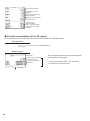
Cash counter and total
Cheque sales counter
and total
Credit sale and tendering
counter and total
Exchange counter and total
Domestic currency
Cash in drawer
Cheque in drawer
Cash + cheque in drawer
Change total for cheque
tendering
■■ Periodic consolidation (X2 or Z2 report)
Put the mode key in the mode switch and turn it to the X/Flash or the Z/PGM position.
Key operation
HA
(For Z2 report: in the Z/PGM position)
Sample report
Mode title*1
Reset counter of daily total
*2
Reset counter of
periodic consolidation
Grand total
28
The subsequent printouts are the same in format
as in the Z1 full sales report.
*1: When you take X2 report, “X2” is printed.
*2: Printed in the Z2 report only
OTHER BASIC SALES ENTRIES
1 Additional Information for BASIC SALES ENTRY
Receipt ON/OFF function
When you use the printer to issue receipts, you can disable receipt printing in the REG mode to save paper
using the receipt ON/OFF function. To disable receipt printing, press the @ key.
This key toggles the receipt printing status ON and OFF.
The register will print reports regardless of the receipt state, so the paper roll must be installed.
ToissueareceiptwhenreceiptON/OFFfunctionissettoOFF:
If your customer wants a receipt after you finalized a transaction with the receipt ON/OFF function being OFF
status, press the R key. This will produce a receipt. However, if more than 40 items were entered, the receipt
will be issued in a summary receipt.
Copy receipt
You can print a copy receipt by pressing the R key.
To realize this function, you must enable the function. Please refer to page 55 (Job code 63).
Power Save Mode
The register will enter into power save mode when no entries are performed based on the pre-programmed time
limit (by default, 30 minutes).
When the register goes to the power save mode, all display lights will turn off except the decimal point at the
leftmost position. The register will return to the normal operation mode when any key is pressed or a mode is
changed with the mode key. Please note when the register is recovered by a key entry, its key entry is invalid.
After the recovery, start the key entry from the beginning.
2 Error Warning
In the following examples, your register will go into an error state with an error symbol “
the error state by pressing the l key and take the proper action.
Please refer to the error code table on page 81.
” on the display. Clear
• Enter over a 32-digit number (entry limit overflow): Cancel the entry and re-enter the correct number.
• An error in key operation: Clear the error and continue operation.
• A merchandise subtotal exceeds eight digits: Delete the subtotal by pressing the l key and press the A,
C or c key to finalize the transaction.
Error escape function
To quit a transaction due to an error or an unforeseen event, use the error escape function as shown below:
To clear the error state
l
(Transaction)
E
E
The transaction is voided (treated as a subtotal void) and the receipt is issued by this function. If you have
already entered a tendered amount, the operation is finalized as a cash sale.
29
3 Starting Cash Memory (SCM) Entry
If you enter the amount of currency for the starting amount in the drawer before entry operations, you can
separate that amount from the sales amount when reports are generated.
Your register can be programmed to enforce the entry of starting cash into memory.
1. Turn the mode switch to the X/Flash position.
2. Enter the amount for domestic currency by using the numeric keys.
3. Press the R key for SCM(+) function, or press the t key for SCM(-) function.
Key operation
Print
250 R
Key operation
250 t
30
Print
4 Item Entries
■ Single item entries
Department entries
Enter a unit price and press a department key. If you use a programmed unit price, press a department key only.
When using a programmed unit price
Unit price *1
(max. 8 digits)
*2
Department key
H
NOTE *1Lessthantheprogrammedupperlimitamounts
Whenthosedepartmentsforwhichtheunitpricehasbeenprogrammedaszero(0)areentered,only
thesalesquantityisadded.
*2Forthedepartments5through8,presstheHkey.
Example
Key operation
Print
1200 !
#
2600 H "
A
31
PLU/subdepartment entries
Enter a PLU code and press the p key. If you do not use a programmed unit price, you need to enter a unit
price after pressing the p key (subdepartment).
By default, these 200 codes are set to PLU mode and zero for unit price.
•PLU entries
PLU code
p
When zero price PLU is entered, only the sales quantity is added.
•Subdepartment (open PLU) entries
PLU code
p
p
Unit price *
(max. 8 digits)
* Less than the programmed upper limit amounts.
Example
Key operation
Print
2 p
16 p
1200
p
A
■■ Repeat entries
The Repeat Entry function allows you to enter a sale of two or more of the same items.
You can simply press the department key or p key to repeat entry.
Example
Key operation
Repeated
department
entry
Repeated
department
entry
Repeated
PLU entry
Repeated
subdepartment
entry
32
200 "
"
"
680 H #
#
10 p
p
p
60 p 500 p
p
A
Print
■■ Multiplication entries
Use this feature when you need to enter two or more of the same items.
This feature helps you when you sell a large quantity of items.
When you use a programmed
unit price
@
Q’ty
Department key
Dept. entry
PLU code
p
PLU entry
PLU code
p
Unit price
Unit price
p
Subdepartment (open PLU) entry
•Q’ty: Up to four-digit integer
•Unit price: Less than a programmed upper limit
• Q’ty x unit price: Up to eight digits
Example
Key operation
7@
165 "
Print
2@
250 H "
15 @
6p
8@
17 p
100 p
A
33
■ Single item cash sale (SICS)
• This function is useful when a sale is for only one item and is for cash; such as a pack of cigarettes. This
function is applicable only to those departments that have been set for SICS or to their associated PLUs.
• The transaction is finalized and the drawer opens as soon as you press the department key or p key.
Example
Key operation
Print
250
For finishing
the transaction
NOTE
#
If an entry to a department, PLU/subdepartment set for SICS follows the ones to departments, PLUs/
subdepartments not set for SICS, it does not finalize and results in a normal sale.
5 Display of Subtotal
■ Subtotal
Press the s key at any point during a transaction. The sales subtotal including tax will appear with the
symbol “ ” in the display.
NOTE
34
Subtotal will not be printed on a receipt on the current factory setting. If you want to print it, change the
setting by programming. Refer to “Receipt print format” (Job code 7) on page 54.
6 Finalization of Transaction
■ Cash or cheque tendering
Press the s key to get a subtotal, enter the amount tendered by your customer, then press the A key
if it is a cash tender or press the C key if it is a cheque tender. When the amount tendered is greater than the
amount of the sale, the register will show the change due amount with the symbol “ ”. Otherwise the register
will show a deficit with the symbol “ ”. Make a correct tender entry.
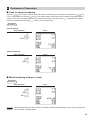
Example
Cash tendering
Key operation
Print
s
1000 A
Cheque tendering
Key operation
Print
s
1000 C
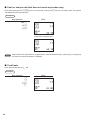
■ Mixed tendering (cheque + cash)
Example
Key operation
Print
s
1000 C
500 A
NOTE Whenprogrammednottoallow“directnon-tenderfinalizationaftertendering”(Jobcode63)onpage55,
youmustenteratenderamount.
35
■■ Cash or cheque sale that does not need any tender entry
Enter items and press the A key if it is a cash sale or press the C key if it is a cheque sale. The register
will display the total sales amount.
Example
Key operation
Print
300 # 10 p
A
In the case of cheque sale
NOTE When the function parameters is programmed to “amount tendered entry; compulsory(1)” on page 48,
the direct non-tender finalization is inhibited.
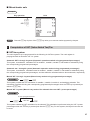
■■ Credit sale
Enter items and press the c key.
Example
36
Key operation
$
$
s
c
Print
■ Mixed-tender sale
Example
Key operation
Print
s
950 A
c
CkeyinplaceoftheAkeywhenyourcustomermakespaymentbycheques.
NOTE Pressthe
7 Computation of VAT (Value Added Tax)/Tax
■ VAT/tax system
The cash register may be programmed for the following six VAT/tax systems. The cash register is
preprogrammed as automatic VAT 1-4 system.
Automatic VAT 1 through 4 system (Automatic operation method using programmed percentages)
This system, at settlement, calculates VAT for taxable 1, taxable 2, taxable 3, and taxable 4 subtotals by using
the corresponding programmed percentages.
Automatic tax 1 through 4 system (Automatic operation method using programmed percentages)
This system, at settlement, calculates taxes for taxable 1, taxable 2, taxable 3, and taxable 4 subtotals by using
the corresponding programmed percentages, and also adds the calculated taxes to those subtotals, respectively.
Manual VAT 1 through 4 system (Manual entry method using programmed percentages)
s
t
This system provides the VAT calculation for taxable 1, taxable 2, taxable 3, and taxable 4 subtotals. This
calculation is performed using the corresponding programmed percentages when the t key is pressed just
after the s key.
Manual VAT 1 system (Manual entry method for subtotals that uses VAT 1 preset percentages)
To use a programmed rate
s
VAT rate
t
This system enables the VAT calculation for the subtotal. This calculation is performed using the VAT 1 preset
percentages when the t key is pressed just after the s key. For this system, the keyed-in tax rate can
be used.
37
Manual tax 1 through 4 system (Manual entry method using programmed percentages)
s
t
This system provides the tax calculation for taxable 1, taxable 2, taxable 3, and taxable 4 subtotals. This
calculation is performed using the corresponding programmed percentages when the t key is pressed just
after the s key. After this calculation, you must finalize the transaction.
Automatic VAT 1 and tax 2 through 4
This system enables the calculation in the combination with automatic VAT 1 and tax 2 through 4. This
combination can be any of VAT 1 and tax 2 through 4. The tax amount is calculated automatically with the
percentages previously programmed for these taxes.
NOTE •The tax status of PLU/subdepartment depends on the tax status of the department which the PLU/
subdepartment belongs to.
•VAT/tax assignment symbol can be printed at the fixed right position near the amount on the receipt as
follows:
VAT1/tax1
VAT2/tax2
VAT3/tax3
VAT4/tax4
A
B
C
D
When the multiple VAT/tax is assigned to a department or a PLU, a symbol of the lowest number
assigned to VAT/tax rate will be printed. For programming, please refer to “Various Function Selection
Programming 1” (Job code 66) on page 56.
Example
Key operation
(When the manual
VAT 1 through 4
system is selected)
38
$
s
t
A
Print
OPTIONAL FEATURES
1 Auxiliary Entries
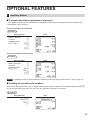
■ Percent calculations (premium or discount)
• Your register provides percent calculations for a subtotal or each item entry depending on the programming.
• Percentage: 0.01 to 100.00%
Percent calculation for a subtotal
Example
Key operation
(When a discount
of 10% is
programmed for
the % key.)
Print
$
$
s
%
A
Percent calculation for item entries
Example
Key operation
(When a premium
of 15% is
programmed for
the % key.)
Print
$
%
30 p
750 %
A
%keyonpage46.
NOTE Availabilityofitem%and/orsubtotal%dependsontheprogrammingdataofthe
■ Printing of non-add code numbers
Enter a non-add code number such as a guest code number within a maximum of 16 digits and press the s
key at any point during the entry of a sale. The non-add code is printed on the receipt.
Example
Key operation
Print
1230 s
700 "
c
39
2 Auxiliary Payment Treatment
■ Currency exchange
Your register allows payment entries in foreign currency. Press the V key to create a subtotal in foreign
currency.
For an additional payment in foreign currency
For direct finalization
After an entry
is completed
or
After the amount
tendered is found
smaller than the
sales amount in
a sales entry
V
Amount
tendered
(max. 8 digits)
l
Reentry
A
C
c
Next registration
or
payment in
domestic currency
(Exchange rate: 0.000000 to 999.999999)
NOTE • Whentheamounttenderedisshort,itsequivalentindeficitisshownindomesticcurrency.
• Changeamountwillbedisplayedindomesticcurrency.
• Availabilityofcreditandchequetenderingdependsontheprogrammingonpage63.
• Ifprogrammed,aforeigncurrencysymbolisprintedwhenyouuseapresetrate.Referto“Foreign
currencysymbol”onpage49fortheprogramming.
Example
Key operation
Print
2300 "
Currency
exchange
Amount
tendered in
foreign currency
4650 !
V
10000 A
(When a currency exchange
rate of 0.939938 is
programmed for the V key.)
Domestic currency
Exchange rate
Foreign currency
Domestic currency
Foreign currency symbol
(Printed if programmed)
40
■■ Received-on-account entries
When you receive on account from a customer, use the R key. For the received-on-account (RA) entry, enter
the amount, and press the R key.
NOTE Cash tendering only available for RA operation.
Example
Key operation
12345 s
4800 R
Print
■■ Paid-out entries
When you pay an amount to a vendor, use the t key. For the paid-out (PO) entry, enter the amount and press
the t key.
NOTE Cash tendering only available for PO operation.
Example
Key operation
54321 s
2300 t
Print
■■ No sale (exchange)
When you need to open the drawer with no sale, press the A key. The drawer will open and printer will print
“NO SALE” on the receipt. If you let the register print a non-add code number before pressing the A key, a
no sale entry is achieved and a non-add code number is printed. Refer to “Other programming” (job code 63) on
page 55 for the programming.
Example
Key operation
Print
A
41
3 Special Printing Function
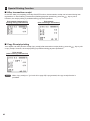
■ After transaction receipt
In the OFF state (no receipting) of receipt ON-OFF function, the transaction receipt can be issued during item
registrations or after finalizing a transaction (finalizing payment operations), press the R key to print it.
However, the receipt printing is prohibited during payment operations.
Print sample (temporary EJ
printing during a transaction)
Print sample
(after finalizing a transaction)
■ Copy Receipt printing
Your register can also print the receipt (copy receipt) after transaction receipt printing, press the R key to print
a copy receipt. However, the receipt printing is prohibited during payment operations.
Print sample
(after finalizing a transaction)
NOTE When“copyreceipt;no”(jobcode63onpage55)isprogrammed,thecopyreceiptfunctionis
prohibited.
42
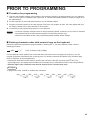
PRIOR TO PROGRAMMING
■■ Procedure for programming
1. Check to see whether a paper roll is present in the machine. If there is not enough paper on a roll, replace it
with a new one (refer to “Replacing the Paper Roll” in “OPERATOR MAINTENANCE” chapter on page 78 for
the replacement).
2. Put the mode key in the mode switch and turn it to the Z/PGM position.
3. Program necessary items into the cash register. Every time you program an item, the cash register will print
the setting. Please refer to print samples in each section.
4. If necessary, issue programming reports for your reference.
NOTE •On the key operation example shown in the programming details, numbers such as “221012” indicates
the parameter which must be entered using the corresponding numeric keys.
•Asterisks in the tables shown in the programming details indicate default settings.
■■ Entering character codes with numeric keys on the keyboard
Numerals, letters and symbols are programmable by entering the : key and character codes. Use the
following procedure.
XXX
:
XXX : character code (3 digits)
For the character codes, please refer to the character code table on the next page. By doing this, you can
program characters other than those on the key tops. For entering numerals and letters using character keys,
refer to “Guidance for text programming”.
•Double-size characters can be made by entering the character code 255 or pressing the W key. The “_”
symbol lights up in the display when double-size characters entry is selected as shown in the example below.
•All three digits of the character code must be entered (even if it starts with zero).
Example
To program the word “SHARP” in double-size characters
255
: 083 : 255 : 072 : 255 : 065 : 255 : 082 : 255 : 080 :
S
H
A
R
P
43
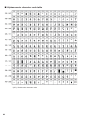
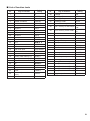
■■ Alphanumeric character code table
44
*(DC) : Double-size character code
AUXILIARY FUNCTION PROGRAMMING
1 Miscellaneous Key Programming
The cash register provides miscellaneous keys such as %, R, t, V, C, c and A.
■ Rate for % and V
To program zero
%
V
Rate
(max. 9 digits)
A
To program another rate
Rate:
XXXXX: 0.00 − 100.00 (% rate) (For example: 15.00%. enter 1500.)
XXXXXXXXX: 0.000000 − 999.999999 (Currency exchange rate)
Example
Key operation
Print
1025 %
939938 V
(0.939938)
Percent rate
A
Currency
exchange rate
■ Percent rate limitation for %
You can program the upper limit of percent rates for percent entries.
NOTE Thisfunctionisactivated,when“HALOfunction;valid”(jobcode62onpage55)isprogrammed.
To program zero
s
29
@
XXXXX
(Percentage limit: 0.00 -100.00%)
%
A
To program for another percent key
Example
Key operation
(15.00%)
s 29 @
1500 %
A
Print
Percentage limit
45
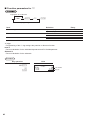
■■ Function parameters for %
To program “0” for all items
@
ABC
%
A
To program again
Item:
+/- sign
A
B
Item %
C
Subtotal %
Selection:
Entry:
Disallow
Allow*
Disallow
1
0
1
+ (premium) sign
- (discount) sign*
Allow*
+/- sign
•Programming of the +/- sign assigns the premium or discount function.
Item %
•Percent calculation for the individual department and PLU/subdepartment.
Subtotal %
•Percent calculation for the subtotals.
Example
Key operation
100 @
%
A
46
Print
From left, BC
Sign (A)
0
1
0
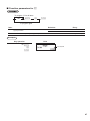
■■ Function parameters for V
To program “0” for all items
@
AB
V
A
To program again
Item:
A
Selection:
V key function
B
Position of decimal point (from right: tab)
Entry:
Allow*
Disallow
0
1
0-3 (default: 2)
Example
Key operation
02 @
V
A
Print
From left, AB
47
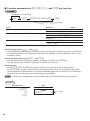
■■ Function parameters for R, t, C, c and A key function
To program “0” for all items
*1
s, C, c, R or t
@
ABC
To program for another key
*1 :Press
s key for A key setting.
Item:
Footer printing*2
A
B
C
A
Selection:
Entry:
Non-compulsory (for C and A)*
0
Inhibit (for c)*
0
For C, c and A
0-8 (default: 8)
For R and t
0-9 (default: 9)
Allow
Disallow*
Compulsory
Amount tendered entry*2
Entry digit limit
1
0
1
*2: When programming for R or t, always enter 0 for item(A) and item(B)
Footer printing (only for C, c and A)
•This programming decides whether or not the machine should print a message at the foot of a receipt when
a specified media key is used. With regard to programming method of footer logo message, refer to “Logo
messages” section.
Amount tendered entry (only for C, c and A)
•You may select amount tendered, compulsory or optional, for the C, and A keys.
•You may select amount tendered, compulsory or inhibited, for the c key.
Entry digit limit
•For the C, c, R and t keys program upper limit entry amount for the tendered amount.
For the A key, program upper limit entry for total cash amount which can be handled on the register.
The entry digit limit is represented by the number of allowable digits for the maximum entry or total amount.
When “0” is set, the operation of the corresponding key is prohibited.
NOTE This function is activated, when “HALO function; valid” (job code 62 on page 55) is programmed.
Example
Key operation
018 @
C
A
48
Print
From left, ABC
2 Other Text Programming
Please refer to “Guidance for text programming” on page 12 or “Entering character codes with numeric keys on
the keyboard” on page 43 as for how to entering characters.
■ Foreign currency symbol (4 characters)
Foreign currency symbol for the V key is printed with a foreign currency exchange amount obtained using a
preset rate.
To keep the current setting
s
106
@
Character entry
(max. 4 characters)
s
A
Example
Key operation
Print
s 106 @
US S
036 :
Entry using
character code
sA
(U:0
, S:8
Foreign currency
symbol
)
■ Domestic currency symbol (4 characters)
“ ? ” is set as a default setting. When you want to change the domestic currency symbol, change the setting.
To keep the current setting
s
85
@
Character entry
(max. 4 characters)
s
A
Example
Key operation
s 85 @
SSS
213 :
Entry using
character code
sA
Print
Domestic
currency symbol
49
■■ Function text (12 characters)
To keep the current setting
s
103
*Function no.
(max. 2 digits)
@
@
Character entry
(max. 12 characters)
To program another function text
* Function no.: See “List of function texts” shown on the following page.
Example
Key operation
s 103 @ 25 @
CARD s
A
Programming “CARD” for credit
, A:0
, R:7
, D:3
(C:2
50
Print
)
s
A
■■ List of function texts
Function
no.
1
Default
setting
Key or function
%
Function
no.
Default
setting
Key or function
%
28
Average
AVE.
2
Differ
DIFFER
29
Exchange (Preset rate)
EXCH
3
Taxable 1 subtotal
TAX1 ST
30
Exchange cheque
EX CHK
4
Taxable 2 subtotal
TAX2 ST
31
Exchange credit
EX CR
32
Domestic currency
5
Taxable 3 subtotal
TAX3 ST
6
Taxable 4 subtotal
TAX4 ST
7
VAT/tax 1
VAT 1
8
VAT/tax 2
VAT 2
9
VAT/tax 3
VAT 3
10
VAT/tax 4
VAT 4
11
Total tax
TTL TAX
12
Net without tax
NET
13
Net 1
NET 1
14
Net 2
NET 2
15
Void
VOID
16
Void mode total
VOID MODE
17
Subtotal void
SBTL VOID
18
No sale
NO SALE
19
Starting cash memory (+)
SCM(+)
20
Starting cash memory (-)
SCM(-)
21
RA
???RA
22
PO
35
DOM.CUR
DOM.CUR
Dom. currency for EX cheque
CHK
DOM.CUR
Dom. currency for EX credit
CR
Cash in drawer
????CID
36
Cheque in drawer
?CH ID
37
Cash/cheque in drawer
CA/CHK ID
38
Change for cheque
CHK/CG
39
(+) Dept total
?DEPT TL
40
(-) Dept total
DEPT (-)
41
Total
???TOTAL
33
34
42
Subtotal
SUBTOTAL
43
Starting cash memory total
SCM TTL
44
Merchandise subtotal
MDSE ST
45
Non add symbol (8 chara.)
#
46
Sales q’ty
ITEMS
47
Change
CHANGE
48
Net 1 (Taxable 1 - VAT/tax 1) NET 1
49
Net 2 (Taxable 2 - VAT/tax 2) NET 2
50
Net 3 (Taxable 3 - VAT/tax 3) NET 3
23
Cash
???PO
CASH
24
Cheque
CHECK
25
Credit
Customer (transaction
count)
Paid total
CREDIT
51
Net 4 (Taxable 4 - VAT/tax 4) NET 4
GUEST
52
Copy receipt title
26
27
COPY
PAID TL
51
ADVANCED FUNCTION PROGRAMMING
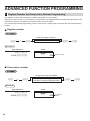
1 Register Number and Consecutive Number Programming
The register number and consecutive numbers are printed on every receipt.
When your store has two or more registers, it is practical to set separate register numbers for identification. The
consecutive number is increased by one each time a receipt is issued.
For consecutive number programming, enter a number (max. 6 digits) that is one less than the desired starting
number.
■ Register number
To set the register number “0”
s
1
@
Register number (one to six digits)
s
A
Example
Key operation
Print
s1@
123456 s A
Register number
■ Consecutive number
To begin the count from 000001
s
2
@
A number (one to six digits) that is one
less than the desired starting number
Example
Key operation
s2@
100000 s A
52
Print
Consecutive
number
s
A
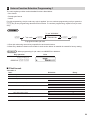
2 Various Function Selection Programming 1
The cash register provides various detailed functions listed below.
• Print format
• Receipt print format
• Others
For this programming, the job code entry style is applied. You can continue programming until you press the
A key for the programming described in this section. To continue programming, repeat from a job code
entry.
To set “00000000”
s
*1Job code
@
*2ABCDEFGH
s
A
To program another job code
*1 Enter job code using numeric keys specified in each section below.
*2 Data entry details are listed on each table in each section below. An asterisk is entered for factory setting.
Example
When programming for job code 6 as ABCDEFGH: 00000111.
Key operation
Print
s6@
00000111 s A
■ Print format
Job code: 6
Item:
Always enter 0.
A
Always enter 0.
B
Time print on all receipts
C
D
Date print on all receipts
E
Consecutive no. print
F
Separator line in reports
G
Zero skip in PLU report
H
Zero skip in full sales/hourly reports
Selection:
Entry:
Yes*
0
0
0
No
Yes*
No
Yes*
No
One line space
Separator line*
No
Yes*
No
Yes*
1
0
1
0
1
0
1
0
1
0
1
53
■■ Receipt print format
Job code: 7
Item:
Always enter 0.
A
Always enter 0.
B
Subtotal print with a press of subtotal key
C
D
E
Always enter 0.
VAT/tax amount print
F
Taxable amount print
G
Net amount print
H
Purchase no. print
Selection:
No*
Yes
Entry:
0
0
0
Yes*
No
Yes*
No
Yes*
No
Yes*
No
1
0
0
1
0
1
0
1
0
1
Selection:
Entry:
■■ Other programming
Job code: 61
Item:
Punctuation for print
A
B
C
D
54
When H is “0”, the punctuation mark (.) is printed by
each 3 digits (ex: 1.200.300).
Always enter 0.
Always enter 0.
Fractional treatment
E
F
Always enter 0.
Time format
G
Date format
H
Position of decimal point (from right) (TAB)
No*
Yes
0
1
0
0
Round off (4 down, 5 up)*
Raising to unit
Disregarding fractional treatment
12-hour format
24-hour format*
Use month-day-year format
Use day-month-year format*
Use year-month-day format
0
1
2
0
0
1
0
1
2
0 to 3 (default: 2)
Job code: 62
Item:
HALO function
A
B
C
D
Always enter 0.
Always enter 0.
E
F
Always enter 0.
Printing of void mode in X2/Z2 report
G
Printing of void mode in X1/Z1 report
H
Addition to the hourly total in VOID mode
Buffered keyboard
Job code: 63
Item:
Receipting at the time of “no sale” entry
A
B
No sale after non-add code entry
C
Non-add code entry
D
Copy receipt
E
F
Entry that causes the merchandise subtotal to
be smaller than zero
Subtotal entry before tendering
G
Subtotal entry before direct non-tender finalization
H
Direct non-tender finalization after tendering
Selection:
Entry:
Yes*
No
Yes*
No
Yes*
No
No*
Yes
0
1
0
0
1
0
1
0
1
Selection:
Entry:
Disable
1
No
Yes*
Enable*
Disable
Noncompulsory*
Compulsory
Noncompulsory*
Compulsory
Disable
Enable*
0
1
0
1
0
1
0
1
0
1
Invalid*
Valid
Yes*
No
Disable
Enable*
Enable*
0
1
0
0
0
1
0
1
0
55
Job code: 64
Item:
Printing of GT1 on Z report
A
B
Printing of GT2 on Z report
C
Printing of GT3 on Z report
D
E
Always enter 0.
Printing of Z counter on Z report
F
Printing of DATA on PLU resetting report
G
Resetting of GT1, 2, 3 at the general Z1 report
H
Always enter 0.
Job code: 65
Item:
Printing of GT1 on X report
A
B
Printing of GT2 on X report
C
Printing of GT3 on X report
D
Starting cash memory input
E
F
G
H
Always enter 0.
Always enter 0.
Always enter 0.
Always enter 0.
Job code: 66
Item:
After transaction receipt
A
56
B
Amount printing when PLU unit price is zero
C
D
Always enter 0.
E
F
G
Always enter 0.
Always enter 0.
Logo text print on journal
H
Footer print control
VAT/tax assignment print
Selection:
Entry:
No
1
Yes*
No
Yes*
No
No*
Yes
0
0
1
0
1
0
1
0
Selection:
Entry:
Yes
1
Non-compulsory*
Compulsory
0
1
0
0
0
0
Selection:
Entry:
Yes
No*
0
1
0
0
0
1
0
1
Yes*
No
Yes*
No
Yes*
No*
Yes
No*
Yes
No*
Total only
Details*
No*
Yes
No*
Yes
All receipts*
Only on selected function key at the
time of finalization
0
1
0
1
0
0
1
0
1
0
0
1
0
1
0
Job code: 67
Item:
Rounding amount printing
A
B
Selection:
Total amount rounding when a transaction is finalized
directly by
C c
or
Entry:
No*
Yes
key
C
D
E
Rounding up of the unit digit of amount
F
Limit of the least significant digit in entering amount of
item
G
Memory of difference due to rounding
H
Limit of the least significant digit in entering amount of
payment
Rounding down of the unit digit of amount
Application of rounding
Rounding*
0
1
0
Not rounding
1
0 - 9 (default: 0)
Item and payment*
Payment
Arbitrary*
0 only
0 and 5 only
No*
Yes
Arbitrary*
0 only
0 and 5 only
0 - 9 (default: 0)
0
1
0
1
2
0
1
0
1
2
Rounding amount printing (A)
Total amount rounding when a transaction is finalized directly by C or c key (B)
Rounding up of the unit digit of amount (C)
Rounding down of the unit digit of amount (D)
•Handle C and D as a pair.
The rounding is performed as follows:
In case C = 0: Unit digit of amount < or = Value of D — rounding down
Value of D < or = Unit digit of amount — rounding to 5
In other cases: Unit digit of amount < or = Value of D — rounding down
Value of D < Unit digit of amount < Value of C — rounding to 5
Value of C < or = Unit digit of amount — rounding up
Application of rounding (E)
Limit of the least significant digit in entering amount of item (F)
Memory of difference due to rounding (G)
Limit of the least significant digit in entering amount of payment (H)
<Example>
CD
82
54
E
Item & payment
Payment
F
0 and 5 only
Arbitrary
G
No
Yes
H
0 and 5 only
0 only
57
Job code: 68
Item:
Printing data on EJ Z report
A
B
C
Always enter 0.
Temporary EJ printing during a transaction
D
E
Always enter 0.
PGM mode operation records type
F
REG/VOID modes operation records type
G
Compressing printing for EJ data
H
Action when EJ memory area is full
Selection:
No
Yes*
Entry:
Disable
0
1
0
0
Enable*
1
Details*
Header information only
Details*
Total
No (normal size)
Yes (small size)*
Continue
Continue and warning
(with near full warning)*
Lock and warning
(with near full warning)
0
0
1
0
1
0
1
0
1
2
Printing data on EJ Z report
•Select “No” to issue an EJ Z report without printing the journal data on it.
Temporary EJ printing during a transaction
•If selecting “enable”, you can print journal data of a current transaction recorded in EJ memory by pressing the
R key during the transaction. To realize this function completely, the cash register must be programmed to
print the receipt and set the Receipt ON/OFF function to OFF.
PGM mode operation records type
•The header information only is recorded during the program reading operation.
The header information only is recorded for X/Z reports.
Action when EJ memory area is full
•By default, when the memory for EJ becomes nearly full, the cash register shows decimal points at the 7th and
8th positions of the display (EJ memory nearly full warning), and the cash register keeps storing new data
while erasing the oldest data. When “0” is selected, the cash register will no longer show EJ memory nearly
full warning. When “2” is selected, the cash register shows EJ memory nearly full warning and when the
memory is totally full, the cash register locks the sales/data entry with a display of the memory full error “
”.
You must issue an EJ report (Z1 report) at this time.
58
Job code: 69
Item:
Always enter 0.
A
Always enter 0.
B
Always enter 0.
C
D
Rounding of foreign currency for
V
E
Tax system
F
Tax print when taxable subtotal is zero
G
Tax print when tax is zero
H
Smallest coin (for rounding system)
Selection:
Entry:
Rising to unit*
Round off (4 down/5 up)
Auto tax 1-4
Auto VAT 1-4*
Manual VAT 1-4
Manual VAT 1
Manual tax 1-4
Auto VAT 1 & Auto tax 2-4
No*
Yes
Yes*
No
Normal*
25
50
100
0
1
0
1
2
3
4
5
0
1
0
1
0
1
2
3
0
0
0
NOTE For (H) smallest coin (for rounding system), as follows;
H=25
Lowest 2 digits
Lowest 2 digits after rounding
0 - 12
13 - 37
38 - 62
63 - 87
88 - 99
00
25
50
75
00 (i.e. rounded up to 100)
Lowest 2 digits
Lowest 2 digits after rounding
0 - 24
25 - 74
75 - 99
00
50
00 (i.e. rounded up to 100)
H=50
H=100
Lowest 2 digits
Lowest 2 digits after rounding
0 - 49
50 - 99
00
00 (i.e. rounded up to 100)
59
Job code: 16 (Control unit (only available in specific countries))
Item:
Selection:
Type
Cash Control Unit (G&D)*
A
B
Transmission speed .(bps)
C-H
Inhibited
Clean Cash (RI)
9600*
19200
38400
-
Entry:
0
1
0
1
2
-
■■ Miscellaneous data
To set “0”
s
Job code
@
Data
s
A
To program another job code
Job code: 71 (GT2)
Data: GT2 (max. 13 digits: 0 - 9999999999999)
Job code: 72 (GT3)
Data: GT3 (max. 13 digits: 0 - 9999999999999)
Job code: 76 (Z1 counter)
Data: Z1 counter (max. 4 digits: 0 - 9999)
Job code: 77 (Z2 counter)
Data: Z2 counter (max. 4 digits: 0 - 9999)
Job code: 612 (VAT ID (only available in specific countries))
Data:VAT ID (max. 9 or 10 digits:
0 – 999999999 or 9999999999)
60
3 Various Function Selection Programming 2
The cash register provides various options so you can use the register to suit your sales needs.
In this section, you can program the following features (parameters within parentheses indicate default setting):
• Power save mode (entering the power save mode after 30 minutes)
• Logo message print format (Header 3-line message and footer 3-line message)
• Save SD function
• Thermal printer density (standard density)
■ Power save mode
To set “000”
s
10
@
s
ABC
A
To program another job code
Item:
Entering power save mode when time is displayed
A
BC
Selection:
Entry:
Yes*
No
0
1
00 to 99
(default 30)
(00: 100 minutes)
Time (minute) to entering power save mode since no
operation is made
Example
Key operation
Print
s 10 @
030 s A
■ Logo message print format
You can select the number of lines for your logo message, and the position to print it on receipt.
For details of the logo message type, please refer to “Logo messages” section on “Text Programming”.
To set “0”
s
11
@
A
s
A
To program another job code
A: Logo message type
0: Header 3-line message without graphic logo
1: Graphic logo only
2: Graphic logo and footer 3-line message
3: Header 6-line message
4: Graphic logo and header 3-line message
5: Header 3-line message and footer 3-line message (default*)
Example
Key operation
Print
s 11 @
3sA
61
■■ Save SD function
To set “0000”
s
@
15
ABCD
s
A
To program another job code
Item:
Selection:
Save all RAM data in the SD card at general Z1 report No*
A
B
C
D
Save sales data in the SD card at general Z1 report
Entry:
0
1
0
Yes
No*
Yes
Save Electronic Journal data in the SD card at general Not to save EJ data and not to clear*
Not to save EJ data and clear
Z1 report
Save EJ data and clear
Control characters
Non-convert*
Convert to space code (0x20)
(when EJ data is saved in the SD card.)
1
0
1
2
0
1
Example
Key operation
Print
s 15 @ 100 s A
■■ Thermal printer density
To set “0”
s
50
Printer density
(00-99)
@
s
A
To program another job code
Printer density (00-99):
Selecting light and shade
00 = 80% for printer standard
50 = 90% for printer standard (default*)
99 = 100% for printer standard
To make the print darker, set a larger number, and to make the print lighter, set a
smaller number.
Example
62
Key operation
s 50 @ 70 s A
Print
4 EURO Programming
For details of EURO migration operation, please refer to “EURO MIGRATION FUNCTION”.
■ EURO system settings
To set “0000”
s
8
@
ABCD
s
A
To program another job code
Item:
Printing exchange total amount and change amount
A
B
C
D
on receipt
Always enter 0.
Selection:
No*
Yes
Cheque and credit operation when tendering in foreign No*
Yes
currency
Exchange calculation method
Multiplication*
Division
Entry:
0
1
0
0
1
0
1
Printing exchange total amount and change amount on receipt
• Total and change amounts in exchange currency are printed respectively below each of the total and exchange
amounts in domestic currency.
Exchange calculation method
• “Division” or “Multiplication” can be selected for the conversion method from domestic currency to exchange
currency, and the calculation is performed as follows:
In case that “Division” is selected:
Domestic currency amount ÷ Exchange rate = Exchange amount
In case that “Multiplication” is selected:
Domestic currency amount Χ Exchange rate = Exchange amount
Example
Key operation
Print
s8@
1000 s
A
63
■■ Automatic EURO modification operation settings
To set “00”
s
@
12
s
AB
A
To program another job code
Item:
Converting the preset unit price of Dept./PLU in the
A
B
Selection:
Entry:
automatic modification operation for EURO (job #800
in the Z/PGM mode)
No
1
Automatic modification operation for EURO (job #800
in the Z/PGM mode) at the preset date
Compulsory*
Non-compulsory
0
1
Yes*
0
Example
Key operation
Print
s 12 @ 01 s
A
NOTE If you have already made the Job #800 operation with the substitution of 3 for “A” in the Z/PGM mode,
this programming is disabled.
■■ Date setting for EURO modification operation
To set all zeros
s
13
@
Date (DD-MM-YY)
(5 or 6 digits)
s
A
To program another job code
Example
Key operation
Print
s 13 @ 010113 s
A
NOTE •In case you changed the date format using job code 61, follow the format you selected for setting the
64
date.
•If all zeros are set, this programming is disabled.
•If you have already made the Job #800 operation with the substitution of 3 for “A” in the Z/PGM mode,
this programming is disabled.
■■ Time setting for EURO modification operation
To set all zeros
s
14
@
Time (Hour)
(00-23)
s
A
To program another job code
Example
Key operation
Print
s 14 @ 10 s
A
NOTE If you have already made the Job #800 operation with the substitution of 3 for “A” in the Z/PGM mode,
this programming is disabled.
65
5 Reading Stored Programs
The machine allows you to read every program stored in the Z/PGM mode.
■ Key sequence for reading stored program
Report name
Key sequence
Programming report 1
1
Programming report 2
2
Printer density programming report
3
Department programming report
4
PLU programming report
5
A
A
A
A
A (Full reading)
Reading a start PLU
(Assigning a range) Start PLU
code
ROM version report
6
@
End PLU
code
@
5
A
A
■ Sample printouts
Programming report 1
Mode
Function no.& its text
Function parameters
Percent rate with sign
Percent limit
Logo Message
Print format (A-H)
Receipt print format (A-H)
EURO system settings (A-D)
Power save mode (A-C)
Logo message print format
Automatic EURO modification
operation settings (AB)
Date setting for EURO
modification operation
Time setting for EURO
modification operation
SD card programming (A-D)
Entry digit limit
Function
parameters (A-C)
Foreign currency
symbol/Rate
Tax rate
66
Programming report 2
Department programming report
Job code
A to H from the left
Dept. code
Dept. text
Dept. unit price
w/sign
Dept. function
Tax status
Domestic currency symbol
Language selection
PLU programming report
PLU code
PLU text
PLU/subdepartment
selection
Unit price
Associated
dept. code
Printer density programming report
Printer density
(entered value)
ROM version report
Version number
Printing density
example
67
READING (X) AND RESETTING (Z)
OF SALES TOTALS
• Use the reading function (X) when you need to take a reading of sales information entered since the last reset.
You can take this reading any number of times. It does not affect the register’s memory.
• Use the resetting function (Z) when you need to clear the register’s memory. Resetting prints all sales
information and clears the entire memory except for the GT1 through GT3, reset count, and consecutive
number.
1 Summary of Reading (X) and Resetting (Z) Reports
X1 and Z1 reports: Daily sales reports
X2 and Z2 reports: Periodic (monthly) consolidation reports
When you take an X1 or X2 report, turn the mode switch to the X/Flash position, and use the corresponding key
sequence.
When you take an Z1 or Z2 report, turn the mode switch to the Z/PGM position, and use the corresponding key
sequence.
Item
Full sales report
Daily report (X1/Z1)
Periodic report (X2/Z2)
PLU report
Hourly report
Mode switch position
X/Flash
Z/PGM
X1
X2
Z1
Z2
X1
Z1
X1
Z1
Flash report (only display)
Key operation
A
HA
For all PLUs
For a start PLU
Start PLU
code
@
End PLU
code
p
v
To clear the display, press the l key or turn the
mode switch to another position.
Department sales total
X1
―
Cash in drawer total
X1
―
Sales total
X1
―
For dept.1 to dept.4: ! to $
For dept.5 to dept.8: H ! to H $
c
C
NOTE •Whenbothsalesquantitiesandsalesamountsarezero,printingisskipped.Ifyoudonotwanttoskip,
68
changetheprogramming.(Referto“Printformat”of“VariousFunctionSelectionProgramming1”on
page53.)
•“X”representsreadsymboland“Z”representsresetsymbolinthereports.
•TostopreadingandresettingthePLUsalesreport,presstheEkey.
Thedatawillnotbeerasedwhenyoureset.
•ThedrawerdoesnotopenwhenyoutakeX/Zreports.
ThedrawercanbeopenedbypressingtheAkeyinREGmodetoremoveitafterclosingyour
business.
2 Daily Sales Totals
For the sample reports of the full sales and periodic consolidation report, refer to “FULL SALES REPORT (X or Z
REPORT)” on page 27-28.
■ PLU report by designated range
• Sample report
Mode title*
Report title
Range
PLU code
Item label
Sales q'ty and
total
Range sum
■ Hourly report
• Sample report
Mode title*
Report title
Customer counter
Sale total
Average (Sales total/Customer counter)
*: When you take Z1 report, “Z1” is printed.
69
EJ REPORT READING AND RESETTING
The cash register provides an electronic journal (EJ) function. This function is intended to record the journal data
in a memory instead of journal paper, and print the data as an EJ report. The register records the journal data in
REG,
, X/Flash, and Z/PGM modes. By default, a maximum of 3000 lines are stored in the memory. For
details of EJ programming, please refer to “Other programming (Job code 68)” on page 58.
■■ Printing journal data on the way of a transaction (temporary EJ printing)
You can print journal data of a current transaction recorded in EJ memory by pressing the R key during the
transaction.
NOTE This function is valid when the receipt ON/OFF function is set to OFF. For changing the setting, refer to
“Additional Information for BASIC SALES ENTRY” on page 29.
•Sample report
■■ Reading and resetting the electronic journal data (Issuing EJ report)
You can read the journal data stored in the EJ memory in the journal format by executing the following procedure
in the X/Flash or Z/PGM mode.
• Sample EJ report
To read all of the data: (X/Flash mode)
700
@
A
To reset all of the data: (Z/PGM mode)
700
@
A
To read the last 10 records: (X/Flash mode)
710
@
A
NOTE •By programming, you can also issue an EJ
Z report without printing the journal data on
it. Refer to “Other programming” (Job code
68) on page 58 for the programming.
70
•To stop reading or resetting the data, press
the E key. The data will not be erased
when resetting.
•On the EJ memory, a maximum of 3000
lines of data can be stored. When executing
all data reading, all of the data stored in the
EJ memory will be printed.
Header
information
print
EURO MIGRATION FUNCTION
NOTE EURO programming described in this section are for users in the countries which will join to the
members of the European Currency Union, not for the users in the countries already have joined the
Union.
Your register can be modified to correspond with each period set for the introduction of EURO, and in your
register each currency is treated as shown on the table below depending on which period you are in.
Basically your register can be automatically modified to correspond to the introduction of EURO by executing
automatic EURO modification operation shown below in the Z/PGM mode. However, there are several options
you must set depending on your needs. So, please carefully conduct necessary settings.
How currencies are treated in your register
Period 1
After the introduction of
EURO, and before EURO
banknotes and coins begin
to circulate
Currency
EURO
Exchange key
Period 2
After EURO banknotes
and coins begin to
circulate, and before
national currency is
withdrawn from circulation.
(Co-existence of EURO
and national currency)
Domestic currency
National currency
Domestic currency
Exchange key
Foreign currency
Period 3
After the national currency
is withdrawn from
circulation
Domestic currency
Exchange key
Automatic EURO modification operation
Make sure the mode switch is in the Z/PGM mode first, then perform the following procedure. Please note that
you can perform each operation only once with the substitution of “A=1”, “A=2” and “A=3”. For example if you
performed the operation with the substitution of “A=2” first, you cannot perform the operation with the
substitution of “A=1”.
800
@
*A
A
* A=1: Applicable for period 1
* A=2: Applicable for period 2
* A=3: Applicable for period 3
71
The details of the register system modification are as shown below:
Items
General Z1 report
General Z2 report
GT memories
(GT1, GT2 and GT3)
Conversion of preset prices of Dept./
PLU
Exchange amount printing for total and
change
Exchange calculation method
Domestic currency symbol
Domestic currency decimal point
position
Exchange currency symbol
Exchange currency decimal point
position
Smallest coin (for rounding system)
Rounding up/down of the unit digits of
amount
Limit of the least significant digit in
entering amount of item
Limit of the least significant digit in
entering amount of payment
Memory of difference due to rounding
Rounding of foreign currency for V
A=1
(EURO status 1)
Issue
Issue
-
A=2
(EURO status 2)
Issue
Issue
Clear
A=3
(EURO status 3)
Issue
Issue
Clear*1
-
Yes
Yes*1
Yes
Yes
No
Division
-
Multiplication
[EURO]
2
Multiplication
[EURO]
2
[EURO]
-*2
-
Previous domestic
currency symbol
Previous domestic currency
decimal point position
Normal
00
-
Arbitrary
Arbitrary*1
-
Arbitrary
Arbitrary*1
Round off
(4 down/5 up)
No
Round off
No*1
Round off
2
Normal*1
00*1
•The item marked with “-” remains the same as the previous data.
*1: When you perform from EURO status 2, previous data remains unchanged.
*2: When you perform from EURO status 1 or 2, “space” is set.
IMPORTANT
•Conversion of the preset unit prices of departments and PLUs
Note that the conversion rate of the preset rate of the V key is applied for the conversion, and the method is
set to “division”. When the conversion is performed, the message “PRICE CONVERTED” will be printed on the
#800 report.
•After the execution of the procedure with “A=1”, treat EURO as foreign currency using the exchange key (V)
with the preset rate entry. Set the EURO conversion rate as the currency exchange rate for the exchange key.
•After the execution of the procedure with “A=2”, treat EURO as domestic currency, and national currency as
foreign currency using the exchange key (V) with the preset rate entry. Set the EURO conversion rate as the
currency exchange rate for the exchange key.
NOTE You can manually make these settings. For programming details, please refer to programming section.
72
Checking the current EURO status
You can check the EURO status currently set on the cash register. Turn the mode switch to the X/Flash
position, and perform the following sequence. The current EURO status will be printed on the receipt.
800
@
A
EURO status
■■ Optional Programming for the Introduction of EURO
Some programming relating with the function of exchange key (V) cannot be changed automatically with the
execution of modification operation described in the previous section. After the execution on each period,
conduct the following programming depending on your needs.
Programming for Exchange Key (V)
Currency exchange rate
For period 1 and period 2, set the EURO conversion rate.
For programming details, refer to “Rate for % and V” on page 45.
Exchange rate entry selection
When you treat EURO currency in the exchange key, you can use the V key function. For programming
details, refer to “Function parameters for V” on page 47.
Cheque/credit operation
For period 1 and period 2, enable cheque/credit operation when tendering in foreign currency so that you can
treat cheque and credit for EURO currency and national currency. For programming details, refer to “EURO
system settings” on page 63.
Setting the date and time when the automatic modification operation for EURO should be executed
Selection of compulsory/non-compulsory of execution of the automatic modification operation for EURO
You can program the scheduled date and time to execute the automatic EURO modification operation (for
programming details, refer to page 64-65).
From ten days before the preset date, the remaining days are printed at the bottom of the daily full resetting (Z1)
report as follows.
Preset date and time
Remaining days
When the above-mentioned preset date and time has come, and also when you start an entry in the REG mode,
the error symbol “
” is displayed. You cannot make any operation in the REG mode until you execute the
automatic modification operation for EURO (job #800) in the Z/PGM mode.
You can program so that you can make entries in the REG mode even when the error symbol is displayed.
Date and time setting will be reset after the execution of the automatic modification operation and you can
program again the date and time for the next automatic modification operation.
73
SD CARD FUNCTION
The register’s data can be saved to the SD memory card, and the programming data can be loaded from the SD
memory card.
To use the SD card function, turn the mode switch to the Z/PGM position and perform the corresponding
operations.
■■ Inserting and removing an SD memory card
The SD card slot is located on the right side of your register.
Inserting an SD memory card
Insert an SD memory card into the SD card slot with the printed SD logo facing
upwards. Push the card in steady with a finger until it clicks and release it slowly.
Removing the SD memory card
Push in the card gently with a finger and release it. The card will come out.
NOTE •This model supports SD cards only. Use of any other types of SD cards such as mini SD, micro SD,
etc. with an adapter is not supported.
•When inserting or removing the SD memory card, be sure to release it slowly. Otherwise, the card may
pop out and injure your finger.
•Never touch or remove the SD memory card while it is accessed, otherwise the data stored in it may
be damaged.
•Formatting the SD memory card erases all the data in it.
Caution: Never turn the power off, while the SD memory card is accessed.
■■ SD card formatting
When the SD card is not formatted yet, take the formatting operation.
s
140
@
s
A
The master folder “SHARP/ECRXXX14” is created for the data file.
74
■■ Data saving
The sales data, EJ data or programming data can be saved to the SD card.
s
*Job no.
141
144
650
750
*Job no.
@
s
A
Saving data
All programming data
All RAM data
Sales data
EJ data (save and clear)
■■ Data loading
The sales data, EJ data or programming data can be saved to the SD card.
s
*Job no.
147
148
*Job no.
@
s
A
Loading data
All programming data
All RAM data
NOTE The loading operation must be circumspect in execution, the data (#147: for all programming data,
#148: for the sales data and all programming data) will be recovered with the back-up data.
■■ Error message table of the SD card function
Error code
01
02
03
05
09
10
99
Error state and action
No SD memory card is found. Insert an SD memory card into the SD card slot or reinsert it
correctly.
The write-protect switch on the SD memory card is in the “PROTECTED” position. Set the
switch on the “NOT PROTECTED” position.
The SD memory card is full. Delete unnecessary data from the card on a PC or replace the
card with a new one. When using a new SD memory card, be sure to format it in advance.
The data stored in the SD memory card is incorrect. Write correct data into the SD memory
card on a PC.
The user folder is not found. (SHARP/ECRXXX14/user folder name)
Over limitation of data records (Over max. record in sales or EJ data.)
An error other than the above mentioned has occurred while the SD memory card is
accessed. Perform the interrupted operation again from the beginning.
75
OPERATOR MAINTENANCE
1 In Case of Power Failure
When power is lost, the machine retains its memory contents and all information on sales entries.
(Note: Three alkaline batteries must be installed.)
• When power failure is encountered in register idle state or during an entry, the
machine returns to normal operation after power recovery.
• When power failure is encountered during a printing cycle, the register prints
“============” and then carries out the correct printing procedure after power
recovery. (See the sample print.)
2 In Case of Printer Error
If the printer runs out of paper, the printer will stall, and “
” will appear on the display. Key entries
will not be accepted. Refer to section 5 in this chapter, install a new roll, then press the l key. The printer will
print the power failure symbol and resume printing.
3 Cautions in Handling the Printer and Recording Paper
■ Cautions in handling the printer
• Avoid dusty and humid environments, direct sunlight and iron powder. (A permanent magnet and electromagnet
are used in this machine.)
• Never pull the paper when the print roller arm is locked. First lift up the arm, and then remove the paper.
• Never touch the surface of the printer head and print roller.
■ Cautions in handling the recording paper (thermal paper)
• Use only the paper specified by SHARP.
• Do not unpack the thermal paper until you are ready to use it.
• Avoid heat. The paper will color at around 70°C.
• Avoid dusty and humid storage places. Avoid direct sunlight.
• The printed text on the paper can discolor under conditions of high humidity and temperature, exposure to the
direct sunlight, contact with glue, thinner or a freshly copied blueprint, and heat caused by friction from
scratching or other such means.
• Be very careful when handling the thermal paper. If you want to keep a permanent record, copy the printed text
with a photocopier.
76
4 Replacing the Batteries
This cash register displays a low battery symbol ( ) when the batteries are low, and displays a no battery
symbol ( ) when batteries are extremely low or batteries are not installed.
When the low battery symbol is displayed, replace the batteries with new ones as soon as possible. The
existing batteries will be dead in about two days.
When the no battery symbol is displayed, replace the batteries immediately. Otherwise, if the AC adapter plug is
disconnected or a power failure occurs, all the programmed settings will be reset to the default settings and any
data stored in memory will be cleared.
Caution: While the no battery symbol is being displayed, do not turn the mode switch to any positions.
Follow the battery replacement procedure below without changing the mode switch position.
Never pull out the AC adapter from the AC outlet, all the programmed settings will be reset to
the default settings and any data stored in memory will be cleared.
NOTE Besuretoobserveprecautionsshownonpage1whenhandlingbatteries.
To replace the batteries:
1. Make sure that the cash register is plugged in.
2. Remove the printer cover.
3. Open the battery compartment cover next to the paper roll cradle and
remove the old batteries.
4. Install three new alkaline batteries LR6 (“AA” size) in the battery
compartment. Be sure the positive and negative poles of each battery are
facing in the proper direction. When they are installed correctly, the “ ”
or “ ” symbol will disappear.
5. Close the battery compartment cover.
6. Replace the printer cover.
77
5 Replacing the Paper Roll
Be sure to use paper rolls specified by SHARP.
The use of any other paper rolls other than those specified could cause paper jamming, resulting in register
malfunction.
Paper specification
Paper width: 57.5 ± 0.5 mm
Max. outside diameter: 80 mm
Quality: High quality (0.06 to 0.08 mm thickness)
• Be sure to set the paper roll prior to using your machine, otherwise it may cause a malfunction.
Install the paper roll in the printer. Be careful to set the roll correctly.
(How to set the paper roll)
To the printer
Correct
To the printer
Incorrect
■ Removing the paper roll
When a red dye appears on the paper roll, it is time to replace it. Replace the paper roll with a new one. If you
plan on not using the register for an extended period of time, remove the paper roll, and store it in an appropriate
place.
Caution: The paper cutter is mounted on the printer cover. Be careful not to cut yourself.
Print roller arm
1. Remove the printer cover.
2. Lift up the print roller arm.
3. Remove the paper roll from the paper roll cradle.
NOTE Donotpullthepaperthroughtheprinter.
■ Installing the paper roll
For information on how to install paper rolls, refer to “Installing a Paper Roll” on page 9.
Caution: The paper cutter is mounted on the printer cover. Be careful not to cut yourself.
78
6 Removing a Paper Jam
Caution: The paper cutter is mounted on the printer cover. Be careful not to cut yourself. Never touch
the printer head immediately after printing, as the head may still be hot.
1. Remove the printer cover.
2. Lift up the print roller arm. (When a large roll paper is set, hold the
both side of the print roller arm as per the diagram.)
3. Remove the paper jam. Check for and remove any shreds of paper
that may remain in the printer.
4. Reset the paper roll correctly by following the steps in “Installing a
Paper Roll” on page 9.
Print roller arm
7 Cleaning the Printer (Printer Head / Sensor / Roller)
When the printed text is getting dark or faint, paper dust may be stuck to the printer head, sensor and/or roller.
Clean them as follows:
Caution:
• Never touch the printer head with a tool or anything hard as it may damage the head.
• The paper cutter is mounted on the printer cover. Be careful not to cut yourself.
Sensor
Roller
Printer head
1.
2.
3.
4.
Turn the mode switch to the “ ” position.
Remove the printer cover.
Lift up the print roller arm.
Remove the paper roll referring to the “Removing the paper roll”
section.
5. Clean the printer head with a cotton swab or soft rag moistened
with ethyl alcohol or isopropyl alcohol. Clean the roller and the
sensor in the same manner.
6. Reset the paper roll correctly by following the steps in “Installing a
Paper Roll” on page 9.
Print roller arm
79
8 Removing the Drawer
The drawer in the register is detachable. After closing your
business for the day, remove the drawer. To detach the drawer, pull
it forward fully, and while holding the lever down, lift the drawer
slightly and remove. The 6-denomination coin case is detachable.
Lever
Coin case
Lever
1
2
9 Opening the Drawer by Hand
Lever
80
The drawer automatically opens. However, when a power failure occurs
or the machine becomes out of order, slide the lever located on the
bottom of the machine in the direction of the arrow. (See the diagram at
the left.)
The drawer will not open if it is locked with the key.
BEFORE CALLING FOR SERVICE
The malfunctions shown in the left-hand column below, labeled “Fault”, do not necessarily indicate functional
faults of the machine. It is therefore advisable to refer to “Checking” shown in the right-hand column before
calling for service.
Fault
Checking
(1) The display shows symbols that do not make
sense.
•Has the machine been initialized properly as
shown in “PREPARING THE CASH REGISTER”?
(Note that initialization clears all the data and
programmed settings stored in memory.)
(2) The display won’t illuminate even when the
mode switch is turned to any other position than
“ ”.
•Is power supplied to the electrical outlet?
•Is the AC adapter plug out or loosely connected to
the AC outlet?
(3) The display is illuminated, but the whole
machine refuses registrations.
•Is the mode switch set properly at the “REG”
position?
(4) No receipt is issued.
•Is the paper roll properly installed?
•Is there a paper jam?
•Is the receipt function in the “OFF” status?
•Is the print roller arm securely locked?
(5) Printing is unusual.
•Is the print roller arm securely locked? Open the
print roller arm, and lock the arm by following the
instruction of installation.
•Is the paper roll properly installed?
•Are the printer head/sensor/roller clean?
(6) Continuous printing stops.
•“–” will be displayed in order from left to right
continuously. It occurs when the printer
temperature is high.
Printing will automatically restart after several
seconds.
■■ Error code table
When the following error codes are displayed, press the l key and take a proper action according to the table
below.
Error
code
Error status
Action
E01
Registration error
Make a correct key entry.
E02
Misoperation error
Make a correct key entry.
E11
Compulsory depression of the s key
Press the s key and continue the operation.
E12
Compulsory tendering
Make a tendering operation.
E33
Compulsory SCM (starting cash memory) Make the SCM (starting cash memory) entry.
entry
E34
Overflow limitation error
Make a registration within a limit of entry.
E35
The open price entry is inhibited.
Make a preset price entry.
E36
The preset price entry is inhibited.
Make an open price entry.
E37
The direct finalization is inhibited.
Make a tendering operation.
E67
Subtotal void is not allowed.
Finalize the transaction, and correct the wrong
mode.
entries in the
E80
The battery trouble is occurred.
Change the battery.
81
SPECIFICATIONS
Model:
XE-A137
XE-A147
Dimensions:
335 (W) x 360 (D) x 190 (H) mm
Weight:
Approx. 5 kg
Power Source:
Official (nominal) voltage and frequency
Power Consumption:
Stand-by:1.9 W (The official voltage: 220 to 230V [50Hz/60Hz] and 230 to 240 V [50 Hz])
Operating:8.1 W (The official voltage: 220 to 230 V [50Hz/60Hz] and 230 to 240 V [50 Hz])
Working Temperature: 0 to 40 °C (32 to 104 °F)
Humidity:
20 % to 90 %
Electronics:
LSI (CPU) etc.
Display:
7-segment display (9 positions)
Printer:
Type:
One-station thermal printer
Printing speed:
Approx. 7 lines/second
Printing capacity:
30 digits
Other functions:
- Receipt (ON-OFF) function
Logo:
Graphic logo printing:
Size:
130 (H) x 360 (W) pixel
Area of black must be less than 35% of all area.
Logo message printing:
Logo message for the receipt (max. 30 characters x 6 lines)
Paper Roll:
Width: 57.5 ± 0.5 mm
Max. diameter: 80 mm
Quality: High quality (0.06 to 0.08 mm thickness)
Cash Drawer:
3 slots for bills and 6 for coin denominations
Accessories:
Basic user manual:
Paper roll:
Mode key (same as drawer lock key):
AC adapter:
Fiscal caution sheet:
1 copy
1
2
1
1 (for Germany and Norway)
*Specifications and appearance are subject to change without notice for improvement.
■■ Option
The following sharp option is available only for your XE-A147 register.
•Option battery model XE-A1BT
For installing option battery XE-A1BT, please refer to “XE-A1BT Installation Manual”.
82
CAUTION: (only for the XE-A147)
Shielded interface cables must be used with this equipment to maintain compliance with EMC regulations.
XE-A137
Noise level LpA: 56.4 dB(A-weighted)
Measured according to EN ISO 7779:2001
[Maximum value if the cash drawer springs open LpAI: 71.4 dB(A-weighted)]
XE-A147
Noise level LpA: 53.0 dB(A-weighted)
Measured according to EN ISO 7779:2001
[Maximum value if the cash drawer springs open LpAI: 70.1 dB(A-weighted)]
SHARP ELECTRONICS (Europe) GmbH
Postbox 105504
20038 Hamburg, Germany