1
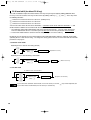
ELECTRONIC CASH REGISTER
ELEKTRONISCHE REGISTRIERKASSE
CAISSE ENREGISTREUSE ELECTRONIQUE
CAJA REGISTRADORA ELECTRONICA
ELEKTRONISCHE KASSA
INSTRUCTION MANUAL
BEDIENUNGSANLEITUNG
MANUEL D’INSTRUCTIONS
MODEL
MODELL
MODELE
MODELO
MODEL
XE-A213
MANUAL DE INSTRUCCIONES
GEBRUIKSAANWIJZING
XE-A213
With Quick Start Guide
Mit Schnellstartanleitung
Avec Guide de démarrage rapide
Con Guía de inicio rápido
Met Gids voor snel starten
A213/Coverback/(SEEG)(5)
06.4.28 7:58 PM
Page 2
CAUTION:
The cash register should be securely fitted to the supporting platforms to avoid instability when the drawer
is open.
CAUTION:
The socket-outlet shall be installed near the equipment and shall be easily accessible.
VORSICHT:
Die Netzsteckdose mu§ nahe dem Gert angebracht und leicht zugnglich sein.
ATTENTION:
La prise de courant murale devra tre installe proximit de lÕquipement et devra tre facilement
accessible.
AVISO:
El tomacorriente debe estar instalado cerca del equipo y debe quedar bien accesible.
VARNING:
Det matande vgguttaget skall placeras nra apparaten och vara ltt tkomligt.
LET OP:
Het stopcontact dient in de buurt van de kassa en gemakkelijk toegangbaar te zijn.
CAUTION:
For a complete electrical disconnection pull out the mains plug.
VORSICHT:
Zur vollstndigen elektrischen Trennung vom Netz den Netzstecker ziehen.
ATTENTION:
Pour obtenir une mise hors-circuit totale, dbrancher la prise de courant secteur.
AVISO:
Para una desconexin elctrica completa, desenchufar el enchufe de tomacorriente.
VARNING:
Fr att helt koppla frn strmmen, dra ut stickproppen.
LET OP:
Trek de stekker uit het stopcontact indien u de stroom geheel wilt uitschakelen.
Warning
This is a Class A product. In a domestic environment this product may cause radio interference in which
case the user may be required to take adequate measures.
Warnung
Dies ist eine Einrichtung der Klasse A. Diese Einrichtung kann im Wohnbereich Funkstörungen
verursachen; in diesem Fall kann vom Betreiber verlangt werden, angemessene Maßnahmen
durchzuführen und dafür aufzukommen.
Avertissement
Ceci est un produit de Classe A. Dans un environnement domestique ce produit risque de provoquer une
interférence radio, auquel cas l’utilisateur sera obligé d’observer les mesures adéquates.
Advertencia
Este es un producto de la clase A. En un ambiente doméstico es posible que este producto cause
radiointerferencia. En este caso se solicita al usuario que tome medidas adecuadas.
Contact the following for the CE mark.
SHARP ELECTRONICS (Europe) GmbH
Sonninstraße 3, D-20097 Hamburg
A213_1 Quick Start Guide
06.4.28 8:20 PM
Page 1
English
INTRODUCTION
Thank you very much for your purchase of the SHARP Electronic Cash Register, Model XE-A213.
Please read this manual carefully before operating your machine in order to gain full understanding of
functions and features.
Please keep this manual for future reference. It will help you if you encounter any operational problems.
CAUTION!
English
Never install the batteries into the cash register before initializing it. Before you start operating the cash
register, you must first initialize it, then install three new alkaline batteries LR6 (“AA” size) on the register.
Otherwise, distorted memory contents and malfunction of the cash register will occur. For this procedure,
please refer to pages 9 to 10.
IMPORTANT
• Be very careful when removing and replacing the printer cover, as the cutter mounted on it is very
sharp.
• Install the cash register in a location not subject to direct sunlight, unusual temperature changes,
high humidity or splashing water.
Installation in such locations could cause damage to the cabinet and the electronic components.
• Never operate the register with wet hands.
The water could seep into the interior of the register and cause component failure.
• When cleaning your register, use a dry, soft cloth. Never use solvents, such as benzine and/or
thinner.
The use of such chemicals will lead to discoloration or deterioration of the cabinet.
• The register plugs into any standard wall outlet (official (nominal) voltage).
Other electrical devices on the same electrical circuit could cause the register to malfunction.
• For protection against data loss, please install three alkaline batteries LR6 (“AA” size) after
initializing the cash register. When handling the batteries, please observe the following:
Incorrectly using batteries can cause them to burst or leak, possibly damaging the interior of the cash
register.
• RISK OF EXPLOSION IF BATTERY IS REPLACED BY AN INCORRECT TYPE.
DISPOSE OF USED BATTERIES ACCORDING TO THE INSTRUCTIONS.
• Be sure that the positive (+) and negative (–) poles of each battery are facing in the proper
direction for installation.
• Never mix batteries of different types.
• Never mix old batteries and new ones.
• Never leave dead batteries in the battery compartment.
• Remove the batteries if you do not plan to use the cash register for long periods.
• Should a battery leak, clean out the battery compartment immediately, taking care to avoid letting
the battery fluid come into direct contact with your skin.
• For battery disposal, follow the corresponding law in your country.
• For complete electrical disconnection, disconnect the main plug.
1
A213_1 Quick Start Guide
06.4.28 8:20 PM
Page 2
CONTENTS
INTRODUCTION ............................................................................................................................................1
IMPORTANT ..................................................................................................................................................1
CONTENTS....................................................................................................................................................2
Part1 QUICK START GUIDE
STEP1 PARTS AND THEIR FUNCTIONS.................................................................................................5
1 External View ........................................................................................................................................5
2 Printer ....................................................................................................................................................5
3 Mode Switch and Mode Keys ................................................................................................................6
4 Keyboard ...............................................................................................................................................6
5 Displays .................................................................................................................................................8
6 Drawer Lock Key ...................................................................................................................................8
STEP2 PREPARING THE CASH REGISTER ...........................................................................................9
1 Initializing the Cash Register .................................................................................................................9
2 Installing Batteries ...............................................................................................................................10
3 Installing a Paper Roll .........................................................................................................................11
STEP3 BASIC FUNCTION PROGRAMMING..........................................................................................13
1 Abbreviations and Terminology ...........................................................................................................13
2 Prior to Programming ..........................................................................................................................13
Procedure for programming..........................................................................................................13
Description of special keys ...........................................................................................................13
Guidance for text programming ....................................................................................................14
3 Language Selection.............................................................................................................................15
4 Date and Time Programming ..............................................................................................................15
5 Tax Programming ................................................................................................................................16
6 Department Programming ...................................................................................................................17
7 PLU (Price Look-Up) and Subdepartment Programming ....................................................................22
8 Text Programming ...............................................................................................................................24
Clerk names .................................................................................................................................24
Logo messages ............................................................................................................................25
9 Programming Other Necessary Items .................................................................................................26
STEP4 BASIC SALES ENTRY ................................................................................................................27
1 Basic Sales Entry Example .................................................................................................................27
2 PLU Entry ............................................................................................................................................28
Direct PLU entry ...........................................................................................................................28
PLU code entry .............................................................................................................................28
STEP5 CORRECTION .............................................................................................................................29
1 Cancellation of the Numeric Entry .......................................................................................................29
2 Correction of the Last Entry (direct void) .............................................................................................29
3 Correction of the Next-to-last or Earlier Entry (indirect void) ...............................................................30
4 Subtotal Void .......................................................................................................................................30
5 Correction of Incorrect Entries not Handled by the Direct or Indirect Void Function ...........................31
STEP6 FULL SALES REPORT (Z REPORT) ..........................................................................................32
2
A213_1 Quick Start Guide
06.4.28 8:20 PM
Page 3
Part2 FOR THE OPERATOR
OTHER BASIC SALES ENTRIES ...............................................................................................................34
1 Additional Information for BASIC SALES ENTRY ...............................................................................34
2 Error Warning ......................................................................................................................................34
3 Item Entries .........................................................................................................................................35
Single item entries ........................................................................................................................35
Repeat entries ..............................................................................................................................36
Multiplication entries .....................................................................................................................37
Single item cash sale (SICS) entry ...............................................................................................37
PLU level shift (for direct PLU key)...............................................................................................38
4 Displaying Subtotals ............................................................................................................................39
5 Finalization of Transaction ..................................................................................................................40
Cash or cheque tendering ............................................................................................................40
Cash or cheque sale that does not require tender entry ..............................................................40
Credit sale ....................................................................................................................................41
Mixed-tender sale .........................................................................................................................41
6 Computation of VAT (Value Added Tax)/tax .......................................................................................41
VAT/tax system ............................................................................................................................41
VAT shift entries ...........................................................................................................................42
OPTIONAL FEATURES...............................................................................................................................43
1 Auxiliary Entries...................................................................................................................................43
Percent calculations (premium or discount) .................................................................................43
Deduction entries..........................................................................................................................43
Refund entries ..............................................................................................................................44
Non-add code number entries and printing ..................................................................................44
2 Guest Look-Up (GLU) .........................................................................................................................45
3 Auxiliary Payment Treatment ..............................................................................................................47
Currency exchange ......................................................................................................................47
Received-on account entries ........................................................................................................48
Paid-out entries ............................................................................................................................48
No sale (exchange) ......................................................................................................................48
4 Automatic Sequence Key (a key) Entries.........................................................................................48
3
A213_1 Quick Start Guide
06.4.28 8:20 PM
Page 4
Part3 FOR THE MANAGER
PRIOR TO PROGRAMMING ......................................................................................................................49
AUXILIARY FUNCTION PROGRAMMING .................................................................................................52
1 Miscellaneous Key Programming ........................................................................................................52
Programming for -.....................................................................................................................52
Programming for %.....................................................................................................................54
Programming for V.....................................................................................................................56
Programming for r, o, X, Y, c and b ..........................................................................58
Function parameters for A .........................................................................................................60
2 Other Text Programming .....................................................................................................................61
Foreign currency symbol ..............................................................................................................61
Domestic currency symbol ...........................................................................................................61
Training mode text ........................................................................................................................62
Function text .................................................................................................................................62
ADVANCED FUNCTION PROGRAMMING ................................................................................................64
1 Register Number and Consecutive Number Programming .................................................................64
2 Various Function Selection Programming 1 ........................................................................................65
Function selection for miscellaneous keys ...................................................................................65
Print format ...................................................................................................................................66
Receipt print format ......................................................................................................................66
PLU level shift and GLU function parameters ..............................................................................67
Other programming ......................................................................................................................67
3 Various Function Selection Programming 2 ........................................................................................72
Power save mode .........................................................................................................................72
Logo message print format ...........................................................................................................73
Thermal printer density .................................................................................................................73
EJ memory type............................................................................................................................73
Training clerk specification for training mode ...............................................................................74
AUTO key programming - Automatic sequence key ....................................................................74
4 EURO Programming ...........................................................................................................................75
5 Reading Stored Programs ...................................................................................................................76
TRAINING MODE ........................................................................................................................................79
READING (X) AND RESETTING (Z) OF SALES TOTALS.........................................................................80
EJ REPORT READING AND RESETTING .................................................................................................83
OVERRIDE ENTRIES ..................................................................................................................................84
CORRECTION AFTER FINALIZING A TRANSACTION (Void mode).......................................................84
EURO MIGRATION FUNCTION ..................................................................................................................85
OPERATOR MAINTENANCE......................................................................................................................88
1 In Case of Power Failure .....................................................................................................................88
2 In Case of Printer Error .......................................................................................................................88
3 Cautions in Handling the Printer and Recording Paper.......................................................................88
4 Replacing the Batteries .......................................................................................................................89
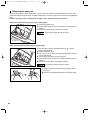
5 Replacing the Paper Roll.....................................................................................................................89
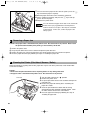
6 Removing a Paper Jam .......................................................................................................................92
7 Cleaning the Printer (Print Head / Sensor / Roller) .............................................................................92
8 Removing the Till and the Drawer .......................................................................................................93
9 Opening the Drawer by Hand ..............................................................................................................93
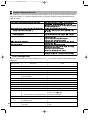
10 Before Calling for Service....................................................................................................................94
Error message table .....................................................................................................................94
SPECIFICATIONS .......................................................................................................................................95
4
A213_1 Quick Start Guide
06.4.28 8:20 PM
Page 5
Part1 QUICK START GUIDE
STEP
1 PARTS AND THEIR FUNCTIONS
1 External View
Front view
Rear view
Customer display
(Pop-up type)
Operator display
Printer cover
Receipt paper
XE-A213
AC power cord
Mode switch
Keyboard
Drawer lock
Drawer
2 Printer
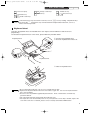
The printer is one station type thermal printer, therefore it does not require any
type of ink ribbon or cartridge.
Lift the rear of the printer cover to remove. To re-install, hook the pawls on the
cabinet and close.
Caution: The paper cutter is mounted on the printer cover. Be careful not
to cut yourself.
Take-up spool
Paper roll cradle
Print roller arm
Paper positioning guides
Print roller
release lever
Inner cover
Do not attempt to remove the paper roll
with the print roller arm locked. This may
result in damage to the printer and print
head.
5
A213_1 Quick Start Guide
06.4.28 8:20 PM
Page 6
3 Mode Switch and Mode Keys
The mode switch can be operated by inserting one of the two supplied mode keys - manager (MA) and operator
(OP) keys. These keys can be inserted or removed only in the “REG” or “ ” position.
The mode switch has these settings:
:
This mode locks all register operations. (AC power turns off.)
No change occurs to register data.
OP X/Z:
To take individual clerk X or Z reports, and to take flash reports.
It can be used to toggle receipt state “ON” and “OFF” by pressing
the R key.
REG:
For entering sales.
PGM:
To program various items.
:
Enters into the void mode. This mode allows correction after
finalizing a transaction.
MGR:
For manager’s entries. The manager can use this mode for an
override entry.
X1/Z1:
To take the X/Z report for various daily totals.
X2/Z2:
To take the X/Z report for periodic (weekly or monthly)
consolidation.
Manager key (MA)
MA
Operator key (OP)
OP
4 Keyboard
Keyboard layout
ESC
RCPT VAT
2
4
6
1
3
5
CLK VAT
SHIFT
#
#
PO
CL
GC
RCPT
L3
AUTO
L2
DEPT
#
L1
PLU
SUB
7
8
9
GLU NBAL
%
4
5
6
CR1
CR2
RA
1
2
3
CH1
CH2
RF
0
00
EX
ST
TL/NS
7
14
21
28
35
42
49
56
63
70
6
13
20
27
34
41
48
55
62
69
5
12
19
26
33
40
47
54
61
68
4
11
18
25
32
39
46
53
60
67
3
10
17
24
31
38
45
52
59
66
2
9
16
23
30
37
44
51
58
65
1
8
15
22
29
36
43
50
57
64
Key names
Paper feed key
ESC
Escape key
RCPT
Receipt print key
VAT
Value added tax key
CLK
#
Clerk code entry key
VAT
SHIFT
#
PLU
/SUB
6
Value added tax shift key
Non-add code/Time display
key
PLU/Subdepartment key
Discount key
Decimal point key
Clear key
%
Percent keys
CL
PO
Paid-out key
00
0 ~
EX
Foreign currency
exchange key
RA
RF
1 ~
Received-on account key
9
Numeric keys
Void key
GC
RCPT
Guest check receipt key
Refund key
AUTO
Automatic sequence key
DEPT
#
Department code entry key
6
Department keys
Multiplication key
L1 ~ L3
PLU level shift keys
A213_1 Quick Start Guide
06.4.28 8:20 PM
Page 7
Part1
GLU
Guest look up key
NBAL
New balance key
CR1 CR2
CH1 CH2
ST
QUICK START GUIDE
Cheque 1 and 2 keys
Subtotal key
TL/NS
1~
Part2
Part3
Total/No sale key
70
Direct PLU keys
Credit 1 and 2 keys
In this manual, key tops are shown in one line, such as p for easy reading. Department keys
are shown like !, and numeric keys are indicated with simple number indication, such as 1,
unless otherwise specified.
Keyboard sheet
Two types of keyboard sheets are installed on the cash register; one for ordinal use and one for text
programming.
To reinstall the keyboard sheet or a new sheet, please follow the procedure below.
➀ Turn over the keyboard cover.
➁ Insert the keyboard sheet into a slit.
Keyboard cover
Keyboard sheet
➂ Close the keyboard cover.
• Do not spread the keyboard cover too far as it might tear the tabs.
• Replace the keyboard sheet with a new one if chance it gets wet. Use of a wet keyboard sheet
may cause problems.
• Be sure to use only SHARP-supplied keyboard sheets. Thick or hard sheets can make key
operations difficult.
• Place the keyboard sheet evenly under the keyboard cover.
• The keyboard cover will eventually wear out. If your keyboard cover is dirty or broken, replace the
cover with a new one. For details, please contact a nearby authorized SHARP dealer.
7
A213_1 Quick Start Guide
06.4.28 8:20 PM
Page 8
5 Displays
Operator display
Numeric entry display area
Repeat number display area
Power save mark display area
Function message display area
• Repeat number display area
The number of repeats is displayed, starting at “2” and incremental with each repeat. When you have
registered ten times, the display will show “0”. (2 ➞ 3 ......9 ➞ 0 ➞ 1 ➞ 2...)
• Power save mark display area
When the cash register goes into the power save mode, the power save mark (decimal point) lights up.
• Function message display area
Item labels of departments and PLU/subdepartments and function texts you use, such as %, (–) and
CASH are displayed. For the details of function texts, please refer to page 63.
When an amount is to be entered or entered, “AMOUNT” is displayed: When an amount is to be
entered, ------- is displayed at the numeric entry area with “AMOUNT”. When a preset price has been
set, the price is displayed at the numeric entry area with “AMOUNT”.
• Numeric entry display area
Numbers entered using numeric keys are displayed here.
Date and time display
Date and time appear on the display in the
, OP X/Z, REG, or MGR mode. In the
mode, press the N key to display the date and time.
, REG or MGR
Error message
When an error occurs, the corresponding error message is displayed in the function message display area.
For details of error messages, please refer to “Error message table” on page 94.
Customer display
(Pop-up type)
6 Drawer Lock Key
SK1-1
This key locks and unlocks the drawer. To lock it, turn 90 degrees counterclockwise. To unlock it, turn 90
degrees clockwise.
8
A213_1 Quick Start Guide
06.4.28 8:20 PM
Page 9
Part1
STEP
Part2
QUICK START GUIDE
Part3
2 PREPARING THE CASH REGISTER
Unpack the cash register and make sure all accessories are included. For details of accessories, please refer to
“SPECIFICATIONS” section on page 95.
For installing the cash register, find a stable surface near an AC outlet where the cash register will not subject to
water sources or direct sunlight.
For preparing the cash register, please follow the three steps shown below; "1 Initializing the Cash Register" on
page 9, "2 Installing Batteries" on page 10, and "3 Installing a Paper Roll" on page 11.
1 Initializing the Cash Register
In order to operate the cash register properly, you must initialize it before operating for the first time. Follow this
procedure.
1. Insert the manager (MA) key into the mode switch and turn it to the REG position.
OPX/Z
REG
X1/Z1
2. Insert the plug of the AC power cord into the AC outlet. The buzzer will sound
three times.
IMPORTANT: This operation must be performed without batteries installed.
3. The cash register has now been initialized. The register display will show
"0.00" and then “NO BATTERY”.
MGR
X2/Z2
PGM
NO BATTERY
If the buzzer does not sound when the plug is inserted, the initialization has not been done
successfully. (This will occur when the voltage is high because you operated the cash register
before starting initialization.) Wait at least one minute after pulling out the plug and insert the plug
again.
9
A213_1 Quick Start Guide
06.4.28 8:20 PM
Page 10
2 Installing Batteries
Three new alkaline batteries LR6 (“AA”size) must be installed in the cash register to prevent the data and
user-programmed settings from being erased from the memory, when the AC cord is accidentally disconnected
or in case of power failure. Once installed, the batteries will last approximately one year before needing
replacement. At this time, the warning message “LOW BATTERY” will appear on the display to indicate the
batteries are low and must be replaced within two days. If the warning message “NO BATTERY” appears, you
must install the batteries at once. Do not set the mode switch to the
,
nor PGM positions while "NO
BATTERY" is being displayed.
Install three new alkaline batteries LR6 (“AA”size) according to the procedure shown below with the AC cord
connected and set the mode switch to the REG position:
1. Push the printer cover forward and detach it.
Be careful with the paper cutter, so as not to cut yourself.
2. Open the battery compartment cover next to the paper roll cradle.
3. Install three new alkaline batteries LR6 (“AA”size) as per the diagram.
When the batteries are properly installed “NO BATTERY” message on the
display will disappear.
4. Close the battery compartment cover.
• Be sure to observe precautions shown on page 1 when handling
batteries.
• If you press a key by mistake, an error message “PAPER EMPTY”
may be displayed. Press the l key to clear message after
installing paper rolls.
"LOW BATTERY" or "NO BATTERY" can be displayed only when the cash register is being turned
on. Please be advised that when the cash register is being turned off for a long time, the data in
memory might be cleared without the warning messages: "LOW BATTERY" or "NO BATTERY".
10
A213_1 Quick Start Guide
06.4.28 8:20 PM
Page 11
Part1
QUICK START GUIDE
Part2
Part3
3 Installing a Paper Roll
Precaution: The paper cutter is mounted on the printer cover. Take caution when removing and installing
the cover.
The register can print receipts or journals. For the printer, you must install the paper roll provided with the
register, even when you program the register for not printing receipts or journals.
Install the paper roll according to the procedure shown below with the AC cord connected and the mode switch
set to the REG position:
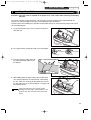
1. Lift up the print roller release lever to unlock and open the
Print roller arm
print roller arm.
Print roller
release lever
2. Set a paper roll in the paper roll cradle as per the diagram.
To the printer
Correct
3. Feed the end of the paper along with
To the printer
Incorrect
Paper positioning guides
the paper positioning guides as per
the diagram.
4. While holding down the paper, slowly close the print roller
arm, and push down the arm until you hear a click locking
the arm. Make sure securely you push down the center of
the wing part of the arm as per the diagram. The paper will
be fed automatically.
If the print roller arm is not securely locked,
printing is not done right. If this problem occurs,
open the arm, and close the arm as instructed
above.
11
A213_1 Quick Start Guide
06.4.28 8:20 PM
Page 12
5. When not using the take-up spool (using as receipt paper):
• Cut off the excess paper using the edge of the inner cover, and
replace the printer cover. Press the F key to make sure the
paper end comes out of the printer cover and clean paper
appears.
If the paper end does not come out, open the printer
cover, and pass the paper end between the paper cutter
and the paper guide of the printer cover, and replace the
cover.
When using the take-up spool (using as journal paper):
• Insert the end of the paper into the slit in the spool. (Press the F
key to feed more paper if required.)
• Wind the paper two or three turns around the spool shaft.
• Set the spool on the bearing, and press the F key to take up
excess slack in the paper.
• Replace the printer cover.
When using a paper roll as journal paper, you must change
the printing style. Refer to “Print format” in “Various
Function Selection Programming 1” section (Job code 6)
for changing the printing style.
12
A213_1 Quick Start Guide
06.4.28 8:20 PM
Page 13
Part1
STEP
QUICK START GUIDE
Part2
Part3
3 BASIC FUNCTION PROGRAMMING
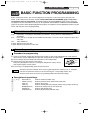
Before starting sales entries, you must first program necessary items so the cash register suits your sales
needs. In this manual, there are three sections, BASIC FUNCTION PROGRAMMING (pages 13-26) where
required items must be programmed, AUXILIARY FUNCTION PROGRAMMING (pages 52-63) where you
can program for more convenient use of keys on the keyboard, and ADVANCED FUNCTION PROGRAMMING
(pages 64-78) where various optional programming features are provided. Find the appropriate features for your
needs, and make the necessary programming.
1 Abbreviations and Terminology
Dept.:
Department; a category for merchandise classifications. Every sales item should belong to a
department.
PLU:
Price Look Up; a category for merchandise classifications. PLUs are used to call up preset prices by a
code entry.
VAT:
Value Added Tax
X report: Report to read sales data
Z report: Report to read and reset sales data
2 Prior to Programming
Procedure for programming
1.
2.
3.
4.
Check to see whether a paper roll is present in the machine. If there is not enough paper on a roll, replace it
with a new one (refer to "Replacing the Paper Roll" on page 89 for the replacement).
REG
OPX/Z
MGR
Put the manager key in the mode switch and turn it to the PGM position.
X1/Z1
Program necessary items into the cash register.
X2/Z2
Every time you program an item, the cash register will print the setting. Please
PGM
refer to print samples in each section.
If necessary, issue programming reports for your reference.
• On the key operation example shown in the programming details, numbers such as “22052007”
indicates the parameter which must be entered using the corresponding numeric keys.
• Asterisks in the tables shown in the programming details indicate default settings.
Description of special keys
0,1 to 9
:
l
P
@
s
A
Numerical key
Double-zero key
Clear key
Point key
Multiplication key
Subtotal key
Finalization key
Used for numerical number entry.
Used for parameter entry and character code entry.
Used for cancel entry.
Used for decimal point entry and right moving entry (as right cursor key).
Used for left moving entry (as left cursor key).
Used for data decision entry.
Used for programming termination entry.
13
A213_1 Quick Start Guide
06.4.28 8:20 PM
Page 14
Guidance for text programming
The register allow you to program texts for department item names (page 17), PLU/subdepartment item names
(page 22), function texts (page 62), clerk names (page 24), logo messages (page 25), foreign and domestic
currency symbols (page 61), and training mode texts (page 62). When you program texts, place the keyboard
sheet for text programming over the keyboard sheet for ordinal use. For the placement, please refer to
“Keyboard sheet” section on page 7.
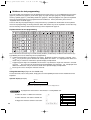
There are two ways for programming text; using character keys (shaded area shown below on the keyboard
sheet for text programming) or entering character codes with numeric keys on the keyboard. For the latter way,
refer to "Entering character codes with numeric keys on the keyboard" on page 50.
Keyboard sheet for text programming
Please note that the character keys used for entering numbers (shaded area) are different from numeric keys.
The following are used as control keys for text programming.
H Toggles between upper-case and lower-case letters. By default, the upper-case letter is selected. Once
the H key is pressed, you are locked in for entering lower-case letters. “a” is displayed when lower-case
letters entry is selected as shown in the operator display example below.
W Toggles between single-size and double-size characters. By default, the single-size character is selected.
Once the W key is pressed, you are locked in for entering double size characters. “W” is displayed when
double-size characters entry is selected as shown in the operator display example below.
B Backs up the cursor, erasing the character to the left.
Using character keys (Keys on the shaded area)
To enter numerals, letters and symbols, simply press the corresponding character on the shaded area on the
keyboard.
Operator display (Example)
Cursor
ABCD_
Wa
Characters entered using character keys are displayed here.
To program the word “Clerk01” with the letter “C” being double size.
To make the letter “C” double size character
To make character size return to normal size
To toggle the characters to lower-case letters
14
Wg
W
H
hijk01
=C_
W
=C_
=C_
a
=Clerk01_
a
A213_1 Quick Start Guide
06.4.28 8:20 PM
Page 15
Part1
QUICK START GUIDE
Part2
Part3
3 Language Selection
To set 0
s
88
*Language: 0: English
1: German
By default, English is set.
@
2: French
Key operation example
s 88 @
0A
*Language
(0-3)
A
3: Spanish
Operator display
Print
LANGUAGE CHANGE
THANK YOU
When you change the language, the texts such as clerk names (page 24), logo messages (page
25) and function texts (page 62), which you programmed, will be reset to the default settings. The
language selection must be made before programming clerk names, logo messages and function
texts.
4 Date and Time Programming
Date
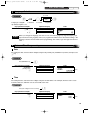
For setting the date, enter the date in 8 digits using the day-month-year (DD/MM/YYYY) format, then press the
N key.
Date(DD/MM/YYYY)
N
Key operation example
22052007
(22 May, 2007)
Operator display
Print
22052007
N
Date
0.00
Time
For setting the time, enter the time in 4 digits using the 24-hour format. For example, when the time is set to
2:30 AM, enter 230; and when it is set to 2:30 PM, enter 1430.
Time(max. 4 digits in 24-hour format)
Key operation example
N
Operator display
1430
1430
N
0.00
Print
Time
15
A213_1 Quick Start Guide
06.4.28 8:20 PM
Page 16
5 Tax Programming
If you program the VAT/tax, the cash register can calculate the sales tax. In the VAT system, the tax is included
in the price you enter in the register, and the tax amount is calculated when tendered according to the VAT rate
programmed. In the tax system, the tax is calculated when tendered according to the tax rate programmed, and
added to the price. The cash register can provide totally 6 kinds of VAT/tax systems (automatic VAT1-4,
automatic tax 1-4, manual VAT 1-4, manual VAT 1, manual tax 1-4, and automatic VAT1 and automatic tax 2-4
systems) and 4 kinds of rates. By default, the cash register is pre-programmed as automatic VAT1-4 system.
When you program tax rate(s) and taxable status for each department (by default, VAT1/tax1 is set to taxable.),
tax will be automatically added to sales of items assigned to the department according to the programmed tax
status for the department and the corresponding tax rate(s).
For details of the tax systems, refer to “Computation of VAT (Value Added Tax)/tax” section on page 41. To
change the tax system, please refer to “Other programming” of “Various Function Selection Programming 1”
section (Job code 69) on page 71.
Tax rate programming
The percent rate specified here is used for tax calculation on taxable subtotals.
To program other kind of tax
s
9
@
@
Tax number (1 to 4)
To program 0.0000
* Sign and tax rate
When the lowest taxable amount is zero
@
Lowest taxable amount
(0.01 to 999.99)
s
*Sign and tax rate: X YYY.YYYY
Tax rate=0.0000 to 100.0000
Sign -/+ = 1/0
For entering tax number, sign and tax rate and lowest taxable amount, the register displays guidance
messages, "ENTER TAX NO.", "ENTER TAX RATE", and "ENTER LOWER TAX" respectively.
Key operation example
s9@
Operator display
TAX RATE PROG.
ENTER TAX NO.
2@
ENTER TAX RATE
7@
ENTER LOWER TAX
s
A
16
ENTER TAX NO.
0.00
Print
A
A213_1 Quick Start Guide
06.4.28 8:20 PM
Page 17
Part1
Part2
QUICK START GUIDE
Part3
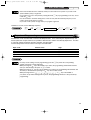
• The lowest taxable amount is valid only when you select add on tax system. If you select VAT
(Value added system), it is ignored.
• If you make an incorrect entry before pressing the third @ key in programming a tax rate, cancel
it with the l key.
• You do not need to enter the trailing zeros of the tax rate (after the decimal point), but you do
need to enter the decimal for fractions.
• If you select VAT system, the sign which you program is ignored.
To delete a tax rate, use the following sequence:
s
9
@
Tax number (1 to 4)
@
v
A
6 Department Programming
Merchandise can be classified into a maximum of 99 departments. Items sold using the department keys can
later be printed on a report shown as the quantities sold and sales amounts classified by department. The data
is useful for making purchasing decisions and other store operations.
Default setting for the VAT/tax statuses and signs are listed below.
Dept. code:
VAT/tax status:
Sign:
Dept. 1-10
Dept. 11-20
Dept. 21
Dept. 22-99
VAT 1
VAT 2
VAT 1
VAT 1
(+)
(+)
(-)
(+)
• To keep current setting on each programming, press the s key when the corresponding
guidance message is firstly displayed.
• When pressing the A key in the middle of procedure, the programming will terminate and the
data you entered before the press of A is saved.
• When pressing the l key twice in the middle of procedure, the programming will terminate and
the data you entered before pressing the l key twice is NOT saved.
• When pressing the PLU, -, %, V, r, o, X, Y, c or b key in the middle of
procedure except while entering texts or prices, the programming will move to the pressed key
programming.
17
A213_1 Quick Start Guide
06.5.30 9:08 AM
Page 18
Key operation
Operator display
1. Specify the department code.
(1) For dept.1 through 6, press the department key.
Or enter dept. code using numeric key, and then
press the d key.
Immediately after displaying the current text data and
the corresponding dept. key code you entered,
guidance message for the next step will be displayed.
6
DEPT.06
06
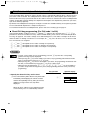
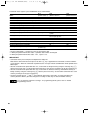
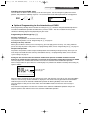
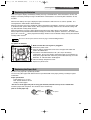
ENTER[00]KEY
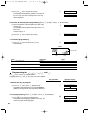
2. Text programming (Press s to skip. / Press A to terminate.)
:
(1) Press : key to enter text programming.
Immediately after displaying guidance message, the
current text data will be displayed.
ENTER TEXT
DEPT.06
(2) Enter an item name.
A maximum of 16 characters can be entered.
Please refer to "Guidance for text programming" on
page 14 for entering the item name.
When you start entering a character, the current
text data will be overwritten by new data.
Pressing the P and @ key moves the cursor to
the right and left respectively.
BOOK
(3) Press the s key to register the item name.
Immediately after displaying guidance message for
the next step, the current setting for the next step
will be displayed.
s
BOOK
PRICE
0.00
3. Unit price programming (Press s to skip. / Press A to terminate.)
(1) Enter a unit price using numeric keys.
A maximum of 6 digits can be set.
Default setting is 0.
300
s
(2) Press the s key to register the unit price.
Immediately after displaying guidance message for
the next step, the current setting for the next step
will be displayed.
300
DEPT ENTRY TYPE
OPEN & PRESET
4. Entry type programming (Press s to skip. / Press A to terminate.)
18
(1) Press : key 3 times to display "PRESET".
Each time : key is pressed, the display shows
"INHIBITED", "OPEN", "PRESET" and "OPEN &
PRESET" in this order.
Default setting is "OPEN".
When the unit price is changed from the default
setting ("0") in step 3, "OPEN & PRESET" will be
displayed first.
However, when the default setting is not changed,
"OPEN" will be displayed first.
:::
PRESET
A213_1 Quick Start Guide
06.4.28 8:20 PM
Page 19
Part1
(2) Press the s key to register the entry type.
Immediately after displaying guidance message for
the next step, the current setting for the next step
will be displayed.
Part2
QUICK START GUIDE
s
Part3
SELECT OF TAX1
TAX1
YES
5. VAT/tax 1 status programming (Press s to skip. / Press A to terminate.)
(1) Go to (2) when the VAT/tax 1 status does not need
to be changed from "TAX1 YES". Otherwise, press
: key to display "TAX1 NO".
Each time : key is pressed, the display shows
"TAX1 NO" and "TAX1 YES" alternatively.
Choose "YES" for taxable and "NO" for non-taxable.
Default setting is "YES" for dept. code 1 to 10 and
21 to 99, and "NO" for dept. code 11 to 20.
When any entry of a taxable department is made in
a transaction, tax is automatically computed
according to the associated tax rate as soon as the
transaction is completed.
(2) Press the s key to register the setting.
Immediately after displaying guidance message for
the next step, the current setting for the next step
will be displayed.
s
SELECT OF TAX2
TAX2
NO
6. VAT/tax2 status programming (Press s to skip. / Press A to terminate.)
(1) Go to (2) when the VAT/tax 2 status does not need
to be changed from "TAX2 NO". Otherwise, press
: key to display "TAX2 YES".
Each time : key is pressed, the display shows
"TAX2 YES" and "TAX2 NO" alternatively.
Default setting is "NO" for dept. code 1 to 10 and 21
to 99, and "YES" for dept. code 11 to 20.
(2) Press the s key to register the setting.
Immediately after displaying guidance message for
the next step, the current setting for the next step
will be displayed.
s
SELECT OF TAX3
TAX3
NO
7. VAT/tax3 status programming (Press s to skip. / Press A to terminate.)
(1) Go to (2) when the VAT/tax 3 status does not need
to be changed from "TAX3 NO". Otherwise, press
: key to display "TAX3 YES".
Each time : key is pressed, the display shows
"TAX3 YES" and "TAX3 NO" alternatively.
Default setting is "NO".
(2) Press the s key to register the setting.
Immediately after displaying guidance message for
the next step, the current setting for the next step
will be displayed.
s
SELECT OF TAX4
TAX4
NO
19
A213_1 Quick Start Guide
06.4.28 8:20 PM
Page 20
8. VAT/tax4 status programming (Press s to skip. / Press A to terminate.)
(1) Go to (2) when the VAT/tax 4 status does not need
to be changed from "TAX4 NO". Otherwise, press
: key to display "TAX4 YES".
Each time : key is pressed, the display shows
"TAX4 YES" and "TAX4 NO" alternatively.
Default setting is "NO".
(2) Press the s key to register the setting.
Immediately after displaying guidance message for
the next step, the current setting for the next step
will be displayed.
s
REGIST.TYPE
NORMAL
9. Registration type programming (Press s to skip. / Press A to terminate.)
(1) Go to (2) when the registration type does not need
to be changed from "NORMAL". Otherwise, press
: key to display "SICS".
Each time : key is pressed, the display shows
"SICS" and "NORMAL" alternatively.
Choose "SICS" for single item cash sale and
"NORMAL" for normal sale.
Default setting is "NORMAL".
If an entry of a department programmed for SICS is
made first, the sale will be finalized as a cash sale
as soon as the department key is pressed. If the
entry is made after entering a department not
programmed for SICS, the sale will not be finalized
until the A key is pressed.
(2) Press the s key to register the setting.
Immediately after displaying guidance message for
the next step, the current setting for the next step
will be displayed.
s
SIGN
(+)
10. Sign programming (Press s to skip. / Press A to terminate.)
(1) Go to (2) when the sign does not need to be
changed from "(+)". Otherwise, press : key to
display "(-)".
Each time : key is pressed, the display shows
"(-)" and "(+)" alternatively.
Choose "(+)" for positive department and "(-)" for
negative department.
Default setting is "(+)" for dept. code 1 to 20 and 22
to 99, and "(-)" for dept. code 21.
(2) Press the s key to register the setting.
Immediately after displaying guidance message for
the next step, the current setting for the next step
will be displayed.
20
s
LIMIT DIGITS
8
A213_1 Quick Start Guide
06.4.28 8:20 PM
Page 21
Part1
Part2
QUICK START GUIDE
Part3
11. Entry digit limit programming (Press s to skip. / Press A to terminate.)
(1) Enter entry digit limit using numeric key.
The entry digit limit can be set up to 8.
Default setting is 8.
7
7
s
(2) Press the s key to register the setting.
Immediately after displaying current text setting and
the corresponding department code for the next
department, guidance message will be displayed.
The dept. code is automatically incremented for a
new department key programming, and ready for
text programming for the incremented dept. code.
DEPT.07
07
ENTER[00]KEY
To program for the incremented dept. code, return to the step 2.
When you want to program for other than incremented dept. code, return to the step 1.
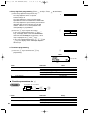
12. Terminate programming
A
(1) Press the A key to terminate department code
programming.
0.00
Print
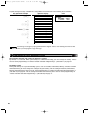
From left, ABC
Item name
Item:
Selection:
A
SICS/Normal
B
C
Entry digit limit
Type of unit price entry
Normal*
SICS
Open and preset
Preset only
Open only*
Inhibit department key
Tax status
Unit price
Print:
0
1
0-8(default:8)
3
2
1
0
21
A213_1 Quick Start Guide
06.4.28 8:20 PM
Page 22
7 PLU (Price Look-Up) and Subdepartment Programming
The PLU function allows speedy key entries whereby a price is automatically called up when a direct PLU key is
pressed or a code is entered. The subdepartment is a kind of “open PLU”, which requires you to enter a price
before the direct PLU key is pressed or after the PLU code is entered. A maximum of 1200 PLU/subdepartment
settings are possible. Each one belongs to a department and acquires the department’s parameters (tax status,
sign, SICS and entry digit limit).
By default, PLU/subdepartment setting for 1 through 210 codes are available and they are assigned as positive
PLUs associated with department 1 and preset unit price “0”.
To extend the number of PLUs/subdepartments, please refer to “EJ memory type” on page 73.
Direct PLU key programming (For PLU code 1 to 210)
Your machine provides 70 direct PLU keys (¡ through /), and three PLU level shift keys (\ [ ]) to
provide three levels for each direct PLU key. For the function details, please refer to "PLU level shift (for direct
PLU key)" on page 38. PLU codes 1 though 70 are allocated for level 1, PLU codes 71 thought 140 for level 2
and PLU codes 141 through 210 for level 3. For example, for ¡ key, PLU1 for level 1, PLU 71 for level 2 and
PLU 141 for level 3 are assigned.
\ ➝ ¡ thru / corresponds to PLU codes 1 through 70 respectively.
[ ➝ ¡ thru / corresponds to PLU codes 71 through 140 respectively.
] ➝ ¡ thru / corresponds to PLU codes 141 through 210 respectively.
• To keep current setting on each programming, press the s key when the corresponding
guidance message is firstly displayed.
• When pressing the A key in the middle of procedure, the programming will terminate and the
data you entered before the press of A is saved.
• When pressing the l key twice in the middle of procedure, the programming will terminate and
the data you entered before pressing the l key twice is NOT saved.
• When pressing the department, -, %, V, r, o, X, Y, c or b key in the middle of
procedure except while entering texts or prices, the programming will move to the pressed key
programming.
Key operation
Operator display
1. Specify the direct PLU key and its level.
(1) Press a level shift key and a direct PLU key in this order.
Immediately after displaying the current text data
and the corresponding PLU key code you entered,
guidance message for the next step will be
displayed.
When you press a direct PLU key without pressing
a level shift key, level 1 is automatically selected.
22
[¡
PLU.0071
ENTER[00]KEY
0071
A213_1 Quick Start Guide
06.5.30 9:04 AM
Page 23
Part1
Part2
QUICK START GUIDE
Part3
2. Text programming (Press s to skip. / Press A to terminate.)
(1) Press : key to enter text programming.
Immediately after displaying guidance message, the
current text data will be displayed.
(2) Enter an item name.
A maximum of 16 characters can be entered.
Please refer to “Guidance for text programming” on
page 14 for entering the item name.
When you start entering a character, the current
text data will be overwritten by new data.
Pressing the P and @ key moves the cursor to
the right and left respectively.
:
ENTER TEXT
PLU.0071
MELON
(3) Press the s key to register the item name.
Immediately after displaying guidance message for
the next step, the current setting for the next step
will be displayed.
s
MELON_
PRICE
0.00
3. Unit price programming (Press s to skip. / Press A to terminate.)
(1) Enter a unit price using numeric keys.
A maximum of 6 digits can be set.
For a subdepartment, set the limit amount of unit
price entry.
Default setting is 0.
(2) Press the s key to register the unit price.
Guidance message for the next step will be displayed.
500
500
s
ENTER DEPT#
4. Associated dept. programming (Press s to skip. / Press A to terminate.)
(1) Enter an associated dept. code using numeric key.
For dept. 1 through 6, you may press the
corresponding department key.
Default setting is dept. 1.
For deleting PLU, enter 0 instead of an associated
dept. code.
1
(2) Press the s key to register the associated dept.
code.
Immediately after displaying guidance message for
the next step, the current setting for the next step
will be displayed.
s
1
ENTER PLU TYPE
PLU
23
A213_1 Quick Start Guide
06.4.28 8:20 PM
Page 24
5. Function programming (Press s to skip. / Press A to terminate.)
(1) Go to (2) when the function does not need to be
changed from "PLU". Otherwise, press : key to
display "SUBDEPT".
Each time : key is pressed, the display shows
"SUBDEPT" and "PLU" alternatively.
Choose "PLU" for using the PLU code as PLU and
"SUBDEPT" for using the PLU code as
subdepartment.
Default setting is "PLU".
s
(2) Press the s key to register the setting.
Immediately after displaying current text setting and
the corresponding PLU code for the next PLU,
guidance message will be displayed.
The PLU code is automatically incremented for a
new direct PLU key programming, and ready for
text programming for the incremented PLU code.
PLU.0072
0072
ENTER[00]KEY
To program for the incremented PLU code, return to the step 2.
When you want to program for other than incremented PLU code, return to the step 1.
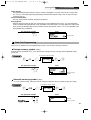
6. Terminate programming
A
(1) Press the A key to terminate direct PLU key
programming.
0.00
Print
PLU code
PLU/subdept. 1/0
Unit price
Item name
Associated dept.
8 Text Programming
Please refer to "Guidance for text programming" on page 14 as for how to entering characters.
When you press an appropriate number key (job code number) and press the P key for text entry just after you
start programming with the s key, the cash register will automatically be ready for text entry.
Then a little after displaying guidance message indicating what programming you are in, the register may ask
you to enter the first parameter. Referring to the corresponding “Procedure”, enter a parameter and start
character entries.
Clerk names (12 digits)
To keep current setting
s
24
5
P
Clerk no.
(1-25)
@
To program another clerk
Character keys
(max. 12 digits)
s
A
A213_1 Quick Start Guide
06.4.28 8:20 PM
Page 25
Part1
Key operation example
QUICK START GUIDE
Operator display
s5P
Part2
Part3
Print
CLERK NAME PROG.
ENTER CLERK NO.
1@
_
DAVID_
DAVID
s
CLERK NAME PROG.
ENTER CLERK NO.
A
0.00
Logo messages (6 lines and 24 digits for each line)
The register can print programmed messages on every receipt. On the standard model, a 6-line logo message is
printed on the receipt. If you want to print in other logo message format, please change the format. For the
programming details, refer to page 73. The options are listed below:
To keep the current setting
s
4
P
*Line number
(1-6)
@
Character keys
(max. 24 digits)
s
A
To program another line
* “Header 3-line message” type: 1 to 3
“Header 6-line message” type: 1 to 6
“Header 3-line and footer 3-line message” type: 1 to 6 (1 to 3 as header, 4 to 6 as footer)
Logo message print format (3 types)
Header 1st line
Header 1st line
Header 1st line
Header 2nd line
Header 2nd line
Header 2nd line
Header 3rd line
Header 3rd line
Header 3rd line
Header 4th line
Header 5th line
Header 6th line
Footer 4th line
Footer 5th line
Footer 6th line
Header 3-line
message
Header 6-line
message
Header 3-line
message and
footer 3-line
messages
(Default setting)
25
A213_1 Quick Start Guide
06.4.28 8:20 PM
Page 26
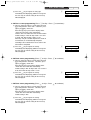
To print the logo message “THANK YOU” using double sized characters and centering on the third line.
Key operation example
s4P
Operator display
Print
LOGO TEXT PROG.
ENTER LINE NO.
3@
SSS
W
THANK S YOU
W
SSS
s
_
_
_
W
N=K= =Y=O=U_ W
N=K= =Y=O=U_
= =Y=O=U
_
LOGO TEXT PROG.
ENTER LINE NO.
A
0.00
A 6-line logo message is preprogrammed when shipped. Please start entering from the first line
when you first program a logo message.
9 Programming Other Necessary Items
Decimal point position (tab) setting for domestic currency
By default, “2” is selected. When your country has a different tab setting, you must change the setting. Please
refer to "Other programming" of “Various Function Selection Programming 1” (Job code 61) on page 67.
Rounding system
When your country has a special rounding system, such as Australia, Switzerland, Norway, Sweden, Denmark
and South Africa, you must change the setting to suit your country. For the setting for Australia, Switzerland,
Norway and South Africa, please refer to “Other programming” of “Various Function Selection Programming 1”
(Job code 67) on page 69. For the setting for Sweden and Denmark, please refer to “Other programming” of
“Various Function Selection Programming 1” (Job code 69) on page 71.
26
A213_1 Quick Start Guide
06.4.28 8:20 PM
Page 27
Part1
STEP
Part2
QUICK START GUIDE
Part3
4 BASIC SALES ENTRY
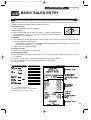
1 Basic Sales Entry Example
Listed below is a basic sales entry example when selling items by cash. For operation details, please refer to
"Additional Information for BASIC SALES ENTRY" on page 34.
Mode switch setting
REG
OPX/Z
MGR
1. Turn the mode switch to the REG position.
X1/Z1
Clerk assignment
X2/Z2
2. Enter your clerk code. (For example, clerk code is 1. Enter 1 using the numeric
PGM
key and press the L key.) The clerk code 1 is automatically selected just after
initialization of the cash register.
Item entries
3. Enter the price for the first department item. (For example, for 15.00, enter 1500 using the numeric keys, and
press the appropriate department key.)
For department 7 and above, enter the department code using numeric keys and press the d key, then
enter the price and press the d key again.
4. Repeat step 3 for all department items.
Displaying subtotals
5. Press the s key to display the amount due.
Finalizing the transaction
6. Enter the amount received from the customer. (You can omit this step if the amount tendered is the same as
the subtotal.)
7. Press the A key, and the change due is displayed and the drawer is opened.
8. Tear off the receipt and give it to the customer with his or her change.
9. Close the drawer.
Key operation example
Clerk
assignment
Item
entries
1
L
Operator display
DAVID
Receipt print
-01Logo message (Header)
1500
!*
DEPT.01
15.00
2300
"*
DEPT.02
23.00
s
SUBTOTAL
38.00
Date/Register number/
Consecutive number
Displaying
subtotal
Amount
tendered
Finalizing
the transaction
Time/Clerk code/Clerk name
Items
4000
A
4000
CHANGE
Price
2.00
Not printed when
non-taxable items
!"
*
:indicate department keys.
(In this example, tax system is set to automatic
VAT 1 and the tax rate is set to 16.00%.)
only are sold.
Total quantity
Total amount
Cash tendering/amount
received
Change
Logo message (Footer)
27
A213_1 Quick Start Guide
06.4.28 8:20 PM
Page 28
2 PLU Entry
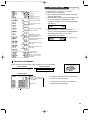
The cash register allows you two ways of entering PLUs; direct PLU entry and PLU code entry. For more
information about PLU entries, refer to "PLU/subdepartment entries" on page 35.
Direct PLU entry
For the direct PLU code entry, press the direct PLU keys. For the location of the keys, refer to "Direct PLU keys"
below. For the PLU level shift, refer to "PLU level shift (for direct PLU key)" on page 38.
Key operation example
Operator display
¡
[¡
]¡
A
Item
entries
PLU.0001
1.50
PLU.0071
15.00
PLU.0141
36.20
CASH
52.70
Receipt print
Direct PLU keys
L3
L2
L1
7
14
21
28
35
42
49
56
63
70
6
13
20
27
34
41
48
55
62
69
5
12
19
26
33
40
47
54
61
68
4
11
18
25
32
39
46
53
60
67
3
10
17
24
31
38
45
52
59
66
2
9
16
23
30
37
44
51
58
65
1
8
15
22
29
36
43
50
57
64
PLU code entry
For the PLU code entry , enter a PLU code using numeric keys and press the p key.
Key operation example
Item
entries
Operator display
1p
PLU.0001
1.50
71 p
PLU.0071
15.00
141 p
PLU.0141
36.20
CASH
52.70
A
28
Receipt print
A213_1 Quick Start Guide
06.4.28 8:20 PM
Page 29
Part1
STEP
QUICK START GUIDE
Part2
Part3
5 CORRECTION
1 Cancellation of the Numeric Entry
If you make an incorrect numeric entry, you can clear the entry by pressing the l key only before pressing a
department key, PLU/subdepartment key, the d key, the % key, the - key or the f key.
2 Correction of the Last Entry (direct void)
If you make an incorrect entry relating to a department, PLU/subdepartment, percentage (%), discount (-) or
refund, you can void this entry by pressing the v key immediately after the incorrect entry.
Key operation example
Operator display
1250 (
DEPT.06
12.50
v
™
v
8d
600 d
%
v
328 ¡
28 v
250 f (
v
A
DEPT.06
-12.50
PLU.0002
1.50
PLU.0002
-1.50
AMOUNT
DEPT.08
Receipt print
-----6.00
%1
-0.90
%1
0.90
PLU.0001
3.28
(-)
-0.28
(-)
0.28
DEPT.06
-2.50
DEPT.06
2.50
CASH
9.28
29
A213_1 Quick Start Guide
06.5.30 9:05 AM
Page 30
3 Correction of the Next-to-last or Earlier Entry (indirect void)
You can void any incorrect department entry, PLU/subdepartment entry or item refund entry made during a
transaction if you find it before finalizing the transaction (e.g. pressing the A key). This function is applicable to
department, PLU/subdepartment and refund entries only.
Press the v key just before you press a department key, d key, direct PLU key or p key. For the refund
indirect void, press the v key after you press the f key.
Key operation example
1310 (
7d
1755 d
Correction of a
department entry
Correction
of a subdept.
entry
Correction
of a PLU entry
Correction of
a refund entry
º
350 ª
¤
250 f (
825 #
1310 v (
7vd
1755 d
350 v ª
v¤
250 f v (
A
Operator display
DEPT.06
13.10
AMOUNT
------
DEPT.07
17.55
PLU.0010
7.15
PLU.0009
3.50
PLU.0012
3.60
DEPT.06
-2.50
DEPT.03
8.25
DEPT.06
-13.10
AMOUNT
------
DEPT.07
-17.55
PLU.0009
-3.50
PLU.0012
-3.60
DEPT.06
2.50
CASH
Receipt print
15.40
4 Subtotal Void
You can void an entire transaction. Once subtotal void is executed, the transaction is aborted and the register
issues a receipt. This function does not work when more than 30 items have been entered.
Key operation example
1310 "
"
1755 (
º
fl
s
v
Subtotal void
s
30
Operator display
DEPT.02
2
13.10
13.10
DEPT.06
17.55
PLU.0010
7.15
PLU.0035
10.00
SUBTOTAL
60.90
0.00
***TOTAL
0.00
Receipt print
A213_1 Quick Start Guide
06.4.28 8:20 PM
Page 31
Part1
QUICK START GUIDE
Part2
Part3
5 Correction of Incorrect Entries not Handled by the Direct or Indirect Void Function
Any errors found after the entry of a transaction has been completed or during an amount tendered entry cannot
be voided. These errors must be corrected by the manager.
The following steps should be taken:
1.
2.
3.
If making the amount tendered entry, finalize the transaction.
Make correct entries from the beginning.
Hand the incorrect receipt to the manager for its cancellation.
31
A213_1 Quick Start Guide
STEP
06.4.28 8:20 PM
Page 32
6 FULL SALES REPORT (Z REPORT)
For reading and resetting the sales data, use the resetting function (Z). Resetting prints all sales information and
clears the entire memory except for the GT1 through GT3, Training GT, BAL, reset count, and consecutive number.
For more information about resetting (Z) of sales totals, refer to "READING (X) AND RESETTING (Z) OF SALES
TOTALS" on page 80.
Full sales report
Put the manager key in the mode switch and turn it to the X1/Z1 position.
Key operation
Operator display
PA
OPX/Z
REG
MGR
X1/Z1
0.00
X2/Z2
PGM
Sample report
*2
Mode title*1
Reset counter
Net grand total (GT2-GT3)
Grand total of plus
registration
Grand total of minus
registration
Grand total of balance *3
(order total-paid total)
Grand total of training
mode registration
Dept. code
Taxable 1 total
VAT 1 total
Sales q’ty
Sales amount
Item percent
counter and total
*4
Tax total
Net total without tax
VAT shift
Tax delete
*5
Item
counter and total
Refund counter and total
REG-mode void counter
and total
Void-mode transaction
counter and total
“+” dept. counter
and total
Manager item void counter
and total
Subtotal void counter
and total
No-sales counter
“-” dept. counter
and total
Received on account
counter and total
Paid out counter and total
Subtotal
and total
counter
Bill(G.C.RCPT) counter
PBAL counter
NBAL counter
Subtotal percent
counter and total
Net sales total
32
(To be continued on the next page)
A213_1 Quick Start Guide
06.4.28 8:20 PM
Page 33
Part1
Customer counter
Order total
Paid total
Paid total average per
customer
Order total–Paid total
Cash counter and total
Cheque1 sales counter
and total
Credit1 sale and tendering
counter and total
Exchange counter and
total (in preset rate entry)
Domestic currency
Part2
QUICK START GUIDE
Part3
*1: When you take X1 report, “X1” is printed.
*2: Printed in the Z1 report only.
*3: BAL is not printed by default. To print, change the
setting on job code 65.
*4: When “Memory of difference due to rounding” is set
to “yes” the following is displayed here. For
changing the setting, refer to "Other programming"
(job code 67).
*5: When manual tax 1-4 system or auto tax 1-4
system is selected, the following is displayed here.
For changing the setting, refer to "Other
programming" (job code 69).
Sales total including tax
Exchange manual rate entry
counter and total
Exchange check (in preset
rate entry)
Exchange credit (in preset
rate entry)
Cash in drawer
Cheque in drawer
Cash + cheque in drawer
Change total for cheque
tendering
Periodic consolidation
Put the manager key in the mode switch and turn it to the X2/Z2 position.
OPX/Z
Key operation
Operator display
PA
0.00
REG
MGR
X1/Z1
X2/Z2
PGM
Sample report
Mode title*1
Reset counter of daily total
Reset counter of periodic
*2
consolidation
The subsequent printouts are the same in format
as in the X1/Z1 full sales report.
Grand total
*1: When you take X2 report, “X2” is printed.
*2: Printed in the Z2 report only
33
A213_2 FOR THE OPERATOR
06.4.28 8:01 PM
Page 34
Part2 FOR THE OPERATOR
OTHER BASIC SALES ENTRIES
1 Additional Information for BASIC SALES ENTRY
Clerk assignment
Prior to any item entries, clerks must enter their clerk codes into the register. However, the code entry may not
be necessary when the same clerk handles the consecutive transactions.
■ Sign-on (in REG, MGR,
■ Sign-off (in REG, MGR,
mode)
mode)
To display the signed-on clerk code
Clerk code
L
L
L
Receipt ON/OFF function
When you use the printer to issue receipts, you can disable receipt printing in the REG mode to save paper
using the receipt ON/OFF function. To disable receipt printing, press the R key in the OP X/Z position. This
key toggles the receipt printing status ON and OFF.
The register will print reports regardless of the receipt state, so the paper roll must be installed.
To issue a receipt when receipt ON/OFF function is set to OFF:
If your customer wants a receipt after you finalized a transaction with the receipt ON/OFF function being OFF
status, press the R key. This will produce a receipt. However, if more than 30 items were entered, the receipt
will be issued in a summary receipt.
Copy receipt
You can print a copy receipt by pressing the R key when the receipt ON/OFF function is in the “ON” status. To
realize this function, you must enable the function. Please refer to page 68 (Job code 63).
Power Save Mode
The register will enter into power save mode when no entries are performed based on the pre-programmed time
limit (by default, 30 minutes).
When the register goes to the power save mode, all display lights will turn off except the decimal point at the
leftmost position. The register will return to the normal operation mode when any key is pressed or a mode is
changed with the mode key. Please note when the register is recovered by a key entry, its key entry is invalid.
After the recovery, start the key entry from the beginning.
2 Error Warning
In the following examples, your register will go into an error state accompanied with a warning beep and a
corresponding error message. Clear the error state by pressing the l key and take the proper action.
Please refer to the error message table on page 94.
• Enter over a 32-digit number (entry limit overflow): Cancel the entry and re-enter the correct number.
• An error in key operation: Clear the error and continue operation.
• An entry beyond a programmed amount entry limit: Check to see if the entered amount is correct. If it is
correct, it can be rung up in the MGR mode. Contact your manager.
• An including-tax subtotal exceeds eight digits: Delete the subtotal by pressing the l key and press the A,
X, Y, c or b key to finalize the transaction.
34
A213_2 FOR THE OPERATOR
06.4.28 8:01 PM
Page 35
Part1
Part2
FOR THE OPERATOR
Part3
Error escape function
To quit a transaction due to an error or an unforeseen event, use the error escape function as shown below:
To clear the error state
l
Transaction
E
E
The transaction is voided (treated as a subtotal void) and the receipt is issued by this function. If you have
already entered a tendered amount, the operation is finalized as a cash sale.
3 Item Entries
Single item entries
1. Department entries
The cash register provides a maximum of 99 departments for a merchandise classification. Group attributes,
such as taxable status, are applied to items when they are entered to the departments.
• When using the department keys (for department 1 to 6)
For department 1 to 6, enter a unit price and press a department key. If you use a programmed unit price,
press a department key only.
When using a programmed unit price
Unit price *
(max. 8 digits)
* Less than the programmed upper limit amounts
When zero is entered, only the sales quantity is added.
Department key
• When using the department code entry key
Enter a department (dept.) code and press the d key, then enter a unit price and press the d key again. If
you use a programmed unit price, enter a dept. code and press the d key.
When using a programmed unit price
Dept. code
(1 to 99)
d
* Less than the programmed upper limit
amounts
When zero is entered, only the sales
quantity is added.
(In case only preset price entry is allowed.)
Unit price *
(max. 8 digits)
d
2. PLU/subdepartment entries
For another merchandise classification, the cash register provides a maximum of 1200 PLUs/subdepartments.
PLUs are used to call up preset prices by pressing direct PLU keys or entering PLU codes with a press of the
p key. Subdepartments are used to classify merchandise into smaller groups under the departments.
Every PLU and subdepartment has a code from 1 to 1200, and should belong to a department to obtain
attributes of that department.
By default, the cash register is preprogrammed to be able to use 1 to 210 codes, and these 210 codes are set to
PLU mode and zero for unit price.
To extend the number of PLU codes to 1200, please refer to “EJ memory type” on page 73, and for other
PLU/subdepartment programming, refer to “PLU (Price Look-Up) and Subdepartment Programming” on page 22.
35
A213_2 FOR THE OPERATOR
06.4.28 8:01 PM
Page 36
• PLU entries
Direct PLU key
PLU code
Direct key entry
p
PLU code entry
• Subdepartment (open PLU) entries
PLU code
Direct key entry
Direct PLU key
Unit price *
(max. 8 digits)
p
p
Unit price *
(max. 8 digits)
PLU code entry
* Less than the programmed upper limit amounts
When zero is entered, only the sales quantity is added.
Key operation example
Receipt print
1200 "
$
Department entry
PLU entry
Subdepartment
entry
50 d 1500 d
41 d
80 p
500 fi
85 p 1200 p
A
Repeat entries
You can use this function for entering a sale of two or more of the same items. Consecutive pressing of a
department key, d key, a direct PLU key or p key is as shown on key operation example below.
Key operation example
Receipt print
1200 " "
Department
entry
PLU entry
Subdepartment entry
$$
50 d 1500 d d
41 d d
80 p p
500 fi fi
85 p 1200 p p
A
36
A213_2 FOR THE OPERATOR
06.4.28 8:01 PM
Page 37
Part1
Part2
FOR THE OPERATOR
Part3
Multiplication entries
When selling a large quantity of items, it is convenient to use the multiplication entry method. Enter quantity
using numeric keys and press the @ key before starting item entry as shown in the example below.
When programmed to allow fractional quantity entries, you can enter up to four integers and three
digit decimal, though the quantity is counted as one for sales reports. To enter a fractional quantity,
use the decimal point key between integer and decimal.
Key operation example
Department
entry
PLU entry
Subdepartment entry
Receipt print
3 @ 1200 "
5@$
3 @ 50 d 1500 d
5 @ 41 d
3@
5 @ 80 p
3 @ 500 fi
5 @ 85 p 1200 p
A
Single item cash sale (SICS) entry
• This function is useful when a sale is for only one item and is for cash. This function is applicable only to those
departments that have been set for SICS or to their associated PLUs or subdepartments.
• The transaction is complete and the drawer opens as soon as you press the department key, d key, the
direct PLU key or p key.
Key operation example
Receipt print
250
For finishing
the transaction
!
If an entry to a department or PLU/subdepartment set for SICS follows the ones to departments or
PLUs/subdepartments not set for SICS, it does not finalize and results in a normal sale.
37
A213_2 FOR THE OPERATOR
06.4.28 8:01 PM
Page 38
PLU level shift (for direct PLU key)
This shift can double or triple the number of direct PLU keys on your register without adding additional direct
PLU keys. You can use direct PLU keys in three levels by utilizing shift keys Ò, Ú, and Æ. These keys have
the following functions.
Ò: Shifts the PLU level from level 2 or 3 to level 1 (ordinary level).
Ú: Shifts the PLU level from level 1 or 3 to level 2.
Æ: Shifts the PLU level from level 1 or 2 to level 3.
You can select one of the two PLU level shift modes — automatic return mode* and lock shift mode** — and
decide whether to allow PLU level shift in both the REG and MGR modes or in the MGR mode alone.
* The automatic return mode automatically shifts the PLU level back to level 1. You can select whether the
PLU level should return to level 1 each time you enter one item or each time you finalize one transaction.
** The lock shift mode holds the current PLU level until pressing of a PLU level shift key.
By default, you can operate PLU level shift in both the REG and MGR modes under the automatic return mode
(returning to level 1 after an item entry). To change the setting, please refer to “PLU level shift and GLU function
parameters” on page 67.
• Automatic return mode
Returning to level 1 after an item entry (default)
Ú
Æ
Numeric entry
(Q’ty,
)
Direct PLU key
(Return to level 1)
@
Returning to level 1 after finalizing a transaction
Ú
Æ
Numeric entry
(Q’ty,
)
Direct PLU key
Payment
(Return to level 1)
@
• Lock shift mode
To shift the level of another PLU
Ò
Ú
Æ
Numeric entry
(Q’ty,
)
Direct PLU key
(Keep the current level)
@
If you select the automatic return mode, it is not necessary to use the Ò key on the keyboard, but
if you select the lock shift mode, it is necessary to use the key.
38
A213_2 FOR THE OPERATOR
06.4.28 8:01 PM
Page 39
Part1
Part2
FOR THE OPERATOR
Part3
When your machine has been programmed for the automatic return mode (returning to level 1 after an item
entry):
Key operation example
The machine returns to
level 1 automatically.
Receipt print
¡
Ú¡
™
¡
A
When your machine has been programmed for the lock shift mode:
Key operation example
The machine keeps
the level 2 until other
level shift key is
pressed.
Receipt print
Ò¡
Ú¡
™
¡
Ò¡
A
4 Displaying Subtotals
The subtotal is displayed by pressing the s key. When you press it, the subtotal of all entries which have been
made is displayed with the function message “SUBTOTAL”.
Subtotal will not be printed on a receipt on the current factory setting. If you want to print it, change
the setting by programming. Refer to “Receipt print format” (Job code 7) on page 66.
39
A213_2 FOR THE OPERATOR
06.4.28 8:01 PM
Page 40
5 Finalization of Transaction
Cash or cheque tendering
Press the s key to get a subtotal, enter the amount tendered by your customer, then press the A key if it is a
cash tender or press a cheque key (X or Y) if it is a cheque tender. When the amount tendered is greater
than the amount of the sale, the register will show the change due amount with the function message
“CHANGE”. Otherwise the register will show a deficit with the function message “DUE”. You now must make a
correct tender entry.
Cash tendering
Key operation example
Receipt print
s
1000 A
Cheque tendering
Key operation example
Receipt print
s
1000 X
Cash or cheque sale that does not require tender entry
Enter items and press the A key if it is a cash sale or press a cheque key if it is a cheque sale. The register
will display the total sale amount.
Key operation example
Receipt print
300 (
º
A
In the case of cheque 1 sale
When programmed not to allow “direct non-tender finalization after tendering” (Job code 63, refer to
page 68), you must always enter a tender amount.
40
A213_2 FOR THE OPERATOR
06.4.28 8:01 PM
Page 41
Part1
Part2
FOR THE OPERATOR
Part3
Credit sale
Enter items and press a credit key (c or b).
Key operation example
Receipt print
2500 (
7 d 3250 d
c
Mixed-tender sale
You can perform mixed-tendering of cheque and cash, cash and credit, and cheque and credit.
Key operation example
Receipt print
s
950 A
b
6 Computation of VAT (Value Added Tax)/tax
VAT/ tax system
The cash register may be programmed for the following six VAT/tax systems. The cash register is preprogrammed as automatic VAT 1-4 system.
Automatic VAT 1-4 system (Automatic operation method using programmed percentages)
This system, at settlement, calculates VAT for taxable 1 through 4 subtotals by using the corresponding
programmed percentages.
Automatic tax 1-4 system (Automatic operation method using programmed percentages)
This system, at settlement, calculates taxes for taxable 1 through 4 subtotals by using the corresponding
programmed percentages, and also adds the the calculated taxes to those subtotals, respectively.
Manual VAT 1-4 system (Manual entry method using programmed percentages)
s
t
This system provides the VAT calculation for taxable 1 through 4 subtotals. This calculation is performed using
the corresponding programmed percentages when the t key is pressed just after the s key.
Manual VAT 1 system (Manual entry method for subtotals that uses VAT 1 preset percentages)
To use a programmed rate
s
VAT rate
t
This system enables the VAT calculation for the then subtotal. This calculation is performed using the VAT 1
preset percentages when the t key is pressed just after the s key. For this system, the keyed-in tax rate can
be used.
41
A213_2 FOR THE OPERATOR
06.4.28 8:01 PM
Page 42
Manual tax 1-4 system (Manual entry method using preset percentages)
s
t
This system provides the tax calculation for taxable 1 through 4 subtotals. This calculation is performed using
the corresponding programmed percentages when the t key is pressed just after the s key.
After this calculation, you must finalize the transaction.
Automatic VAT 1 and automatic tax 2-4 system
This system enables the calculation in the combination with automatic VAT 1 and automatic tax 2 through 4. The
combination can be any of VAT1 corresponding to taxable 1 and any of tax 2 through 4 corresponding to taxable
2 through taxable 4 for each item. The tax amount is calculated automatically with the percentages previously
programmed for these taxes.
• The tax status of PLU/subdepartment depends on the tax status of the department which the
PLU/subdepartment belongs to.
• VAT/tax assignment symbol can be printed at the fixed right position near the amount on the
receipt as follows:
VAT1/tax1
A
VAT2/tax2
B
VAT3/tax3
C
VAT4/tax4
D
When the multiple VAT/tax is assigned to a department or a PLU, a symbol of the lowest number
assigned to VAT/tax rate will be printed. For programming, please refer to “Various Function
Selection Programming 1” (Job code 66) on page 69.
Key operation example
(When the manual
VAT 1-4 system
is selected)
Receipt print
1000 !
s
t
A
VAT shift entries
This feature is intended to shift the tax status of a particular department (or PLU) programmed for taxable 1 or
taxable 1 and taxable 3.
When the VAT shift entry is made for a particular department or PLU programmed for taxable 1, their tax status
shifts to taxable 2.
When this entry is made for a particular department (or PLU) programmed for taxable 1 and taxable 3, the tax
status "taxable 1" remains unchanged, but the other "taxable 3" is ignored.
Press the D key to activate the VAT shift prior to entering department(s) or PLU(s) concerned. For programming
the VAT shift operation timing, please refer to "Various Function Selection Programming 1" (Job code 70) on page 72.
Key operation example
(When the manual
VAT 1-4 system
is selected)
42
Receipt print
D
1000 !
s
t
A
A213_2 FOR THE OPERATOR
06.4.28 8:01 PM
Page 43
Part1
Part2
FOR THE OPERATOR
Part3
OPTIONAL FEATURES
1 Auxiliary Entries
Percent calculations (premium or discount)
Your register provides the percent calculation for the subtotal and/or each item entry depending on the
programming. Refer to "Programming for %" for the programming.
• Percentage: 0.01 to 100.00% (Depending on the programming)
Application of preset rate (if programmed) and manual rate entry are available.
Percent calculation for subtotal
Key operation example
Receipt print
4@
140 '
™
s
10 %
A
Percent calculation for item entries
Key operation example
Receipt print
800 (
7P5%
º
%
A
(When premium and 15% are
programmed for the
key)
%
Deduction entries
Your register allows you to deduct a preset amount or a certain amount manually entered, which are less than a
programmed upper limit. These calculations can be after the entry of an item and/or the computation of subtotal
depending on the programming. Refer to "Programming for -" for the programming.
Deduction for subtotal
Key operation example
Receipt print
575 (
º
s
100 A
43
A213_2 FOR THE OPERATOR
06.4.28 8:01 PM
Page 44
Deduction for item entries
Key operation example
Receipt print
7 d 675 d
A
(When a deduction amount of
0.75 is programmed.)
Refund entries
For departments 1 to 6, enter the refund amount and press the f key, and then press the corresponding
department key (when using the preset price, omit entering the amount), and for a departments 7 to 99, enter
the department code and press the f and d keys, then enter the refund amount and press the d key if
necessary.
For a refund of a PLU item, press the f key and the corresponding direct PLU key, or enter the PLU code and
press the f key, then press the p key.
For a refund of a subdepartment item, enter the refund amount and press the f key, then press the
corresponding direct PLU key, or enter the PLU code and press the f and p keys, then enter the refund
amount and press the p key.
Key operation example
Receipt print
250 f (
41 f d 100 d
7@
f‹
85 f p 150 p
A
Non-add code number entries and printing
You can enter a non-add code number such as a customer’s code number and credit card number, a maximum
of 16 digits, at any point during the entry of a sale. The cash register will print it at once.
To enter a non-add code number, enter the number and press the N key.
Key operation example
1230 N
1500 (
c
44
Receipt print
A213_2 FOR THE OPERATOR
06.4.28 8:01 PM
Page 45
Part1
Part2
FOR THE OPERATOR
Part3
2 Guest Look-Up (GLU)
This feature is used to store and recall previous balances when a guest look-up (GLU) code is entered. You can
accept re-order and issue bills with GLU codes. The GLU code refers to a code that is used whenever the guest
check must be accessed for re-ordering or final payment.
The GLU code can be 1 to 50.
For new guest
For a new guest, open a new guest check by assigning a GLU code.
For automatic GLU
code generation
GLU code
(1-50)
G
To finalize temporarily
Item entries
For settlement
*
1
˜
*
2
˝
Finalization operation
*1: The tax is not calculated.
*2: Press the ˝ key to issue a guest check receipt (bill). A print sample is shown on the next page.
Key operation example
11 G
3500 "
2700 #
˜
Receipt print
GLU code
Previous balance
New balance
• Your register can be programmed to generate GLU codes automatically in a sequential fashion. If
your register has not been programmed to do so, each GLU code must be entered manually. By
default, GLU codes are generated automatically. For the programming, please refer to “Other
programming” (job code 68) on page 70.
• You can enter a maximum of 50 items for each GLU code. When the machine detects only area
for five items are left on the GLU buffer, the operator display shows “5 ITEMS REMAIN” to warn
you the number of items you can enter furthermore and the number decrease one by one. When
an error message “BUFFER FULL” is displayed, you cannot enter an item anymore.
By default, the details of items for each GLU are cleared when you press the ˝ key. You can
clear the details when you press the ˜ key as well as the ˝ key when you change the default
setting. To change the setting, please refer to “PLU level shift and GLU function parameters” on
page 67.
• You can change the printing style so that previous balance (PBAL) and new balance (NBAL) are
printed on guest check receipts. To change the setting, please refer to “PLU level shift and GLU
function parameters” on page 67.
45
A213_2 FOR THE OPERATOR
06.4.28 8:01 PM
Page 46
Additional ordering
For making additional entries for a GLU already generated and not settled yet (hereinafter referred to as open
GLU), enter the corresponding open GLU code and press the G key to recall the previous balance of the open
GLU, then start item entries.
By default, when entering an open GLU code, the cash register does not check if the clerk code is the same as
the new order was made for the guest. If you want the register to check the clerk code, change the setting on
“PLU level shift and GLU function parameters” (page 67). When the code is not the same, the register shows
the error message “NO AUTHORITY” and does not accept additional order.
Open GLU code
(1-50)
G
Item entries
Key operation example
(Same as the operation for new guest)
Receipt print
11 G
1400 '
1600 (
˜
Settlement
Key operation example
11 G
A
Guest check receipt (bill)
˝
46
Receipt print
A213_2 FOR THE OPERATOR
06.4.28 8:01 PM
Page 47
Part1
Part2
FOR THE OPERATOR
Part3
3 Auxiliary Payment Treatment
Currency exchange
For an additional payment in foreign currency
Preset exchange rate
After an entry
is completed
For direct finalization
V
*Exchange rate
or
After the amount
Amount
tendered
(max. 8 digits)
tendered is found
smaller than the
A
X Y
c b
or
or
sales amount in
a sales entry
l
Reentry
Next registration
or
payment in
domestic currency
*Exchange rate: 0.000000 to 999.999999
• Press the l key after pressing the V key to cancel payment in a foreign currency.
• If “Yes” is selected for cheque and credit operation when tendering in foreign currency in EURO
programming, you can finalize a sale in foreign currency using the X, Y, c or b key with
preset exchange rate operation.
• If programmed, a foreign currency symbol is printed when you use a preset rate. Refer to
"Foreign currency symbol" for the programming.
• Refer to "Programming for V" for programming the currency exchange rate.
Applying preset exchange rate
Key operation example
Currency
exchange
Amount
tendered in
7
Receipt print
2300 (
d 4650 d
V
10000 A
Domestic currency
foreign currency
Exchange rate
(When a currency exchange
Foreign currency
rate of 0.939938 is programmed for
the
V
key.)
Domestic currency
Foreign currency symbol
(Printed if programmed)
Applying manual exchange rate
Key operation example
Exchange rate
Receipt print
2300 (
7 d 4650 d
1 P 275 V
10000 A
47
A213_2 FOR THE OPERATOR
06.4.28 8:01 PM
Page 48
Received-on account entries
When you receive on account from a customer, use the r key. For the received-on-account (RA) entry, enter
the amount, and press the r key.
Cash tendering only available for RA operation.
Key operation example
Receipt print
12345 N
4800 r
Paid-out entries
When you pay an amount to a vendor, use the o key. For the paid-out (PO) entry, enter the amount and press
the o key.
Cash tendering only available for PO operation.
Key operation example
Receipt print
54321 N
2300 o
No sale (exchange)
When you need to open the drawer with no sale, press the A key. The drawer will open and printer will print
“NO SALE” on the receipt or journal. If you let the machine print a non-add code number before pressing the
A key, a no sale entry is achieved and a non-add code number is printed. Refer to "Other programming" (job
code 63) for the programming.
4 Automatic Sequence Key (a key) Entries
You can achieve a programmed transaction simply by pressing the a key. Refer to "AUTO key programming Automatic sequence key" for the programming.
Key operation example
a
(a = 500 ( A)
48
Receipt print
A213_3 FOR THE MANAGER(SEEG)
06.4.28 8:33 PM
Page 49
Part3 FOR THE MANAGER
PRIOR TO PROGRAMMING
Procedure for programming
1.
2.
3.
4.
Check to see whether a paper roll is present in the machine. If there is not enough
REG
OPX/Z
MGR
paper on a roll, replace it with a new one (refer to "Replacing the Paper Roll" on
X1/Z1
page 89 for the replacement).
X2/Z2
Put the manager key in the mode switch and turn it to the PGM position.
PGM
Program necessary items into the cash register.
Every time you program an item, the cash register will print the setting. Please refer to print samples in each
section.
If necessary, issue programming reports for your reference.
• On the key operation example shown in the programming details, numbers such as “22052007”
indicates the parameter which must be entered using the corresponding numeric keys.
• Asterisks in the tables shown in the programming details indicate default settings.
Guidance messages
Depending on programming items, the register shows guidance messages on the operator display to indicate a
programming item you are in, or guidance to enter data, as shown in the examples below.
Your register allows you to program all necessary data in one procedure with the guidance messages for
department programming (page 17), PLU (Price Look-Up) and subdepartment programming (page 22),
programming for the -, %, V, r, o, X, Y, c and b keys (pages 52-60). For their guidance
messages, please refer to each section.
Example 1: For key entry type programming
Key operation example
Parameter/price entry
Operator display
008
@
008
To repeat
(In case of parameter entry)
Press of the subjected key
s
(depending on programming)
PAYMENT KEY PROG
¥ Guidance message is displayed.
To terminate
Guidance message is kept
displaying until you press
the
A
A key.
0.00
49
A213_3 FOR THE MANAGER(SEEG)
06.4.28 8:33 PM
Page 50
Example 2: Job code type programming (programming starting from the press of s.)
Key operation example
Operator display
s1@
Job code entry
MACHINE NO.
¥ Guidance message is displayed.
To repeat
Parameter entry
50
50
(depending on programming)
Guidance message is changed
after a new job code entry.
Registration of parameter
s
To terminate
A
ENTER[TL/NS]KEY
0.00
Entering character codes with numeric keys on the keyboard
For entering numerals, letters or symbols, enter a character code using numeric keys and press the numeric key :.
For the character codes, please refer to the alphanumeric character code table on the next page. By doing this,
you can program characters other than those on the key tops. For entering numerals, letters or symbols using
character keys, refer to "Using character keys" on page 14.
• Double-size characters can be made by entering the character code 253 or pressing the W key. “W” is
displayed when double-size characters entry is selected as shown in the operator display example below.
• All three digits of the character code MUST be entered (even if it starts with zero).
Key operation example
Operator display
Cursor
253
:
_
W
Characters entered are displayed here.
065
065
Character code
:
=A_
W
Characters: Indicating double size character of "A"
To program the word “SHARP” in double-size characters
253
: 083 : 072 : 065 : 082 : 080 :
S
50
H
A
R
P
A213_3 FOR THE MANAGER(SEEG)
06.4.28 8:33 PM
Page 51
Part1
Part2
Part3
FOR THE MANAGER
Alphanumeric character code table
Ï
««u
««o
¬
U««
ò
««
O
î
(space)
!
Ó
#
$
%
&
Õ
(
)
+
,
-
Code Character
046
047
048
049
050
051
052
053
054
055
056
057
058
059
060
061
062
063
064
065
066
067
068
069
070
071
072
073
074
075
076
077
078
079
080
081
082
083
084
085
086
087
088
089
090
.
/
0
1
2
3
4
5
6
7
8
9
:
;
<
=
>
?
@
A
B
C
D
E
F
G
H
I
J
K
L
M
N
O
P
Q
R
S
T
U
V
W
X
Y
Z
Code Character
091
092
093
094
095
096
097
098
099
100
101
102
103
104
105
106
107
108
109
110
111
112
113
114
115
116
117
118
119
120
121
122
123
124
125
126
127
128
129
130
131
132
133
134
135
^
_
Õ
a
b
c
d
e
f
g
h
i
j
k
l
m
n
o
p
q
r
s
t
u
v
w
x
y
z
{
|
}
§
¢
!!
1
2
3
4
1/2
FT
←
Code Character
136
→
137
138
139
140
141
142
143
144
145
146
147
148
149
150
151
152
153
154
155
156
157
158
159
160
161
162
163
164
165
177
178
180
181
182
183
184
185
186
187
188
189
190
191
192
▲
001
002
003
004
005
006
007
008
009
010
011
012
013
014
015
016
017
018
019
020
021
022
023
024
025
026
027
028
029
030
031
032
033
034
035
036
037
038
039
040
041
042
043
044
045
▲
Code Character
F
T
↓
¡
À
®
¿
¤
Pt
i
£
´
¡
.
ç
ê
A
a
E
e
I
i
U
u
N.
n.
C
S
C.
Code Character
193
194
195
196
197
198
199
200
201
202
203
204
205
206
207
208
209
210
211
212
213
214
215
216
217
218
219
224
225
226
227
228
229
230
231
232
233
234
235
236
237
238
253
.
.I
G
S.
G..
g
K.
k.
L
l
Z
D
d
C
c
P
e
s
c
z
y
u.
n
r
¤
¯
↑
]
[
Ó
¾
*(DC)
*(DC): Double-size character code
: The shaded characters cannot be correctly displayed; a similar character or a space is displayed instead.
The character “!!” (code 128) cannot be displayed (displayed as “!”).
51
A213_3 FOR THE MANAGER(SEEG)
06.4.28 8:33 PM
Page 52
AUXILIARY FUNCTION PROGRAMMING
1 Miscellaneous Key Programming
The cash register provides miscellaneous keys such as -, %, V, r, o, X, Y, c, b and A.
Miscellaneous keys are programmed in one procedure with guidance messages except for the A key.
• To keep current setting on each programming, press the s key when the corresponding
guidance message is firstly displayed.
• When pressing the A key in the middle of procedure, the programming will terminate and the
data you entered before the press of A is saved.
• When pressing the l key twice in the middle of procedure, the programming will terminate and
the data you entered before pressing the l key twice is NOT saved.
• When pressing the department, PLU, -, %, V, r, o, X, Y, c or b key in the middle
of procedure except while entering texts or prices, the programming will move to the pressed key
programming.
Programming for Key operation
Operator display
1. Specify the key to program.
(1) Press the - to enter - programming.
Immediately after displaying "(-) PROGRAMMING",
guidance message for the next step will be displayed.
-
(-) PROGRAMMING
ENTER[00]KEY
2. Text programming (Press s to skip. / Press A to terminate.)
(1) Press : key to enter text programming.
Immediately after displaying guidance message, the
current text data will be displayed.
(2) Enter the text.
A maximum of 16 characters can be entered.
Please refer to "Guidance for text programming" on
page 14 for entering the text.
When you start entering a character, the current
text data will be overwritten by new data.
Pressing the P and @ key moves the cursor to
the right and left respectively.
:
(3) Press the s key to register the text.
Immediately after displaying guidance message for
the next step, the current setting for the next step
will be displayed.
s
ENTER TEXT
=(=-=)
(-)
(-)
ENTER AMOUNT
-0.00
3. Amount programming (Press s to skip. / Press A to terminate.)
(1) Enter the amount using numeric keys.
A maximum of 6 digits can be set.
Default setting is 0.
52
300
300
A213_3 FOR THE MANAGER(SEEG)
06.4.28 8:33 PM
Page 53
Part1
Part2
(2) Press the s key to register the amount.
Immediately after displaying guidance message for
the next step, the current setting for the next step
will be displayed.
Part3
FOR THE MANAGER
s
SIGN
(-)
4. Sign programming (Press s to skip. / Press A to terminate.)
(1) Go to (2) when the sign does not need to be
changed from "(-)". Otherwise, press : key to
display "(+)".
Each time : key is pressed, the display shows
"(+)" and "(-)" alternatively.
Choose "(-)" for discount and "(+)" for premium.
Default setting is "(-)".
(2) Press the s key to register the setting.
Immediately after displaying guidance message for
the next step, the current setting for the next step
will be displayed.
s
ENTRY FOR ITEM
ITEM ENABLE
5. Discount calculation (for the items) programming (Press s to skip. / Press A to terminate.)
(1) Go to (2) when the discount calculation for the items
does not need to be changed from "ITEM
ENABLE". Otherwise, press : key to display
"ITEM DISABLE".
Each time : key is pressed, the display shows
"ITEM DISABLE" and "ITEM ENABLE" alternatively.
Default setting is "ENABLE".
(2) Press the s key to register the setting.
Immediately after displaying guidance message for
the next step, the current setting for the next step
will be displayed.
s
ENTRY FOR SBTL
SBTL ENABLE
6. Discount calculation (for the subtotals) programming (Press s to skip. / Press A to terminate.)
(1) Go to (2) when the discount calculation for the
subtotals does not need to be changed from "SBTL
ENABLE". Otherwise, press : key to display
"SBTL DISABLE".
Each time : key is pressed, the display shows
"SBTL DISABLE" and "SBTL ENABLE" alternatively.
Default setting is "ENABLE".
(2) Press the s key to register the setting.
Immediately after displaying guidance message for
the next step, the current setting for the next step
will be displayed.
s
LIMIT DIGITS
8
53
A213_3 FOR THE MANAGER(SEEG)
06.4.28 8:33 PM
Page 54
7. Entry digit limit programming (Press s to skip. / Press A to terminate.)
(1) Enter entry digit limit using numeric key.
The entry digit limit can be set up to 8.
Default setting is 8.
The entry digit limit is in effect for the REG mode
operations but can be overridden in the MGR mode.
The entry digit limit is represented by the number of
allowable digit for the maximum entry amount for
discount key. When "0" is set, open price entry is
prohibited.
7
7
s
(2) Press the s key to register the setting.
ENTER[TL/NS]KEY
8. Terminate programming
A
(1) Press the A key to terminate the - key
programming.
0.00
Print
From left, ABC
Text
Item:
A
B
C
Amount
Sign
Selection:
Discount calculation
(for the items)
Discount calculation
(for the subtotals)
Entry digit limit
Print:
Enable*
Disable
Enable*
Disable
0
1
0
1
0-8(default:8)
Programming for %
Key operation
Operator display
1. Specify the key to program.
(1) Press the % key to enter % programming.
Immediately after displaying "%1 PROGRAMMING",
guidance message for the next step will be displayed.
%
%1 PROGRAMMING
ENTER[00]KEY
2. Text programming (Press s to skip. / Press A to terminate.)
(1) Press : key to enter text programming.
Immediately after displaying guidance message, the
current text data will be displayed.
54
:
ENTER TEXT
=%=1
A213_3 FOR THE MANAGER(SEEG)
06.4.28 8:33 PM
Page 55
Part1
Part2
Part3
FOR THE MANAGER
(2) Enter the text.
A maximum of 16 characters can be entered.
Please refer to "Guidance for text programming" on
page 14 for entering the text.
When you start entering a character, the current
text data will be overwritten by new data.
Pressing the P and @ key moves the cursor to
the right and left respectively.
%
(3) Press the s key to register the text.
Immediately after displaying guidance message for
the next step, the current setting for the next step
will be displayed.
s
%
ENTER RATE
0.00
3. Rate programming (Press s to skip. / Press A to terminate.)
(1) Enter the rate using numeric keys, using a decimal
point when setting fractional rates.
The rate can be set from 0.00 to 100.00.
Default setting is 0.
15.00
(2) Press the s key to register the rate.
Immediately after displaying guidance message for
the next step, the current setting for the next step
will be displayed.
s
15.00
SIGN
(-)
4. Sign programming (Press s to skip. / Press A to terminate.)
(1) Go to (2) when the sign does not need to be
changed from "(-)". Otherwise, press : key to
display "(+)".
Each time : key is pressed, the display shows
"(+)" and "(-)" alternatively.
Choose "(-)" for discount and "(+)" for premium.
Default setting is "(-)".
(2) Press the s key to register the setting.
Immediately after displaying guidance message for
the next step, the current setting for the next step
will be displayed.
s
ENTRY FOR ITEM
ITEM ENABLE
5. Discount calculation (for the items) programming (Press s to skip. / Press A to terminate.)
(1) Go to (2) when the discount calculation for the items
does not need to be changed from "ITEM
ENABLE". Otherwise, press : key to display
"ITEM DISABLE".
Each time : key is pressed, the display shows
"ITEM DISABLE" and "ITEM ENABLE" alternatively.
Default setting is "ENABLE".
(2) Press the s key to register the setting.
Immediately after displaying guidance message for
the next step, the current setting for the next step
will be displayed.
s
ENTRY FOR SBTL
SBTL ENABLE
55
A213_3 FOR THE MANAGER(SEEG)
06.4.28 8:33 PM
Page 56
6. Discount calculation (for the subtotals) programming (Press s to skip. / Press A to terminate.)
(1) Go to (2) when the discount calculation for the
subtotals does not need to be changed from "SBTL
ENABLE". Otherwise, press : key to display
"SBTL DISABLE".
Each time : key is pressed, the display shows
"SBTL DISABLE" and "SBTL ENABLE" alternatively.
Default setting is "ENABLE".
s
(2) Press the s key to register the setting.
Immediately after displaying guidance message for
the next step, the current setting for the next step
will be displayed.
% HALO PROG.
100.00
7. Percent rate limit programming (Press s to skip. / Press A to terminate.)
(1) Enter percent rate limit using numeric key.
The rate limit can be set from 0.00 to 100.00.
Default setting is 100.00.
90.00
90.00
s
(2) Press the s key to register the setting.
ENTER[TL/NS]KEY
8. Terminate programming
A
(1) Press the A key to terminate the % key
programming.
0.00
Print
From left, ABC
Text
Percent rate
Sign
Percentage rate limit
Item:
A
B
C
Selection:
Discount calculation
(for the items)
Discount calculation
(for the subtotals)
Always 0 is printed.
Print:
Enable*
Disable
Enable*
Disable
0
1
0
1
0
Programming for V
Key operation
Operator display
1. Specify the key to program.
(1) Press the V key to enter V programming.
Immediately after displaying "EXCHANGE PROG.",
guidance message for the next step will be displayed.
56
V
EXCHANGE PROG.
ENTER[00]KEY
A213_3 FOR THE MANAGER(SEEG)
06.4.28 8:33 PM
Page 57
Part1
Part2
Part3
FOR THE MANAGER
2. Text programming (Press s to skip)
(1) Press : key to enter text programming.
Immediately after displaying guidance message, the
current text data will be displayed.
(2) Enter the text.
A maximum of 16 characters can be entered.
Please refer to "Guidance for text programming" on
page 14 for entering the text.
When you start entering a character, the current
text data will be overwritten by new data.
Pressing the P and @ key moves the cursor to
the right and left respectively.
(3) Press the s key to register the text.
Immediately after displaying guidance message for
the next step, the current setting for the next step
will be displayed.
:
ENTER TEXT
EXCH1
EX
EX
s
ENTER EX RATE
0.000000
3. Rate programming (Press s to skip. / Press A to terminate.)
(1) Enter the rate using numeric keys, using a decimal
point when setting fractional rates.
The rate can be set from 0.000000 to 999.999999.
Default setting is 0.000000.
0.939938
(2) Press the s key to register the rate.
Immediately after displaying guidance message for
the next step, the current setting for the next step
will be displayed.
s
0.939938
OPEN RATE ENTRY
OPEN ENABLE
4. Open rate entry programming (Press s to skip. / Press A to terminate.)
(1) Go to (2) when the open rate entry does not need to
be changed from "OPEN ENABLE". Otherwise,
press : key to display "OPEN DISABLE".
Each time : key is pressed, the display shows
"OPEN DISABLE" and "OPEN ENABLE" alternatively.
Default setting is "ENABLE".
(2) Press the s key to register the setting.
Immediately after displaying guidance message for
the next step, the current setting for the next step
will be displayed.
s
PRESET RATE
PRESET ENABLE
5. Preset rate entry programming (Press s to skip. / Press A to terminate.)
(1) Go to (2) when the preset rate entry does not need to
be changed from "PRESET ENABLE". Otherwise,
press : key to display "PRESEST DISABLE".
Each time : key is pressed, the display shows
"PRESET DISABLE" and "PRESET ENABLE"
alternatively.
Default setting is "ENABLE".
57
A213_3 FOR THE MANAGER(SEEG)
06.4.28 8:33 PM
Page 58
s
(2) Press the s key to register the setting.
Immediately after displaying guidance message for
the next step, the current setting for the next step
will be displayed.
TAB
2
6. Position of decimal point programming (Press s to skip. / Press A to terminate.)
(1) Enter the position of decimal point from right using
numeric key.
The position of decimal point from right can be set
from 0 to 3.
Default setting is 2.
2
2
s
(2) Press the s key to register the setting.
ENTER[TL/NS]KEY
7. Terminate programming
A
(1) Press the A key to terminate the V key
programming.
0.00
Print
From left, ABC
Rate
Text
Item:
Selection:
A
Open rate entry
B
Preset rate entry
C
TAB (position of decimal point from right)
Print:
Enable*
Disable
Enable*
Disable
0
1
0
1
0-3 (default:2)
Programming for r, o, X, Y, c and b
The X key is used as an example below.
Programming for r and o, the step 3 and 4 are skipped.
Key operation
Operator display
1. Specify the key to program.
(1) Press the X key to enter X programming.
Immediately after displaying "CH1 PROGRAMMING",
guidance message for the next step will be displayed.
X
CH1 PROGRAMMING
ENTER[00]KEY
2. Text programming (Press s to skip. / Press A to terminate.)
(1) Press : key to enter text programming.
Immediately after displaying guidance message, the
current text data will be displayed.
58
:
ENTER TEXT
CHECK1
A213_3 FOR THE MANAGER(SEEG)
06.4.28 8:33 PM
Page 59
Part1
Part2
Part3
FOR THE MANAGER
(2) Enter the text.
A maximum of 16 characters can be entered.
Please refer to "Guidance for text programming" on
page 14 for entering the text.
When you start entering a character, the current
text data will be overwritten by new data.
Pressing the P and @ key moves the cursor to
the right and left respectively.
CHEQUE
(3) Press the s key to register the text.
Immediately after displaying guidance message for
the next step, the current setting for the next step
will be displayed.
s
CHEQUE
FOOTER PRINT
NO
3. Footer print on receipt programming (Press s to skip. / Press A to terminate.)
(1) Go to (2) when the footer print on receipt does not
need to be changed from "NO". Otherwise, press
: key to display "YES".
Each time : key is pressed, the display shows
"YES" and "NO" alternatively.
Default setting is "NO".
This programming decides whether or not the
machine should print a message at the foot of a
receipt when a specified key is used. With regard
to programming method of footer logo message,
refer to "Logo messages" section on page 25.
(2) Press the s key to register the setting.
Immediately after displaying guidance message for
the next step, the current setting for the next step
will be displayed.
s
AMOUNT TENDERED
NON COMPULSORY
4. Entry of amount tendered programming (Press s to skip. / Press A to terminate.)
(1) Go to (2) when the entry of amount tendered does
not need to be changed from "NON
COMPULSORY". Otherwise, press : key to
display "COMPULSORY".
Each time : key is pressed, the display shows
"COMPULSORY" and "NON COMPULSORY"
alternatively. In case of c and b programming,
"INHIBIT" is displayed instead of "NON
COMPULSORY".
Default setting is "NON COMPULSORY" or "INHIBIT".
(2) Press the s key to register the setting.
Immediately after displaying guidance message for
the next step, the current setting for the next step
will be displayed.
s
LIMIT DIGITS
8
59
A213_3 FOR THE MANAGER(SEEG)
06.4.28 8:33 PM
Page 60
5. Entry digit limit programming (Press s to skip. / Press A to terminate.)
(1) Enter entry digit limit using numeric key.
The entry digit limit can be set up to 8.
Default setting is 8.
The entry digit limit is in effect for REG mode
operation but can be overridden in the MGR mode.
The entry digit limit is represented by the number of
allowable digits for the maximum entry or total
amount. When "0" is set, the operation of the
corresponding key is prohibited.
7
(2) Press the s key to register the setting.
In the case of programming for the X and c
keys, the display shows "CH2 PROGRAMMING"
and "CR2 PROGRAMMING" respectively. Go to
step 2 to program the Y and b keys.
In the case of programming for the r, o, Y and
b keys, the display shows "ENTER[TL/NS]KEY".
Go to step 6.
s
7
CH2 PROGRAMMING
ENTER[00]KEY
6. Terminate programming
A
(1) Press the A key to terminate the X key
programming.
0.00
Print
From left, ABC
Text
Item:
Selection:
A
Footer print
B
Amount tendered entry
Print:
No*
Yes
Non compulsory (for X and Y)*
Inhibit (for c and b)*
Compulsory
C
Entry digit limit
0
1
0
0
1
0-8 (default:8)
Function parameters for A
To program 0 for all items
*1ABC
@
s
A
To program for another key
*1:Item:
60
Selection:
A
Footer printing*
B
Amount tendered entry*
C
Entry digit limit
Allow
Disallow*
Compulsory
Non-compulsory*
Entry:
1
0
1
0
0-8 (default:8)
A213_3 FOR THE MANAGER(SEEG)
06.4.28 8:33 PM
Page 61
Part1
Part2
Part3
FOR THE MANAGER
Footer printing
• This programming decides whether or not the machine should print a message at the foot of a receipt when
the A key is used. With regard to programming method of footer logo message, refer to “Logo messages”
section on page 25.
Amount tendered entry
• You may select amount tendered, compulsory or optional.
Entry digit limit
• Program upper limit entry for total cash amount which can be handled on the register. The entry digit limit is
in effect for REG mode operation but can be overridden in the MGR mode. The entry digit limit is represented
by the number of allowable digits for the maximum entry or total amount. When “0” is set, the operation of the
corresponding key is prohibited.
Key operation example
Print
@
sA
018
From left, ABC
2 Other Text Programming
Please refer to “Guidance for text programming” on page 14 as for how to entering characters.
Foreign currency symbol (4 digits)
Foreign currency symbol for the V key is printed with a foreign currency exchange amount obtained using a
preset rate.
To keep the current setting
s
P
6
Character keys
(max. 4 digits)
s
Key operation example
A
Print
s6P
US S $
sA
Foreign currency
symbol
Domestic currency symbol (4 digits)
” is set as a default setting. When you want to change the domestic currency symbol, change the setting.
✱
“
To keep the current setting
s
85
P
Key operation example
Entry using
character code
s 85 P
SSS
207 :
sA
Character keys
(max. 4 digits)
s
A
Print
Domestic
currency symbol
61
A213_3 FOR THE MANAGER(SEEG)
06.4.28 8:33 PM
Page 62
Training mode text (12 digits)
For every receipts issued in the training mode, **TRAINING** is printed by default. When you want to change
the text, follow the procedure below.
To keep the current setting
s
P
87
Character keys
(max. 12 digits)
Key operation example
s
A
Print
s 87 P
S S TRAINING S S
sA
The programmed text is printed in double-size characters on the receipts issued in the training
mode.
Function text (12 digits)
To keep the current setting
s
3
P
*Function no.
(max. 2 digits)
@
Character keys
(max. 12 digits)
To program another function text
* Function no.: See “List of function texts” shown on the next page.
Key operation example
s3P
36 @
CARD1 s
A
(Programming CARD1 for
credit 1)
62
Print
s
A
A213_3 FOR THE MANAGER(SEEG)
06.4.28 8:33 PM
Page 63
Part1
Part2
Part3
FOR THE MANAGER
List of function texts
Function
no.
Key or function
Default
setting
Function
no.
Key or function
Default
setting
1
_
Cash in drawer
%
(–)
%1
42
2
43
Cash/cheque in drawer
CA/CH ID
4
Differ
DIFFER
44
Change for cheque
CHK/CG
5
Taxable 1 subtotal
TAX1 ST
45
Domestic currency 1
DOM.CUR1
6
Taxable 2 subtotal
TAX2 ST
46
Domestic currency 2
DOM.CUR2
7
Taxable 3 subtotal
TAX3 ST
47
Dom. currency for EX cheque DOM.CUR1
8
Taxable 4 subtotal
TAX4 ST
48
Dom. currency for EX credit
9
VAT/tax 1
VAT 1
49
Cheque in drawer
CH ID
10
VAT/tax 2
VAT 2
50
(+) Dept total
DEPT TL
11
VAT/tax 3
VAT 3
51
(-) Dept total
12
VAT/tax 4
VAT 4
52
Net 1 (Taxable 1 - VAT/tax 1) NET 1
13
Net 1
NET1
53
Net 2 (Taxable 2 - VAT/tax 2) NET 2
14
VAT shift
VAT SFT
54
Net 3 (Taxable 3 - VAT/tax 3) NET 3
15
VAT/tax delete
TAX DELE
55
Net 4 (Taxable 4 - VAT/tax 4) NET 4
16
Net 2
NET2
56
Subtotal
SUBTOTAL
17
Refund
REFUND
57
Merchandise subtotal
MDSE ST
18
Void
58
Total
19
Void mode total
59
Change
20
Manager void
MGR
60
Sales q’ty
ITEMS
21
Subtotal void
SBTL
61
Due
DUE
22
Bill counter
BILL CNT
62
Exchange (Preset rate) change
EX1 CHG
23
No sale
NO SALE
63
Amount
AMOUNT
24
Previous balance
PBAL
64
Total tax
TTL TAX
25
New balance
NBAL
65
Old balance
OLD BAL.
26
Customer
GUEST
66
New balance
BALANCE
27
Order total
ORDER TL
67
Net without tax (on report)
28
Paid total
PAID TL
68
Department report title
29
Average
AVE.
69
PLU report title
30
Order total — paid total
O–P
70
Transaction report title
31
RA
RA
71
Clerk report title
32
PO
PO
72
Hourly report title
33
Cash
CASH
73
GLU report title
NET
DEPT
PLU
TRANS.
CLERK
HOURLY
GLU
34
Cheque 1
CHECK1
74
GLU code
GLU#
35
Cheque 2
CHECK2
75
Balance report title
36
Credit 1
CREDIT1
76
Non add symbol (8 chara.)
37
Credit 2
CREDIT2
77
Copy receipt title
38
Exchange (Preset rate)
EXCH1
78
Guest check receipt title
39
Exchange (Open rate)
EXCH2
79
EJ report title
40
Exchange cheque
EX1 CHK
80
EJ report end title
41
Exchange credit
EX1 CR
MODE
CID
DOM.CUR1
DEPT (-)
TOTAL
CHANGE
BALANCE
#
COPY
BILL
EJ
EJ END
63
A213_3 FOR THE MANAGER(SEEG)
06.4.28 8:33 PM
Page 64
ADVANCED FUNCTION PROGRAMMING
1 Register Number and Consecutive Number Programming
The register number and consecutive numbers are printed on every receipt or journal.
When your store has two or more registers, it is practical to set separate register numbers for identification. The
consecutive number is increased by one each time a receipt is issued or when a journal print occurs.
For consecutive number programming, enter a number (max. 6 digits) that is one less than the desired starting
number.
Register number
To set the register number 0
s
1
@
Key operation example
Register number (one to six digits)
s
A
Print
s1@
123456 s A
Register number
Consecutive number
To begin the count from 000001
s
2
@
Key operation example
s2@
1000 s A
64
A number (one to six digits) that is one
less than the desired starting number
s
Print
Consecutive
number
A
A213_3 FOR THE MANAGER(SEEG)
06.4.28 8:33 PM
Page 65
Part1
Part2
Part3
FOR THE MANAGER
2 Various Function Selection Programming 1
The cash register provides various detailed functions listed below.
• Function selection for miscellaneous keys
• Print format
• Receipt print format
• PLU level shift and GLU function parameters
• Others
For this programming, the job code entry style is applied. You can continue programming until you press the A
key for the programming described in this section. To continue programming, repeat from a job code entry.
To set 00000000
s
*1Job code
@
*2ABCDEFGH
s
A
*1 Enter job code using numeric keys specified in each section below.
*2 Data entry details are listed on each table in each section below. An asterisk is entered for factory setting.
Example: When programming for job code 5 as ABCDEFGH: 00000100.
Key operation example
Print
s5@
00000100 s A
Function selection for miscellaneous keys
Job code: 5
* Item:
Selection:
A
Paid-out in the REG mode
B
Received on account in the REG mode
C
Subtotal void in the REG mode
D
Indirect void in the REG mode
E
Direct void in the REG mode
F
Refund entry in the REG mode
G
No sale in the REG mode
H
Fractional quantity entry
Enable*
Disable
Enable*
Disable
Enable*
Disable
Enable*
Disable
Enable*
Disable
Enable*
Disable
Enable*
Disable
Enable (3 digits decimal place)
Disable*
Entry:
0
1
0
1
0
1
0
1
0
1
0
1
0
1
0
1
65
A213_3 FOR THE MANAGER(SEEG)
06.4.28 8:33 PM
Page 66
Print format
Job code: 6
* Item:
Selection:
A
Printing style
B
Receipt print style
C
Time print on all receipts
D
Date print on all receipts
E
Consecutive no. print
F
Separator line in reports
G
Zero skip in PLU report
H
Zero skip in full sales/clerk/hourly reports
Journal printing
Receipt*
Total
Detailed*
Yes*
No
Yes*
No
Yes*
No
One line space
Separator line*
No
Yes*
No
Yes*
Entry:
0
1
0
1
0
1
0
1
0
1
0
1
0
1
0
1
Printing style
• Even when receipt printing is selected, the journal rewind motor will be driven in PGM, OP X/Z, X1/Z1 and
X2/Z2 modes so you can wind sales and programming reports.
Receipt print format
Job code: 7
* Item:
66
Selection:
A
B
C
Always enter 0.
Always enter 0.
Subtotal print with a press of subtotal key
D
E
Always enter 0.
VAT/tax amount print
F
Taxable amount print
G
Net amount print
H
Purchase no. print
No*
Yes
Yes*
No
Yes*
No
Yes*
No
Yes*
No
Entry:
0
0
0
1
0
0
1
0
1
0
1
0
1
A213_3 FOR THE MANAGER(SEEG)
06.4.28 8:33 PM
Page 67
Part1
Part2
Part3
FOR THE MANAGER
PLU level shift and GLU function parameters
Job code: 15
* Item:
Selection:
A
PLU level shift mode
B
PLU level shift operation availability
C
PLU level shift timing for returning to
level 1 in automatic return mode
Checking clerk code on guest check
when a reorder is made
Printing of previous and new balances on
G.C. receipt
Clearing details in GLU buffer at a press
of ˜
Clearing details in GLU buffer at a press
of ˝
Always enter 0.
D
E
F
G
H
Automatic return mode*
Lock shift mode
Available in MGR & REG modes*
Available in MGR mode
1 item*
1 transaction
Yes
No*
Yes
No*
No*
Yes
No
Yes*
Entry:
0
1
0
1
0
1
0
1
0
1
0
1
0
1
0
Other programming
As the guidance messages for other programming, “OTHERS + the lower digit number of job code”
is displayed. For example, for job code 61, “OTHERS 1” is displayed as the guidance message.
Job code: 61
* Item:
Selection:
A
B
C
Always enter 0.
Always enter 0.
Negative dept. and PLU/subdept.
D
Fractional treatment
E
Use of : key
F
Time format
G
Date format
H
Position of decimal point (from right) (TAB)
Disable
Enable*
Round off (4 down, 5 up)*
Raising to unit
Disregarding fractional treatment
As 00 key*
As 000 key
12-hour format
24-hour format*
Use month-day-year format
Use day-month-year format*
Use year-month-day format
Entry:
0
0
0
1
0
1
2
0
1
0
1
0
1
2
0 to 3 (default: 2)
67
A213_3 FOR THE MANAGER(SEEG)
06.4.28 8:33 PM
Page 68
Job code: 62
* Item:
Selection:
A
B
Always enter 0.
Error beep for misoperation
C
Key catch sound
D
Buffered keyboard
E
Void mode
F
Printing of void mode in X2/Z2 report
G
Printing of void mode in X1/Z1 report
H
Addition to the hourly total in VOID mode
Lock error
Misoperation*
Yes*
No
Yes*
No
Enable*
Disable
Yes*
No
Yes*
No
No*
Yes
Entry:
0
0
1
0
1
0
1
0
1
0
1
0
1
0
1
Job code: 63
* Item:
Selection:
A
Receipting at the time of “no sale” entry
B
No sale after non-add code entry
C
Non-add code entry
D
Copy receipt
E
Entry that causes the merchandise
subtotal to be smaller than zero
Subtotal entry before tendering
F
G
H
Subtotal entry before direct non-tender
finalization
Direct non-tender finalization after
tendering
Yes*
No
Disable
Enable*
Enable*
Disable
No*
Yes
Enable*
Disable
Noncompulsory*
Compulsory
Noncompulsory*
Compulsory
Disable
Enable*
Entry:
0
1
0
1
0
1
0
1
0
1
0
1
0
1
0
1
Job code: 64
* Item:
Printing of GT1 on Z report
B
Printing of GT2 on Z report
C
Printing of GT3 on Z report
D
Printing of Training GT on Z report
E
Printing of Z counter on Z report
F
Printing of DATA on PLU resetting report
G
Resetting of GT1, 2, 3 at the general Z1
report
OP X/Z report
H
68
Selection:
A
Yes*
No
Yes*
No
Yes*
No
Yes*
No
Yes*
No
Yes*
No
No*
Yes
Enable*
Disable
Entry:
0
1
0
1
0
1
0
1
0
1
0
1
0
1
0
1
A213_3 FOR THE MANAGER(SEEG)
06.4.28 8:33 PM
Page 69
Part1
Part2
Part3
FOR THE MANAGER
Job code: 65
* Item:
A
Selection:
Printing of balance GT on Z report
B
Resetting of balance GT at the general
Z1 report
C to H Always enter 0.
Yes
No*
No*
Yes
Entry:
0
1
0
1
0
Job code: 66
* Item:
A
B
C
D
E
F
G
H
Selection:
Entry:
Total only
Details*
Amount printing when PLU unit price
No*
is zero
Yes
Conversion SBTL printing of native SBTL Yes*
No
VAT/tax assignment print
Yes
No*
Compression print on journal at PGM,
No (normal size)
X1/Z1 and X2/Z2 modes
Yes (small size)*
Compression print on journal at REG,
No (normal size)
MGR and VOID modes
Yes (small size)*
Logo text print on journal
No*
Yes
Footer print control
All receipts*
Only on selected function key at the time of finalization
0
1
0
1
0
1
0
1
0
1
0
1
0
1
0
1
After transaction receipt
Compression print on journal
• This selection is valid when “printing style” (job code 6) is set to “journal printing”.
Job code: 67
* Item:
Selection:
A
Rounding amount printing
B
Total amount rounding when a transaction
is finalized directly by X, Y, c or b key
Rounding up of the unit digit of amount
Rounding down of the unit digit of amount
Application of rounding
C
D
E
F
Limit of the least significant digit in
entering amount of item
G
Memory of difference due to rounding
H
Limit of the least significant digit in
entering amount of payment
Entry:
No*
0
Yes (for Australian system)
1
Rounding*
0
Not rounding (for Australian system)
1
0 - 9 (default: 0)
0 - 9 (default: 0)
Item and payment*
0
Payment
1
Arbitrary*
0
0 only
1
0 and 5 only
2
No*
0
Yes
1
Arbitrary*
0
0 only
1
0 and 5 only
2
69
A213_3 FOR THE MANAGER(SEEG)
06.4.28 8:33 PM
Page 70
Rounding amount printing (A)
Total amount rounding when a transaction is finalized directly by X, Y, c or b key(B)
• When you live in Australia, set as shown on the tale below for the parameters A and B.
Rounding up of the unit digit of amount (C)
Rounding down of the unit digit of amount (D)
• Handle C and D as a pair. When you live in Australia, Switzerland, Norway or South Africa, set as shown on
the table below for the parameters C and D.
The rounding is performed as follows:
In case C = 0: Unit digit of amount < or = Value of D — rounding down
Value of D < or = Unit digit of amount — rounding to 5
In other cases: Unit digit of amount < or = Value of D — rounding down
Value of D < Unit digit of amount < Value of C — rounding to 5
Value of C < or = Unit digit of amount — rounding up
Application of rounding (E)
Limit of the least significant digit in entering amount of item (F)
Memory of difference due to rounding (G)
Limit of the least significant digit in entering amount of payment (H)
• When you live in Australia, Switzerland, Norway or South Africa, set as shown on the table below for the
parameters E through H.
Switzerland
Norway
South Africa
CD
82
54
05
E
Item & payment
Payment
Payment
F
0 and 5 only
Arbitrary
Arbitrary
A
B
CD
E
Australia
Yes
Not rounding
82
Payment*
* Applied to payment by cash and change amount.
F
Arbitrary
G
No
Yes
Yes
H
0 and 5 only
0 only
0 and 5 only
G
Yes
H
0 and 5 only
Job code: 68
* Item:
A
B
C
D
E
F
G
H
70
Selection:
Always enter 0.
GLU code automatic generation
Entry:
Enable*
Disable
Temporary EJ printing during a transaction Disable
Enable*
EJ printing and clearing EJ data when
No*
issuing general Z1 report
Yes
PGM mode operation records type
Details*
Header information only
REG/MGR/VOID modes operation
Details*
records type
Total
Compressing printing for EJ data
No (normal size)
Yes (small size)*
Action when EJ memory area is full
Continue
Continue and warning (near full warning)*
Lock and warning (with near full warning)
0
0
1
0
1
0
1
0
1
0
1
0
1
0
1
2
A213_3 FOR THE MANAGER(SEEG)
06.4.28 8:33 PM
Page 71
Part1
Part2
Part3
FOR THE MANAGER
Temporary EJ printing during a transaction
• If selecting “enable”, you can print journal data of a current transaction recorded in EJ memory by pressing
the R key during the transaction. To realize this function completely, the cash register must be programmed
to print the receipt and set the Receipt ON/OFF function to OFF.
PGM mode operation records type
• The header information only is printed during the program reading operation.
The header information only is printed for X/Z reports.
(Receipt sample for Header Information only)
Action when EJ memory area is full
• By default, when the memory for EJ becomes nearly full, the cash register shows "EJ NEAR FULL", and the
cash register keeps storing new data while erasing the oldest data. When “0” is selected, the cash register
will no longer show EJ memory nearly full message. When “2” is selected, the cash register shows EJ
memory nearly full message and when the memory is totally full, the cash register locks the sales/data entry
with a display of the memory full message “EJ DATA FULL” . You must issue an EJ report (Z1 report) at this
time.
Job code: 69
* Item:
Selection:
A
G.C. receipt (bill) print on journal
B
C
D
Always enter 0.
Always enter 0.
Rounding of foreign currency for V
E
Tax system
F
Tax print when taxable subtotal is zero
G
Tax print when tax is zero
H
Rounding system
No*
Yes
Rising to unit*
Round off (4 down/5 up)
Auto tax 1-4
Auto VAT 1-4*
Manual VAT 1-4
Manual VAT 1
Manual tax 1-4
Auto VAT 1 & Auto tax 2-4
No*
Yes
Yes*
No
Normal*
Sweden
Denmark
Entry:
0
1
0
0
0
1
0
1
2
3
4
5
0
1
0
1
0
1
2
Rounding system
• When you live in Sweden or Denmark, change the default setting (H=0) to the corresponding setting.
71
A213_3 FOR THE MANAGER(SEEG)
06.4.28 8:33 PM
Page 72
Job code: 70
* Item:
Selection:
A
VAT shift operation timing
B
C
D
E
F
G
H
Always enter 0.
Always enter 0.
Always enter 0.
Always enter 0.
Always enter 0.
Always enter 0.
Always enter 0.
Entry:
Only during a transaction*
Only at the start of transaction
1
0
0
0
0
0
0
0
0
3 Various Function Selection Programming 2
The cash register provides various options so you can use the register to suit your sales needs.
In this section, you can program the following features (parameters within parentheses indicate default setting):
• Power save mode (entering the power save mode after 30 minutes)
• Logo message print format (Header 6-line message)
• Thermal printer density (standard density)
• EJ memory type (EJ 9000 records and PLU 210 codes)
• Training clerk specification (none) - If you specify a clerk number who is trained for use on this cash register,
the cash register will go into training mode when the clerk is signed on for sales entries. The sales operations
done by the trained clerk do not affect sales totals. For details, refer to TRAINING MODE section.
Power save mode
s
10
@
* Item:
A
B-D
*ABCD
s A
Selection:
Entering power save mode
when time is displayed
Time(min.) to entering power save mode
since no operation is made
Entry:
Yes*
No
0
1
001-254 or 999
(Default 030)
When 999 is set for B to D, entering into power save mode is inhibited.
Key operation example
s 10 @
0060 s A
72
Print
A213_3 FOR THE MANAGER(SEEG)
06.4.28 8:33 PM
Page 73
Part1
Part2
Part3
FOR THE MANAGER
Logo message print format
You can select the number of lines for your logo message, and the position to print it on receipt.
For details of the logo message type, please refer to “Logo messages” on page 25.
To set 0
s
@
11
*A
s
A
*A: Logo message type
0: Header 3-line message without graphic logo
3: Header 6-line message
5: Header 3-line message and footer 3-line message (default)
Key operation example
Print
s 11 @
3sA
Thermal printer density
To set 0
s
50
@
*Printer density
s
(00-99)
A
* 50 (100%) is the default setting. To make the print darker, set a larger number, and to make the print lighter,
set a smaller number.
Key operation example
Print
s 50 @
70 s A
EJ memory type
When this procedure is executed, EJ data is cleared, and PLU data (programming data and sales
data) are reset to the default after all data is cleared even if the same memory type is selected.
s
90
@
*A
A
*A: 0 for EJ 8000 lines and PLU 1200 codes
1 for EJ 9000 lines and PLU 210 codes (default)
Key operation example
Print
s 90 @
0A
73
A213_3 FOR THE MANAGER(SEEG)
06.4.28 8:33 PM
Page 74
Training clerk specification for training mode
For the details of clerk training, please refer to “TRAINING MODE” on page 79.
To cancel
s
@
86
Clerk number
(1 to 25)
Key operation example
s
A
Print
s 86 @
20 s A
AUTO key programming — Automatic sequence key
If you program frequently performed transactions or report sequences for the a key, you can recall those
transactions and/or reports simply by pressing the a key in key operations.
Delete
a
Transaction
(key entry)
a
A
max. 25 times
Programming for a; entering a PLU 2 item and a dept. 6 item (unit price: 1.00)
Key operation example
AUTO
setting
Print
a
™ 100 (
a
A
When the AUTO key has been programmed to execute a report job function, the mode switch must
be in the appropriate position (OPX/Z for individual clerk reports, X1/Z1 for daily reports or X2/Z2
for weekly or monthly reports).
74
A213_3 FOR THE MANAGER(SEEG)
06.4.28 8:33 PM
Page 75
Part1
Part2
Part3
FOR THE MANAGER
4 EURO Programming
For details of EURO migration operation, please refer to “EURO MIGRATION FUNCTION”.
EURO system settings
To set 0 for all items
s
@
8
* Item:
A
B
C
D
*ABCD
s
A
Selection:
Printing exchange total amount and
change amount on receipt or journal
Always enter 0.
Cheque and credit operation when
tendering in foreign currency
Exchange calculation method
Entry:
No*
Yes
0
1
0
0
1
0
1
No*
Yes
Multiplication*
Division
Printing exchange total amount and change amount on receipt/journal
• Total and change amounts in exchange currency are printed respectively below each of the total and
exchange amounts in domestic currency.
Exchange calculation method
• “Division” or “Multiplication” can be selected for the conversion method from domestic currency to exchange
currency, and the calculation is performed as follows:
In case that “Division” is selected:
Domestic currency amount Exchange rate = Exchange amount
In case that “Multiplication” is selected
Domestic currency amount Exchange rate = Exchange amount
Key operation example
s8
1000
Print
@
s
A
Automatic EURO modification operation settings
To set 00
s
*
Item:
A
B
12
@
*AB
Converting the preset unit price of Dept./PLU in the automatic
modification operation for EURO (job #800 in the X2/Z2 mode)
Automatic modification operation for EURO
(job #800 in the X2/Z2 mode) at the preset date
Key operation example
s
A
Selection:
Yes*
No
Compulsory*
Non-compulsory
Entry:
0
1
0
1
Print
s 12 @
01 s
A
If you have already made the Job #800 operation with the substitution of 3 for “A” in the X2/Z2
mode, this programming is disabled.
75
A213_3 FOR THE MANAGER(SEEG)
06.4.28 8:33 PM
Page 76
Date setting for EURO modification operation
To set all zeros
s
@
13
Key operation example
s 13
01072009
s
Date (Day-Month-Year)
(seven or eight digits)
A
Print
@
s
A
• In case you changed the date format using job code 61, follow the format you selected for setting
the date.
• If all zeros are set, this programming is disabled.
• If you have already made the Job #800 operation with the substitution of 3 for “A” in the X2/Z2
mode, this programming is disabled.
Time setting for EURO modification operation
s
14
@
s
Time (Hour) (00-23)
Key operation example
A
Print
s 14 @
10 s
A
• If you have already made the Job #800 operation with the substitution of 3 for “A” in the X2/Z2
mode, this programming is disabled.
5 Reading Stored Programs
The machine allows you to read every program stored in the PGM mode.
Key sequence for reading stored program
Report name
Key sequence
Programming report 1
A
A
A
A
A
Department programming report
2
1
3
4
PLU programming report
Start PLU code
Programming report 2
Auto key programming report
Printer density programming report
@
End PLU code
To stop reading programming report, turn the mode switch to the MGR position.
76
p
A213_3 FOR THE MANAGER(SEEG)
06.4.28 8:33 PM
Page 77
Part1
Part2
Part3
FOR THE MANAGER
Sample printouts
1 Programming report 1
Mode
Function no.& its text
Function parametrs
Discount amt. w/sign
Function parametrs
Percent rate with sign
Percent limit
Logo Message
Function selection for
miscellaneous keys (A-H)
Print format (A-H)
Receipt print format(A-H)
EURO system settings (A-D)
Power save mode(A-D)
Logo message print format
Automatic EURO modification
operation settings (AB)
Date setting for EURO
modification operation
Time setting for EURO
modification operation
PLU level shift and
GLU function parameters
*Job code #35 is fixed
settings, for which you
cannot change the settings.
Tax rate
Min. taxable amount
Clerk name/code
Entry digit limit
Function parameters (A-C)
Foreign currency
symbol/Rate
77
A213_3 FOR THE MANAGER(SEEG)
06.4.28 8:33 PM
Page 78
2 Programming report 2
5 Department programming report
Job code
Dept. code
Dept. text
A to H from the left
* Job code #71, 72, 76 and
77 are fixed settings, for
which you cannot change
the settings.
Dept. function
Dept. unit price
w/sign
Minus department
Tax status
Domestic currency symbol
Training clerk specification
Training mode text
Language selection
EJ memory type
6 PLU programming report
Range
PLU code
PLU text
Mode parameter
Unit price
3 Auto key programming report
Associated
dept. code
4 Printer density programming report
Entered value
Printer density
Printing density
example
78
A213_3 FOR THE MANAGER(SEEG)
06.4.28 8:33 PM
Page 79
Part1
Part2
Part3
FOR THE MANAGER
TRAINING MODE
The training mode is used when the operator or the manager practices register operations.
When a clerk in training is selected, the machine automatically enters the training mode. To specify a clerk to be
trained, refer to “Training clerk specification for training mode” in “ADVANCED FUNCTION PROGRAMMING” in
page 74.
The training operation is valid only in REG, MGR and
mode.
The corresponding clerk memory is only updated in the training mode.
Key operation example
A clerk set in training
Print
20 L
1000 '
3@
#
A
79
A213_3 FOR THE MANAGER(SEEG)
06.4.28 8:33 PM
Page 80
READING (X) AND RESETTING (Z)
OF SALES TOTALS
• Use the reading function (X) when you need to take a reading of sales information entered since the last reset.
You can take this reading any number of times. It does not affect the register’s memory.
• Use the resetting function (Z) when you need to clear the register’s memory. Resetting prints all sales
information and clears the entire memory except for the GT1 through GT3, Training GT, BAL, reset count, and
consecutive number.
1 Summary of Reading (X) and Resetting (Z) Reports
X1 and Z1 reports: Daily sales reports
X2 and Z2 reports: Periodic (monthly) consolidation reports
When you take an X or Z report, turn the mode switch to the appropriate position referring to the column of
“Mode switch position” shown on the table below, and use the following corresponding key sequence.
Item
Flash report:
(Only display)
To clear the
display, press the
l key or turn the
mode switch to
another position.
Full sales report
Mode switch position
OPX/Z X1/Z1
Key operation
X2/Z2
Dept. code
d
For dept. 1 to 6: Dept. key (
X
--
--
--
X1, Z1 X2, Z2
! to ( )
@ key: Amount of cash in drawer
A key: Sales total
Reading:
A
Resetting:
P
A
All PLUs
PLU report by
designated range
Start
PLU code
Reading:
--
X1, Z1
--
p
All PLUs
Start
PLU code
X, Z
End
PLU code
@
-Resetting:
Individual clerk
report
: Department sales total
--
Reading:
L
End
PLU code
@
Resetting:
P
P p
L
(The report of the current clerk)
Full clerk report
Hourly report
Open GLU report
Open GLU report
by clerk
--
X1, Z1
--
Reading:
L
Resetting:
P
L
--
X1, Z1
--
Reading:
N
Resetting:
P
N
--
X1, Z1
--
Reading:
G
Resetting:
P
G
--
X1, Z1
--
Reading:
c
Resetting:
P
c
(The report of the current clerk)
Balance report
80
--
X1
--
Reading:
r
A213_3 FOR THE MANAGER(SEEG)
06.4.28 8:33 PM
Page 81
Part1
Part2
Part3
FOR THE MANAGER
• When both sales quantities and sales amounts are zero, printing is skipped. If you do not want to
skip, change the programming. (Refer to “Print format” of “Various Function Selection
Programming 1”.)
• “X” represents read symbol and “Z” represents reset symbol in the reports.
• To stop reading and resetting the PLU sales report, turn the mode switch to the MGR position.
The data will not be erased when you reset.
• The drawer does not open when you take X/Z reports.
The drawer can be opened by pressing the A key to remove the till after closing your business.
• When printing is performed continuously, the printing may be intermitted several seconds. After
the intermission, the printing will be restarted.
2 Daily Sales Totals
For the sample reports of the full sales and periodic consolidation report, refer to "FULL SALES REPORT (Z
REPORT)" on page 32.
PLU report by designated range
Individual clerk report
• Sample report
• Sample report
Mode title*
Report title
Clerk code
Clerk name
Order total
Paid total
Average
Order total–Paid total
Mode title*
Report title
Range
PLU code
Item label
Sales q'ty and total
PBAL counter
NBAL counter
Customer counter
Range sum
*: When you take Z1 report, “Z1” is printed.
Full clerk report
The printout occurs in the same format as in the
sample report of individual clerk, but all clerk’s sales
data and total of all clerks are printed in the order of
clerk number (from #1 to #25).
81
A213_3 FOR THE MANAGER(SEEG)
06.4.28 8:33 PM
Hourly report
Page 82
Open GLU report
• Sample report
• Sample report
Mode title*
Report title
Clerk code
Previous balance
Mode title*
Report title
Customer counter
Sales total
GLU code
*: When you take Z1 report, “Z1” is printed.
*: When you take Z1 report, “Z1” is printed.
Open GLU report by clerk
• Sample report
• Sample report
Mode title*
Report title
Clerk code/name
*: When you take Z1 report, “Z1” is printed.
82
Balance report
Mode title
Report title
Total balance on previous day
Order total
Paid total
Balance
A213_3 FOR THE MANAGER(SEEG)
06.4.28 8:33 PM
Page 83
Part1
Part2
Part3
FOR THE MANAGER
EJ REPORT READING AND RESETTING
The cash register provides an electronic journal (EJ) function. This function is intended to record the journal
data in a memory instead of journal paper, and print the data as an EJ report. The register records the journal
data in REG, PGM,
, X1/Z1 and X2/Z2 modes. By default, a maximum of 9000 lines are stored in the
memory. For details of EJ programming, please refer to “Other programming (Job code 68)” on page 70 and
“EJ memory type” on page 73.
Printing journal data on the way of a transaction
You can print journal data of a current transaction recorded in EJ memory by pressing the R key during the
transaction.
This function is valid when the printing style is programmed to receipt, and the receipt ON/OFF
function is set to OFF. For changing the setting, refer to "Additional Information for BASIC SALES
ENTRY".
• Sample print
EJ report title
EJ report end title
Reading and resetting the electronic journal data (Issuing EJ report)
You can read the journal data stored in the EJ memory in the journal format by executing the following
procedure in the X1/Z1 or OP X/Z mode.
• Sample EJ report
To read all of the data:
700
@ A
To reset all of the data:
700
P @ A
To read the last 10 records:
710
@ A
• To stop reading or resetting the data, turn the mode switch to
“MGR” position. The data will not be erased when resetting.
• On the EJ memory, a maximum of 9000 (or 8000, depending
on programming) lines of data can be stored. When executing
all data reading, all of the data stored in the EJ memory will be
printed. Refer to "EJ memory type" for the programming.
• When printing is performed continuously, the printing may be
intermitted several seconds. After the intermission, the printing
will be restarted.
83
A213_3 FOR THE MANAGER(SEEG)
06.4.28 8:33 PM
Page 84
OVERRIDE ENTRIES
Programmed limit for functions (such as for maximum amounts) can be overridden by making an entry in the
MGR mode.
1.
2.
Turn the mode switch to the MGR position.
Make an override entry.
OPX/Z
REG
MGR
X1/Z1
X2/Z2
In this example, the register has been programmed not to allow
discounts entries over 1.00.
Key operation example
REG mode
entries
PGM
Print
1500 #
250 - ...Error
l
Turn the mode switch
to the MGR position.
250 Return the mode switch
to the REG position.
A
CORRECTION AFTER FINALIZING A
TRANSACTION (Void mode)
When you need to void incorrect entries that clerks cannot correct (incorrect entries found after finalizing a
transaction or cannot be corrected by direct or indirect void), follow this procedure:
1.
2.
Turn the mode switch to the
position using the manager key (MA), to enter
into the void mode.
Repeat the entries that are recorded on an incorrect receipt. (All data on the
incorrect receipt is removed from register memory; the voided amounts are
added to the void mode transaction totalizer.)
Incorrect receipt
84
OPX/Z
REG
MGR
X1/Z1
X2/Z2
PGM
Cancellation receipt
A213_3 FOR THE MANAGER(SEEG)
06.4.28 8:33 PM
Page 85
Part1
Part2
Part3
FOR THE MANAGER
EURO MIGRATION FUNCTION
• EURO programming described in this section are for users in the countries which will join to the
members of the European Currency Union, not for the users in the countries already have joined
the Union.
Your register can be modified to correspond with each period set for the introduction of EURO, and in your
register each currency is treated as shown on the table below depending on which period you are in.
Basically your register can be automatically modified to correspond to the introduction of EURO by executing
automatic EURO modification operation shown below in the X2/Z2 mode. However, there are several options
you must set depending on your needs. So, please carefully conduct necessary settings.
How currencies are treated in your register
Currency
Period 1
Period 2
Period 3
After the introduction of
EURO, and before EURO
banknotes and coins begin to
circulate
After EURO banknotes and
coins begin to circulate, and
before national currency is
withdrawn from circulation.
(Co-existence of EURO and
national currency)
After the national currency is
withdrawn from circulation
EURO
Exchange key
(Preset rate entry)
Domestic currency
Domestic currency
National currency
Domestic currency
Exchange key
(Preset rate entry)
Foreign currency
Exchange key
(Manual rate entry)
Exchange key
(Manual rate entry)
Exchange key
Automatic EURO modification operation
Make sure the mode switch is in the X2/Z2 mode first, then perform the following procedure. Please note that
you can perform each operation only once with the substitution of “A=1”, “A=2” and “A=3”. For example if you
performed the operation with the substitution of “A=2” first, you cannot perform the operation with the
substitution of “A=1”.
800
P
@
*A
A
*A=1: Applicable for period 1
*A=2: Applicable for period 2
*A=3: Applicable for period 3
85
A213_3 FOR THE MANAGER(SEEG)
06.4.28 8:33 PM
Page 86
The details of the register system modification are as shown below:
Items
A=1
(EURO status 1)
A=2
(EURO status 2)
A=3
(EURO status 3)
General Z1 report
General Z2 report
GT memories (GT1, GT2, GT3 and Training GT)
Conversion of preset prices of Dept./PLU
Conversion of entry digit/amount limit
Exchange amount printing for total and change
Exchange calculation method
Domestic currency symbol
Domestic currency decimal point position
Exchange currency symbol
Issue
Issue
Yes
Division
[EURO]
Issue
Issue
Clear*1
Yes*1
Yes*1
No
Multiplication
[EURO]
2
-*2
Exchange currency decimal point position
2
Rounding system (Denmark/Sweden/Normal)
Rounding up/down of the unit digits of amount
Lowest digit entering limitation of item
Lowest digit entering limitation of payment
Memory of difference due to rounding
Rounding of exchange currency
Round off
(4 down/5 up)
Issue
Issue
Clear
Yes
Yes
Yes
Multiplication
[EURO]
2
Previous domestic currency
symbol
Previous domestic currency
decimal point position
Normal
No
Arbitrary
Arbitrary
No
Round off
Normal*1
No*1
Arbitrary*1
Arbitrary*1
No*1
Round off
• The item marked with “-” remains the same as the previous data.
*1: When you perform from EURO status 2, previous data remains unchanged.
*2: When you perform from EURO status 1 or 2, “space” is set.
IMPORTANT
• Conversion of the preset unit prices of departments and PLUs
Note that the conversion rate of the preset rate of the V key is applied for the conversion, and the method is
set to “division”. When the conversion is performed, the message “PRICE CONVERTED” will be printed on the
#800 report.
• After the execution of the procedure with “A=1”, treat EURO as foreign currency using the exchange key (V)
with the preset rate entry. Set the EURO conversion rate as the currency exchange rate for the exchange key.
• After the execution of the procedure with “A=2”, treat EURO as domestic currency, and national currency as
foreign currency using the exchange key (V) with the preset rate entry. Set the EURO conversion rate as the
currency exchange rate for the exchange key.
• As for the percent rate for % and -, the automatic conversion is not made. So, when your domestic
currency becomes EURO, you must change these settings so that they are base on EURO currency.
You can manually make these settings. For programming details, please refer to “EURO
Programming” section.
86
A213_3 FOR THE MANAGER(SEEG)
06.4.28 8:33 PM
Page 87
Part1
Part2
Part3
FOR THE MANAGER
Checking the current EURO status
You can check the EURO status currently set on the cash register. Set the manager key (MA) to the X2/Z2
position, and perform the following sequence. The current EURO status will be printed on the receipt/journal.
800
@ A
EURO status
Optional Programming for the Introduction of EURO
Some programming relating with the function of exchange key (V) cannot be changed automatically with the
execution of modification operation described in the previous section. After the execution on each period,
conduct the following programming depending on your needs.
Programming for Exchange Key (V)
Currency exchange rate
For period 1 and period 2, set the EURO conversion rate.
For programming details, refer to “Programming for V” on page 56.
Exchange rate entry selection
When you treat EURO currency in the exchange key, you must apply preset rate entry. So, make enable for
preset rate entry for period 1 and period 2. For programming details, refer to “Programming for V” on page 56.
Cheque/credit operation
For period 1 and period 2, enable cheque/credit operation when tendering in foreign currency so that you can
treat cheque and credit for EURO currency and national currency. For programming details, refer to “EURO
system settings” on page 75.
Setting the date and time when the automatic modification operation for EURO should be executed
Selection of compulsory/non-compulsory of execution of the automatic modification operation for EURO
You can program the scheduled date and time to execute the automatic EURO modification operation .
From ten days before the preset date, the remaining days are printed at the bottom of the daily full resetting (Z1)
report as follows.
Preset data and time
Remaining days
When the above-mentioned preset date and time has come, and also when you start an entry in the REG/MGR
mode, the error message “EURO CHANGE” is displayed. You cannot make any operation in the REG/MGR
mode until you execute the automatic modification operation for EURO (job #800) in the X2/Z2 mode.
You can program so that you can make entries in the REG/MGR mode even when the error message is
displayed.
Date and time setting will be reset after the execution of the automatic modification operation and you can
program again the date and time for the next automatic modification operation.
87
A213_3 FOR THE MANAGER(SEEG)
06.4.28 8:33 PM
Page 88
OPERATOR MAINTENANCE
1 In Case of Power Failure
When power is lost, the machine retains its memory contents and all information on sales entries.
• When power failure is encountered in register idle state or during an entry, the
machine returns to normal operation after power recovery.
• When power failure is encountered during a printing cycle, the register prints
“============” and then carries out the correct printing procedure after
power recovery. (See the sample print.)
2 In Case of Printer Error
If the printer runs out of paper, the printer will stall, and “PAPER EMPTY” will appear on the display. Key entries
will not be accepted. Refer to section 5 in this chapter, install a new roll, then press the l key. The printer will
print the power failure symbol and resume printing.
If the print roller arm comes up, the printer stalls, “HEAD UP” will appear on the display. Key entries will not be
accepted. Push down the arm until it is securely locked, then press the l key. The printer will print the power
failure symbol and resume printing.
3 Cautions in Handling the Printer and Recording Paper
Cautions in handling the printer
• Avoid dusty and humid environments, direct sunlight and iron powder. (A permanent magnet and
electromagnet are used in this machine.)
• Never pull the paper when the print roller arm is locked. First lift up the arm, and then remove the paper.
• Never touch the surface of the print head and print roller.
Cautions in handling the recording paper (thermal paper)
• Use only the paper specified by SHARP.
• Do not unpack the thermal paper until you are ready to use it.
• Avoid heat. The paper will color at around 70°C.
• Avoid dusty and humid storage places. Avoid direct sunlight.
• The printed text on the paper can discolor under conditions of high humidity and temperature, exposure to the
direct sunlight, contact with glue, thinner or a freshly copied blueprint, and heat caused by friction from
scratching or other such means.
• Be very careful when handling the thermal paper. If you want to keep a permanent record, copy the printed text
with a photocopier.
88
A213_3 FOR THE MANAGER(SEEG)
06.4.28 8:33 PM
Page 89
Part1
Part2
Part3
FOR THE MANAGER
4 Replacing the Batteries
This cash register displays a low battery warning message “LOW BATTERY” when the batteries are low, and
displays a no battery warning message “NO BATTERY” when batteries are extremely low or batteries are not
installed.
When the low battery message is displayed, replace the batteries with new ones as soon as possible. The
existing batteries will be dead in about two days.
When the no battery message is displayed, replace the batteries immediately. Otherwise, if the AC power cord
is disconnected or a power failure occurs, all the programmed settings will be reset to the default settings and
any data stored in memory will be cleared.
While the no battery message is being displayed, do not turn the mode switch to any positions. Follow the
battery replacement procedure below without changing the mode switch position. Otherwise, if the mode switch
passes or is set to the
, all the programmed settings will be reset to the default settings and any data stored in
memory will be cleared.
Be sure to observe precautions shown on page 1 when handling batteries.
To replace the batteries:
1. Make sure that the cash register is plugged in.
2. Remove the printer cover.
3. Open the battery compartment cover next to the paper roll cradle and
remove the old batteries.
4. Install three new alkaline batteries LR6 (“AA” size) in the battery
compartment. Be sure the positive and negative poles of each battery are
facing in the proper direction. When they are installed correctly, the “LOW
BATTERY” or “NO BATTERY” will disappear.
5. Close the battery compartment cover.
6. Replace the printer cover.
5 Replacing the Paper Roll
Be sure to use paper rolls specified by SHARP.
The use of any other paper rolls other than those specified could cause paper jamming, resulting in register
malfunction.
Paper specification
Paper width: 57.5 ± 0.5 mm
Max. outside diameter: 80 mm
Quality: Thermal paper
• Be sure to set the paper roll prior to using your machine, otherwise it may cause a malfunction.
Install the paper roll in the printer. Be careful to set the roll correctly.
(How to set the paper roll)
To the printer
Correct
To the printer
Incorrect
89
A213_3 FOR THE MANAGER(SEEG)
06.4.28 8:33 PM
Page 90
Removing the paper roll
When a red dye appears on the paper roll, it is time to replace it. Replace the paper roll with a new one. If you
plan on not using the register for an extended period of time, remove the paper roll, and store it in an appropriate
place.
Caution: The paper cutter is mounted on the printer cover. Be careful not to cut yourself.
When not using the take-up spool (using as receipt paper):
Print roller arm
1. Remove the printer cover.
2. Lift up the print roller release lever to unlock and open the print
roller arm.
3. Remove the paper roll from the paper roll cradle.
Do not pull the paper through the printer.
Print roller
release lever
When using the take-up spool (using as journal paper):
Area to cut
1. Turn the mode switch to a position other than “
” with the
power cord connected.
2. Remove the printer cover.
3. Press the
key to advance the journal paper until its printed
part is out of the way.
4. Cut the paper and remove the take-up spool.
5. Lift up the print roller release lever to unlock and open the print
roller arm.
6. Remove the paper roll from the paper roll cradle.
F
Do not pull the paper through the printer.
7. Remove the outer side of the take-up spool as shown
on the left.
8. Remove the printed journal roll from the take-up spool.
90
A213_3 FOR THE MANAGER(SEEG)
06.4.28 8:33 PM
Page 91
Part1
Part2
Part3
FOR THE MANAGER
Installing the paper roll
Caution: The paper cutter is mounted on the printer cover. Be careful not to cut yourself.
Installing the receipt paper roll:
Paper positioning guides
1. Turn the mode switch to a position other than
“
” with the power cord connected.
2. Remove the printer cover.
3. Lift up the print roller release lever to unlock
and open the print roller arm.
4. Set the paper correctly in the paper roll cradle.
5. Feed the end of the paper along with the paper
positioning guides.
6. While holding down the paper, slowly close the print roller arm, and
push down the arm until you hear a click locking the arm. Make
sure securely you push down the center of the wing part of the arm
as per the diagram. The paper will be fed automatically.
If the print roller arm is not securely locked, printing is not
done right. If this problem occurs, open the arm, and
close the arm as instructed above.
7. Cut off the excess paper using the edge of the inner cover, and
F
replace the printer cover. Press the
key to make sure the
paper end comes out of the printer cover and clean paper appears.
If the paper end does not come out, open the printer
cover, and pass the paper end between the paper cutter
and the paper guide of the printer cover, and replace the
cover.
Installing the journal paper roll:
1. Turn the mode switch to a position other than “
” with the power
cord connected.
2. Remove the printer cover.
3. Lift up the print roller release lever to unlock and open the print
roller arm.
4. Set the paper correctly in the paper roll cradle.
5. Feed the end of the paper along with the paper positioning guides.
6. While holding down the paper, slowly close the print roller arm, and
push down the arm until you hear a click locking the arm. Make
sure securely you push down the center of the wing part of the arm
as per the diagram. The paper will be fed automatically.
If the print roller arm is not securely locked, printing is not
done right. If this problem occurs, open the arm, and
close the arm as instructed above.
91
A213_3 FOR THE MANAGER(SEEG)
06.4.28 8:33 PM
Page 92
7. Insert the end of the paper into the slit in the spool.
(Press the
key to feed more paper if required.)
8. Wind the paper two or three turns around the spool shaft.
9. Set the spool on the bearing, and press the
key to take up
excess slack in the paper.
10. Replace the printer cover.
F
F
You can wind the roll paper in OP X/Z, X1/Z1, and X2/Z2
modes even if you programmed so that the printer is
used for issuance of receipts. This may be convenient
to wind reports. In this case, set the roll paper to the
take-up spool.
6 Removing a Paper Jam
Caution: The paper cutter is mounted on the printer cover. Be careful not to cut yourself. Never touch
the print head immediately after printing, as the head may still be hot.
1. Remove the printer cover.
2. Lift up the print roller release lever to unlock and open the print roller arm.
3. Remove the paper jam. Check for and remove any shreds of paper that may remain in the printer.
4. Reset the paper roll correctly by following the steps in “Installing the paper roll”.
7 Cleaning the Printer (Print Head / Sensor / Roller)
When the printed text is getting dark or faint, paper dust may be stuck to the print head, sensor and/or roller.
Clean them as follows:
Caution:
• Never touch the print head with a tool or anything hard as it may damage the head.
• The paper cutter is mounted on the printer cover. Be careful not to cut yourself.
1. Turn the mode switch to the “ ” position.
2. Remove the printer cover.
3. Lift up the print roller release lever to unlock and open the
Print head
print roller arm.
4. Remove the paper roll referring to the “Removing the
paper roll” section.
5. Clean the print head with a cotton swab or soft rag
Roller
92
Sensor
moistened with ethyl alcohol or isopropyl alcohol. Clean
the roller and the sensor in the same manner.
6. Reset the paper roll correctly by following the steps in
“Installing the paper roll”.
A213_3 FOR THE MANAGER(SEEG)
06.4.28 8:33 PM
Page 93
Part1
Part2
Part3
FOR THE MANAGER
8 Removing the Till and the Drawer
The till in the register is detachable. After closing your business for the day, remove the till from the drawer and
keep the drawer open. The 8-denomination coin case is also detachable from the till. To detach the drawer, pull
it forward fully with the till removed, and remove it by lifting it up.
Till Coin case
Bill case
Drawer
8-denomination coin case
(detatchable)
1
2
9 Opening the Drawer by Hand
The drawer automatically opens. However, when a power failure occurs or the
machine becomes out of order, slide the lever located on the bottom of the
machine in the direction of the arrow. (See the diagram at the left.)
The drawer will not open if it is locked with the key.
Lever
93
A213_3 FOR THE MANAGER(SEEG)
06.4.28 8:33 PM
Page 94
10 Before Calling for Service
The malfunctions shown in the left-hand column below, labelled “Fault,” do not necessarily indicate functional
faults of the machine. It is therefore advisable to refer to “Checking” shown in the right-hand column before
calling for service.
Fault
Checking
(1) The display shows symbols that do not make sense.
¥ Has the machine been initialized properly as shown in
"PREPARING THE CASH REGISTER" on page 9?
(Note that initialization clears all the data and programmed
settings stored in memory.)
(2) The display wonÕt illuminate even when the mode switch
is turned to any other position than Ò
Ó.
¥ Is power supplied to the electrical outlet?
¥ Is the power cord plug out or loosely connected to the
AC outlet?
(3) The display is illuminated, but the whole machine
refuses registrations.
¥ Is a clerk code assigned to the register?
¥ Is the mode switch set properly at the ÒREGÓ position?
(4) No receipt is issued.
¥ Is the paper roll properly installed?
¥ Is there a paper jam?
¥ Is the receipt function in the ÒOFFÓ status?
¥ Is the print roller arm securely locked?
(5) No journal paper is taken up.
¥ Is the take-up spool installed on the bearing properly?
(6) Printing is unusual.
¥ Is the print roller arm securely locked?
¥ Is there a paper jam?
Open the print roller arm, and lock the arm by following
the instruction of installation.
¥ Is the paper roll properly installed?
¥ Are the print head/sensor/roller clean?
¥ Display shows Ò→
(7) Continuous printing stops.
→ → → →Ó.
Printing will automatically restart after several seconds.
Error message table
When the following error messages are displayed, press the l key and take a proper action according to the
table below.
Error message
Error status
Action
ENTRY ERROR
Registration error
Make a correct key entry.
MISOPERATION
Misoperation error
Make a correct key entry.
NO RECORD
Undefined code is entered.
Enter a correct code.
MEMORY FULL
Memory is full (in the AUTO key programming). Program the AUTO key within 25 steps.
SBTL COMPUL.
Compulsory depression of the s key for
direct finalization
Press the s key and continue the operation.
TEND COMPUL.
Compulsory tendering
Make a tendering operation.
NOT ASSIGNED
No entry of a clerk code
Make a clerk code entry.
OVER LIMIT.
Overflow limitation error
Make a registration within a limit of entry.
INH. OPEN PR
The open price entry is inhibited.
Make a preset price entry.
INH. UNIT PR
The preset price entry is inhibited.
Make an open price entry.
NOT NON-TEND
The direct finalization is inhibited.
Make a tendering operation.
BUFFER FULL
1. Subtotal void is not allowed.
Finalize the transaction, and correct the wrong
mode.
entries in the
2. GLU item entries are reached to 50 items.
Finalize the transaction.
HEAD UP
Print roller arm is lifted up.
Make sure the print roller arm is surely rocked.
PAPER EMPTY
Receipt or journal paper roll is not
Install a receipt or journal paper.
installed or empty.
94
EURO CHANGE
EURO modification operation must be
Execute EURO modification operation (Job code
executed
800).
A213_3 FOR THE MANAGER(SEEG)
06.4.28 8:33 PM
Page 95
Part1
Part2
Part3
FOR THE MANAGER
SPECIFICATIONS
Model:
Dimensions:
Weight:
Power source:
Power consumption:
Working temperature:
Electronics:
Display:
Operator display:
Customer display:
Printer:
Type:
Printing speed:
Printing capacity:
Other functions:
XE-A213
355 (W) x 430 (D) x 312 (H) mm
11 kg
Official (nominal) voltage and frequency
Stand-by: 11.5W (When the official voltage is 220 to 230 V)
Stand-by: 11.4W (When the official voltage is 230 to 240 V)
Operating: 41.4W (When the official voltage is 220 to 230 V)
Operating: 41.8W (When the official voltage is 230 to 240 V)
0 °C to 40 °C
LSI (CPU) etc.
Dot matrix display (16 positions and 1 line)
7-segment display (7 positions)
One-station thermal printer
Approx. 12 lines/second
24 digits each for receipt/journal paper
• Graphic logo printing function
• Logo message function
• Receipt (ON-OFF) function
• Compression print for journal
Paper roll:
Width: 57.5 ± 0.5 mm
Max. diam.: 80 mm
Quality: High quality (0.06 to 0.08 mm thickness)
Cash drawer:
5 slots for bill and 8 for coin denominations
Accessories:
Manager key
2
Operator key
2
Drawer lock key
2
Paper roll
1
Take-up spool
1
Keyboard sheet
1 (mounted on the keyboard)
Keyboard sheet for text programming 1 (mounted on the keyboard)
Instruction manual
1 copy
Reset caution sheet
1 copy
Battery caution sheet
1 copy
"Where to Find" sheet
1 copy
* Specifications and appearance subject to change without notice for improvement.
95
A213_3 FOR THE MANAGER(SEEG)
06.4.28 8:33 PM
Page 96
A. Information on Disposal for Users (private households)
1. In the European Union
Attention: If you want to dispose of this equipment, please do not use the
ordinary dust bin!
Attention: Your product
is marked with this
symbol. It means that
used electrical and
electronic products
should not be mixed with
general household
waste. There is a
separate collection
system for these
products.
Used electrical and electronic equipment must be treated separately and
in accordance with legislation that requires proper treatment, recovery
and recycling of used electrical and electronic equipment.
Following the implementation by member states, private households
within the EU states may return their used electrical and electronic
equipment to designated collection facilities free of charge*. In some
countries* your local retailer may also take back your old product free of
charge if you purchase a similar new one.
*) Please contact your local authority for further details.
If your used electrical or electronic equipment has batteries or
accumulators, please dispose of these separately beforehand according
to local requirements.
By disposing of this product correctly you will help ensure that the waste
undergoes the necessary treatment, recovery and recycling and thus
prevent potential negative effects on the environment and human health
which could otherwise arise due to inappropriate waste handling.
2. In other Countries outside the EU
If you wish to discard this product, please contact your local authorities
and ask for the correct method of disposal.
For Switzerland: Used electrical or electronic equipment can be returned
free of charge to the dealer, even if you don’t purchase a new product.
Further collection facilities are listed on the homepage of www.swico.ch
or www.sens.ch.
B. Information on Disposal for Business Users.
1. In the European Union
If the product is used for business purposes and you want to discard it:
Please contact your SHARP dealer who will inform you about the takeback of the product. You might be charged for the costs arising from
take-back and recycling. Small products (and small amounts) might be
taken back by your local collection facilities.
For Spain: Please contact the established collection system or your local
authority for take-back of your used products.
2. In other Countries outside the EU
If you wish to discard of this product, please contact your local
authorities and ask for the correct method of disposal.
96
A213/Coverback/(SEEG)(5)
06.4.28 7:58 PM
Page 3
FOR CUSTOMERS IN U.K.
IMPORTANT
The wires in this mains lead are coloured in accordance with the following code:
BLUE:
BROWN:
Neutral
Live
As the colours of the wires in the mains lead of this apparatus may not correspond with the coloured
markings identifying the terminals in your plug proceed as follows.
The wire which is coloured BLUE must be connected to the terminal which is marked with the letter
N or coloured black.
The wire which is coloured BROWN must be connected to the terminal which is marked with the
letter L or coloured red.
The apparatus must be protected by a 3A fuse in the mains plug or distribution board.
CAUTION: DO NOT CONNECT THE LIVE (BROWN) WIRE OR THE NEUTRAL (BLUE) WIRE
TO THE EARTH TERMINAL OF YOUR 3-PIN MAINS PLUG.
Environment Protection
The device is supported by a battery. To dispose the battery safely to protect the environment,
please note the following points:
¥ Take the used battery to your local waste depot, dealer or customer service centre for recycling.
¥
Do not throw the used battery into fire, into water or into the household waste!
Umweltschutz
Das Gert wird durch eine Batterie gesttzt. Um die Batterie sicher und umweltschonend zu
entsorgen, beachten Sie bitte folgende Punkte:
¥ Bringen Sie die leere Batterie zu Ihrer rtlichen Mlldeponie, zum Hndler oder zum
Kundenservice-Zentrum zur Entsorgung.
¥
Werfen Sie die leere Batterie niemals ins Feuer, ins Wasser oder in den Hausmll.
Protection de l’environnement
LÕappareil est support sur pile. Afin de protger lÕenvironnement, nous vous recommendons de
traiter la pile usage la faon suivante:
¥ Apporter la pile usage votre centre de traitement des ordures mnagres le plus proche ou,
votre revendeur ou, au service aprs-vente, pour recyclement.
¥
Ne jamais jeter la pile usage dans une source de chaleur, dans lÕeau ou dans les vide-ordures.
Miijöskydd
Denna produkt nddrivs av batteri.
Vid batteribyte skall fljande iakttagas:
¥ Det frbrukade batteriet skall inlmnas till er lokala handlare eller till kommunal miljstation fr
terinssamling.
¥
Kasta ej batteriet i vattnet eller i hushllssoporna. Batteriet fr ej heller utstttas fr ppen eld.
Bescherming van het milieu
Deze kassa gebruikt een batterij. Bescherm het milieu en gooi een gebruikte batterij op de juiste
manier weg. Let op de volgende punten:
¥ Breng een lege batterij naar de lokale verzamelplaats voor klein chemisch afval, terug naar de
winkel of gooi in een batterijbak.
¥ Gooi een gebruikte batterij niet in een vuur of water en gooi niet met het gewone huisafval weg.
Geräuschpegel LpA: 64,7 dB
Gemessen nach EN ISO 7779:2001
SHARP ELECTRONICS (Europe) GmbH
Sonninstraße 3, D-20097 Hamburg
Printed in China / Imprimé en Chine / Gedruckt in China / Impreso en China / Gedrukt in China
TINSM2551RCZZ ➁