1
Contents
Contents
1
2
2.1
3
3.1
3.2
3.3
4
5
6
7
7.1
7.2
Introduction
Getting Started
Quick Start
Overview
About HDMI—General Description
About HDCP—General Description
Recommendations for Best Performance
Your VP-438 Presentation Switcher / Scaler
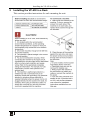
Installing the VP-438 in a Rack
Connecting the VP-438 Presentation Switcher / Scaler
Controlling the VP-438
Controlling via the Front Panel Buttons
Using the OSD Menu
1
1
1
3
4
5
5
5
9
10
12
12
12
7.3
7.4
8
9
Connecting to VP-438 via RS-232
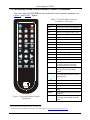
Controlling via the Infrared Remote Control Transmitter
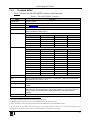
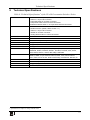
Technical Specifications
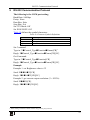
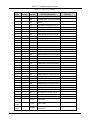
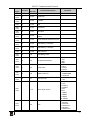
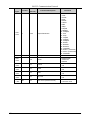
RS-232 Communication Protocol
15
16
17
19
7.2.1
7.2.2
7.2.3
7.2.4
The MAIN MENU
The FINETUNE Menu
The AUDIO Menu
The OSD Menu
13
14
14
15
Figures
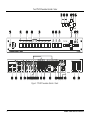
Figure 1: VP-438 Presentation Switcher / Scaler
Figure 2: Connecting the VP-438 Presentation Switcher / Scaler
Figure 3: Infrared Remote Control Transmitter
Tables
Table 1: VP-438 Presentation Switcher / Scaler Front Panel Features
Table 2: VP-438 Presentation Switcher / Scaler Rear Panel Features
Table 3: The MAIN MENU Features
Table 4: The FINETUNE Menu Features
Table 5: The AUDIO Menu Features
Table 6: The OSD Menu Features
Table 7: Infrared Remote Control Transmitter Functions
Table 8: Technical Specifications of the VP-438 Presentation Switcher /Scaler
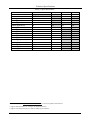
Table 9: Input Resolutions
Table 10: Character Symbols Definitions
Table 11: RS-232 Protocol
6
11
16
7
8
13
14
14
15
16
17
18
19
20
i