1
2
Controls and Connections
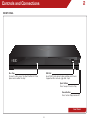
front Panel
Disc Tray
To insert a disc, press the Eject Button first then
place a disc onto the tray.
USB Port
Insert USB thumb drive to play photos and music.
Supported files include .jpg and .mp3.
Eject Button
Press to eject the disc tray.
Power Button
Press to turn Player on or off.
Front Panel
8