1
15. Attachments - Do not use attachments not recommended by the product manufactures, as they
may cause hazards.
16. Accessories - Do not place this product on an unstable cart, stand, tripod, bracket or table. The
product may fall, causing serious injury to a child or adult, and serious damage to the product. Use only
with a cart, stand, tripod, bracket or table recommended by the manufacturer or sold with the product. Any
mounting of the product should follow the manufacturer's instructions and should use a mounting
accessory recommended by the manufacturer.
17. Moving the product - A product and cart combination should be moved with care. Quick stops,
excessive force and uneven surfaces may cause the product and cart combination to overturn.
18. Unused periods - The power cord of the appliance should be unplugged from the outlet during
lightning storms or when the apparatus is left unused for a long period of time.
19. Servicing - Do not attempt to service this product yourself, as opening or removing covers may
expose you to dangerous voltage or other hazards. Refer all servicing to qualified service personnel.
20. Please remove the power plug form the main power source or wall power source when not in use.
When plugged in to a power source, the system is in standby mode, so the power is not entirely cut off.
21. Replacement parts - When replacement parts are required, ensure the service technician has used
replacement parts specified by the manufacturer or have the same characteristics as the original part.
Unauthorized substitutions may result in fire, electric shock or other hazards.
22. Mains fuses - For continued protection against fire hazard, use fuses only of the correct type and
rating. The correct fuse specification for each voltage range is marked on the product.
23. Do not turn up the volume while listening to a section with very low level inputs or no audio signals. If
you do, the speaker may be damaged when a peak level section is suddenly played.
24. The only means of completely disconnecting the product from the power supply is by removing the
power cord from the wall outlet or the product. The wall outlet or the power cord entry to the product must
remain freely accessible at all times while the product is in use.
25. Try to install the product near a wall socket or extension cord and shall be easily accessible.
26. The highest environmental temperature suitable for this product is 40°C.
Illustrations
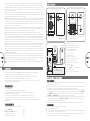
Front View
1
VOLUME
Back view
3
4
2
2
3
4
5
Main / Right speaker
Left speaker
Right speaker
Left speaker
CD / VCD / DVD
player
EN
3
Mp3 / Mp4
Media player
R
AUDIO
INPUT
L
—
+
TREBLE
+
BASS
AC IN
INPUT1
INPUT2
L AUDIO OUTPU T
ON
OFF
L-
L+
Introduction
Interconnect speaker cable
High Fidelity bookshelf stereo speakers for music and multimedia entertainment.
Ideal for all occasions and placement.
Wooden cabinets for ideal sound performances and accurate production.
Side volume control for convenience.
Book cabinet for stereo sound effects, and easy placement between LCD screen or playback devices.
Features
Powerful 80 Watt performance
Bookself type speaker system with 2-way stereo effects
Wood design for excellent sound handling and all range performances
Ideal for music entertainment and multimedia applications
Deep woofer effects with bass reflex tunnel
High-end connection type for clearer sound and distortion free audio pleasure
1
PC or Notebook
AC power supply
AC 220V - 240V ~ 50Hz, 600mA
6
7
8
R
AUDIO
INPUT
L
—
+
TREBLE
+
BASS
AC IN
INPUT1
INPUT2
L AUDIO OUTPU T
ON
OFF
L-
L+
Main / Right speaker
9
Left speaker
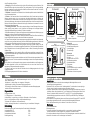
Front view
1. Tweeter
2. Woofer
3. Master volume
4. Power LED
Back view
1. Bass reflex tunnel
2. Cooling fins
3. Treble & Bass volume
4. Power switch
5. AC IN power cord
6. Binding posts
7. PC input
8. AUX input
9. Binding posts to Left speaker
Product connection and operation
Connections
1.Ensure the volume knob is set to lowest and the AC power is turned off.
2.Connect the interconnect cables between the 2 speakers. You can use a third-party banana plugs or
use the bare expose wires to connect.
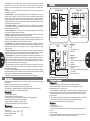
3.Connect to your playback device. Ensure they are turned off first. There are 2 sets for RCAs for you to
connect to. You can select between INPUT 1 or INPUT 2. You can connect to various type of playback
devices such as CD, DVD player, or MP3,MP4 player, or Media player and even your computer.
4.Please note that between INPUT 1 or INPUT 2, only one playback can be turned on, else the other
playback will distort the audio quality of the first .
5.Last, connect the AC power cable to the power source.
Packing list
Operation
You should find following items while unpacking:
1.Turn on the AC power source
2.Start the playback of your media
3.Slowly raise the volume level to your listening preference. Next, adjust the Treble and Bass volumes
to your preferred sound effects.
4.When turning off the speakers, always stop the playback first. Then lower the volume before
proceeding to turn off the power.
SOLO15 speakers
3.5mm stereo - 2RCA cable
Interconnect speaker cable
User manual
2pcs
1pc
1pc
1pc
EN
4