1
" [View network settings]: Display the
current network status.
" [View wireless settings]: Display the
current Wi-Fi status.
Preference (languages,
parental control...)
1
2
14
Press
.
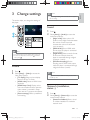
Select [Setup] > [Preference] to access
the preference setup options.
" [Menu language]: Select an onscreen
display menu language.
" [Audio]: Select an audio language for
video.
" [Subtitle]: Select a subtitle language for
video.
" [Disc menu]: Select a menu language
for a video disc.
" [Parental control]: Restrict access to
discs that are encoded with ratings.
{@@
options. To play all discs irrespective of
Q'
+
@|@!
" [Screen saver]: Enable or disable
screen saver mode. If enabled, the
screen enters idle mode after 10
minutes of inactivity (for example, in
pause or stop mode).
" [Auto subtitle shift]: Enable or disable
subtitle shift. If enabled, the subtitle
Q&
the TV screen (this feature works with
some Philips TVs only).
" [Change password]: Set or change
a password to play a restricted disc.
{@@&+
password or if you have forgotten your
password.
" [Display panel]: Change the brightness
of the display panel of the player (for
BDP2930 only).
" [Auto standby]: Enable or disable
auto standby. If enabled, the player
switches to standby after 30 minutes
of inactivity (for example, in pause or
stop mode).
" [VCD PBC]: Display or skip the
content menu for VCD and SVCD.
Note
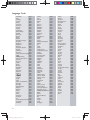
" If your preferred language is not available for disc
"
language, audio or subtitle, you can select [Others]
from the menu options and input 4-digit language code
which can be found at the back of this user manual.
If you select a language which is not available on a disc,
this player uses the default language of the disc.
Advanced options (clear
memory...)
1
2
Press
.
Select [Setup] > [Advanced] to access the
advanced setup options.
" [BD-Live security]: Restrict or allow
access to BD-Live (only for noncommercial, user-created BD-Live
discs).
" [Downmix mode]: Control 2-channel
stereo audio output.
" [Software update]: Select to update
software from a network or from USB
storage device.
" [Clear memory]: Delete the previous
BD-Live download on the USB
Q&+!}@`*}@
&
automatically created to store the BDLive download.
" [DivX® VOD Code]: Display the
DivX® registration code or the
deregistration code for this player.
" [Version information]: Display the
software version of this player.
" [Restore default settings]: Reset this
player to the default settings made at
the factory, except for password and
parental control level.
EN
BDP2900_93_UM_V1.0.indb 14
2012-3-30 14:11:47