1
7.5.2
To register an additional wireless headset
IMPORTANT: The wireless headset is pre-registered when supplied and
should not need to be registered. Headset registration is only necessary when
you buy a new headset or if it has lost its registration, and the headset LED is
purple.
Note: Before trying to register a headset to the base station, make sure the
base station system PIN code is set to 0000, otherwise you will not be
able to register the headset
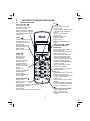
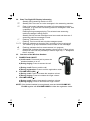
1. Press and hold VOLUME UP / FLASH [ + ] together with VOLUME
DOWN [ - ] to put the headset into registration mode. The LED on the
wireless headset will toggle between red and blue.
2. Press and hold <FIND> on the base station for more than five seconds, to
put the base station into registration mode.
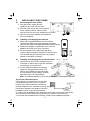
3. Place the unregistered wireless headset on the base charging bay.
4. The headset LED will flash blue for about 3 seconds and a long beep tone
is generated if the registration is successful.
Note: If the headset LED flashes slowly in purple, it means that the headset
is registered but the base is not available.
7.6 Reset Your Phone
You can reset your phone to the default settings . After a reset, all your
personal settings, call list entries, redial list entries, and answering machine
messages will be deleted but your phonebook remains unchanged.
1.
2.
3.
4.
5.
Press <MENU/OK> and <UP/DOWN> to select DEFAULT.
Press <MENU/OK> to display PIN?-----.
Enter the 4-digit system PIN(default 0000).
Press <MENU/OK> to display CONFIRM?
Press <MENU/OK> to confirm, and the phone will be reset to its default
settings.
26