1
"
"
"
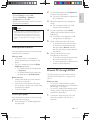
[Picture settings]: Select the most
optimum picture setting (powered by
CinemaPerfect HD).
[Repeat]: Repeat a selected folder.
[2D to 3D]: Convert instantly a 2D picture
to be viewed in 3D effect.
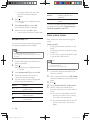
Character set
[Standard]
Audio options
[Chinese]
[Chinese-Traditional]
[Korean]
Languages
English, Albanian,
Danish, Dutch,
Finnish, French, Gaelic,
German, Italian, Kurdish
(Latin), Norwegian,
Portuguese, Spanish,
Swedish and Turkish
$
'!
Traditional Chinese
English and Korean
Note
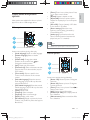
Press
repeatedly to cycle through the
following options.
" Repeat the current track.
" Repeat all the tracks on the disc or folder.
" Play audio tracks in a random loop.
" Turn off a repeat mode.
" *+;*'
<$=
"
"
device, or an online video store, connect this player to a
TV through HDMI.
?%
*+;+'
@
J
?*+;+'
'Q++W?
+
Q+[?Q+[
=
formats: .srt, .sub, .txt, .ssa, and .smi.
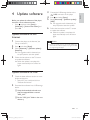
DivX videos
You can play DivX videos from a disc, a USB
storage device, or an online video store (see
"Rent online videos).
VOD code for DivX
" Before you purchase DivX videos and play
them on this player, register this player on
www.divx.com using the DivX VOD code.
" Display the DivX VOD code: press
, and select [Setup] > [Advanced] >
[DivX®VOD Code].
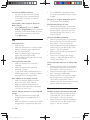
DivX subtitles
" Press SUBTITLE to select a language.
" If the subtitle is not displayed correctly,
change the character set that supports the
DivX subtitle. Select a character set: press
, and select [Character set].
\
'
USB storage device.
An Real Media Variable Bitrate (RMVB) and
']^
''
+'\
your computer onto a recordable disc or USB
storage device. And play them from this player.
Note
" %
JWW
".RM".
Synchronize audio with video
You can adjust the audio delay time when video
is out of sync with audio.
12
EN
BDP7700_98_UM_V1.0.indb 12
2012-2-28 14:52:29