1
2 Use your Bluray disc/ DVD
player
Congratulations on your purchase, and
the support that Philips offers (e.g. product
software upgrade), register your product at
www.philips.com/welcome.
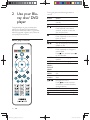
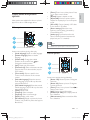
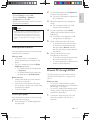
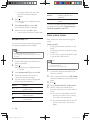
During play, press the following buttons to
control.
Button
/
Basic play control
/
/
AUDIO
SUBTITLE
DISC
MENU /
POP-UP
MENU
TOP
MENU
Color
buttons
OK
10
Action
Turn on the player, or switch to
standby.
Access the home menu.
Stop play.
Press and hold (more than 4
seconds) to open or close the
disc compartment.
Pause play.
Press repeatedly to slow forward
frame by frame.
Start or resume play.
Skip to the previous or next track,
Fast backward or forward.
Press repeatedly to change the
search speed.
Press once, and then press
to slow forward.
Select an audio language or
channel.
Select a subtitle language.
Access or exit the disc menu.
Access the main menu of a video
disc.
Select tasks or options for Blu-ray
discs.
Navigate the menus.
Press
to rotate a picture
clockwise or counter-clockwise
during slideshow.
!
Return to a previous display menu.
Access more options during play.
EN
BDP7700_98_UM_V1.0.indb 10
2012-2-28 14:52:27