1
Product connection and operation
Product connection and operation
iPod docking interface
1.Product connection
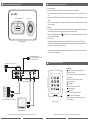
a. Connect the LINE OUT of iDock with the audio signal input port of the amplifier.
b. Connect the LINE IN of iDock with the audio output port of the audio players, e.g., DVD player or PC,
etc..
c. Connect the S-VIDEO OUT/Composite OUT of the iDock with the TV or LCD respective video input
ports.
d. Connect the power adaptor’s DC plug into the iDock DC 9V socket, and the other end into the wall or
AC power supply.
2.Operation
a. Turn on the AC power supply. The Volume dial LED remains off and ensure the Volume dial remains
at the lowest point to prevent speaker damage from sudden volume spike.
b. Turn the volume dial or press the " " (ST-BY) on the remote control to turn on the product. The blue
luminous ring LED is lighted.
3.Input selection:
With the iPod docked, the audio output is from the iPod interface. When there is no iPod player
connected, the LINE IN becomes the default input selection. Any digital audio playback devices can
be connected via this 3.5mm stereo interface.
Volume dial
iDock top panel
Note: When using iPod, please install the base adaptor of your respective iPod player version into
the common base of the system.
from CD/MP3/MP4/DVD/PC...
or any digital audio playback source
with 3.5mm stereo socket
Remote control illustration
AC power source: 100 to 240V
Power adaptor
Functions:
: Power ON / Off button, product goes to
standby in Off mode
INPUT: Depress to select between line input or
iPod interface
MENU: Revert to iPod's previous menu
: Previous menu
: Next menu
ENTER: Confirm selected menu
: Previous song
: Next song
VOL+/-: Volume adjustment level
: Play or Pause the playback
RESET: Depress to revert volume to factory
default settings.
iDock Rear panel
Video outputs:
S-Video or Composite
Multimedia Speakers
(To any amplified source or speakers)
Remote control
TV or projection screen
Basic connections
All specification and information are subject to changes without further notice
3
All specification and information are subject to changes without further notice
4