1
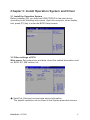
Exit menu: exit the BIOS Setup after completed the relevant setup.
Save Changes and Exit: store the value and exit.
Discard Changes and Exit: without storing the value and exit.
Discard Changes: discard this setting, and return to the last setting.
Load Optimal Defaults:discard this setting, and return to the default
setting.
Load Fail-safe Defaults: change all setting to safe default setting.
3.3 Install the Driver program
Please use the CD attached with the machine to operate in accordance
with the CD operation interface.
Option 1: Computer-specific driver.
Option 2: Application Software.
Choose the driver program you need and operate according to the screen
instruction. System will install the driver program automatically; during the
process, the system may restart.
ViewSonic VPC221
8