1
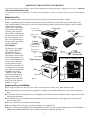
 3. Wash the removable pot, fry/steam basket, fryer cover, and base in dishwasher or in warm, sudsy water.
Do not use steel wool scouring pads or abrasive kitchen cleaners on the removable pot, cover, or base and do not use
bleaching agents to clean the fry/steam basket.
If desired, the basket handle may be removed for cleaning. Squeeze the drain hooks and fold the handle into the basket
until the handle bars are out of the brackets. Continue squeezing to remove both pegs from the bracket holes. After
cleaning, reattach handle making sure both pegs are in the bracket holes and the handle bars are in the brackets (see
Fig. D, page 3). Fold handle into basket for storage (see Fig. B1, page 3).
Note: Your fryer has a grease filter in the cover. The filter does not need replacing.
4. Before reassembling unit, be sure all parts are completely dry.
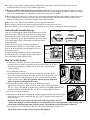
5. Always check the magnetic plug before use to assure metal items have not become attached to the magnet.
6. Periodically check the screws on the base handles and feet to be sure they are tight. Retighten, if necessary, with a
standard #2 Phillips head screwdriver.
CAUTION: Overtightening can result in stripping of screws or cracking of handles and feet.
Questions and Answers
What does it mean when the words UNPLUG and PUSH alternately flash in the display panel and the unit keeps
beeping?
The deep fryer has been overheated. The deep fryer is equipped with a sensor which will alert you if the unit has
overheated. Overheating occurs if the unit is heated without oil or water or with insufficient oil or water. Older oil that has
become thick and solid fats may not conduct heat well and may also cause the sensor to trip. When the sensor trips, the
following will occur:
1. The deep fryer will beep continuously.
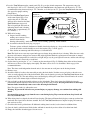
2. The words Unplug and Push will alternately flash in the display panel.
3. The red and green signal lights will flash.
4. The unit will stop heating.
Whenever the unit has overheated, you will need to reset the fryer for cooking.
To reset the fryer:
1. Unplug the unit and allow the unit to cool.
2. Correct the cause of overheating; for example, make sure there is sufficient oil or water in the fryer, or if the oil is
old, replace the oil with fresh oil.
3. After the unit has cooled, use the tip of a pen and push the red power reset button on the back of the
control unit (Fig. A2, page 2). The unit will not operate until it is reset.
4. Plug the unit back in and reset the temperature and heat up cycle as described in steps 7 thru 9 on pages 3 and 4.
What if the letters “err” start flashing in the display panel and the unit keeps beeping?
This lets you know that the temperature sensing device has become damaged or is defective. The unit will be inoperable;
you should unplug the unit and contact our Consumer Service Department weekdays 8:00 AM to 4:30 PM (Central Time)
at 1-800-877-0441 or contact us at our website www.GoPresto.com.
Sometimes my deep fryer fails to preheat or the cooking process stops. Why?
If your fryer does not preheat or if cooking stops, check the following:
1. Check cord assembly to assure magnetic plug is attached to the appliance and the cord is plugged into the wall
outlet.
2.Check to see that both guides on the front of the control unit are properly positioned in the tracks on the back of
the base (see Fig. E and Fig. F, page 3).
3.The reset button may have tripped and has not been reset; see the information above regarding resetting the fryer.
11