1
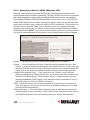
use two of these wireless routers to connect the two networks. Both routers
need to be set to AP Bridge (Point to Point) mode: The screen will then display
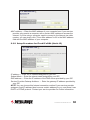
a MAC Address 1 field in which you enter the MAC address of the opposite
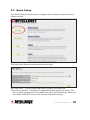
router, which you can obtain by clicking “Status” (top right) and “Device Status.”
You also need to set both routers to the same wireless channel in the Channel
Number field. Finally, click “Security Settings” and set both devices up the
same way. NOTE: In Bridge mode, no wireless client will be able to wirelessly
connect to the device.
• “AP Bridge (Point to Multi-Point)” mode is very similar to the above-mentioned
Point-to-Point mode, except here you can have the router connecting up to four
different devices. The setup is the same, but you need to provide MAC
addresses for all other bridges you want to connect to (MAC Address 1 – 4).
NOTE: In Bridge mode, no wireless client will be able to wirelessly connect to
the device.
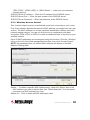
• “AP Bridge (WDS)” mode is quite similar to the Point to Multi-Point described
above in that it allows you to connect your wireless router to up to four other
wireless routers. However, whereas in bridge mode you can only use this
function to connect wired Ethernet networks (since in Bridge mode no wireless
client can connect to the wireless router), in WDS mode this limitation no longer
exists. WDS (Wireless Distribution System) is a system that enables the
wireless interconnection of access points in an IEEE 802.11 network. It allows
a wireless network to be expanded using multiple access points without the
traditional requirement for a wired backbone to link them. The downside is
two-fold: First, the performance of the wireless network suffers in WDS mode
quite significantly; second, the setup is more complicated and interoperability
with different access points and routers cannot be guaranteed. The setup is
very much the same as the Point to Multi-Point Bridge mode; the only extra
information that needs to be provided is the SSID of the wireless network.
• “Universal Repeater” combines the first two modes, Access Point and Station,
SYSTEM & NETWORK SETUP
33