1
2 Your home theater
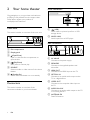
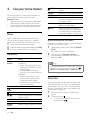
Front connectors
Congratulations on your purchase, and welcome
to Philips! To fully benefit from the support that
Philips offers, register your product at
www.philips.com/welcome.
Main unit
This section includes an overview of the main unit.
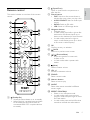
a
(USB)
Audio, video or picture input from a USB
storage device.
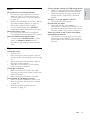
b MUSIC iLINK
Audio input from an MP3 player.
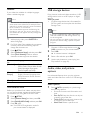
Rear connectors
a Disc compartment
AUDIO IN
AUX
AC MAINS~
b Display panel
L
FM
ANTENNA
R
HDMI OUT (ARC) OPTICAL IN
VIDEO OUT
c (Open/Close)
d
Open or close the disc compartment, or
eject the disc.
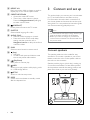
a AC MAINS
(Play/Pause)
Start, pause or resume play.
b SPEAKERS
e SOURCE
f
Connect to the power supply.
Connect to the supplied speakers and
subwoofer.
Select an audio or video source for the home
theater.
c HDMI OUT
(Standby-On)
Switch the home theater on or to standby.
d OPTICAL IN
Connectors
This section includes an overview of the
connectors available on your home theater.
Connect to the HDMI input on the TV.
Connect to an optical audio output on the
TV or a digital device.
e VIDEO OUT
Connect to the composite video input on
the TV.
f AUDIO IN-AUX
Connect to an analog audio output on the TV
or an analog device.
g ANTENNA FM
Fixed FM antenna.
4
EN