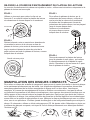
1
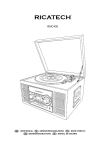
RMC100 5 in 1 MUSIC CENTER
USER MANUAL
GEBRUIKERSHANDLEIDING
MODE D’EMPLOI
BEDIENUNGSANLEITUNG
MANUALE D’USO
English
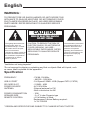
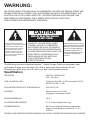
WARNING :
TO PREVENT FIRE OR SHOCK HAZARD, DO NOT EXPOSE THIS
APPLIANCE TO RAIN OR MOISTURE. DO NOT REMOVE COVER.
PILOT LAMPS SOLDERED IN PLACE. NO USER SERVICEABLE
PARTS INSIDE. REFER SERVICING TO QUALIFIED SERVICE
PERSONNEL.
CAUTION
RISK OF ELECTRIC SHOCK
DO NOT OPEN
The lighting flash with arrowhead symbol, within an
equilateral triangle, is intended to alert user to the presence of uninsulated
“dangerous voltage” within the
product’s enclosure that may
be of sufficient magnitude to
constitute risk of electric
shock to persons.
CAUTION: TO REDUCE THE RISK OF
ELECTRIC SHOCK, DO NOT REMOVE
COVER (OR BACK). NO USER SERVICEABLE PARTS INSIDE. REFER
SERVICING TO QUALIFIED SERVICE
PERSONNEL.
The exclamation point within
an equilateral triangle is intended to alert user to the
presence of important
operating and maintenance
(servicing) instruction in the
literature accompanying
the appliance.
“Ventilation not being impeded.”
“Do not exposed to dripping or splashing and that no objects filled with liquids, such
as vases, shall be placed on the apparatus.”
Specification
FREQUENCY
USB 2.0 PORT
SD CARD SLOT
POWER SOURCE
ANTENNA
POWER CONSUMPTION
SPEAKER SIZE
REMOTE CONTROL
: FM 88 -108 MHz
: AM 530 - 1600 KHz
: Full Speed 512MB - 4GB (Support FAT16, FAT32)
: 512MB – 4GB
: AC 230V-50Hz
: External antenna for FM
: Built-in ferrite bar for AM
: 18W
: 2 x 3” 4 ohm Dynamic type
: A Cell battery is fitted Replacement Lithium Battery required :
1 x 3V CR2025
* DESIGN AND SPECIFICATIONS SUBJECT TO CHANGE WITHOUT NOTICE.
IMPORTANT SAFEGUARDS FOR AUDIO PRODUCTS
PLEASE READ CAREFULLY THE FOLLOWING IMPORTANT SAFEGUARDS THAT ARE
APPLICABLE TO YOUR EQUIPMENT.
1. Read Instructions - All the safety and operating instructions should be read before
the appliance is operated.
2. Retain Instructions - The safety and operating instructions should be retained for
future reference.
3. Heed Warnings - All warnings on the appliance and in the operating instructions
should be adhered to.
4. Follow Instructions - All operating and use instructions should be followed.
5. Water and Moisture - The appliance should not be used near water-for example, near
a bathtub,washbowl,kitchen sink,laundry tub, in a wet basement, or near a
swim ming pool and the like.
6. Carts and Stands - The appliance should be used only with a cart or stand that is
recommended by the manufacturer.
6A.An appliance and cart combination should be moved with care. Quick stops,
excessive force, and uneven surfaces may cause the appliance and cart
combination to overturn.
7. Wall or Ceiling Mounting - The appliance should be mounted to a wall or ceiling
only as recommended by the manufacturer.
8. Ventilation - The appliance should be situated so that its location or position does
not interfere with-its proper ventilation.For example, the appliance should not be
situated on a bed, sofa, rug,or similar surface that may block the ventilation
openings or, placed in a built-in installation, such as a bookcase or cabinet that may
impede the flow of air through the ventilation openings.
9. Heat - The appliance should be situated away from heat sources such as
radiators,heat registers, stoves,or other appliances (including amplifiers) that
produce heat.
10.Power Sources - The appliance should be connected to a power supply only of the
type described in the operating instructions or as marked on the appliance.
11.Grounding or Polarization - Precautions should be taken so that the grounding or
polarization means of an appliance is not impeded.
12.Power - Cord Protection - Power-supply cords should be routed so that they are not
likely to be walked on or pinched by items placed upon or against them, paying
particular attention to cords at plugs, and the point where they exit from the
appliance.
13.Cleaning - The appliance should be cleaned only as recommended by the
manufacturer.
14.Antenna -This product is designed for use with the antenna attached and should not
be connected to any other external antennas.
15.Non-use Periods - The power cord of the appliance should be unplugged from the
outlet when left unused for a long period of time.
16.Object and Liquid Entry - Care should be taken so objects do not fall and liquids
are not spilled into the enclosure through openings
17.Damage Requiring Service - The appliance should be serviced by qualified service
personnel when:
A. The power-supply cord of the plug has been damaged;or
B. Objects have fallen, or liquid has been spilled into the appliance;or
C. The appliance has been exposed to rain, or
D. The appliance does not appear to operate normally or exhibits a marked change inperformance, or
E. The appliance has been dropped, or the enclosure damaged.
18.Servicing - The user should not attempt to service the appliance beyond that described
in the operating instructions. All other servicing should be referred to qualified service personnel.
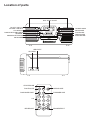
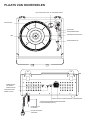
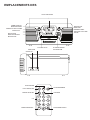
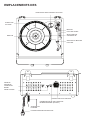
Location of parts
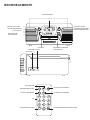
SPEAKERS
DIAL SCALE PLATE
ON-OFF SWITCH /
VOLUME CONTROL
LCD DISPLAY
RADIO\CD\ PHONO SWITCH
SENSOR
AM\FM\FM.ST SWITCH
CD DRAWER
TUNING KNOB
REC/ERASE
PLAY/PAUSE
OPEN/CLOSE
STOP/SD/USB
USB PO RT
SD CARD
SD
USB
STOP/SD/USB
PLAY/PAUSE
SD/USB
BACK WARD SKI P
OPEN/CLOSE
FORWARD SKIP
0-9
REC/ERAS E
REC/
ERASE
PROG/REPEA T
Location of parts
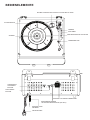
SPINDLE ADAPTOR FOR 45 RPM RECORDS
TURNTABLE
TONE ARM
CUE LEVER
SPEED CONTROL SWITCH
SPINDLE
TONE ARM REST
SUBWOOFER
OUTPUT JACK
EARPHONE JACK
EXTERNAL SPEAKER JACK
INTERNAL/EXTERNAL
SPEAKER SWITCH(INT./EXT.)
EXTERNAL FM ANTENNA
AC POWER PLUG
Unpacking
1. Remove packing materials from unit.
NOTE: Save all packing materials until you are completely satisfied all parts of
the unit are operating satisfactorily and just in case the unit should need
service in the future.
2. Make sure you have located the Remote Control before storing the packaging.
3. Remove the plastic bag covering the unit.
4. Remove the plastic safety cover from the AC 3-pin plug.
5. Remove the tie from the AC cord and untie the Wire Antenna on the back of the unit.
6. Lift up the Record Player Lid and remove the Polystyrene shipping material from the turntable.
7. Remove the black tie-wire from the Tone arm.
8. Remove the white protective needle cover by gently pulling it towards the front of the unit.
Stylus
A universal Sapphire Stylus is supplied and fitted to the Tone Arm, this is suitable for playing records
of all 3 speeds (331/3/45/78rpm). A replacement universal stylus and a separate stylus for playing
78rpm records are available direct from the Manufacturer and some Dealers.
PU
To remove the Stylus from the Tone Arm, hold the Tone Arm
head steady while grabbing the plastic Stylus Holder with
two fingers - then gently pull the complete red stylus holder
straight towards you and off the silver cartridge, as shown
in the diagram.To re-fit the Stylus, hold the sides of the red
plastic stylus holder, ensuring the Needle is facing downwards.
Gently push the back of the stylus holder at a slight angle against
TURN
the silver cartridge at the end of the TONE ARM until you are sure
it is securely fitted. Refit the white protective needle cover, if so required.
SH
Removing/Refitting the Stylus
Notes
· Always handle the Stylus with care as the Sapphire needle tip is easily damaged.
· When transporting the turntable it is advisable to re-fit the white protective needle cover and the
Tone Arm Hold-down Clip until the unit is going to be used again.
· When removing or re-fitting the Stylus, always be careful not to put too much pressure on the Stylus
Holder and the Tone Arm silver cartridge to avoid any possible damage to them.
Power source
This unit is operated by 230V AC Mains.
NOTES:
a) ESD remark: In case of a malfunction due to electrostatic discharge, you may need to re-set the
product to resume normal operation (re-connection to the power source may be required).
b) Electrical Fast Transient (Burst) : In case of a malfunction due to electrical fast transient (Burst),
just reset the product to resume normal operation (re-connection to the power source may be
required).
Set up
Unwind the AC Power Cord at the back of the unit and insert the 3-pin plug into a 230V AC Power
socket.
Radio operation
1. Untie the FM WIRE ANTENNA and allow it to hang down in a straight line for optimum FM
reception. Do no connect the FM antenna to an outside antenna.
2. Switch the unit on by turning the power ON-OFF SWITCH/VOLUME CONTROL to the ON position
and turn the Sound. Volume to mid-range position.
3. Set the Function switch to RADIO mode.
4. Slide the Band switch to the desired band – AM (= MW) or FM or FM.ST*.
5. Select the desired radio station by rotating the TUNING KNOB.
6. Adjust the Volume again if necessary.
NOTE: *If FM Stereo reception is not good, it may be better to switch to FM Mono.
Antenna
For FM reception, the unit has an FM WIRE ANTENNA on the rear of the unit.
Move the wire until Radio reception is clear and with no interference. If you have trouble tuning in an
FM station, re-position the wire FM antenna for best reception.
CAUTION: The external FM ANTENNA must not be connected to an outside antenna.
For AM (= MW) reception, the unit is provided with a directional built-in ferrite antenna.
Rotate the set to find the position in which the best reception is obtained.
Turntable operation
Preparing to use the Turntable
1. Lift up the Record Player Lid, untwist and remove the black tie-wrap securing the TONE ARM.
2. Remove any packing materials.
3. Remove the white protective NEEDLE COVER by gently pulling it off the red stylus holder towards
the front of the unit. Keep this safe and re-fit to the stylus in case the unit needs transporting to a
different location.
4. Release the TONE ARM HOLD-DOWN CLIP by gently pushing this to the right. This will unlock the
tone arm from its ARM REST. Re-lock the hold-down clip when moving the unit to another location.
Playing a record
1. Switch the unit ON by turning the power ON-OFF SWITCH/VOLUME CONTROL switch to the ON
position.
2. Turn the VOLUME control to mid-range position.
3. Slide the FUNCTION Switch to PHONO mode.
4. Set the SPEED CONTROL SWITCH to the correct speed (331/3, 45 or 78 rpm) required for the
selected record.
5. Use the CUE LEVER to raise the tone arm off its rest. Move the tone arm gently to the right until a
‘click’ is heard, the turntable should start rotating.
6. Move the Tone Arm towards the record and use the cue lever to lower it onto the point where you
want the record to start playing.
7. At the end of the record, the TONE ARM will stop automatically. Lift the Tone Arm and return it
manually to the TONE ARM REST.
Accessory supplied
Spindle Adaptor for 45 rpm records
To play a 45rpm record with the centre clip missing, remove the adaptor from
the record player deck by placing thumb & forefinger in the recesses and
pulling it upwards, then place it on the Turntable
Spindle. The record can then be placed on the turntable.
CD Player operation
Playing a CD
1. Switch the unit ON by turning the power ON-OFF SWITCH/VOLUME CONTROL switch to the ON
position and turn the Sound Volume to mid-range position.
2. Slide the FUNCTION Switch to CD mode.
3. Press CD OPEN / CLOSE / to open the CD Compartment.
4. Insert a pre-recorded compact disc with the printed side facing up. Press CD OPEN / CLOSE /
again to close the compartment, “ READ “ is displayed as the CD player scans the contents of the
disc.
CD
5. Track no. 1 will start playing back automatically after the CD Player has finished reading the
contents of the disc.
6. Press FORWARD SKIP / or BACKWARD SKIP / once or repeatedly until the desired track
number appears on the display.
ESP
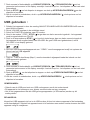
7. Press
8. Press
CD
CD
or the “ STOP/SD/USB “ key (marked with a red dot) to stop playback.
or the “ PLAY/PAUSE “ key (marked with a green dot) to resume play or pause the music.
MP3-CD Disc Playback – by Remote Control
1. Insert an MP3-CD format disc. Press CD OPEN / CLOSE / again to close the compartment. “
READ “ is displayed as the CD Player scans the contents of the disc.
CD
2. Track no. 1 in the Root Folder (Folder 1) will start playing back automatically after the MP3-CD disc
contents has been read.
ESP
CD
MP3
3. Press FORWARD SKIP / or BACKWARD SKIP /
number appears on the display.
4. Press STOP / to stop playback.
once or repeatedly until the desired track \
CD
5. In Stop mode, press and hold the PLAY/PAUSE key / to select the MP3 folder.
NOTE: In Stop Mode: For faster skipping forward or backward of 10 tracks at a time,
press and hold the FORWARD
SKIP / or BACKWARD SKIP / button. This stops when the button is released.
USB & SD Card operation
SD Card Operation:
1. Switch the unit ON by turning the power ON-OFF SWITCH/VOLUME CONTROL switch to the ON
position.
2. Turn the VOLUME control to mid-range position.
3. Slide the FUNCTION Switch to “ CD “ mode.
4. In “ STOP “ mode Press and hold STOP / for over half a second – this will switch from CD>SD .
If no Card has been detected, “ NO CARD “ will show on the Display.
CARD
5. Insert an SD Card with pre-recorded MP3 music (not supplied) into the card slot. “READ” is then
displayed as the system scans the contents of the SD Card.
CARD
6. Track no. 1 of the Root folder (Folder 1) will play back automatically after reading the SD card
contents.
7. Press the FORWARD SKIP / or BACKWARD SKIP / once or repeatedly until the desired
track number appears on the display. Release the button – the track will start playing automatically.
8. Press STOP / to stop playback and press PLAY/PAUSE/ to resume play.
9. To pause the music, press PLAY/PAUSE / , press it again to resume play.
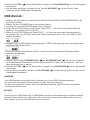
USB Operation :
1. Switch the unit ON by turning the power ON-OFF SWITCH/VOLUME CONTROL switch to the
ON position.
2. Turn the VOLUME control to mid-range position.
3. Slide the FUNCTION Switch to CD mode.
4. In “ STOP “ mode Press and hold STOP / for over half a second – this will switch from CD>SD .
5. In Stop mode, press STOP / and hold the key for over half a second - this will switch from
SD>USB. If no USB has been detected, “NO USB” will show on the Display.
USB
6. Plug-in a USB mass storage device. “ READ “ is displayed as the system scans the contents of the
USB device.
USB
7. Track no. 1 of root folder (Folder 1) will be played back automatically after the USB device contents
has been read.
USB
MP3
8. Press the FORWARD SKIP / or BACKWARD SKIP / once or repeatedly until the desired
track number appears on the display. Release the button - the track will start playing automatically.
9. Press STOP / to stop playback and press PLAY/PAUSE/ to resume play.
10.To pause the music, press PLAY/PAUSE / , press it again to resume play.
NOTES:
· The USB Port does not support connection with a USB Extension Cable.
· It is not designed for direct communication with a computer.
· It is not guarantee that all USB memory devices (or SD cards) will work on this audio system
IMPORTANT:
Do not disconnect the USB device during USB mode, as this may damage the external device or its
files. Please power off first or select another Mode before safely disconnecting the USB device.
USB Specification
Interface:
- USB 2.0 Full speed, HOST (USB HUB is not supported) Corresponding Flash memory
- Compatible with MPEG Audio 1, 2, 2.5
- Compatible with Layer 1, 2, 3
- Compatible with Bit rate: 128 – 320 Kbps
- Subfolder nest : 8 levels
- Number of track / titles max 999
- Support ID3 tag V2.0
Programming tracks
Up to 20 tracks can be programmed to play tracks on an Audio or MP3-CD, USB Device or SD Card
in the desired sequence.
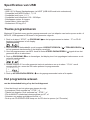
1. In “ STOP “ position, press PROGRAM / to start programming - “P” and P0-01 will start flashing
on the display.
P
CD
2. Press the FORWARD SKIP / or BACKWARD SKIP / buttons once or repeatedly until the
desired track number appears on the display.
3. For MP3 Programming: press and hold the PLAY/PAUSE key / to select the desired album.
4. Press PROGRAM / to confirm, the display shows the stored track number and the next store
position.
P
CD
5. Repeat steps 2-3 to select and store all desired tracks. “ FULL “ is displayed if you attempt to
program more than 20 tracks.
P
CD
6. Press PLAY/PAUSE /
to play the programmed tracks.
Erasing the Program
You can erase the contents of the memory as follows :
- In Stop position: Press “ STOP “ once, or
- During Playback: Press “ STOP “ twice, or
- Turn the ON-OFF Switch/Volume Control to OFF, or
- Select another sound source/function, or
- Press the CD OPEN/CLOSE button to open the CD door.(at CD mode)
Play mode
Repeat Play Mode for CD-DA or MP3 Playback
1. Press REPEAT / on the Remote Control while in Play mode.
2. The default Play Mode function is OFF.
3. For CD-DA playback there is a choice of 2 Play Modes: “REPEAT 1” / “REPEAT ALL”
4. For MP3 Playback there is a choice of 3 Play Modes: “REPEAT 1” / “REPEAT FOLDER” /
“REPEAT ALL”.
MP3 Recording
Recording from CD to USB / SD
The system is capable of converting (encoding) a whole Audio CD into MP3 format and copy/record
this to a USB mass storage device (e.g. a Flash Drive) or SD card (not supplied). It can also copy a
single MP3 track to/from a USB device or SD card.
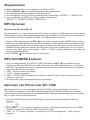
1. In CD playback mode, press REC / to start ripping (recording) to USB/SD card
(the default is USB if both devices are detected), playback will stop and skip back to the beginning
of the current track, the system will scan the contents of the USB/SD Card and create a folder to
store the MP3 Tracks in. Resume CD playback and ripping will start from that moment. “ USB ” or “
CARD “ will start flashing, depending on the device selected.
2. Press STOP / to exit CD ripping.
MP3 CD/USB/SD Copying
1. In MP3-CD, USB or SD Card playback mode, press REC / to start MP3 copying from MP3-CD
to USB or SD card, USB to SD Card and SD Card to USB. Playback will stop and the system will
scan the contents of the USB or SD card and create a folder to store the MP3 tracks in.
2. “ REC “ will show on the display.
3. “ COPY ” will be displayed.
4. Either “USB” or “CARD” will start flashing, MP3 copying starts, the process will stop when copying
has finished.
5. The current MP3 track will play back from the beginning.
Recording from Phono to SD / USB
The system is capable of converting an audio signal from PHONO input (record player) into MP3
format and store it on a USB mass storage device or SD card (the default is USB if both devices are
detected). Prepare for playing a record, as described previously.
1. Slide the FUNCTION button to PHONO mode, place a record on the turntable and start playing it.
2. Press REC / to start ripping(recording), the system will scan the contents of the USB or SD card
and create a folder to store the MP3 tracks.
3. “ REC ” and “ TO” are displayed on the LCD for about 15 seconds, “ USB “ starts flashing.
4. Either “ USB ” or “ CARD ” starts flashing as Recording begins.
5. Press STOP /
to exit PHONO Recording mode.
Deleting MP3 tracks
The system can delete previously recorded MP3 or existing files on either USB device or SD Card.
1. In USB or SD card playback mode, press and hold REC / for 2 seconds, the currently playing track
is stopped and will be deleted.
2. “ DELETE “ is displayed.
Fitting optional external speakers
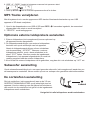
1. There is the option of connecting external speakers to this unit
(not supplied).
2. The speaker jacks to connect external speakers to
are located on the back of the unit. Along with
the speaker jacks there is a switch marked
“ INT./EXT.” When using external speakers,
this switch must be switched to the “ EXT.” position.
This turns off the internal speakers in the unit
and redirects the power to the External Speakers.
3. If you decide not to use External Speakers, make
sure the switch is set to “ INT.”
Speaker jack
RED
RED
METAL CONDUCTOR
BLACK
BLACK
Subwoofer socket
The subwoofer socket enables you to attach a separate powered Subwoofer (not supplied) which will
enhance bass response. Please contact your retailer for suitable subwoofer models.
Earphone jack operation
Insert the earphones (not supplied) into the 3.5mm diameter
EARPHONE JACK on the rear of the unit.
Please note that when listening through earphones, the sound
from the built-in speakers is cut off.
The sound from all speakers is cut off.
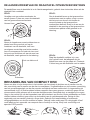
Re-attaching the turntable drive belt
The turntable drive belt is factory fitted - use these instructions only if the turntable fails to revolve ….
STEP 1
Use a screwdriver to remove the black
iron C-clipand lift the turntable off the
phonograph mechanism.
lron binder
STEP 2
Retrieve the dropped black rubberband
and replace it around the column on the
bottom of the turntable, then pull it out
gently without overstretching and book
the band around the small column point
at the edge of the turntable, as shown
in the diagram.
Small column point
STEP 3
To fix the turntable back onto the phonograph
mechanism, make sure the column point is
positioned over the correct place on the
phonograph mechanism, while placing the
axis of the turntable in the hole on the
phonograph mechanism, asshown in the
diagram.
STEP 4
Gently turn the turntable until a ‘plop’-sound
is heard, which indicates the repositioning of
the rubber band. Replace the C-clip to
secure the turntable.
Rubber band
Compact disc care
To remove a disc from its storage case, press down on the centre of the case and lift the disc out,
holding it carefully by the edges. Fingerprints and dust should be carefully wiped off the disc’s
recorded surface with a soft cloth. Unlike conventional vinyl or Shellac records, compact discs have
no grooves to collect dust and microscopic debris, so a gentle wipe with a soft clean cloth should
remove most particles. Wipe in a straight line from the inside to the outside of the disc. Small dust
particles and light stains will have absolutely no effect on sound reproduction quality. Clean the disc
periodically with a soft, lint-free, dry cloth. Never use detergents or abrasive cleaners to clean the
disc. If necessary, use a CD cleaning kit. Never affix labels to the surface of compact discs or write on
them, except very gently with specialist CD-R Pens.
Trouble shooting
There is no power
· Make sure the unit is plugged in correctly.
· Make sure the unit is switched on by the ON/OFF POWER SWITCH.
There is no sound
· Check to make sure the power is turned on.
· Check the volume level by turning the On/Off Power Switch/Volume Control.
· Check you did not leave any Headphones plugged in – this will cut all sound form the speakers.
· Make sure the INT./EXT. switch on the back of the radio is switched to INT.
(Unless you are using external speakers, in which case it should be on EXT.)
The Turntable does not work
· Make sure the unit is set to Phono mode by sliding the Function switch.
· Try moving the Tone arm to the right until you hear a click - the turntable should start rotating.
· Make sure the Turntable Drive Belt has not come off. To replace the belt, see separate Instructions
and diagrams.
The Tone Arm will not move
· The black tie-wrap has not been removed from the Tone Arm.
· The Tone Arm hold down clip has not been released.
· Make sure you lift the Tone Arm with the Cue Lever and then move it manually over the edge of the
record – then lower it with the Cue Lever. Caution: Do not force it down onto the record without
using the Cue Lever.
The Tone Arm slides across the Record
· Make sure the protective needle cover is removed.
· Make sure the Stylus has not been damaged – replace if necessary.
· Your record may be one of the newer types with micro grooves and may need a different stylus to
play successfully.
Any of the older style records should not have this problem.
Turntable – the sound is low when playing a record
· Try removing and refitting the stylus.
· Turn up the volume.
I have recorded a Record but it does not display any Folder/Artist/Title or Song Information
· Vinyl records have no digital information, so no MP3 song information will be stored on the USB
device or card. However, if required, MP3 tracks can be transferred to, viewed and named on a
computer.
I have recorded a CD but it does not display any Folder/Artist/Title or Song Information
· If this information was not already on the original Disc, this will not show on the recorded disc either.
The CD does not play
· Check to make sure the CD is inserted correctly (label side facing up).
· Make sure the Function switch is set to CD and a CD is in the tray.
· Make sure the CD is not blank.
· Check that the surface of the CD is clean. See separate Instructions on CD Care.
The CD does not play
· Check to make sure the CD is inserted correctly (label side facing up).
· Make sure the Function switch is set to CD and a CD is in the tray.
· Make sure the CD is not blank.
· Check that the surface of the CD is clean. See separate Instructions on CD Care.
USB /SD Card - no music is playing when PLAY/PAUSE is pressed
· Make sure there are MP3 music files stored on the USB Device/Flash Drive / SD Card.
· Check the USB Device/Flash Drive / SD Card is not larger than 4GB as the limit of this unit is up to
4GB max.
· Try resetting the USB by powering off.
· Check if the files on the device/card are perhaps in WMA format. This unit does not play WMA
format, only MP3 format.
· Not all makes of USB device/SD Card are compatible with this unit – this is not a malfunction of the
unit.
Cannot Record Music on the USB /SD Card
· Make sure the USB/SD Card is not full.
· Make sure the lock switch on the SD card is in the unlocked position.
· It may be the device/card is not compatible or of the correct size (up to 4GB max.) –
not all available USB/SD devices are guaranteed to work with this unit due to the way they are
manufactured.
The recorded MP3 Music does not have the same sound quality as the original CD
· The sound quality of an MP3 disc varies from that of a pre-recorded Audio Compact Disc, due to the
quality and method of recording and the difference in format.
The Remote is not working
· Replace the battery. See Specifications for type of battery required.
· Remove any obstacles in the path of the Infra Red Remote and the Remote Sensor next to the LCD
Display, so the remote signal has a straight path to it.
Customer support
You can contact the Ricatech customer service when you have a question or a problem with your
Ricatech product. You can contact us by telephone and email.
Email
For customer support by email, please sent a email to
[email protected] Please make sure that you mention the model number and serial number of
the product, mention your name & address and describe your question or problem clearly.
Telephone
For customer support by telephone, please dial +32 3 3265694. One of our service staff will be ready
to serve you. For full procedure please visit the website of Ricatech at: www.ricatech.com
Hereby, Ricatech B.V. declares that this turntable is in compliance with the essential
requirements and other relevant provisions of Directive 1999/5/EC.
Ricatech B.V.
Cornusbaan 1
2908 KB Capelle a/d IJssel
The Netherlands
Nederlands
WAARSCHUWING :
STEL HET APPARAAT NIET BLOOT AAN REGEN OF VOCHT OM GEVAAR VOOR BRAND
OF EEN ELEKTRISCHE SCHOK TE VOORKOMEN. DE BEHUIZING NIET VERWIJDEREN.
CONTROLELAMPJES ZIJN OP HET APPARAAT GESOLDEERD. GEEN DOOR DE
GEBRUIKER TE ONDERHOUDEN ONDERDELEN AAN DE BINNENKANT. LAAT
ONDERHOUD OVER AAN GEKWALIFICEERD ONDERHOUDS PERSONEEL.
CAUTION
RISK OF ELECTRIC SHOCK
DO NOT OPEN
Het symbool van de bliksemflits
met pijlkop, in een gelijk
zijdige driehoek, is bedoeld om
de gebruiker attent te maken op
de aanwezigheid van niet-geïsoleerde “gevaarlijke spanning” in
de behuizing van het product die
zo hoog kan zijn dat ze gevaar
voor een elektrische schok
betekent voor personen.
OPGELET: OM HET GEVAAR VOOR
EEN ELEKTRISCHE SCHOK TE
VERMINDEREN, BEHUIZING (OF
ACHTERKANT) NIET VERWIJDEREN.
GEEN DOOR DE GEBRUIKER TE
ONDERHOUDEN ONDERDELEN AAN
DE BINNENKANT. LAAT ONDERHOUD
OVER AAN GEKWALIFICEERD
ONDERHOUDS- PERSONEEL.
Het uitroepteken in een
gelijkzijdige driehoek is bedoeld om de gebruiker attent
te maken op de aanwezigheid
van een belangrijke instructie
voor bediening en onderhoud
(service) in de documentatie
bij het apparaat.
“Ventilatie niet belemmeren.”
“Niet blootstellen aan druipende of spattende vloeistoffen en geen voorwerpen met
vloeistoffen, zoals vazen, op het apparaat plaatsen.”
Specification
FREQUENTIE
USB-POORT 2.0
SD-KAARTSLEUF
VOEDINGSBRON
ANTENNE
STROOMVERBRUIK
AFMETINGEN LUIDSPREKER
AFSTANDSBEDIENING
: FM 88 -108 MHz
AM 530 - 1600 KHz
: Full Speed 512 MB - 4 GB
(ondersteunt FAT16, FAT32)
: 512 MB - 4 GB
: AC 230 V-50 Hz
: Externe antenne voor FM
Ingebouwde ferrietstaaf voor AM
: 18 W
: 2 x 3” 4 ohm dynamisch type
: A-celbatterij is voorzien Lithium-vervangingsbatterij vereist:
1 x 3 V CR2025
*SPECIFICATIES EN UITERLIJK KUNNEN WORDEN GEWIJZIGD ZONDER
KENNISGEVING.
BELANGRIJKE VOORZORGSMAATREGELEN VOOR AUDIOPRODUCTEN
LEES AANDACHTIG DE VOLGENDE BELANGRIJKE VOORZORGSMAATREGELEN DIE VAN
TOEPASSING ZIJN OP UW APPARATUUR.
1. Instructies lezen - Alle veiligheids - en bedieningsinstructies moeten worden gelezen voordat het
apparaat wordt gebruikt.
2. Instructies bewaren - De veiligheids- en bedieningsinstructies moeten worden
bewaard voor raadpleging in de toekomst.
3. Aandacht besteden aan waarschuwingen - Alle waarschuwingen op het apparaat
en in de bedieningsinstructies moeten in acht worden genomen.
4. Instructies opvolgen - Alle bedienings- en gebruiksinstructies moeten worden
opgevolgd.
5. Water en vocht - Het apparaat mag niet worden gebruikt in de buurt van water, bijvoorbeeld nabij
een badkuip, wasbak, gootsteen, wastobbe, in een vochtige kelder of nabij een zwembad en
dergelijke.
6A. Karretjes en staanders - Het apparaat mag alleen worden gebruikt met een karretje of staander
aanbevolen door de fabrikant.
6A.Een apparaat op een karretje moet voorzichtig worden verplaatst. Bruusk stoppen, overmatige
kracht en oneffen oppervlakken kunnen het karretje met apparaat doen omkantelen.
7. Wand- of plafondbevestiging - Het apparaat mag aan een wand of plafond alleen worden
bevestigd volgens de aanbevelingen van de fabrikant.
8. Ventilatie - De plaats en de stand van het apparaat mogen correcte ventilatie niet belemmeren.
Het apparaat mag bijvoorbeeld niet op een bed, sofa, vloerkleed of dergelijk oppervlak worden
geplaatst aangezien de ventilatieopeningen kunnen worden geblokkeerd; en evenmin in een
ingebouwde installatie zoals een boekenrek of kast aangezien de luchtstroom door de
ventilatieopeningen kan worden belemmerd.
9. Warmte - Het apparaat moet verwijderd zijn van warmtebronnen zoals radiators, warmteregisters,
kachels of andere toestellen (inclusief versterkers) die warmte produceren.
10. Voedingsbronnen - Het apparaat mag alleen worden aangesloten op een voeding van het type
beschreven in de bedieningsinstructies of aangegeven op het apparaat.
11. Aarding of polarisatie - Er moeten voorzorgsmaatregelen worden genomen zodat de middelen
voor aarding of polarisatie van een apparaat niet worden belemmerd.
12. Voeding - Netsnoerbescherming – Netsnoeren moeten zodanig worden geleid dat de kans om
erop te trappen of ze te knellen met voorwerpen die erop of ertegen staan minimaal is, met
bijzondere aandacht voor netsnoeren aan stekkers en op de plaats waar ze het apparaat verlaten.
13. Reiniging - Het apparaat mag alleen worden gereinigd volgens de aanbevelingen van de
fabrikant.
14. Dit product is ontworpen voor gebruik met de bevestigde antenne en mag niet worden
aangesloten op andere externe antennes.
15. Perioden van niet gebruik - Het netsnoer van het apparaat moet uit het stopcontact worden
getrokken wanneer het apparaat lange tijd niet wordt gebruikt.
16. Voorwerpen en vloeistoffen in het apparaat - U dient voorzichtig te zijn dan er geen
voorwerpen vallen of vloeistoffen worden gemorst in de behuizing via openingen
17. Schade die onderhoud vereist - Het apparaat moet door gekwalificeerd onderhoudspersoneel
worden onderhouden wanneer:
A. Het netsnoer van de stekker beschadigd is; of
B. Voorwerpen zijn gevallen of vloeistoffen zijn gemorst in het apparaat; of
C. Het apparaat werd blootgesteld aan regen; of
D. Het apparaat niet normaal lijkt te werken of de prestaties opvallend zijn gewijzigd; of
E. Het apparaat is gevallen, of de behuizing beschadigd is.
18.Onderhoud - De gebruiker mag niet proberen onderhoud van het apparaat uit te voeren behalve
het onderhoud beschreven in de bedieningsinstructies. Alle andere onderhoudswerkzaamheden
moeten worden uitgevoerd door gekwalificeerd onderhoudspersoneel.
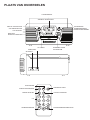
PLAATS VAN ONDERDELEN
LUIDSPREKERS
AM/FM/AF STEMSCHAAL
AAN/UIT SCHAKELAAR
AFSTEMKNOP
VOLUMEREGELAAR
OPNEMEN/WISSEN
AFSPELEN/PAUZEREN
LCD-SCHERM
RADIO\CD\
PHONO-SCHAKELAAR
CD LADER
USB-POORT
OPENEN/SLUITEN
STOP/SD/USB
SD-KAART
SD
USB
STOP/SD/USB
AFSPELEN/PAUZEREN
SD/USB
TERUG SPOELEN
OPENEN/SLUITEN
VOORUIT SPOELEN
0-9
OPNEMEN/WISSEN
REC/
ERASE
PROGRAMMEREN/HERHALEN
PLAATS VAN ONDERDELEN
SPILADAPTER VOOR 45-TOERENPLATEN
DRAAITAFEL
TOONARM
TOONARMHENDEL
TOERENTALREGELAAR
SPIL
TOONARMSTEUN
SUBWOOFER
UITGANGS
AANSLUITING
OORTELEFOONAANSLUITING
AANSLUITING VOOR EXTERNE LUIDSPREKER
SCHAKELAAR INGEBOUWDE/EXTERNE
LUIDSPREKER(INT./EXT.)
EXTERNE FMANTENNE
WISSELSTROOMSTEKKER
Uitpakken
1. Verwijder het verpakkingsmateriaal van het apparaat.
OPMERKING : Bewaar al het verpakkingsmateriaal tot u volledig tevreden
bent over de goede werking van het apparaat en voor het geval dat het
apparaat in de toekomst onderhoud vereist.
2. Zorg dat u de afstandsbediening hebt gevonden voordat u het verpakkingsmateriaal opbergt.
3. Neem het apparaat uit de plastic zak.
4. Verwijder de plastic veiligheidsafdekking van de 3-pins wisselstroomstekker.
5. Verwijder de kabelbinder van het wisselstroomsnoer en maak de draadantenne op de achterzijde
van het apparaat los.
6. Til het deksel van de platenspeler op en verwijder het piepschuimen transportmateriaal van de
draaitafel.
7. Verwijder de zwarte tie-wrap van de toonarm.
8. Verwijder de witte naaldbescherming door ze voorzichtig naar de voorzijde van het apparaat te
trekken.
Stylus
Een universele saffierstylus wordt meegeleverd en op de toonarm
aangebracht, deze is geschikt voor het afspelen van platen van
de 3 toerentallen (331/3/45/78 toeren). Een universele
vervangingsstylus en een afzonderlijke stylus voor het afspelen
van 78-toerenplaten zijn rechtstreeks verkrijgbaar bij de fabrikant
en sommige dealers.
TURN
PU
Om de stylus van de toonarm te verwijderen, houdt u de
toonarm stevig vast terwijl u de plastic stylushouder met twee
vingers vastneemt - trek vervolgens voorzichtig de volledige
rode stylushouder naar u toe uit het zilveren element, zoals
getoond in de tekening. Om de stylus weer aan te brengen,
houdt u beide zijden van de rode plastic stylushouder vast,
terwijl u ervoor zorgt dat de naald naar beneden is gericht.
Druk voorzichtig de achterzijde van de stylushouder in een
lichte hoek tegen het zilveren element aan het uiteinde van
de TOONARM tot u zeker bent dat de houder goed vastzit.
Breng de witte naaldbescherming indien nodig weer aan.
SH
De stylus verwijderen/aanbrengen
Opmerkingen :
• Ga altijd zorgvuldig om met de stylus, aangezien de saffieren naaldpunt gemakkelijk wordt
beschadigd.
• Wanneer u de draaitafel vervoert, is het aanbevolen de witte naaldbescherming en de neerdrukker
van de toonarm weer aan te brengen tot het apparaat opnieuw wordt gebruikt.
• Wanneer u de stylus verwijdert of aanbrengt, moet u altijd voorzichtig zijn dat u niet te hard drukt op
de stylushouder en het zilveren element van de toonarm om mogelijke beschadiging ervan te
vermijden.
Voedingsbron :
Dit apparaat werkt met een netvoeding van 230 V wisselstroom.
Opmerkingen :
a) Opmerking over ESD : in geval van storing wegens elektrostatische ontlading moet u het product
mogelijk resetten om de normale bediening te hervatten (mogelijk moet u de voedingsbron
opnieuw aansluiten).
b) Elektrische snelle transiënt (Burst): in geval van storing wegens elektrische snelle transiënt (Burst)
reset u het product om de normale bediening te hervatten (mogelijk moet u de voedingsbron
opnieuw aansluiten).
Opstelling
Wikkel het wisselstroomsnoer aan de achterzijde van het apparaat af en steek de 3-pins stekker in
een stopcontact met 230 V wisselstroom.
Bediening van de radio
1. Maak de FM-DRAADANTENNE los en laat ze neerhangen in een rechte lijn voor optimale
FM-ontvangst. Sluit de FM-antenne niet aan op een buitenantenne.
2. Schakel het apparaat in door de voeding AAN/UIT-SCHAKELAAR/VOLUMEREGELAAR naar de
stand AAN te draaien en het geluidsvolume in de middelste stand te zetten.
3. Zet de functieschakelaar op RADIO-modus.
4. Schuif de golfbandschakelaar naar de gewenste golfband - AM (=MW) of FM of FM.ST*.
5. Selecteer de gewenste radiozender door aan de AFSTEMKNOP te draaien.
6. Regel het volume opnieuw indien nodig.
OPMERKING : *Als de FM Stereo ontvangst niet goed is, kan het beter zijn om te schakelen naar
FM Mono.
Antenne
Voor FM-ontvangst is het apparaat uitgerust met een FM-DRAADANTENNE op de achterzijde van
het apparaat. Verplaats de draad tot de radio-ontvangst zuiver en zonder storingen is. Als u moeilijk
kunt afstemmen op een FM-zender, verplaatst u de FM-draadantenne voor een betere ontvangst.
OPGELET : De externe FM-ANTENNE mag niet worden aangesloten op een buitenantenne. Voor
AM (= MW)-ontvangst is het apparaat uitgerust met een ingebouwde ferrietstaaf richtingsantenne.
Draai het toestel om de positie met optimale ontvangst te vinden.
Bediening van de draaitafel
De draaitafel klaarmaken voor gebruik
1. Til het deksel van de platenspeler op, draai de zwarte tie-wrap waarmee de TOONARM is
bevestigd los en verwijder de tie-wrap.
2. Verwijder al het verpakkingsmateriaal.
3. Verwijder de witte NAALDBESCHERMING door ze voorzichtig van de rode stylushouder te trekken
naar de voorzijde van het apparaat. Bewaar ze op een veilige plaats om ze terug op de stylus aan
te brengen als het apparaat naar een andere locatie moet worden gebracht.
4. Maak de NEERDRUKKER van de TOONARM los door deze voorzichtig naar rechts te drukken.
Hierdoor wordt de toonarm losgemaakt van de ARMSTEUN. Vergrendel de neerdrukker opnieuw
wanneer u het apparaat naar een andere locatie brengt.
Een plaat afspelen
1. Schakel het apparaat in door de voeding AAN/UIT-SCHAKELAAR/VOLUMEREGELAAR naar de
stand AAN te draaien.
2. Zet de VOLUME-regelaar in de middelste stand.
3. Schuif de FUNCTIE-schakelaar naar PHONO-modus.
4. Zet de TOERENTALSCHAKELAAR op het correcte toerental (331/3, 45 of 78 toeren) voor de
geselecteerde plaat.
5. Breng de toonarm met de TOONARMHENDEL omhoog uit de steun. Beweeg de toonarm
voorzichtig naar rechts tot u een ‘klik’ hoort, de draaitafel moet beginnen te draaien.
6. Breng de toonarm naar de plaat en laat hem met de toonarmhendel neer op het punt waar u het
afspelen van de plaat wilt starten.
7. Aan het einde van de plaat stopt de TOONARM automatisch. Til de toonarm op en zet hem
handmatig terug in de TOONARMSTEUN.
Meegeleverde accessoire
Spiladapter voor 45-toerenplaten
Voor het afspelen van een 45-toerenplaat zonder de middenklem, verwijdert u de adapter van het
deck van de platenspeler door duim & wijsvinger in de uitsparingen te plaatsen en zet u hem
vervolgens op de spil van de draaitafel. Daarna kunt u de plaat op de draaitafel plaatsen.
Bediening van de CD speler
Een CD afspelen
1. Schakel het apparaat in door de voeding AAN/UIT-SCHAKELAAR/VOLUMEREGELAAR naar de
stand AAN te draaien en het geluidsvolume in de middelste stand te zetten.
2. Schuif de FUNCTIE-schakelaar naar CD-modus.
3. Druk op CD OPEN / CLOSE / om het CD-compartiment te openen.
4. Plaats een vooraf opgenomen compact disc met de bedrukte zijde naar boven. Druk opnieuw op
CD OPEN/ CLOSE / om het compartiment te sluiten, “ READ “ wordt weergegeven terwijl de
CD-speler de inhoud van de disc scant.
CD
5. Track nr. 1 wordt automatisch afgespeeld nadat de CD-speler de inhoud van de disc heeft gelezen.
6. Druk eenmaal of herhaaldelijk op VOORUITSPOELEN /
gewenste tracknummer in het display verschijnt.
ESP
of TERUGSPOELEN /
tot het
CD
CD
7. Druk op of de toets “ STOP/SD/USB “ (gemarkeerd met een rode stip) om het afspelen te
stoppen.
8. Druk op of de toets “ AFSPELEN/PAUZEREN “ (gemarkeerd met een groene stip) om het af
spelen te hervatten of de muziek te onderbreken.
MP3 CD afspelen - met de afstandsbediening
1. Plaats een disc in MP3-CD-formaat. Druk opnieuw op CD OPEN / CLOSE / om het
compartiment te sluiten. “ READ “ wordt weergegeven terwijl de CD-speler de inhoud van de disc
scant.
CD
2. Track nr. 1 in de hoofdmap (Map 1) wordt automatisch afgespeeld nadat de inhoud van de
MP3 CD is gelezen.
ESP
CD
MP3
3. Druk eenmaal of herhaaldelijk op VOORUITSPOELEN /
gewenste tracknummer verschijnt in het display.
4. Druk op STOP / om het afspelen te stoppen.
of TERUGSPOELEN /
tot het
CD
5. Houd in de stopmodus de toets AFSPELEN/PAUZEREN /
selecteren.
ingedrukt om de MP3-map te
OPMERKING : In de stopmodus: Om sneller vooruit of terug te spoelen met 10 tracks tegelijk,
houdt u de knop VOORUIT SPOELEN / of TERUGSPOELEN / ingedrukt.
Het spoelen stopt wanneer u de knop loslaat.
USB & SD-KAART GEBRUIKEN
SD-kaart gebruiken :
1. Schakel het apparaat in door de voeding AAN/UIT-SCHAKELAAR/VOLUMEREGELAAR naar de
stand AAN te draaien.
2. Zet de VOLUME-regelaar in de middelste stand.
3. Schuif de FUNCTIE-schakelaar naar de modus “ CD “.
4. Houd in de modus “ STOP “ STOP / langer dan een halve seconde ingedrukt - het apparaat
wordt omgeschakeld van CD>SD. Als er geen kaart wordt gedetecteerd, wordt “ NO CARD “ in het
display getoond.
CARD
5. Plaats een SD-kaart met vooraf opgenomen MP3-muziek (niet meegeleverd) in de kaartsleuf.
Vervolgens wordt “READ” weergegeven terwijl het systeem de inhoud van de SD-kaart scant.
CARD
6. Track nr. 1 van de hoofdmap (Map 1) wordt automatisch afgespeeld nadat de inhoud van de SD
kaart is gelezen.
7. Druk eenmaal of herhaaldelijk op VOORUITSPOELEN /
of TERUGSPOELEN / tot het
gewenste tracknummer in het display verschijnt. Laat de knop los - het afspelen van de track start
automatisch.
8. Druk op STOP / om het afspelen te stoppen en druk op AFSPELEN/PAUZEREN/ om het
afspelen te hervatten.
9. Om de muziek te onderbreken, drukt u op AFSPELEN/PAUZEREN / , druk opnieuw om het
afspelen te hervatten.
USB gebruiken :
1. Schakel het apparaat in door de voeding AAN/UIT-SCHAKELAAR/VOLUMEREGELAAR naar de
stand AAN te draaien.
2. Zet de VOLUME regelaar in de middelste stand.
3. Schuif de FUNCTIE schakelaar naar CD-modus.
4. Houd in de modus “ STOP “ STOP / langer dan een halve seconde ingedrukt - het apparaat
wordt omgeschakeld van CD>SD.
5. Druk in de stopmodus op STOP / en houd de toets langer dan een halve seconde ingedrukt
het apparaat wordt omgeschakeld van SD>USB. Als geen USB werd gedetecteerd, wordt
“NO USB” in het display getoond.
USB
6. Sluit een USB-massaopslagapparaat aan. “ READ “ wordt weergegeven terwijl het systeem de
inhoud van het USB-apparaat
USB
7. Track nr. 1 van de hoofdmap (Map 1) wordt automatisch afgespeeld nadat de inhoud van het
USB-apparaat is gelezen.
USB
MP3
8. Druk eenmaal of herhaaldelijk op VOORUITSPOELEN / of TERUGSPOELEN / tot het
gewenste tracknummer in het display verschijnt. Laat de knop los - het afspelen van de track start
automatisch.
9. Druk op STOP /
om het afspelen te stoppen en druk op AFSPELEN/PAUZEREN/
om het
afspelen te hervatten.
10.Om de muziek te onderbreken, drukt u op AFSPELEN/PAUZEREN / , druk opnieuw om het
afspelen te hervatten.
OPMERKINGEN :
• Gebruik van de USB-poort met een USB-verlengsnoer wordt niet ondersteund.
• Dit apparaat is niet ontworpen voor directe communicatie met een computer.
• Het is niet gegarandeerd dat alle USB-geheugenapparaten (of SD-kaarten) werken op dit
audiosysteem
BELANGRIJK :
Koppel het USB-apparaat niet los in de USB-modus, dit kan het externe apparaat of de bestanden
ervan beschadigen. Schakel het apparaat eerst uit of selecteer een andere modus alvorens het USBapparaat veilig te verwijderen.
Specificaties van USB
Interface :
- USB 2.0 Full Speed, flashgeheugen via HOST (USB HUB wordt niet ondersteund)
- Compatibel met MPEG Audio 1, 2, 2.5
- Compatibel met Layer 1, 2, 3
- Compatibel met bitsnelheid: 128 - 320 Kbps
- Submappen nesten: 8 niveaus
- Aantal tracks / titels max 999
- Ondersteunt ID3 tag V2.0
Tracks programmeren
Maximaal 20 tracks kunnen worden geprogrammeerd voor het afspelen van tracks op een audio- of
MP3-CD, USB-apparaat of SD-kaart in de gewenste volgorde.
1. Druk in de stand “ STOP “ op PROGRAM /
beginnen te knipperen in het display.
P
om het programmeren te starten - “P” en P0-01
CD
2. Druk eenmaal of herhaaldelijk op de knoppen VOORUITSPOELEN / of TERUGSPOELEN /
tot het gewenste tracknummer in het display verschijnt.
3. Voor het programmeren van MP3: houd de toets AFSPELEN/PAUZEREN / ingedrukt om het
gewenste album te selecteren.
4. Druk op PROGRAM / om te bevestigen, het display toont het opgeslagen tracknummer en de
volgende opslagpositie.
P
CD
5. Herhaal stappen 2-3 om alle gewenste tracks te selecteren en op te slaan. “ FULL “ wordt
weergegeven als u meer dan 20 tracks probeert te programmeren.
P
CD
6. Druk op AFSPELEN/PAUZEREN /
om de geprogrammeerde tracks af te spelen.
Het programma wissen
met de afstandsbediening of op het hoofdapparaat
U kunt de inhoud van het geheugen wissen als volgt:
- In stopstand: Druk eenmaal op “ STOP “, of
- Tijdens het afspelen: Druk tweemaal op “ STOP “, of
- Zet de AAN/UIT-schakelaar/volumeregelaar op UIT, of
- Selecteer een andere geluidsbron/functie, of
- Druk op de CD OPEN/CLOSE-knop om de CD-deur te openen (in CD-modus)
Afspeelmodus
Herhaalde afspeelmodus voor het afspelen van CD-DA of MP3
1. Druk op REPEAT / op de afstandsbediening in de afspeelmodus.
2. De standaardfunctie van de afspeelmodus staat op UIT.
3. Voor het afspelen van CD-DA kunt u kiezen tussen 2 afspeelmodi: “REPEAT 1” / “REPEAT ALL”
4. Voor het afspelen van MP3 kunt u kiezen tussen 3 afspeelmodi :
“REPEAT 1” / “REPEAT FOLDER” / “REPEAT ALL”.
MP3 Opnemen
Opnemen van CD naar USB / SD
Met dit systeem kunt u een volledige audio-CD omzetten (coderen) in MP3-formaat en deze kopiëren
naar/opnemen op een USB-massaopslagapparaat (bijv. flashstation) of SD-kaart (niet meegeleverd).
U kunt ook één MP3-track kopiëren van/naar een USB-apparaat of SD-kaart.
1. Druk in de CD-afspeelmodus op REC / om het rippen (opnemen) naar USB/SD-kaart te starten
(USB wordt standaard geselecteerd als beide apparaten worden gedetecteerd), het afspelen stopt
en het apparaat gaat terug naar het begin van de huidige track, het systeem scant de inhoud van
USB/SD-kaart en maakt een map om de MP3-tracks op te slaan. Het afspelen van de CD wordt
hervat en het rippen start op dat ogenblik. “ USB “ of “ CARD “ begint te knipperen, afhankelijk van
het geselecteerde apparaat.
2. Druk op STOP / om het rippen van CD af te sluiten.
MP3-CD/USB/SD kopiëren
1. Druk in de afspeelmodus voor MP3-CD, USB of SD-kaart op REC / om te starten met het
kopiëren van MP3 van MP3-CD naar USB of SD-kaart, van USB naar SD-kaart en van SD-kaart
naar USB. Het afspelen stopt en het systeem scant de inhoud van USB of SD-kaart en maakt een
map om de MP3-tracks op te slaan.
2. “ REC “ wordt getoond in het display.
3. “ COPY “ wordt weergegeven.
4. “USB” of “CARD” begint te knipperen, het kopiëren van MP3 start, het proces stopt wanneer het
kopiëren is voltooid.
5. De huidige MP3-track wordt afgespeeld van bij het begin.
Opnemen van Phono naar SD / USB
Met dit systeem kunt u een audiosignaal vanaf de PHONO-ingang (platenspeler) omzetten in
MP3-formaat en opslaan op een USB-massaopslagapparaat of SD-kaart (USB wordt standaard
geselecteerd als beide apparaten worden gedetecteerd). Maak het apparaat klaar voor het afspelen
van een plaat, zoals eerder beschreven.
1. Schuif de FUNCTIE-knop naar PHONO-modus, leg een plaat op de draaitafel en start het
afspelen.
2. Druk op REC / --- om het rippen (opnemen) te starten, het systeem scant de inhoud van USB of
SD-kaart en maakt een map om de MP3-tracks op te slaan.
3. “ REC “ en “ TO” worden ongeveer 15 seconden op het LCD weergegeven, “ USB “ begint te
knipperen. “
4. USB “ of “ CARD “ begint te knipperen wanneer het opnemen start.
5. Druk op STOP /
om de PHONO-opnamemodus af te sluiten.
MP3 Tracks verwijderen
Met dit systeem kunt u eerder opgenomen MP3-tracks of bestaande bestanden op een USB
apparaat of SD-kaart verwijderen.
1. Houd in de afspeelmodus voor USB of SD-kaart REC /
afgespeelde track stopt en wordt verwijderd.
2. “ DELETE “ wordt weergegeven.
2 seconden ingedrukt, de momenteel
Optionele externe luidsprekers aansluiten
1. Externe luidsprekers (niet meegeleverd) kunnen optioneel op
dit apparaat worden aangesloten.
Speaker jack
RED
2. De luidsprekeraansluitingen voor externe luidsprekers
bevinden zich op de achterzijde van het apparaat.
Naast de luidsprekeraansluitingen zit een schakelaar
METAL CONDUCTOR
met de aanduiding “ INT./EXT.”. Wanneer u externe
luidsprekers gebruikt, moet u deze schakelaar in de
BLACK
stand “ EXT.” zetten. Hierdoor worden de ingebouwde
luidsprekers in het apparaat uitgeschakeld en wordt de
voeding omgeleid naar de externe luidsprekers.
3. Als u beslist de externe luidsprekers niet te gebruiken, zorg dan dat u de schakelaar op “ INT.” zet.
RED
BLACK
Subwoofer aansluiting
Via de subwooferaansluiting kunt u een apart gevoede subwoofer (niet meegeleverd) aansluiten om
de basrespons te versterken. Neem contact op met uw verkoper voor geschikte subwoofermodellen.
De oortelefoon aansluiting
Sluit de oortelefoon (niet meegeleverd) aan op de 3,5 mm
OORTELEFOONAANSLUITING op de achterzijde van het
apparaat. Houd er rekening mee dat tijdens het beluisteren
van muziek via de oortelefoon het geluid via de ingebouwde
luidsprekers wordt onderbroken.
Het geluid via alle luidsprekers wordt onderbroken.
DE AANDRIJFRIEM VAN DE DRAAITAFEL OPNIEUW BEVESTIGEN
De aandrijfriem van de draaitafel is in de fabriek aangebracht, gebruik deze instructies alleen als de
draaitafel niet ronddraait
STAP 1
Verwijder met een schroevendraaier de
zwarte ijzeren C-klem en neem de draaitafel
van het grammofoonmechanisme.
IJzeren klem
STAP 2
Neem de losgekomen zwarte rubberriem en
plaats hem terug rond de zuil op de
onderkant van de draaitafel, trek hem
vervolgens voorzichtig naar buiten zonder
hem te overspannen en haak de riem rond
het punt van de kleine zuil aan de rand van
de draaitafel, zoals getoond in de tekening.
Punt van kleine zuil
STAP 3
Om de draaitafel weer op het grammofoon
mechanisme vast te maken, zorgt u ervoor
dat het punt van de zuil zich boven de
correcte plaats op het grammofoon
mechanisme bevindt, terwijl u de as van de
draaitafel in de opening op het grammofoon
mechanisme plaatst zoals getoond in de
tekening.
STAP 4
Draai de draaitafel zachtjes tot u een
‘plof’-geluid hoort, dat aangeeft dat de
rubberriem weer op zijn plaats zit. Plaats de
C-klem terug om de draaitafel vast te maken.
Ruberriem
BEHANDELING VAN COMPACT DISC
Neem een disc uit zijn doosje door in het midden van het doosje te drukken en de randen van de
disc voorzichtig vast te nemen om de disc te verwijderen. Vingerafdrukken en stof moeten voorzichtig
van het opnameoppervlak van de disc worden verwijderd met een zachte doek. In tegenstelling tot
conventionele vinyl- of Shellac-platen hebben compact discs geen groeven, zodat zich geen stof en
microscopisch afval ophopen en de meeste deeltjes worden verwijderd door ze zachtjes af te vegen.
Veeg in een rechte lijn van de binnenkant naar de buitenkant van de disc. Kleine stofdeeltjes en lichte
vlekken hebben absoluut geen effect op de kwaliteit van de geluidsreproductie. Reinig de disc
regelmatig met een zachte, pluisvrije, droge doek. Gebruik nooit wasmiddelen of schurende
reinigingsmiddelen om de disc schoon te maken. Gebruik indien nodig een CD-reinigingskit. Kleef
nooit labels op het oppervlak van compact discs of schrijf er niet op, tenzij heel voorzichtig met
speciale CD-R-pennen.
PROBLEMEN OPLOSSEN
Er is geen stroomtoevoer
• Controleer of de stekker van het apparaat correct is aangesloten.
• Controleer of het apparaat is ingeschakeld met de AAN/UIT-VOEDINGSCHAKELAAR.
Er is geen geluid
• Controleer of de voeding is ingeschakeld.
• Controleer het volumeniveau door aan de aan/uit-voedingschakelaar/volumeregelaar te draaien.
• Controleer of er geen hoofdtelefoon meer aangesloten is - hierdoor wordt al het geluid via de
luidsprekers onderbroken.
• Controleer of de INT./EXT.-schakelaar op de achterzijde van de radio op INT. staat.
(Tenzij u externe luidsprekers gebruikt, dan moet hij op EXT. staan.)
De draaitafel werkt niet
• Zorg dat het apparaat in Phono-modus staat door de functieschakelaar te verschuiven.
• Beweeg de toonarm naar rechts tot u een klik hoort - de draaitafel moet beginnen te draaien.
• Controleer of de aandrijfriem van de draaitafel niet is losgekomen. Zie voor het terugplaatsen van
de riem de aparte instructies en tekeningen.
De toonarm beweegt niet
• De zwarte tie-wrap onder de toonarm is niet verwijderd.
• De neerdrukker van de toonarm is niet losgemaakt.
• Zorg dat u de toonarm optilt met de toonarmhendel en plaats de toonarm handmatig boven de rand
van de plaat - laat hem vervolgens neer met de toonarmhendel.
Opgelet : Druk hem niet met kracht op de plaat zonder de toonarmhendel te gebruiken.
De toonarm schuift over de plaat
• Controleer of de naaldbescherming verwijderd is.
• Controleer of de stylus niet beschadigd is - vervang indien nodig.
• U gebruikt mogelijk een plaat van een van de nieuwere types met microgroeven en u hebt mogelijk
een andere stylus nodig om deze te kunnen afspelen. Met oudere platen komt dit probleem niet
voor.
Draaitafel - het geluidsniveau is laag wanneer een plaat wordt afgespeeld
• Verwijder de stylus en breng hem weer aan.
• Verhoog het volume.
Ik heb een plaat opgenomen maar er wordt geen informatie over map/artiest/titel of lied
weergegeven
• Vinylplaten hebben geen digitale informatie, daardoor wordt er geen MP3-trackinformatie
opgeslagen op het USB-apparaat of de kaart. Indien nodig kunnen MP3-tracks echter worden
overgebracht, weergegeven en benoemd op een computer.
Ik heb een CD opgenomen maar er wordt geen informatie over map/artiest/titel of lied weergegeven
• Als deze informatie niet beschikbaar was op de originele disc, wordt ze ook niet op de opgenomen
disc weergegeven.
De CD wordt niet afgespeeld
• Controleer of de CD correct is geplaatst (labelzijde naar boven).
• Controleer of de functieschakelaar op CD staat en een CD in de lade zit.
• Controleer of de CD niet leeg is.
• Controleer of het oppervlak van de CD schoon is. Zie aparte instructies over behandeling van CD.
USB /SD-kaart - er wordt geen muziek afgespeeld wanneer u op AFSPELEN/PAUZEREN drukt
• Controleer of er MP3-muziekbestanden zijn opgeslagen op het USB-apparaat/het flashstation /
de SD-kaart.
• Controleer of het USB-apparaat/het flashstation / de SD-kaart niet groter is dan 4 GB aangezien
de maximumlimiet van dit apparaat 4 GB is.
• Reset het USB-apparaat door het uit te schakelen.
• Controleer of het apparaat/de kaart misschien bestanden in WMA-formaat bevat. Dit apparaat
speelt geen WMA-bestanden af, alleen MP3-bestanden.
• Niet alle modellen van USB-apparaten/SD-kaarten zijn compatibel met dit apparaat,
dit wijst niet op een storing van het apparaat.
Muziek opnemen op USB /SD-kaart is niet mogelijk
• Controleer of het USB-apparaat/de SD-kaart niet vol is.
• Controleer of de vergrendelingsschakelaar op de SD-kaart in de ontgrendelde stand staat.
• Mogelijk is het apparaat/de kaart niet compatibel of is de grootte niet correct (maximaal 4 GB)
er wordt niet gegarandeerd dat alle beschikbare USB-/SD-aparaten werken met dit apparaat
wegens de manier waarop ze zijn vervaardigd.
De opgenomen MP3-muziek heeft niet dezelfde geluidskwaliteit als de originele CD
• De geluidskwaliteit van een MP3-disc verschilt van deze van een vooraf opgenomen audio-CD,
wegens de opnamekwaliteit en -methode en het verschil in formaat.
De afstandsbediening werkt niet
• Vervang de batterij. Zie de specificaties voor het vereiste batterijtype.
• Verwijder obstakels tussen de infrarood afstandsbediening en de afstandsbedieningssensor naast
het LCD-scherm, zodat het afstandsbedieningssignaal een recht pad naar de sensor heeft.
KLANTENONDERSTEUNING
U kunt contact opnemen met Ricatech klantenservice als u een vraag of een probleem heeft met uw
Ricatech product. U kunt contact met ons opnemen per telefoon en e-mail.
E-mail
Voor klantenondersteuning per e-mail, gelieve een e-mail te sturen naar [email protected]. Zorg
ervoor dat u het modelnummer en het serienummer van het product vermeldt, onder vermelding van
uw naam & adres en een duidelijke omschrijving van uw vraag of probleem.
Telefoon
Voor telefonische klantenondersteuning belt u naar
+32 3 3265694. Een van onze servicemedewerkers zal u dan te woord staan. Voor de volledige
procedure kunt u terecht op de website van Ricatech: www.ricatech.com
Hereby, Ricatech B.V. declares that this turntable is in compliance with the essential
requirements and other relevant provisions of Directive 1999/5/EC.
Ricatech B.V.
Cornusbaan 1
2908 KB Capelle a/d IJssel
The Netherlands
FRANÇAIS
AVERTISSEMENT:
POUR RÉDUIRE LES RISQUES DE CHOC ÉLECTRIQUE, N’EXPOSEZ PAS CET
APPAREIL À LA PLUIE NI À L’HUMIDITÉ. N’ENLEVEZ PAS LE COUVERCLE. LES
VOYANTS SONT SOUDÉS SUR PLACE. L’INTÉRIEUR NE CONTIENT AUCUN
COMPOSANT À RÉPARER PAR L’UTILISATEUR. CONFIEZ VOTRE APPAREIL
SEULEMENT AU PERSO DE SERVICE QUALIFIÉ.
CAUTION
RISK OF ELECTRIC SHOCK
DO NOT OPEN
Le symbole de l’éclair avec
la pointe de flèche à l’intérieur
d’un triangle équilatéral a pour
but d’alerter l’utilisateur de la
présence de «voltage dangereux» non isolé à l’intérieur
du coffret du produit qui est
suffisamment grave pour
causer un risque de choc
électrique aux personnes.
AVERTISSEMENT:POUR RÉDUIRE
LES RISQUES DE CHOC ÉLECTRIQUE,
N’ENLEVEZ PAS LE COUVERCLE (OU
LE DOS). L’INTÉRIEUR NE CONTIENT
AUCUN COMPOSANT À RÉPARER PAR
L’UTILISATEUR. CONFIEZ VOTRE
APPAREIL SEULEMENT AU
PERSONNELDE SERVICE QUALIFIÉ
Le point d’exclamation à
l’intérieur d’un triangle
équilatéral a pour but
d’alerter l’utilisateur de la
présence d’instructions
importantes sur l’opération
et l’entretien dans le
manuel de l’utilisateur livré
avec l’appareil.
«La ventilation ne doit pas être entravée.»
«Ne pas exposer à un ruissellement ou à un éclaboussement et veiller à ce qu’aucun objet
contenant un liquide, par exemple un vase, ne soit placé sur l’appareil.»
Spécifications techniques
Gammes des Fréquences
: FM 88 -108 MHz
AM 530 - 1600 KHz
Porte USB 2.0
: Pleine vitesse 512 Mo - 4 Go
(compatible avec FAT16, FAT32)
512 Mo - 4 Go
Source d’alimentation
: AC 230 V - 50 Hz
Antennes
: Antenne externe pour FM
Barre de ferrite intégrée pour AM
Puissance Sortie
Haut-parleur taille
TÉLÉCOMMANDE
18 W
2 x 3 po Type dynamique x 2
Une pile bouton est incluse Pile de remplacement au lithium nécessaire: 1 x
3 V CR2025
*LE FABRICANT RÉSERVE LE DROIT DE CHANGER LA CONCEPTION ET LES
SPÉCIFICATIONS SANS PRÉAVIS.
INSTRUCTIONS DE SECURITE IMPORTANTES POUR PRODUITS AUDIO
VEUILLEZ LIRE ATTENTIVEMENT LES INSTRUCTIONS SUIVANTES APPLICABLES
A VOTRE EQUIPEMENT
1. Lisez les instructions – Lisez toutes les instructions de sécurité et d’utilisation avant de
vous servir de l’appareil.
2. Conservez les instructions – Conservez les instructions de sécurité et d’utilisation pour
vous y référer ultérieurement.
3. Tenez compte des avertissements – Suivez tous les avertissements et instructions d’utilisation
de l’appareil.
4. Suivez les instructions – Suivez toutes les instructions de fonctionnement et utilisation.
5. Eau et humidité – Cet appareil ne doit pas être utilisé à proximité de
pointsd’eau, comme par exemple près de baignoires, lavabos, éviers
ou lavoirs, sur surfaces mouillées ou près d’une piscine.
6. Chariots et supports – Utilisez cet appareil uniquement avec des
chariots ou supports recommandés par le fabricant.
6A.Déplacez avec précaution l’ensemble chariot et appareil. Les arrêts rapides,
l’excès de force ou les surfaces irrégulières peuvent renverser le chariot.
7. Support mural ou de plafond – Placez cet appareil uniquement sur les supports muraux ou de
plafond recommandés par le fabricant.
8. Ventilation – Cet appareil doit être placé de façon à ne pas compromettre une bonne ventilation.
Par exemple, il ne doit pas être placé sur un lit, un divan, tapis ou surface semblable, qui puisse
bloquer les ouvertures de ventilation. Ne le placez pas non plus dans des placards, sur des
étagères ou armoires, qui puissent empêcher l’air de circuler par les ouvertures de ventilation.
9. Chaleur – Cet appareil doit être situé loin de sources de chaleur, telles que radiateurs,
chauffe-eaux, convecteurs ou autres appareils qui dégagent de la chaleur (y compris
les amplificateurs).
10.Courant – Cet appareil doit être branché uniquement au courant décrit dans le mode
d’emploi ou à celui décrit sur l’appareil lui-même.
11.Prise de terre ou polarisation – On doit prendre des précautions pour s’assurer que la prise de
terre ou la polarisation de l’appareil ne soient pas perturbées.
12.Protection du câble électrique – Les câbles électriques doivent être correctement placés pour
ne pas être piétinés ni aplatis avec des objets placés dessus ou contre ceux-ci. On doit prêter une
attention tout spéciale à la partie du câble proche de la prise et au connecteur de l’appareil.
13.Nettoyage – Vous devez nettoyer cet appareil uniquement comme le recommande le fabricant.
14.Ce produit a été conçu pour être utilisé avec une antenne intégrée et ne doit être connecté à
aucune autre antenne extérieure.
15.Périodes sans utilisation – Lorsque vous ne devez pas utiliser cet appareil pendant de longues
périodes, débranchez-le de la prise de courant.
16.Entrée d’objets et de liquides – Evitez que des objets ou liquides ne tombent à travers
les ouvertures du boîtier.
17.Dommages qui nécessitent réparation – Cet appareil doivent être apportés au service
technique si :
A.Le câble électrique ou la fiche sont endommagés.
B.Des objets ou liquides sont tombés à l’intérieur de l’appareil.
C.L’appareil a été exposé à la pluie.
D.L’appareil ne fonctionne pas normalement ou montre un changement dans son fonctionnement.
E.L’appareil est tombé ou le boîtier est endommagé.
18. Réparations — L’usager ne doit pas tenter de réparer l’appareil au-delà de ce qui est décrit dans
le présent manuel. Tout le reste doit être réalisé par un personnel d’entretien compétent.
EMPLACEMENTS DES
HAUT-PARLEURS
COMMUTATEUR
MARCHE-ARRET
BOUTON DE
RÉGLAGE
CONTROLE DU VOLUME
ENREGISTRER/
EFFACER LECTURE/
PAUSE
ÉCRAN ACL
SÉLECTEUR
RADIO\CD\PHONO
RÉCEPTEUR
PLATEAU À CD
PORT USB
OUVRIR/FERMER
STOP/SD/USB
CARTE SD
SD
USB
STOP/SD/USB
LECTURE/PAUSE
SD/USB
TERUG SPOELEN
OUVRIR/FERMER
AVANCER
0-9
ENREGISTRER/EF
REC/
ERASE
PROG/RÉPÉTITION
EMPLACEMENTS DES
ADAPTATEUR POUR DISQUES 45 TOURS
PLATEAU DE
LECTURE
BRAS DE
LECTURE LEVIER
SÉLECTEUR DE
CONTRÔLE DE
BROCHE
SUPPORT DU BRAS DE
LECTURE
PRISE DE
SORTIE DE
CAISSON DE
BASSE
PRISE CASQUE
PRISE POUR HAUT-PARLEUR
COMMUTATEUR DE HAUT-PARLEUR
INTERNE/EXTERNE (INT./EXT.)
ANTENNE FM
EXTERNE
FICHE\D’ALIMENTATION SECTEUR
Déballage
1. Retirez les matériaux d’emballage de l’appareil.
REMARQUE : Conservez tous les matériaux d’emballage jusqu’à ce
que vous vous soyez assuré que tous les éléments de l’appareil fonctionnent
de façon satisfaisante et juste au cas où l’appareil devrait être réparé dans le futur.
2. Assurez-vous d’avoir situé la télécommande avant d’entreposer l’emballage.
3. Retirez le sac en plastique recouvrant l’appareil.
4. Retirez le couvercle en plastique de sécurité de la fiche secteur à 3 broches.
5. Retirez le lien du cordon d’alimentation et dénouez l’antenne filaire à l’arrière de l’appareil.
6. Soulevez le couvercle du tourne-disque et retirez du plateau de lecture les éléments de
polystyrène dédiés au transport.
7. Retirez le lien noir du bras de lecture.
8. Retirez le couvercle de protection blanc de l’aiguille en le tirant doucement vers l’avant de
l’appareil.
Tête de lecture
Une tête de lecture saphir universelle est fournie et montée sur le bras de lecture, elle convient à la
lecture des disques des trois types de vitesses (331/3/45/78 tours). Une tête de lecture universelle
de remplacement et une tête de lecture à part pour la lecture de disques 78 tours sont disponibles
directement après du fabricant et de certains revendeurs.
TURN
PU
Pour retirer la tête de lecture du bras de lecture, maintenez
la tête du bras de lecture et saisissez le support en plastique
de tête de lecture avec deux doigts - puis tirez doucement le
support rouge complet de tête de lecture vers vous et en
dehors de la cartouche grise, comme indiqué sur le schéma.
Pour remettre la tête de lecture en place, maintenez les côtés
du support en plastique rouge de tête de lecture, en vous
assurant que l’aiguille est tournée vers le bas. Poussez
doucement l’arrière du support de tête de lecture en angle
léger contre la cartouche argent à l’extrémité du bras de lecture
jusqu’à ce que vous soyez sûr qu’il est bien attaché. Replacez
le couvercle de protection blanc de l’aiguille si nécessaire.
SH
Retirer/replacer la tête de lecture
Remarques:
• Manipulez toujours la tête de lecture avec soin car la pointe de l’aiguille du saphir se détériore
facilement.
• Lors du transport du plateau de lecture, il est recommandé de remettre en place le couvercle de
protection blanc de l’aiguille et le clip de maintien du bras de lecture jusqu’à ce que l’appareil soit de
nouveau utilisé.
• Lorsque vous retirez ou remettez en place la tête de lecture, soyez toujours attentif à ne pas
appliquer une pression trop élevée sur le support de tête de lecture et sur la cartouche argent du
bras de lecture pour éviter leur éventuel endommagement.
Alimentation
Cet appareil est alimenté par une prise secteur CA 230 V.
Remarques
a) Remarque sur les décharges électrostatiques: Dans le cas d’un dysfonctionnement provoqué par
une décharge électrostatique, vous pourriez être obligé de réinitialiser l’appareil pour reprendre
son utilisation normale (une reconnexion à la source d’alimentation pourrait être nécessaire).
b) Coupures de courant: Dans le cas d’un dysfonctionnement provoqué par des coupures de
courant, réinitialisez simplement l’appareil pour reprendre son utilisation normale (une reconnexion
à la source d’alimentation peut être nécessaire).
Installation
Déroulez le cordon d’alimentation à l’arrière de l’appareil et insérez la fiche à 3 broches dans une
prise d’alimentation secteur 230 V.
Utilisation de la radio
1. Dénouez l’antenne filaire FM et laissez-la pendre en ligne droite pour obtenir une réception FM
optimale. Ne pas brancher l’antenne FM à une antenne extérieure.
2. Mettez l’appareil sous tension en plaçant le COMMUTATEUR MARCHE-ARRÊT/CONTRÔLE DU
VOLUME sur la position ON et réglez le volume sonore en position médiane.
3. Réglez le commutateur de fonction sur le mode RADIO.
4. Glissez le sélecteur de bande sur la bande de votre choix - AM (= MW) ou FM ou FM.ST*.
5. Sélectionnez la station radio de votre choix en tournant le bouton de réglage.
6. Réajustez le volume si nécessaire.
REMARQUE : *Si la réception stéréo FM n’est pas bonne, il convient peut être mieux de régler sur
Mono FM.
Antenne
Pour la réception FM, l’appareil est doté d’une antenne filaire FM située à l’arrière.
Déplacez le câble jusqu’à ce que la réception radio soit claire et sans interférences. Si vous
rencontrez des problèmes pour ajuster une station FM, repositionnez l’antenne FM filaire pour
accroître la qualité de la réception.
ATTENTION : L’antenne FM externe ne doit pas être connectée à une antenne extérieure.
Pour la réception AM (= MW), l’appareil est fourni avec une antenne directionnelle
intégrée en ferrite. Pivotez-la pour trouver la position dans laquelle vous obtiendrez la
meilleure réception.
Opération de base
1. Soulever le couvercle du tourne-disque, défaites et retirez le lien fixant le bras de lecture.
2. Retirez les matériaux d’emballage.
3. Retirez le couvercle de protection blanc de l’aiguille en le tirant doucement hors du support de tête
de lecture rouge vers l’avant de l’appareil. Gardez-le intact et replacez-le sur la tête de lecture au
cas où l’appareil devrait être transporté dans un endroit différent.
4. Retirez le clip de maintien du bras de lecture en le poussant doucement vers la droite. Cela
déverrouillera le bras de lecture de son support. Refixez le clip de maintien lorsque vous déplacez
l’appareil à un autre endroit.
LECTURE D’UN DISQUE
1. Mettez l’appareil sous tension en plaçant le COMMUTATEUR MARCHE-ARRÊT/CONTRÔLE DU
VOLUME sur la position ON.
2. Placez le contrôle du volume en position médiane.
3. Glissez le sélecteur de fonction sur le mode PHONO.
4. Réglez le sélecteur de contrôle de vitesse sur la vitesse qui convient (331/3, 45 ou 78 tours) à la
lecture du disque sélectionné.
5. Utilisez le levier pour soulever le bras de lecture de son support. Déplacez doucement le bras de
lecture vers la droite jusqu’à ce que vous entendiez un clic ; le plateau de lecture devrait
commencer à tourner.
6. Déplacez le bras de lecture vers le disque et utilisez le levier pour l’abaisser sur le point où vous
désirez faire démarrer la lecture.
7. À la fin du disque, le bras de lecture s’arrête automatiquement. Levez le bras de lecture et
remettez-le à la main sur son support.
ACCESSOIRE FOURNI
Adaptateur pour disques 45 tours
Pour lire un disque 45 tours avec le clip central manquant, retirez l’adaptateur de la station de lecture
de disque en mettant votre pouce & index dans les replis et tirez vers le haut, puis placez-le sur la
broche du plateau de lecture. Le disque peut être déposé sur le plateau de lecture.
UTILISATION DU LECTEUR CD
Lecture d’un CD
1. Mettez l’appareil sous tension en plaçant le COMMUTATEUR MARCHE-ARRÊT/CONTRÔLE DU
VOLUME sur la position ON et réglez le volume sonore en position médiane.
2. Glissez le sélecteur de fonction sur le mode CD.
3. Appuyer sur OUVRIR / FERMER / CD
CD pour ouvrir le compartiment à CD.
4. Insérez un disque enregistré en orientant la face imprimée vers le haut. Appuyez de nouveau sur
OUVRIR / FERMER/ CD pour fermer le compartiment. «LECTURE» s’affiche tandis que le
lecteur CD balaye le contenu du disque.
CD
5. La piste n°1 est lue automatiquement après la fin de la lecture du contenu du CD par le lecteur CD
6. Appuyez sur les boutons AVANCER / ou RECULER / une seule ou plusieurs fois jusqu’à ce
que le numéro de piste de votre choix apparaisse à l’écran.
ESP
CD
CD
7. Appuyez sur ou sur la touche “STOP/SD/USB” (marquée d’un point rouge) pour interrompre la
lecture.
8. Appuyez sur ou sur la touche LECTURE/PAUSE (marquée d’un point rouge) pour reprendre ou
mettre en pause la lecture de la musique.
Lecture d’un disque MP3 - avec la télécommande
1. Insérez un disque au format CD MP3. Appuyez de nouveau sur OUVRIR / FERMER / CD pour
fermer le compartiment. «LECTURE» s’affiche tandis que le lecteur CD balaye le contenu du
disque.
CD
2. La piste n°1 du dossier racine (dossier 1) est automatiquement lue après l’achèvement de la
lecture du contenu du CD MP3.
ESP
CD
MP3
3. Appuyez sur AVANCER / ou RECULER / une seule ou plusieurs fois jusqu’à ce que le
numéro de piste de votre choix apparaisse sur l’écran.
4. Appuyez sur STOP / pour arrêter la lecture.
CD
5. En mode Stop, maintenez enfoncée la touche LECTURE/PAUSE / --- pour sélectionner un dossier
MP3.
REMARQUE : En mode Stop: Pour avancer ou reculer plus rapidement de 10 pistes en une fois,
maintenez enfoncé le bouton ADVANCER / --- ou RECULER / ---. Cela s’arrête lorsque le bouton
est relâché.
Utilisation avec un périphérique USB & une carte SD
Utilisation avec une carte SD :
1. Mettez l’appareil sous tension en plaçant le COMMUTATEUR MARCHE-ARRÊT/CONTRÔLE DU
VOLUME sur la position ON.
2. Placez le contrôle du volume en position médiane.
3. Glissez le sélecteur de fonction sur le mode CD.
4. En mode STOP, maintenez enfoncé STOP / pendant une demi-seconde pour permuter de CD à
>SD. Si aucune carte n’a été détectée, «PAS DE CARTE» s’affiche sur l’écran.
CARD
5. Insérez une carte SD sur laquelle de la musique MP3 a été enregistrée (non fournie) dans le
logement de carte. «LECTURE» s’affiche tandis que le système balaye le contenu de la carte SD.
CARD
6. La piste n°1 du dossier racine (dossier 1) est lue automatiquement après la lecture du contenu de
la carte SD.
7. Appuyez sur les boutons AVANCER / ou RECULER / une seule ou plusieurs fois jusqu’à ce
que le numéro de piste de votre choix apparaisse à l’écran. Relâchez le bouton - la lecture de la
piste démarre automatiquement.
8. Appuyez sur STOP / --- pour interrompre la lecture et appuyez sur LECTURE/PAUSE pour
reprendre la lecture.
9. Pour mettre la musique en pause, appuyez sur LECTURE/PAUSE / --- appuyez de nouveau pour
reprendre la lecture.
Utilisation avec un périphérique USB :
1. Mettez l’appareil sous tension en plaçant le COMMUTATEUR MARCHE-ARRÊT/CONTRÔLE DU
VOLUME sur la position ON.
2. Placez le contrôle du volume en position médiane.
3. Glissez le sélecteur de fonction sur le mode CD.
4. En mode STOP, maintenez enfoncé STOP / pendant plus d’une demi-seconde pour permuter
de CD à >SD.
5. En mode STOP, maintenez enfoncée la touche STOP / pendant plus d’une demi-seconde pour
permuter de SD à >USB. Si aucun périphérique USB n’a été détecté, «AUCUN PÉRIPH USB»
s’affiche sur l’écran.
USB
6. Branchez un périphérique de stockage de masse USB à l’appareil. «LECTURE» s’affiche tandis
que le système balaye le contenu du périphérique USB.
USB
7. La piste n°1 du dossier racine (dossier 1) est lue automatiquement après la lecture du contenu du
périphérique USB.
USB
MP3
8. Appuyez sur les boutons AVANCER / ou RECULER / une seule ou plusieurs fois jusqu’à ce
que le numéro de piste de votre choix apparaisse à l’écran. Relâchez le bouton - la lecture de la
piste démarre automatiquement.
9. Appuyez sur STOP / pour interrompre la lecture et appuyez sur LECTURE/PAUSE pour
reprendre la lecture.
10. Pour mettre la musique en pause, appuyez sur LECTURE/PAUSE /
appuyez de nouveau
pour reprendre la lecture.
REMARQUES :
• Le port USB ne prend pas en charge la connexion via un câble USB prolongateur.
• Il n’est pas conçu pour une communication directe avec un ordinateur.
• Le fonctionnement de tous les périphériques de stockage USB (ou cartes SD) n’est pas garanti
avec ce système audio
IMPORTANT :
Ne déconnectez pas le périphérique USB en mode USB car cela pourrait endommager le
périphérique externe ou les fichiers qu’il contient. Veuillez tout d’abord mettre hors tension ou
sélectionner un autre mode avant de déconnecter sans risque le périphérique USB.
Spécification USB Interface :
- USB 2.0 pleine vitesse, HÔTE (les concentrateurs USB ne sont pas compatibles) mémoire flash
correspondante
- Compatible avec MPEG Audio 1, 2, 2.5
- Compatible avec Layer 1, 2, 3
- Compatible avec le débit binaire: 128 à 320 Kbps
- Emboîtement de sous-dossier: 8 niveaux
- Nombre max de pistes / titres 999
- Compatible avec ID3 tag V2.0
PROGRAMMER DES PISTES
Vous pouvez programmer jusqu’à 20 pistes pour lire les pistes d’un CD audio ou MP3, d’un dispositif
USB ou d’une carte SD dans la séquence de votre choix.
1. En position «STOP», appuyez sur PROGRAM /
commenceront à clignoter sur l’écran.
P
pour commencer à programmer - «P» et P0-01
CD
2. Appuyez sur les boutons AVANCER / ou RECULER / une seule ou plusieurs fois, ou jusqu’à
ce que le numéro de piste de votre choix apparaisse à l’écran.
3. Pour la programmation MP3: maintenez enfoncée la touche LECTURE/PAUSE / pour
sélectionner l’album de votre choix.
4. Appuyez sur PROGRAMME / pour confirmer, l’écran affiche le numéro de piste stockée et la
position suivante de stockage.
P
CD
5. Répétez les étapes 2 et 3 pour sélectionner et stocker toutes les pistes de votre choix.
«COMPLET» s’affiche si vous tentez de programmer plus de 20 pistes.
P
CD
6. Appuyez sur LECTURE/PAUSE /
pour lire les pistes programmées.
Supprimer le programme
avec la télécommande ou sur l’appareil
Vous pouvez supprimer le contenu de la mémoire comme suit :
- En position stop: Appuyez une fois sur «STOP» ou
- Pendant la lecture: Appuyez deux fois sur «STOP» ou
- Placez le commutateur MARCHE-ARRÊT/contrôle du volume sur OFF, ou
- Sélectionnez une autre source sonore/fonction, ou
- Appuyez sur le bouton OUVRIR/FERMER CD pour ouvrir le tiroir à CD (en mode CD)
Mode de lecture
Mode de lecture répétée pour la lecture CD-DA ou MP3
1. Appuyez sur RÉPÉTER / sur la télécommande en mode de lecture.
2. La fonction du mode de lecture par défaut est OFF.
3. Pour la lecture CD-DA vous avez le choix entre 2 modes de lecture :
«RÉPÉTER 1» / «RÉPÉTER TOUT»
4. Pour la lecture MP3 vous avez le choix entre 3 modes de lecture :
«RÉPÉTER 1» / «RÉPÉTER DOSSIER» / «RÉPÉTER TOUT».
Enregistrement MP3
Enregistrer depuis un CD vers USB / SD
Le système est capable de convertir (encoder) un CD audio entier au format MP3 et de le copier/
l’enregistrer sur un périphérique de stockage de masse USB (par exemple, une mémoire flash) ou
une carte SD (non fournis). Il peut également copier une seule piste MP3 vers/depuis un périphérique USB ou une carte SD.
1. En mode de lecture CD, appuyez sur ENREGISTRER / pour démarrer la sauvegarde
(enregistrement) vers un périphérique USB/une carte SD (si les deux périphériques sont détectés,
USB est le réglage par défaut), la lecture s’arrête et revient au début de la piste en cours,
le système va balayer le contenu du périphérique USB/de la carte SD et créer un dossier pour
y stocker les pistes MP3. La reprise de la lecture CD et la sauvegarde démarrent à ce moment-là.
«USB» ou «CARTE» vont commencer à clignoter, en fonction du périphérique sélectionné.
2. Appuyez sur STOP / pour quitter la sauvegarde de CD.
Copier MP3 CD/USB/SD
1. En mode de lecture CD MP3, USB ou carte SD, appuyez sur ENREGISTRER / pour démarrer la
copie MP3 à partir d’un CD MP3 vers un périphérique USB ou une carte SD, d’un périphérique
USB vers une carte SD et d’une carte SD vers un périphérique USB. La lecture va s’interrompre et
le système va balayer le contenu du périphérique USB ou de la carte SD et créer un dossier pour
stocker les pistes MP3.
2. «ENREGISTRER» va s’afficher sur l’écran.
3. «COPIE» va s’afficher.
4. «USB» ou «CARTE» va commencer à clignoter, la copie MP3 va démarrer et le processus
s’arrêtera lorsque la copie sera terminée.
5. La piste MP3 en cours sera lue depuis le début.
Enregistrer depuis Phono vers un périphérique USB /
une carte SD
Le système est capable de convertir un signal audio depuis l’entrée PHONO (lecteur enregistreur) en
format MP3 et de l’enregistrer sur un périphérique de stockage de masse USB ou une carte SD
(si les deux sont détectés, le périphérique USB est utilisé par défaut). Préparez la lecture d’un
enregistrement comme décrit précédemment.
1. Glissez le sélecteur de fonction sur le mode phono, placez un disque sur le plateau de lecture et
commencez la lecture.
2. Appuyez sur ENREGISTRER / pour démarrer la sauvegarde (enregistrement), le système va
balayer le contenu du périphérique USB/ de la carte SD et créer un dossier pour stocker les pistes
MP3.
3. «ENREGISTRER» et «VERS» s’affichent sur l’écran ACL pendant environ 15 secondes, «USB»
commence à clignoter.
4. Soit «USB», soit «CARTE» commence à clignoter lorsque l’enregistrement commence.
5. Appuyez sur STOP /
pour quitter le mode d’enregistrement PHONO.
SUPPRIMER DES PISTES MP3
Le système peut supprimer des pistes MP3 précédemment enregistrées ou des fichiers existants sur
un périphérique USB ou une carte SD.
1. En mode lecture USB ou carte SD, maintenez enfoncé ENREGISTRER /
la piste en cours de lecture est arrêtée et supprimée.
2. «SUPPRIMER» s’affiche.
pendant 2 secondes,
UTILISER DES HAUT-PARLEURS EXTERNES
1. Vous pouvez connecter des haut-parleurs externes à cet
Speaker jack
appareil (non fournis).
2. Les prises haut-parleur pour la connexion de haut-parleurs
externes est située à l’arrière de l’appareil. Un commutateur
«INT./EXT.» se trouve à côté des prises haut-parleur. Lors de
l’utilisation de haut-parleurs externes, ce commutateur doit
être réglé sur «ETX.». Cela coupe le son des haut-parleurs
intégrés de l’appareil et le redirige vers les haut-parleurs externes.
3. Si vous décidez de ne pas utiliser des haut-parleurs externes, veillez
à ce que le commutateur soit réglé sur «INT.».
RED
RED
METAL CONDUCTOR
BLACK
BLACK
PRISE CAISSON DE BASSE
La prise pour caisson de basse vous permet de brancher un caisson de basse à part (non fourni) afin
d’améliorer la réponse des basses. Veuillez contacter votre revendeur pour acquérir un modèle de
caisson de basse qui convient.
UTILISATION DE LA PRISE CASQUE
Insérez les écouteurs (non fournis) dans la PRISE CASQUE
de 3,5 mm de diamètre à l’arrière de l’appareil.
Veuillez noter que lors de l’écoute via des écouteurs, le son
émit pas les haut-parleurs est coupé.
Le son de tous les haut-parleurs est coupé.
RE-FIXER LA COURROIE D’ENTRAÎNEMENT DU PLATEAU DE LECTURE
La courroie d’entraînement du plateau est ajustée en usine - utilisez ces instructions uniquement si le
plateau de lecture ne tourne pas
ÉTAPE 1
Utilisez un tournevis pour retirer le clip noir en
forme de C en métal et retirez le plateau de lecture
du mécanisme du tourne-disque en le soulevant
lron binder
ÉTAPE 2
Retirez la bande noire en caoutchouc abandonnée
et remettez-la autour de la colonne en bas du
plateau de lecture, puis sortez-la doucement sans
trop la tendre et laissez-la autour du point de la
petite colonne au bord du plateau de lecture, comme
indiqué dans le schéma.
Small column point
ÉTAPE 3
Pour refixer le plateau de lecture sur le
mécanisme du tourne-disque, veillez à ce
que le point de la colonne soit positionné
au-dessus de l’emplacement correct du
mécanisme du tourne-disque, tout en plaçant
l’axe du tourne-disque dans
l’orifice sur le mécanisme
du tourne-disque comme
indiqué dans le schéma.
ÉTAPE 4
Tournez doucement le plateau de lecture
jusqu’à entendre le son «plop», qui indique
le repositionnement de la bande de caoutchouc. Remettez le clip en forme de C pour
fixer le plateau de lecture.
Rubber band
MANIPULATION DES DISQUES COMPACTS
Pour retirer un disque de sa boîte de rangement, appuyez sur le centre de la boîte et sortez le disque
en le maintenant prudemment par les bords. Les empreintes digitales et la poussière doivent être
essuyées prudemment de la surface enregistrée du disque avec un tissu doux. Les disques
compacts, à l’inverse des enregistrements vinyles ou Shellac conventionnels, n’ont pas de sillons
qui collectent la poussière et les débris microscopiques, donc essuyer doucement la surface avec un
chiffon propre et doux devrait enlever la plupart des particules. Essuyez en ligne droite de l’intérieur
vers l’extérieur du disque. Les petites particules de poussière et tâches légères n’auront absolument
aucun effet sur la qualité de reproduction du son. Nettoyez le disque périodiquement avec un chiffon
doux, sec et non pelucheux. N’utilisez jamais de détergent ou de nettoyants abrasifs pour nettoyer le
disque. Si nécessaire, utilisez un kit de nettoyage pour CD. Ne jamais coller d’étiquettes ou écrire sur
la surface des disques compacts, mis à part si vous le faites prudemment avec des stylos dédiés à
l’écriture sur CD.
RÉSOLUTION DES PROBLÈMES
Il n’y a pas d’alimentation
• Vérifiez que l’appareil est correctement branché.
• Vérifiez si l’appareil est sous tension par le commutateur MARCHE-ARRÊT.
Il n’y a pas de son
• Vérifiez que l’appareil est sous tension.
• Vérifiez le niveau du volume en tournant le commutateur MARCHE-ARRÊT/contrôle du volume.
• Vérifiez que vous n’avez pas laissé un casque audio branché - cela coupe le son des haut-parleurs.
• Vérifiez que le commutateur INT./EXT. à l’arrière de la radio est placé sur INT.
(à moins que vous n’utilisiez des haut-parleurs externes, auquel cas il devrait être placé sur EXT.)
Le plateau de lecture ne fonctionne pas
• Veillez à ce que l’appareil soit en mode Phono en glissant le sélecteur de fonction.
• Essayez de déplacer le bras de lecture vers la droite jusqu’à ce que vous entendiez un clic
- le plateau de lecture devrait commencer à tourner.
• Assurez-vous que la courroie d’entraînement du plateau de lecture n’est pas retirée.
Pour remettre la courroie en place, reportez-vous aux instructions et schémas séparés.
Le bras de lecture ne bouge pas
• Le lien noir n’as pas été ôté du bras de lecture.
• Le clip de maintien du bras de lecture n’a pas été retiré.
• Assurez-vous de lever le bras de lecture avec le levier et de le déplacer manuellement sur le bord
du disque - puis de l’abaisser avec le levier. Attention: Ne pas l’appuyer sur le disque sans utiliser le
levier.
Le bras de lecture glisse sur le disque
• Veillez à ce que le couvercle de protection de l’aiguille soit retiré.
• Veillez à ce que la tête de lecture ne soit pas endommagée - remplacez-la si nécessaire.
• Votre disque pourrait être d’un des types les plus récents avec des microsillons et pourrait
nécessiter une tête de lecture différente pour être lu avec succès. Les disques anciens ne devraient
pas poser ce problème.
Le plateau de lecture - le son est bas lors de la lecture d’un disque
• Essayez de retirer puis de replacer la tête de lecture.
• Montez le volume.
J’ai enregistré un disque mais il n’affiche aucun dossier/artiste/titre ni aucune information de
chanson
• Les disques vinyles ne possèdent pas d’informations numériques, aucune information de chanson
MP3 ne sera donc stockée sur le périphérique USB ou la carte. Cependant, si nécessaire, les pistes
MP3 peuvent être transférées, visionnées et nommées sur un ordinateur.
J’ai enregistré un CD mains il n’affiche aucun dossier/artiste/titre ou information de chanson
• Si ces informations n’étaient pas sur le disque original, elles ne seront pas non plus affichées sur le
disque enregistré.
La lecture du CD échoue
• Vérifiez que le CD est correctement inséré (face imprimée vers le haut).
• Veillez à ce que le sélecteur de fonction soit réglé sur CD et qu’un CD est présent dans le tiroir àCD
• Vérifiez que le CD n’est pas vierge.
• Vérifiez que la surface du CD est propre. Lisez les instructions séparées concernant la manipulation
des CD.
USB/carte SD - aucune musique n’est jouée lorsque le bouton LECTURE/PAUSE est enfoncé
• Vérifiez que des fichiers de musique MP3 sont stockés sur le périphérique USB/la mémoire
flash/la carte SD.
• Vérifiez que le périphérique USB/la mémoire flash/la carte SD ne dépassent pas 4 Go, étant donné
que la limite de cette appareil est de 4 Go.
• Essayez de réinitialiser le périphérique USB en le mettant hors tension.
• Vérifiez si les fichiers du périphérique/de la carte sont en format WMA. Cet appareil ne lit pas le
format WMA mais uniquement le format MP3.
• Tous les périphériques USB/cartes SD ne sont pas compatibles avec cet appareil - il ne s’agit pas
d’un dysfonctionnement de l’appareil.
Impossible d’enregistrer de la musique sur le périphérique USB/la carte SD
• Vérifiez que le périphérique USB/la carte SD ne sont pas saturés.
• Vérifiez que le commutateur de protection contre l’écriture est déverrouillé sur la carte SD.
• Le périphérique/la carte n’est peut-être pas compatible ou d’un taille qui ne convient pas
(maximum 4 Go) - le fonctionnement de tous les périphériques USB/cartes SD n’est pas garanti sur
cet appareil en fonction de leur fabrication.
La musique MP3 enregistrée n’a pas la même qualité de son que le CD original
• La qualité de son d’un disque MP3 varie par rapport à un disque compact audio enregistré, à cause
de la qualité et de la méthode d’enregistrement, et de la différence de format.
La télécommande ne fonctionne pas
• Remplacez la pile. Référez-vous aux caractéristiques techniques pour connaître le type de pile
requis.
• Débarrassez-vous des obstacles au signal infrarouge de la télécommande entre celle-ci et le
récepteur situé à côté de l’écran ACL, afin que le signal arrive directement.
La télécommande ne fonctionne pas
1 Remplacez la pile. Voyez les Spécifications Techniques pour le type de pile requise.
2 Soyez sûr de viser la cellule de réception de l’appareil lorsque vous utilisez la télécommande.
3 Enlevez tous les obstacles du chemin de la télécommande IR et le capteur ID qui est situé à côté
de l’écran LCD sur l’appareil afin de donner une ligne droite au signal de la télécommande vers
l’appareil.
SERVICE CONSOMMATEUR
Vous pouvez contacter le service consommateur de Ricatech si vous avez une question ou un
problème avec votre produit Ricatech. Vous pouvez nous contacter par téléphone ou par email.
Email
Pour une assistance par email, veuillez nous écrire à l’adresse [email protected].
Assurez-vous de bien nous communiquer le numéro de modèle et le numéro de série du produit,
vos nom et adresse ainsi qu’une description claire de votre problème ou votre question.
Téléphone
Pour contacter le service consommateur par téléphone,
composez le +32 3 3265694. Un membre de notre personnel se tiendra à votre service.
Pour toutes les procédures, rendez vous sur le site web de
Ricatech : www.ricatech.com
Hereby, Ricatech B.V. declares that this turntable is in compliance with the essential
requirements and other relevant provisions of Directive 1999/5/EC.
Ricatech B.V.
Cornusbaan 1
2908 KB Capelle a/d IJssel
The Netherlands
WARNUNG:
UM FEUER ODER STROMSCHLAG ZU VERMEIDEN, SETZEN SIE DIESES GERÄT NIE
REGEN ODER FEUCHTIGKEIT AUS. ENTFERNEN SIE NICHT DIE ABDECKUNG. DIE
KONTROLLLEUCHTEN SIND VERLÖTET. IM GERÄT BEFINDEN SICH KEINE VOM
BENUTZER ZU WARTENDEN TEILE. ÜBERLASSEN SIE DIE WARTUNG
QUALIFIZIERTEM KUNDENDIENST PERSONAL.
CAUTION
RISK OF ELECTRIC SHOCK
DO NOT OPEN
Das Symbol eines Blitzes mit
Pfeilspitze in einem gleichseitigen
Dreieck soll den Benutzer auf
die im Gehäuse des Produkts
vorhandene, nicht isolierte
“gefährliche Spannung” hinweisen, welche so stark sein
kann, dass sie eine Gefahr für
Personen darstellt.
VORSICHT: UM DAS RISIKO EINES
STROMSCHLAGS ZU VERMEIDEN,
ENTFERNEN SIE NICHT DIE ABDECKUNG (ODER DIE RÜCKVERKLEIDUNG).
IM GERÄT BEFINDEN SICH KEINE VOM
BENUTZER ZU WARTENDEN TEILE.
ÜBERLASSEN SIE DIE WARTUNG
QUALIFIZIERTEM KUNDEN
DIENSTPERSONAL.
Das Ausrufezeichen in einem
gleichseitigen Dreieck soll den
Benutzer auf das Vorhandensein von wichtigen Betriebsund Wartungshinweisen in
der dem Gerät beiliegenden
Unterlagen aufmerksam
machen.
“Die Belüftung darf nicht behindert werden”. „Halten Sie das Gerät von tropfenden oder
spritzenden Dingen fern und achten Sie darauf, dass keine Gegenstände, die mit
Flüssigkeiten gefüllt sind, wie z.B. Vasen, auf dem Gerät platziert werden.“
Spezifikation
FREQUENZ
: UKW 88 -108 MHz MW
530 - 1600 KHz
USB 2.0-ANSCHLUSS
: Full Speed 512 MB – 4 GB (Unterstützt FAT16,
FAT32) 512 MB – 4 GB
SD-KARTENSTECKPLATZ STROMQUELLE
: 230 VAC-50 Hz
ANTENNE
: Externe Antenne für UKW
Integrierte Ferritstange für MW
STROMVERBRAUCH
: 18 W
LAUTSPRECHERGRÖSSE
: 2 x 3” 4 Ohm Dynamischer Typ
FERNBEDIENUNG
: Mit einer Knopfzellen-Batterie ausgestattet Ersatz-Lithium-Batterie erforderlich: 1 x 3 V
CR2025
*DESIGN UND SPEZIFIKATIONEN KÖNNEN SICH OHNE VORHERIGE ANKÜNDIGUNG ÄNDERN.
WICHTIGE SICHERHEITSHINWEISE FÜR AUDIOGERÄTE
BITTE LESEN SIE SORGFÄLTIG DIE FOLGENDEN WICHTIGEN SICHERHEITSHINWEISE,
DIE FÜR IHRE GERÄTE GELTEN.
1 Lesen Sie die Anleitungen - Alle Sicherheits- und Bedienungsanleitungen sollten gelesen
werden, bevor das Gerät betrieben wird.
2 Bewahren Sie die Anleitungen auf - Die Sicherheits-und Bedienungsanleitungen
sollten für zukünftige Fragen aufbewahrt werden.
3 Beachten Sie die Warnungen - Alle Warnhinweise auf dem Gerät und in der
Bedienungsanleitung sollten beachtet werden.
4 Befolgen Sie die Anweisungen - Alle Bedienungs-und Gebrauchsanleitungen
sollten befolgt werden.
5 Wasser und Feuchtigkeit - Das Gerät sollte nicht in der Nähe von Wasser verwendet werden- wie
z.B. in der Nähe einer Badewanne, Wasch- und Spülbecken, Waschmaschine, in einem feuchten
Keller oder in der Nähe eines Schwimmbad und dergleichen.
6 Wagen und Gestelle - Das Gerät sollten nur mit einem Wagen oder Gestell benutzt werden, die
vom Hersteller empfohlen werden.
6A Ein Gerät auf einem Wagen sollte mit Vorsicht bewegt werden. Schnelles Anhalten, übermäßige Krafteinwirkung und unebene Oberflächen können zum Umkippen des Geräts und dem Wagen
führen.
7 Wand-oder Deckenmontage - Das Gerät sollte an einer Wand oder Decke nur so montiert
werden, wie vom Hersteller empfohlen.
8 Belüftung - Das Gerät muss so aufgestellt werden, dass der Standort oder die Position nicht die
einwandfreie Belüftung verhindert. Zum Beispiel sollte das Gerät nicht auf einem Bett, Sofa,
Teppich oder einer ähnlichen Oberfläche, die die Lüftungsöffnungen blockieren könnte, platziert
oder in eine fest eingebaute Vorrichtung, z.B. einem Bücherregal oder Schrank, wo der Luftstrom
durch die Lüftungsöffnungen behindert werden könnten, gestellt werden.
9 Wärme - Das Gerät sollte von Wärmequellen, wie Heizkörpern, Wärmespeichern, Öfen oder
anderen Geräten (einschließlich Verstärkern), die Wärme erzeugen, entfernt liegen.
10 Stromquellen - Das Gerät sollte nur an eine solche Stromversorgung angeschlossen werden,
wie sie in der Bedienungsanleitung beschrieben oder auf dem Gerät markiert ist.
11 Erdung oder Polarisation - Vorsichtsmaßnahmen sollten ergriffen werden, damit die Erdung oder
Polarisation eines Geräts nicht behindert wird.
12 Strom - Kabelschutz - Stromkabel sollten so gelegt werden, dass man nicht auf sie tritt oder sie
von Gegenständen, die auf ihnen abgestellt sind, zusammengedrückt werden. Besonderes
Augenmerk gilt den Kabelstücken an der Steckdose und am Gerät selbst.
13 Reinigung - Das Gerät sollte nur wie vom Hersteller empfohlen gereinigt werden.
14 Dieses Produkt ist für den Gebrauch mit der beigefügten Antenne konzipiert und sollten nicht´an
externe Antennen angeschlossen werden.
15 Nicht-Verwendungs - Perioden – Das Netzkabel des Geräts sollte aus der Steckdose gezogen
werden,wenn das Gerät für eine längere Zeit ungenutzt bleibt.
16 Eindringen von Gegenständen oder Flüssigkeiten - Achten Sie darauf, dass keine
Gegenstände und keine Flüssigkeiten durch die Öffnungen des Geräts in das Gerät gelangen.
17 Schäden die Reparatur erfordern - Das Gerät sollte von qualifiziertem Fachpersonal gewartet werden, wenn:
A. Das Netzkabel des Steckers beschädigt wurde; oder
B. Gegenstände oder Flüssigkeiten in das Geräteinnere gelangt sind; oder
C. Das Gerät Regen ausgesetzt wurde; oder
D. Das Gerät scheinbar nicht ordnungsgemäß funktioniert oder sich in seiner Leistung deutlich
verändert hat; oder
E. Das Gerät fallengelassen wurde oder das Gehäuse beschädigt wurde.
18 Wartung - Der Benutzer sollte nicht versuchen, das Gerät, über die in den
Bedienungsanleitungen beschriebenen Hinweise hinaus, zu warten. Jede weitere Wartung sollte
von qualifiziertem Fachpersonal durchgeführt werden.
BEDIENELEMENTE
LAUTSPRECHER
AN/AUS-SCHALTER
EINSTELLKNOPF
LAUTSTÄRKEREGLER
AUFNAHME/LÖSCHEN
WIEDERGABE/PAUSE
LCD-DISPLAY
MW\UKW\UKW.
ST-SCHALTER
CD-FACH
USB-ANSCHLUSS
ÖFFNEN/SCHLIESSEN
STOP/SD/USB
SD-KARTE
SD
USB
STOP/SD/USB
WIEDERGABE/PAUSE
SD/USB
ZURÜCK SPRINGEN
ÖFFNEN/ SCHLIESSEN
VORWÄRTS SPRINGEN
0-9
AUFNAHME/LÖSCHEN
REC/
ERASE
PROGRAMMIEREN/ WIEDERHOLEN
BEDIENELEMENTE
SPINDEL-ADAPTER FÜR SCHALLPLATTEN MIT 45 U/MIN
PLATTENSPIELE
TONARM
CUE-HEBEL
DREHZAHLREGLER-SCHALTER
SPINDEL
TONARMABLAGE
SUBWOOFERAUSGANGSBUCHSE
KOPFHÖRER
BUCHSE
EXTERNE LAUTSPRECHERBUCHSE
INTERNER/EXTERNER
LAUTSPRECHERSCHALTER (INT./EXT.)
EXTERNE UKWANTENNE
NETZSTECKER
AUSPACKEN
1. Entfernen Sie die Verpackung des Geräts.
HINWEIS : Bewahren Sie alle Verpackungsmaterialien auf, nicht nur solange
alle Teile des Geräts zufriedenstellend funktionieren, sondern vor allem für
den Fall, dass Sie den Reparaturservice in Zukunft benötigen.
Vergewissern Sie sich, dass Sie die Fernbedienung vor dem Aufbewahren
der Verpackung entdeckt haben.
2. Entfernen Sie den Plastikbeutel, welcher das Gerät umhüllt. Entfernen Sie die Plastikschutzhaube
vom 3-poligen Netzstecker.
3. Entfernen Sie den Kabelbinder vom Netzkabel und lösen Sie die Drahtantenne auf der Rückseite
des Geräts.
4. Öffnen Sie den Plattenspieler-Deckel und entfernen Sie das Styropor-Verpackungsmaterial vom
Plattenteller.
5. Entfernen Sie den schwarzen Kabelbinder vom Tonarm.
6. Entfernen Sie den weißen Nadelschutz, indem Sie ihn vorsichtig Richtung Vorderseite des Geräts
ziehen.
NADEL
Eine universelle Saphir-Nadel ist enthalten und an den Tonarm
angebracht : dies ermöglicht die Wiedergabe von allen 3
Schallplatten-Geschwindigkeiten (331/3/45/78 U/min).
Eine Ersatz-Universalnadel und eine separate Nadel zur
Wiedergabe von 78 U/min Schallplatten sind direkt beim
Hersteller und bei einigen Händler erhältlich.
TURN
PU
Um die Nadel aus dem Tonarm zu entfernen, halten Sie den
Tonarmkopf ruhig, während Sie den Plastik-Nadelhalter mit
zwei Fingern fassen - dann ziehen Sie den kompletten roten
Nadelhalter gerade in Ihre Richtung und von der silbernen
Kassette ab so wie in der Abbildung dargestellt. Um die Nadel
wieder anzubringen, halten Sie die Seiten des roten PlastikNadelhalters und achten Sie dabei darauf, dass die Nadel nach
unten zeigt. Schieben Sie sanft die Rückseite des Nadelhalters
in einem leichten Winkel gegen die silberne Kassette am Ende
des TONARMS, bis Sie sicher sind, dass er sicher angebracht ist.
Bringen Sie, falls erforderlich, die weiße Nadelabdeckung an.
SH
Entfernen/Wiederanbringen der Nadel
HINWEISE :
• Behandeln Sie die Nadel stets mit Sorgfalt, da die Saphir-Nadelspitze leicht beschädigt werden
kann.
• Beim Transport des Plattenspielers ist es ratsam, wieder die weiße Schutz-Nadelabdeckung und
den Tonarm-Haltebügel anzubringen, bis das Gerät wieder verwendet wird.
• Seien Sie bei Entfernung oder beim Wiederanbringen der Nadel stets vorsichtig und darauf
bedacht, nicht zu viel Druck auf den Nadelhalter und die silberne Kassette des Tonarms auszuüben,
um eventuelle Schäden zu vermeiden.
STROMQUELLE
Dieses Gerät wird mit 230 V Wechselstrom betrieben.
HINWEISE :
a) Anmerkung zur elektrostatischen Entladung: Im Falle einer Fehlfunktion aufgrund von elek
trostatischer Entladung, muss das Gerät u.U. zurückgesetzt werden, um den normalen Betrieb
wieder aufzunehmen (Trennen und Neu-Verbinden der Stromzufuhr kann erforderlich sein).
b) Elektrische, schnelle Störimpulse (Burst): Im Falle einer Fehlfunktion aufgrund von elektrischen,
schnellen Störimpulsen (Burst), setzen Sie das Gerät zurück, um den normalen Betrieb wieder
aufzunehmen (Trennen und Neu-Verbinden der Stromzufuhr kann erforderlich sein).
EINRICHTUNG
Entrollen Sie das Netzkabel an der Rückseite des Geräts und stecken Sie den 3-poligen Stecker in
die 230 V Wechselstromsteckdose
RADIOBETRIEB
1. Lösen Sie die UKW-DRAHTANTENNE und lassen Sie sie gerade nach unten hängen, um einen
optimalen UKW-Empfang zu erzielen. Schließen Sie die UKW-Antenne nicht an Außenantennen
an.
2. Schalten Sie das Gerät ein, indem Sie den AN/AUS-SCHALTER/LAUTSTÄRKEREGLER in die
AN-Position stellen und drehen Sie die Tonlautstärke in die mittlere Position.
3. Stellen Sie den Funktionsschalter auf den RADIO-Modus.
4. Schieben Sie den Bandschalter auf das gewünschte Band – AM (= MW) oder UKW oder UKW.
5. Wählen Sie die gewünschte Radiostation durch Drehen des EINSTELLKNOPFES aus.
6. Stellen Sie die Lautstärke gegebenenfalls erneut ein.
HINWEIS : *Falls der UKW-Stereo-Empfang nicht gut sein sollte, kann es besser sei, auf UKW-Mono
zu wechseln.
ANTENNE
Für den UKW-Empfang hat das Gerät eine UKW-DRAHTANTENNE auf der Rückseite des Geräts.
Bewegen Sie den Draht so lange, bis der Radioempfang klar und frei von Störungen ist. Wenn Sie
Probleme beim Einstellen eines UKW-Senders haben, verschieben Sie die UKW-Drahtantenne für
den besten Empfang.
VORSICHT : Die externe UKW-ANTENNE darf nicht an eine Außenantenne angeschlossen werden.
Für den MW-Empfang ist das Gerät mit einer integrierten Ferrit-Richtantenne ausgestattet. Drehen
Sie das Gerät, um die Position zu finden, in der der beste Empfang zu erreichen ist.
PLATTENSPIELERBETRIEB
Vorbereitung zur Nutzung des Plattenspielers
1. Öffnen Sie den Plattenspieler-Deckel und entfernen Sie den schwarzen Kabelbinder, welcher den
TONARM schützt.
2. Entfernen Sie die Verpackung des Geräts.
3. Entfernen Sie den weißen NADELSCHUTZ, indem Sie ihn vorsichtig Richtung Vorderseite des
Geräts ziehen. Bewahren Sie diesen auf und stecken Sie ihn wieder über die Nadel, falls Sie das
Gerät an einen anderen Ort transportieren.
4. Lösen Sie den TONARM-FESTHALTEBÜGEL, indem Sie in vorsichtig nach rechts drücken. Dies
wird den Tonarm von der ARMABLAGE lösen. Befestigen Sie den Festhaltebügel wieder, wenn Sie
das Gerät an einen anderen Ort transportieren.
EINE SCHALLPLATTE ABSPIELEN
1. Schalten Sie das Gerät ein, indem Sie den AN/AUS-SCHALTER/LAUTSTÄRKEREGLER in die
AN-Position stellen.
2. Drehen Sie den VOLUME-Regler in die mittlere Position.
3. Sie den FUNCTION-Schalter zum PHONO-Modus.1
4. Setzen Sie den DREHZAHLREGLER-SCHALTER auf die richtige Geschwindigkeit
(331/3, 45 oder 78 Umdrehungen pro Minute), die für die Schallplatte erforderlich ist.
5. Nutzen Sie den CUE-HEBEL, um den Tonarm aus der Ablage zu heben. Bewegen Sie den Tonarm
nach rechts, bis Sie ein Klicken hören – der Plattenteller sollte anfangen sich zu drehen.
6. Bewegen Sie den Tonarm zur Schallplatte und nutzen Sie den Cue-Hebel, um ihn zu der Stelle zu
bringen, an der Sie die Schallplatte starten möchten.
7. Am Ende der Schallplatte wird der TONARM automatisch stoppen. Heben Sie den Tonarm an und
legen Sie ihn mit der Hand zurück auf die TON ARMABLAGE.
MITGELIEFERTES ZUBEHÖR
Spindeladapter für Schallplatten mit 45 U/min
Um eine Schallplatten mit 45 U/min mit einem fehlenden Mittelclip
abzuspielen, entfernen Sie den Adapter vom Plattenspielerdeck indem Sie Daumen & und Zeigefinger in die Aussparung drücken
und anheben - und setzen ihn auf die Plattenteller-Spindel. Nun kann
die Schallplatte auf den Plattenteller gelegt werden.
CD-SPIELERBETRIEB
Wiedergabe einer CD
1. Schalten Sie das Gerät ein, indem Sie den AN/AUS-SCHALTER/LAUTSTÄRKEREGLER in
die AN-Position stellen und stellen Sie die Lautstärke auf die mittlere Position.
2. Schieben Sie den FUNCTION-Schalter zum CD-Modus.
ESP
CD
CD
3. Drücken Sie die Taste OPEN / CLOSE / , um das CD-Fach zu öffnen.
4. Legen Sie eine vorher aufgezeichnete CD mit der bedruckten Seite nach oben ein. Drücken
Sie die Taste OPEN / CLOSE / , erneut, um das Fach zu schließen, „READ“ wird angezeigt,
während der CD-Player die Inhalte der CD scannt.
CD
5. Der erste Titel wird nach dem Auslesen des CD-Inhalts automatisch abgespielt.
6. Drücken Sie die Taste FORWARD SKIP / oder BACKWARD SKIP / einmal oder mehrmals,
bis die gewünschte Titelnummer auf dem Display erscheint.
7. Drücken Sie oder die „STOP/SD/USB “-Taste (markiert mit einem roten Punkt), um die
Wiedergabe zu stoppen.
8. Drücken Sie oder die „ PLAY/PAUSE “-Taste (markiert mit einem grünen Punkt), um die
Wieder gabe fortzusetzen oder die Musik anzuhalten.
MP3-CD-Wiedergabe - mit Fernbedienung
1. Legen Sie eine MP3-CD ein. Drücken Sie die Taste CD OPEN / CLOSE / erneut, um das Fach
zu schließen. “READ” wird angezeigt, wenn der CD-Player den Inhalt der CD scannt.
CD
2. Der erste Titel des Root-Ordners (Ordner 1) wird nach dem Auslesen des MP3-CD-Inhalts
automatisch abgespielt.
ESP
CD
MP3
3. Drücken Sie FORWARD SKIP /
oder BACKWARD SKIP /
gewünschte Titelnummer auf dem Display erscheint.
4. Drücken Sie auf STOP / , um die Wiedergabe anzuhalten.
einmal oder mehrmals, bis die
CD
5. Im Stopp-Modus, halten Sie die PLAY/PAUSE-Taste /
MP3-Ordner auszuwählen.
gedrückt, um den gewünschten
HINWEIS : Im Stopp-Modus: Für schnelles Vor- und Zurückspringen von 10 oder mehr Titeln auf
einmal, halten Sie die Taste FORWARD SKIP / oder BACKWARD SKIP / gedrückt.
Dies wird gestoppt, sobald Sie die Taste loslassen.
USB- & SD-KARTENBETRIEB
SD-Kartenbetrieb :
1. Schalten Sie das Gerät ein, indem Sie den AN/AUS-SCHALTER/LAUTSTÄRKEREGLER in die
AN-Position stellen.
2. Drehen Sie den VOLUME-Regler in die mittlere Position.
3. Stellen Sie den FUNCTION-Schalter auf „CD“-Modus.
4. Halten Sie im STOPP-Modus gedrückt die Taste STOP / für mehr als eine halbe Sekunde
Halten Sie die STOP-Taste für mehr als eine halbe Sekunde gedrückt - so wechseln Sie von
CD>SD .Falls keine Karte entdeckt wurde, wird „NO CARD“ auf dem Display angezeigt.
CARD
5. Legen Sie eine SD-Karte mit zuvor aufgenommener MP3-Musik (nicht mitgeliefert) in den
Kartensteckplatz. “READ” wird angezeigt, wenn das System den Inhalt der SD-Karte scannt.
CARD
6. Der erste Titel des Root-Ordners (Ordner 1) wird nach dem Auslesen des SD-Karteninhalts
automatisch abgespielt.
7. Drücken Sie die Taste FORWARD SKIP / oder BACKWARD SKIP / einmal oder mehrmals,
bis die gewünschte Titelnummer auf dem Display erscheint. Lassen Sie die Taste los – der Titel
fängt automatisch an zu spielen.
8. Drücken Sie STOP / , um die Wiedergabe zu stoppen und PLAY/PAUSE/ , um die Wiedergabe
fortzusetzen.
9. Um die Musik anzuhalten, drücken Sie die Taste PLAY/PAUSE / , drücken Sie die Taste
nochmals, um die Wiedergabe fortzusetzen.
USB-Betrieb :
1. Schalten Sie das Gerät ein, indem Sie den AN/AUS-SCHALTER/LAUTSTÄRKEREGLER in die
AN-Position stellen.
2. Drehen Sie den VOLUME-Regler in die mittlere Position.
3. Schieben Sie den FUNCTION-Schalter zum CD-Modus.
4. Halten Sie im STOPP-Modus gedrückt die Taste STOP / --- für mehr als eine halbe Sekunde
gedrückt - so wechseln Sie von CD>SD .
5. Halten Sie im STOPP-Modus die Taste STOP / --- für mehr als eine halbe Sekunde gedrückt so wechseln Sie von SD>USB. Wenn kein USB-Gerät erkannt wurde, wird “NO USB” auf dem
Display angezeigt.
USB
6. Schließen Sie ein USB-Massenspeichergerät an. “READ” wird angezeigt, wenn das System den
Inhalt des USB-Geräts scannt.
USB
7. Der erste Titel des Root-Ordners (Ordner 1) wird nach dem Scannen des SD-Karteninhalts
automatisch abgespielt.
USB
MP3
8. Drücken Sie die Taste FORWARD SKIP / oder BACKWARD SKIP /
einmal oder mehrmals,
bis die gewünschte Titelnummer auf dem Display erscheint. Lassen Sie die Taste los – der Titel
fängt automatisch an zu spielen.
9. Drücken Sie STOP / , um die Wiedergabe zu stoppen und PLAY/PAUSE/ , um die Wiedergabe
fortzusetzen.
10.Um die Musik anzuhalten, drücken Sie PLAY/PAUSE / , drücken Sie die Taste nochmal, um die
Wiedergabe fortzusetzen.
HINWEISE :
• Der USB-Anschluss unterstützt keine Verbindung mit einem USB-Verlängerungskabel.
• Er ist nicht für eine direkte Kommunikation mit dem Computer geeignet.
• Es kann nicht garantiert werden, dass alle USB-Speichergeräte (oder SD-Karten) auf diesem
Audiosystem funktionieren.
WICHTIG :
Trennen Sie das USB-Gerät nicht im USB-Modus, da dies zu Beschädigung des externen Gerätes
oder der Dateien führen kann. Bitte stellen Sie das Gerät erst aus oder wechseln Sie in einen anderen Modus, bevor sie das USB-Gerät sicher entfernen.
USB-Spezifikation
Schnittstelle:
- USB 2.0 Full speed, HOST (USB-HUB wird nicht unterstützt) entsprechender Flash-Speicher
- Kompatibel mit MPEG Audio 1, 2, 2.5
- Kompatibel mit Layer 1, 2, 3
- Kompatibel mit folgenden Bitraten: 128 – 320 Kbps
- Unterordnerstruktur: 8 Ebenen
- Maximal 999 Tracks oder Titel
- Unterstützt ID3 Tags V2.0
TITELPROGRAMMIERUNG
Bis zu 20 Titel können programmiert werden, um sie in der gewünschten Reihenfolge von einer Audio- oder MP3-CD, einem USB-Gerät oder einer SD-Karte abzuspielen.
1. Drücken Sie in der „STOP“-Position die Taste PROGRAM / , um mit der Programmierung zu
beginnen. „P“ und P0-01 blinken auf dem Display.
P
CD
2. Drücken Sie die Taste FORWARD SKIP / oder BACKWARD SKIP / einmal oder mehrmals,
bis die gewünschte Titelnummer auf dem Display erscheint.
3. Zur MP3-Programmierung: Halten Sie die PLAY/PAUSE-Taste / gedrückt, um das gewünschte
Album auszuwählen.
4. Drücken Sie zur Bestätigung die Taste PROGRAM / , das Display zeigt dann die gespeicherte
Titelnummer sowie die nächste Speicherposition an.
P
CD
5. Wiederholen Sie die Schritte 2 bis 3, um alle gewünschten Titel auszuwählen und zu speichern.
“FULL” wird angezeigt, wenn Sie versuchen mehr als 20 Titel zu programmieren.
P
CD
6. Drücken Sie PLAY/PAUSE /
, um programmierte Titel abzuspielen.
Löschen des Programms
per Fernbedienung oder am Gerät
Sie können den Inhalt des Speichers wie folgt löschen :
- In Stopp-Position: Drücken Sie einmal „STOP“, oder
- Während der Wiedergabe: Drücken Sie zweimal „STOP“, oder
- Schalten Sie den AN-AUS-Schalter/Lautstärkeregler auf AUS, oder
- Wählen Sie eine andere Tonquelle/Funktion aus, oder
- Drücken Sie die Taste CD OPEN/CLOSE, um das CD-Fach zu öffnen (im CD-Modus).
WIEDERGABEMODUS
Wiedergabemodus wiederholen für CD-DA oder MP3-Wiedergabe
1. Drücken Sie im Wiedergabemodus auf REPEAT / auf der Fernbedienung.
2. Der Standardzustand im Wiedergabemodus ist AUS.
3. Für die CD-DA-Wiedergabe gibt es 2 verschiedene Wiedergabemodi: „WIEDERHOLEN 1“ / „ALLE
WIEDERHOLEN“.
4. Für die MP3-Wiedergabe gibt es 3 verschiedene Wiedergabemodi: “WIEDERHOLEN 1” /
“ORDNER WIEDERHOLEN” / “ALLE WIEDERHOLEN”.
MP3-AUFNAHME
Von CD nach USB/SD aufnehmen
Das Gerät ist in der Lage eine ganze Audio-CD ins MP3-Format zu umzuwandeln (verschlüsseln)
und diese MP3-Dateien auf ein USB-Massenspeichergerät (z.B. ein Flash-Laufwerk) oder eine SDKarte (nicht mitgeliefert) zu kopieren/aufzunehmen. Zudem kann auch ein einzelner MP3-Titel von
oder auf ein USB-Gerät oder eine SD-Karte kopiert werden.
1. Im CD-Wiedergabemodus, drücken Sie REC / , um mit dem Kopiervorgang (Aufnahme) auf ein
USB-Gerät/eine SD-Karte (Standard ist USB, falls beide Geräte erkannt werden) zu beginnen.
Die Wiedergabe wird unterbrochen und springt zurück zum Anfang des aktuellen Titels, das
System wird den Inhalt des USB-Geräts/der SD-Karte scannen und einen Ordner erstellen, in dem
dann die MP3-Titl gespeichert werden. Setzen Sie die CD-Wiedergabe fort und der Kopiervorgang
startet von diesem Moment aus. „USB“ oder „CARD“ wird aufblinken, abhängig vom ausgewählten
Gerät.
2. Drücken Sie STOP / , um den CD-Kopiervorgang zu beenden.
MP3 CD/USB/SD-Kopieren
1. Drücken Sie im MP3-CD-, USB- oder SD-Karten-Wiedergabemodus REC / , um den MP3
Kopiervorgang von der MP3-CD zum USB-Gerät oder zur SD-Karte, vom USB-Gerät zur SD-Karte
und von der SD-Karte zum USB-Gerät zu starten. Die Wiedergabe wird unterbrochen und das
System wird den Inhalt des USB-Geräts/der SD-Karte scannen und einen Ordner erstellen, in dem
dann die MP3-Titel gespeichert werden.
2. “REC” wird auf dem Display angezeigt.
3. Die Meldung „COPY“ wird angezeigt.
4. Entweder „USB“ oder „CARD“ wird blinken, der MP3-Kopiervorgang startet, der Vorgang endet,
sobald der Kopiervorgang abgeschlossen ist.
5. Der aktuelle MP3-Titel wird vom Anfang abgespielt.
Von Phono nach SD / USB aufnehmen
Das Gerät ist in der Lage, ein Audiosignal am PHONO-Eingang (Plattenspieler) in das MP3-Format
umzuwandeln und auf einem USB-Massenspeichergerät oder einer SD-Karte zu speichern
(Standardmäßig USB, wenn beide Geräte erkannt werden). Bereiten Sie die Wiedergabe einer
Schallplatte wie zuvor beschrieben vor.
1. Stellen Sie die FUNCTION-Taste auf den PHONO-Modus ein, legen Sie eine Schallplatte auf den
Plattenteller und starten Sie die Wiedergabe.
2. Drücken Sie REC / , um mit dem Kopiervorgang (Aufnahme) zu beginnen. Das System wird den
Inhalt des USB-Geräts/der SD-Karte scannen und einen Ordner erstellen, in dem dann die MP3Titel gespeichert werden.
3. „REC“ und „TO“ werden für etwa 15 Sekunden auf dem LCD-Display angezeigt, das Symbol „USB“
fängt an zu blinken.
4. Entweder “USB” oder “CARD” fängt an zu blinken, sobald die Aufnahme startet.
5. Drücken Sie die STOP /
Taste, um den PHONO-Aufnahmemodus zu beenden.
MP3-TITEL LÖSCHEN
Das System kann zuvor aufgenommene MP3- oder bereits vorhandene Dateien vom USB-Gerät
oder der SD-Karte löschen.
1. Halten Sie im USB- oder SD-Karten-Wiedergabemodus
REC / 2 Sekunden lang gedrückt. Die Wiedergabe des
aktuellen Titels wird unterbrochen und der Titel wird gelöscht.
2. Die Meldung „DELETE“ wird angezeigt.
OPTIONALE EXTERNE LAUTSPRECHER ANBRINGEN
1. Es besteht die Möglichkeit externe Lautsprecher an dieses
Gerät anzuschließen (nicht mitgeliefert).
2. Die Lautsprecherbuchsen, um externe Lautsprecher
anzuschließen, befinden sich auf der Rückseite des Geräts.
Neben den Lautsprecherbuchsen befindet sich dort auch
ein Schalter, der mit “INT./EXT.” Markiert ist. Wenn Sie
externe Lautsprecher verwenden, müssen Sie diesen
Schalter auf “EXT.” stellen. Dadurch stellen Sie die
internen Lautsprecher aus und leiten den Strom zu
den externen Lautsprechern um.
3. Wenn Sie keine externen Lautsprecher verwenden,
stellen Sie sicher, dass der Schalter auf „INT.“ gestellt ist.
Speaker jack
RED
RED
METAL CONDUCTOR
BLACK
BLACK
SUBWOOFER-BUCHSE
Die Subwoofer-Buchse ermöglicht den Anschluss eines separat angetriebenen Subwoofers
(nicht mitgeliefert), welcher die Basswiedergabe verbessert. Bitte kontaktieren Sie Ihren Händler für
passende Subwoofer-Modelle.
KOPFHÖRERBUCHSEN-BETRIEB
Stecken Sie die Kopfhörer (nicht mitgeliefert) in die
KOPFHÖRERBUCHSE mit 3,5 mm Durchmesser auf der
Rückseite des Geräts. Bitte beachten Sie, dass der Ton
der integrierten Lautsprecher abgeschaltet wird, wenn
Sie mit Kopfhörern Musik hören.
Der Ton aller Lautsprecher wird ausgeschaltet.
WIEDERANBRINGEN DES PLATTENTELLER-ANTRIEBSRIEMEN
Der Plattenspieler-Antriebsriemen ist werkseitig eingebaut - Verwenden Sie diese Anweisungen nur,
wenn der Plattenspieler sich nicht dreht.
SCHRITT 1
Benutzen Sie einen Schraubenzieher, um den
schwarzen C-förmigen Eisenring zu entfernen und
heben Sie den Plattenteller aus dem Phonographen-Mechanismus.
lron binder
SCHRITT 3
Um den Plattenteller wieder auf den
Phonographen-Mechanismus zu setzen, stellen
Sie sicher, dass der Rillenpunkt über der
richtigen Stelle des Phonographen
Mechanismus positioniert ist, während Sie die
Achse des Plattentellers in
das Loch des Phonographen
Mechanismus stecken
wie in der Abbildung
dargestellt.
SCHRITT 2
Ziehen Sie das schwarze Gummiband heraus und
legen Sie es um den kleinen Holm auf der
Unterseite des Plattentellers, dann ziehen Sie es
vorsichtig heraus, ohne es zu überspannen und
legen Sie das Band um den kleinen Rillenpunkt
am Rand des Tellers, wie in der Abbildung
dargestellt.
SCHRITT 4
Drehen Sie sanft den Plattenteller bis ein
Small column point
„Plopp“-Ton zu hören ist, welcher die
Neupositionierung des Gummibandes
signalisiert. Bringen Sie den C-förmigen
Ring wieder an, um den
Plattenteller zu sichern.
Rubber band
COMPACT DISC-PFLEGE
Um eine Disc aus ihrer Aufbewahrungshülle zu nehmen, drücken Sie auf die Mitte des Gehäuses
und heben Sie die Disc heraus; halten Sie sie vorsichtig an den Kanten. Fingerabdrücke und Staub
sollten vorsichtig, mit einem weichen Tuch, von der Aufnahmeseite der CD abgewischt werden. Im
Gegensatz zu herkömmlichen Vinyl- oder Schellack-Platten, haben Compact-Discs keine Rillen in
denen sich Staub und mikroskopischer Schmutz ansammeln können; durch einen sanften Wisch mit
einem weichen, sauberen Tuch sollten die meisten Partikel zu entfernen sein. Wischen Sie in einer
geraden Linie von innen nach außen auf der CD. Kleine Staubpartikel und leichte Flecken haben
absolut keinen Einfluss auf die Klangqualität. Reinigen Sie die Disc in regelmäßigen Abständen mit
einem weichen, fusselfreien und trockenen Tuch. Benutzen Sie keine Reinigungsmittel oder
Scheuermittel, um die Disc zu reinigen. Falls erforderlich, verwenden Sie ein CD-Reinigungskit.
Bringen Sie nie Etiketten auf der Oberfläche von CDs an oder schreiben Sie auf ihnen, außer sehr
vorsichtig mit speziellen CD-R-Stiften.
FEHLERSUCHE
Es gibt keine Stromzufuhr
• Vergewissern Sie sich, dass das Netzkabel richtig eingesteckt ist.
• Stellen Sie am AN/AUS-SCHALTER sicher, dass das Gerät angeschaltet ist.
Es gibt keinen Ton
• Vergewissern Sie sich, dass das Gerät eingeschaltet ist.
• Überprüfen Sie die Lautstärke durch Drehen des Lautstärke An/Aus-Drehknopfes.
• Überprüfen Sie, ob Kopfhörer eingestöpselt sind – dies schaltet den Ton der Lautsprecher aus.
• Vergewissern Sie sich, dass der INT./EXT.-Schalter auf der Rückseite des Radios auf INT.
gestellt ist. (Es sei denn, Sie nutzen externe Lautsprecher. Dann sollten Sie den Schalter auf EXT.
Stellen.)
Der Plattenspieler funktioniert nicht
• Vergewissern Sie sich, dass der Funktionsschalter auf Phono gestellt ist.
• Versuchen Sie den Tonarm nach rechts zu bewegen, bis Sie ein Klicken hören – der Plattenteller
sollte anfangen sich zu drehen.
• Vergewissern Sie sich, dass der Plattenteller-Antriebsriemen nicht abgegangen ist. Schauen Sie
sich die separaten Anweisungen und Abbildungen an, wenn Sie den Riemen ersetzen wollen.
Der Tonarm bewegt sich nicht
• Der schwarze Kabelbinder wurde nicht vom Tonarm entfernt.
• Der Festhalteclip des Tonarms wurde nicht gelöst.
• Stellen Sie sicher, dass Sie den Tonarm mit dem Cue-Hebel hochheben und in dann manuell über
den Rand der Schallplatte hinaus bewegen. Anschließend senken Sie den Tonarm wieder mit dem
Cue-Hebel. Vorsicht: Drücken Sie den Tonarm nicht mit Gewalt nach unten auf die Schallplatte und
nicht ohne den Cue-Hebel.
Der Tonarm schleift über die Schallplatte
• Vergewissern Sie sich, dass die schützende Nadel-Abdeckung entfernt ist.
• Vergewissern Sie sich, dass die Nadel nicht beschädigt wurde - wenn nötig, ersetzen Sie sie.
• Ihre Schallplatte könnte zu den neueren Typen mit Mikro-Rillen gehören und damit eine andere
Nadel erfordern, um sie abzuspielen. Schallplatten der älteren Generation sollten dieses Problem
nicht haben.
Plattenspieler – Der Ton ist bei der Wiedergabe einer Schallplatte leise
• Versuchen Sie die Nadel zu entfernen oder neu anzubringen.
• Erhöhen Sie die Lautstärke.
Ich habe eine Aufnahme erstellt, aber es wird keine Ordner/Interpreten/Titel- oder Liedinformation angezeigt
• Vinyl-Schallplatten beinhalten keine digitalen Informationen, sodass keine MP3-Liedinformation auf
dem USB-Gerät oder der SD-Karte gespeichert wird. Jedoch können, falls gewünscht, MP3-Titel
auf den Computer übertragen, angeschaut und mit Namen versehen werden.
Ich habe eine CD erstellt, aber es wird keine Ordner/Interpreten/Titel- oder Liedinformation
angezeigt.
• Wenn diese Information nicht bereits auf der Original-Disc zu finden war, dann wird sie auch nicht
auf der aufgenommenen Disc erscheinen.
Die CD wird nicht abgespielt
• Vergewissern Sie sich, dass die CD richtig eingelegt ist (die beschriftete Seite nach oben zeigt).
• Vergewissern Sie sich, dass der Funktionsschalter auf CD gestellt ist und dass sich eine CD im
Fach befindet.
• Überprüfen Sie, ob die CD nicht leer ist.
• Überprüfen Sie, ob die Oberfläche der CD sauber ist. Beachten Sie die separaten Anweisungen zur
CD-Pflege.
USB/SD-Karte - es wird keine Musik gespielt, wenn PLAY/PAUSE gedrückt wird.
• Stellen Sie sicher, dass sich MP3-Musikdateien auf dem USB-Gerät/Flash-Laufwerk/der SD-Karte
befinden.
• Stellen Sie sicher, dass das USB-Gerät/Flash-Laufwerk/die SD-Karte nicht größer als 4 GB ist, da
das Limit des Geräts bei maximal 4 GB liegt.
• Versuchen Sie das USB-Gerät zurückzusetzen, indem Sie das Gerät ausschalten.
• Überprüfen Sie, ob die Dateien auf dem Gerät/der Karte eventuell das WMA-Format haben. Dieses
Gerät kann kein WMA-Format abspielen, nur das MP3-Format.
• Nicht alle Arten von USB-Geräten oder SD-Karten sind mit diesem Gerät kompatibel, dies ist keine
Fehlfunktion des Geräts.
Musik kann nicht auf dem USB-Gerät/der SD-Karte aufgenommen werden
• Vergewissern Sie sich, dass das USB-Gerät/die SD-Karte nicht voll ist.
• Stellen Sie sicher, dass sich der Schreibschutzschalter der SD-Karte auf entriegelt/freigegeben
befindet.
• Es ist möglich, dass das Gerät bzw. die Karte nicht kompatibel oder zu groß ist (bis max. 4 GB) nicht alle USB-Geräte/SD-Karten funktionieren garantiert in diesem Gerät. Das liegt an der
Herstellungsweise.
Die aufgenommene MP3-Musik hat nicht dieselbe Klangqualität wie die Original-CD.
• Die Klangqualität einer MP3-Disc weicht aufgrund der Aufnahmemethode und -qualität, sowie dem
Formatunterschied von der einer gepressten Audio-CD ab.
Die Fernbedienung funktioniert nicht
• Ersetzen Sie die Batterie. Beachten Sie die Spezifikationen für die erforderliche Batterie.
• Entfernen Sie jegliche Hindernisse, die im Weg zwischen der Infrarot-Fernbedienung und dem
Sensor neben dem LCD-Display liegen, sodass das Signal ungehindert den Sensor erreicht.
KUNDENBETREUUNG
Sollten Sie eine Frage haben oder ein Problem mit Ihrem Ricatech-Produkt auftauchen, können Sie
den Ricatech-Kundenservice kontaktieren. Sie können uns per Telefon und E-Mail erreichen.
E-Mail
Senden Sie uns für die Kundenbetreuung per E-Mail bitte eine E-Mail an [email protected].
Achten Sie bitte darauf, dass Sie Ihre Modellnummer und die Seriennummer des Produkts angeben,
teilen Sie uns außerdem Ihren Namen & Ihre Adresse mit und beschreiben Sie Ihre Frage oder
problem deutlich.
Telefon
Für Kundenbetreuung per Telefon wählen Sie bitte
+32 3 3265694. Ein Mitarbeiter aus unserem Serviceteam wird Ihnen gern behilflich sein.
Besuchen Sie für ein vollständiges Verfahren die Webseite von Ricatech unter: www.ricatech.com
Hereby, Ricatech B.V. declares that this turntable is in compliance with the essential
requirements and other relevant provisions of Directive 1999/5/EC.
Ricatech B.V.
Cornusbaan 1
2908 KB Capelle a/d IJssel
The Netherlands