1
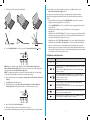
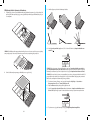
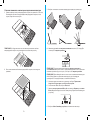
Insert Your Tablet and Connect the Keyboard
English
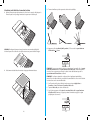
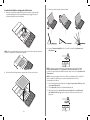
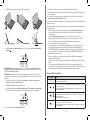
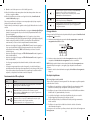
1 Remove protective film from the micro-suction pad and stick it on the cover. Do not
discard the film, use it to protect the micro-suction pad when it is not in use.
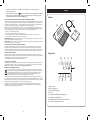
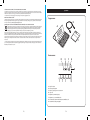
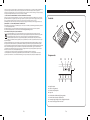
Contents
B
A
QUIC
K STA
RT G
UID
E
C
NOTE: Occasionally clean the micro-suction pad with adhesive tape to remove dust and
regain original strength.
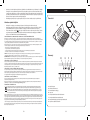
Components
D
E
F
G
2 Position your tablet over the sticky pad and press down firmly.
H
A
B
C
D
E
F
G
H
KeyFolio Expert
Charging Cable
Quick Start Guide
Caps Lock
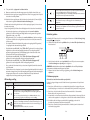
Power/Charging Indicator Light
Bluetooth Status Indicator Light
On/Off Switch/Bluetooth Connection Button
MicroUSB Charging Connector
2
3