1
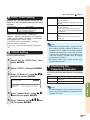
Picture Adjustment (“Picture” menu)
Menu operation
Picture
1
2
3
4
5
6
7
8
SIG
Picture Mode
Contrast
Bright
Color
Tint
Sharp
Red
Blue
CLR Temp
Progressive
Film Mode
DNR
MNR
Eco+Quiet Mode
Reset
SCR
PRJ
Net.
2 Adjusting the Image
Standard
0
0
0
0
0
0
0
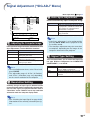
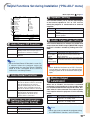
Adjustment items
button \
Contrast
For less contrast.
Bright
For less brightness.
Color*1
For less color
intensity.
Tint*1
For making skin
tones purplish.
Sharp*1
For less sharpness.
Red*2
For weaker red.
For weaker blue.
Blue*2
7500K
3D Progressive
Auto
Off
Off
Off
SEL./ADJ.
RETURN
ENTER
END
*1
*2
1 Selecting the Picture Mode
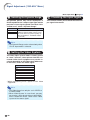
Selectable items
Standard
Presentation
Movie
Game
*sRGB
Description
For standard image
Brightens portions of
image for more enhanced
presentations.
Gives natural tint to the
projected image.
Gives sharpness to the
projected image.
For high fidelity reproduction of images from a
computer.
Page 43
The default
settings of
CLR Temp
7500K
7500K
button |
For more contrast.
For more brightness.
For more color
intensity.
For making skin
tones greenish.
For more sharpness.
For stronger red.
For stronger blue.
Not adjustable/selectable in the RGB input mode.
Not adjustable/selectable when selecting “sRGB”
in “Picture Mode”.
Note
• “Red” and “Blue” cannot be set when selecting
“sRGB” in “Picture Mode”.
• To reset all adjustment items, select “Reset” and
press ENTER.
6500K
7500K
–
• “sRGB” is displayed only when RGB signal is input.
• You can set or adjust each item in the “Picture”
menu to your preference. Any changes you make
are retained in memory.
Note
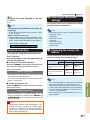
Selectable items
5500K
6500K
7500K
8500K
9300K
10500K
Description
For lower color temperature for warmer,
reddish incandescent-like images.
For higher color temperature for cooler,
bluish, fluorescent-like images.
Note
• Values on “CLR Temp” are only for general standard purposes.
• “CLR Temp” cannot be set when selecting
“sRGB” in “Picture Mode”.
Useful Features
• You can also press PICTURE MODE on the
remote control to select the picture mode. (See
page 36.)
• *sRGB is an international standard of color reproduction regulated by the IEC (International
Electrotechnical Commission). As the fixed color
area has been decided by the IEC, the images
are displayed in a natural tint based on an original image, when “sRGB” is selected.
For additional information about the sRGB function, visit “http://www.srgb.com/”.
You cannot set the items, “Red”, “Blue” and
“CLR Temp”, when “sRGB” is selected.
3 Adjusting the Color Temperature
Info
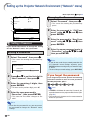
• When “sRGB” is selected, the projected image may become dark, but this does not indicate a malfunction.
-45