1
Note
•• If you don't need to preset more stations, press SAVE
again to make sure that the SAVE button is deactivated
(in gray).
4
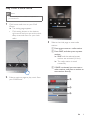
Slide to the following page. You can:
• set the theme;
• share the information;
• set the location for weather report;
• choose temperature unit;
• turn on or off month/day revert;
• search for radio stations automatically
by pressing Radio Auto Program
(radio auto program) to activate
automatic programming.
»» [Searching] (searching) is displayed.
»» All available stations are
programmed in the order of
waveband reception strength.
»» The first programmed radio
station is broadcast automatically.
Charge the iPod/iPhone
When your clock radio is connected to power,
the docked iPod/iPhone begins to charge
automatically.
9
EN
Adjust volume
During play, you can rotate the knob to adjust
volume.
Remove the iPod/iPhone
Pull the iPod/iPhone out of the dock.