1
PLAYING iPod AND CHARGING INTERNAL iPod BATTERY
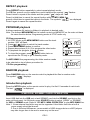
REPEAT playback
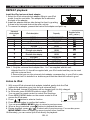
Install the iPod universal dock adapter
1. Select the iPod universal dock adaptor fitting to your iPod
model, from the next table. The adapter No is marked at
the back of the adapter.
2. Install the adapter with two tabs facing the front, by pushing
it down in the universal dock at the main unit top.
3. To remove the adapter, press at the back of the adapter and pull it up.
Universal
dock adapter
No
iPod description
Capacity
3GB iPod
3GB iPod
iPod mini
4G iPod & U2 iPod
4G iPod
iPod photo & Color U2 iPod
iPod with color display
iPod photo
iPod with color display
iPod nano
5G iPod & U2 iPod with video
5G iPod with video
iPod nano(2ndgeneration)
Supplied in this
unit ( yes/no )
10GB,15GB,20GB
30GB & 40GB
4GB & 6GB
20GB
40GB
20GB & 30GB
20GB
40GB &60GB
60GB
2GB & 4GB
30GB
60GB 80GB
2GB,4GB,8GB
Note: 1. Only the universal dock adapter Nos. 1 to 7 are supplied with this unit.
Adapter Nos 8 to 11 should be supplied with your iPod model and they can be used
with this universal dock.
2. Ensure that you use the universal dock adapter corresponding to your iPod in order
to ensure that it is installed in a stable way and that the electrical contact is good
Listen to iPod
1. With correct iPod universal dock adapter installed, gently dock the iPod
(without the protective cover) into the unit universal dock.
2. When docked, Internal iPod battery will be charged until it is fully charged.
3. In ON mode, press SOURCE button to select “IPOD”.
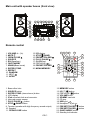
You can use the remote control to control iPod functions:
4. Press MENU/ MEMO button on the remote control to iPod
access the iPod menu.
5. Press
/
button to select a function.
6. Press ENTER button to confirm the function.
7. You can press MENU/ MEMO button to return to previous menu.
8. When a song is selected, press
button to playback the music.
9. During playback, press
/
to select next or previous song. You can also press
MENU/ MEMO button to display the menu to select other functions.
10.Alternately, you can control your iPod directly for playback.
GB-10