1
CONTENTS
INTRODUCTION...............................................................................................................................................1
IMPORTANT.....................................................................................................................................................1
CONTENTS.......................................................................................................................................................2
1 Parts and Their Functions.......................................................................................................................6
External View..............................................................................................................................................6
Front view..........................................................................................................................................6
Rear view...........................................................................................................................................6
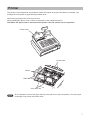
Printer ........................................................................................................................................................7
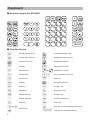
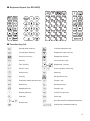
Keyboard....................................................................................................................................................8
Keyboard layout (for XE-A407)..........................................................................................................8
Function key list.................................................................................................................................8
Keyboard layout (for XE-A43S).........................................................................................................9
Function key list.................................................................................................................................9
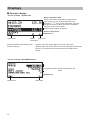
Displays....................................................................................................................................................10
Operator display..............................................................................................................................10
Customer display . .......................................................................................................................... 11
Screen save mode........................................................................................................................... 11
2 Selecting an Operating Mode................................................................................................................12
Operating Modes......................................................................................................................................12
Mode Selection.........................................................................................................................................13
3 Prior to Making Entries..........................................................................................................................14
Preparations for Entries............................................................................................................................14
Receipt and journal paper rolls........................................................................................................14
Receipt ON/OFF function................................................................................................................14
Clerk assignment.............................................................................................................................14
Error Warning...........................................................................................................................................14
Selecting the Function from the Menu......................................................................................................15
HELP/FAQ Function.................................................................................................................................16
The HELP menu and printing guidance messages.........................................................................16
The FAQ menu and guidance messages........................................................................................17
4 Entries.....................................................................................................................................................18
Item Entries..............................................................................................................................................18
Single item entries...........................................................................................................................18
Repeat entries.................................................................................................................................20
Multiplication entries........................................................................................................................21
Split-pricing entries..........................................................................................................................22
Single item cash sale (SICS)...........................................................................................................23
PLU/UPC information inquiry (view) function..................................................................................23
UPC learning function (creation and registration of unknown UPCs)..............................................24
Display of Subtotals..................................................................................................................................25
Taxable subtotal...............................................................................................................................25
Including-tax subtotal (complete subtotal).......................................................................................25
Finalization of Transaction........................................................................................................................25
Cash or check tendering..................................................................................................................25
Cash or check sale that does not need any tender entry................................................................26
Charge (credit) sale.........................................................................................................................26
Mixed-tender sale (cash or check tendering + charge tendering)...................................................26
Tax Calculation.........................................................................................................................................27
Automatic tax...................................................................................................................................27
Manual tax.......................................................................................................................................27
Tax delete........................................................................................................................................28
2