1
POWER CONNECTIONS
APPLICATIONS
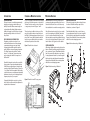
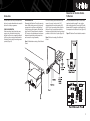
Connect power to BassLink, as shown in Figure 5.
Also observe these installation tips:
• Install a fuse holder with a 20 A fuse within 18"
of the battery + terminal (see Figure 5).
• Use at least #12 AWG wire for the +BATT
(+12 Vdc) and GND (ground) connections. If
needed, use at least a #20 AWG wire for the
REM (remote) connection.
• The REM connection requires +5 to +12 Vdc
signal for BassLink to turn on remotely. Most
head units with preamp outputs provide this
remote voltage signal. For speaker-level applications, a remote connection is not required,
since BassLink’s Auto Turn-On feature will
sense voltage on the speaker wires to
automatically turn on BassLink.
• Route all power wires through a grommet in
the vehicle’s firewall. If a factory grommet is
unavailable, install one.
• Connect a short GND wire from BassLink to the
nearest bare metal surface. For a good connection, scrape away paint from the metal surface
and use a screw with a lock (star) washer.
BassLink is equipped with four line-level (RCA)
inputs and four speaker-level inputs. Any combination of line-level and speaker-level inputs may be
used to provide nonfading bass when connected to
a head unit with four outputs.
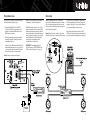
Figure 6. BassLink audio connections for a head
unit with two line-level or subwoofer (RCA) outputs.
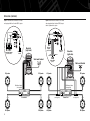
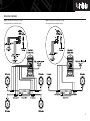
To help you plan your installation, we included
five system applications in Figures 6 through 10
on pages 3 through 5. For more system ideas, see
your authorized Infinity car audio dealer.
Note: The applications show the remote SUB
LEVEL control which installs under the dashboard
for easy in-car bass level adjustments (see page 7).
IMPORTANT:To enable BassLink’s Auto
Turn-On feature, set AUTO TURN-ON to the
AUTO position (see Figure 12 on page 6).
Figure 5. Power connections for BassLink.
3