1
iDect_C5i_IFU_EN_UK.book
Page 1
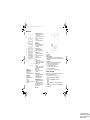
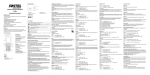
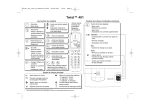
Where to find it
A Earpiece
B LCD display
C MENU/OK/MUTE m key
- Access to main menu
- Select a menu entry
- Mute the microphone during a call
D REDIAL l key
- View Redial list
E TALK/SPEAKER < key
- Make a call
- Answer a call
- Switch to speakerphone mode on / off
during a call
Monday, November 30, 2009
11:54 AM
F UP/DOWN navigation . key
- Press up or down to scroll through the
menu or list options
- From standby, press up to view Call list
(CID)
- From standby, press down to access
Phonebook
- Press up or down to adjust volume
during a call
G SKIP BACK 4 key
- Go back to previous message or replay
current message in answering
machine mode.
H */KEYLOCK * key
- From standby, press and hold to
activate or deactivate the key lock
I BACK/R/C b key
- Return to previous menu or the main
menu
- During a call, press to send a Recall
(Flash) signal
- Clear a digit or character
J INT key
- Make an internal call
- Make a 3 way conference call between
2 internal callers and 1 external caller
K HANG-UP B key
- End a call
- From standby, press and hold to power
the handset off. Press to turn back on.
- Return to standby
L SKIP 6 key
- Skip to next message in answering
machine mode
M PLAY/STOP 5 key
- From standby, press and hold to start
message playback
- Play/Stop message playback in
answering machine mode
N # /PAUSE/RINGER OFF # key
- From standby, press and hold to turn
ringer Off / On
- Press and hold to insert a pause (P)
when dialling or saving a number
- Switch between upper and lower case
when entering text
O Microphone
A FIND p key
- Page handsets
- Register handset
B Charge/In use indicator
- On steady when a handset is on charge on the base or when the line is in use.
- Flashes when there is an incoming call or if there are new answering machine or
call list messages.
C Message counter
- Shows the number of messages and status of the answering machine
XX : Steady On - The number of old messages recorded.
XX : Flashing - The number of new messages recorded.
-- : The answering machine is turned off.
Ao : The answering machine is in Answer Only mode
An : The answering machine is recording.
88 / XX : Alternating - The memory is full and XX new messages.
Selecting a menu option
The phone uses a menu system on the handset to access all its features. You may
access the following items through the main menu:
Phonebook, Set Date/Time, Personal Set, Advanced Set, Answ. Machine.
1
2
3
m
.
m
To access the main menu, press MENU/OK m.
Press UP u or DOWN d to select a menu option.
Press MENU/OK m to confirm the option and enter its sub-menu.
** Press BACK/R/C b to return to the previous menu or press HANG-UP B to
return to standby mode.
For answering machine models
(TAM operation by the base), please
refer to “Answering machine (TAM) Quick Ref” on page 31.