1
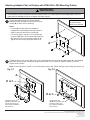
Attaching Adapter Plate to Display with VESA 200 x 200 Mounting Pattern
WARNING
• If screws don't get three complete turns in the display inserts or if screws bottom out and adapter plate is still not
tightly secured, damage may occur to display or product may fail.
1
Choose hole pattern as shown. Attach adapter
plate (A) to back of display using four M6 x 12 mm
screws (B) or M8 x 10 mm screws (F).
Note: Flat panel display
may appear slightly
different than illustrated.
Notes:
• If screw (B) gets less than three threads of
engagement, attach adapter plate (A) to back of
display using four M6 x 20 mm screws (D).
• For security option, use M6 x 12 mm screws (C)
in place of (B), M6 x 20 mm screws (E) in place of
(D), and M8 x 10 mm screws (G) in place of (F).
Tighten security screws using allen wrench (J).
A
2
Thread two M5 x 6 mm screws (H), leaving .25" exposed thread, into top holes of adapter plate (A). Hook adapter
plate onto mounting plate, and secure using bottom two M5 x 6 mm screws as shown in figures 2.1 and 2.2.
Tighten all four screws.
Note: For security option, use M5 x 6 mm screws (I) in place of (H). Tighten security screws using allen wrench (J).
fig. 2.1
fig. 2.2
A
H or I
H or I
MOUNTING PLATE
(NOTE: MOUNTING PLATE
SHOWN WITHOUT FULL
WALL MOUNT ASSEMBLY
FOR CLARITY)
MOUNTING PLATE
(NOTE: MOUNTING PLATE
SHOWN WITHOUT FULL
WALL MOUNT ASSEMBLY
FOR CLARITY)
2 of 2
ISSUED: 10-13-05 SHEET #: 202-9039-2 08-16-11
© 2011, Peerless Industries, Inc. All rights reserved.
All other brand and product names are trademarks or registered trademarks of their respective owners.
Peerless Industries, Inc.
2300 White Oak Circle
Aurora, Il 60502
www.peerlessmounts.com